


KeylessUniversal
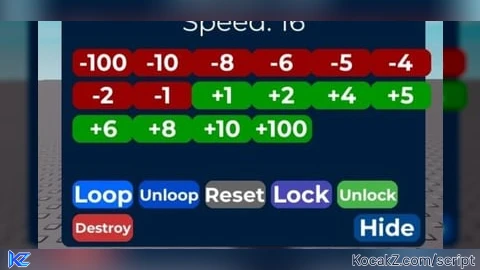
-- LocalScript inside StarterPlayerScripts

local Players = game:GetService("Players")
local UIS = game:GetService("UserInputService")
local RS = game:GetService("RunService")

local player = Players.LocalPlayer
local gui = Instance.new("ScreenGui", player:WaitForChild("PlayerGui"))
gui.Name = "SpeedGui"
gui.ResetOnSpawn = false

-- Setup values
local character = player.Character or player.CharacterAdded:Wait()
local humanoid = character:WaitForChild("Humanoid")
local originalSpeed = humanoid.WalkSpeed
local currentSpeed = originalSpeed
local dragging = false
local loopEnabled = false
local locked = false
local collapsed = false
local loopConn

-- GUI Base
local main = Instance.new("Frame")
main.Name = "MainFrame"
main.Size = UDim2.new(0, 330, 0, 250)
main.Position = UDim2.new(0.2, 0, 0.2, 0)
main.BackgroundColor3 = Color3.fromRGB(0, 30, 60)
main.Active = true
main.Draggable = true
main.Parent = gui
Instance.new("UICorner", main)

-- Title
local title = Instance.new("TextLabel", main)
title.Size = UDim2.new(1, 0, 0, 30)
title.BackgroundTransparency = 1
title.Text = "Speed Setter"
title.TextColor3 = Color3.fromRGB(0, 255, 255)
title.Font = Enum.Font.GothamBold
title.TextScaled = true

-- Speed Label
local speedLabel = Instance.new("TextLabel", main)
speedLabel.Position = UDim2.new(0, 0, 0, 30)
speedLabel.Size = UDim2.new(1, 0, 0, 30)
speedLabel.BackgroundTransparency = 1
speedLabel.TextColor3 = Color3.fromRGB(255, 255, 255)
speedLabel.Font = Enum.Font.Gotham
speedLabel.TextScaled = true
speedLabel.Text = "Speed: " .. currentSpeed

-- Update Speed
local function updateSpeed()
	local hum = player.Character and player.Character:FindFirstChild("Humanoid")
	if hum then
		hum.WalkSpeed = currentSpeed
	end
	speedLabel.Text = "Speed: " .. currentSpeed
end

-- Loop
local function startLoop()
	if loopConn then loopConn:Disconnect() end
	loopConn = RS.RenderStepped:Connect(function()
		updateSpeed()
	end)
end

local function stopLoop()
	if loopConn then loopConn:Disconnect() end
end

-- Button Utility
local function createTinyButton(text, pos, color, callback)
	local btn = Instance.new("TextButton", main)
	btn.Text = text
	btn.Size = UDim2.new(0, 55, 0, 25)
	btn.Position = pos
	btn.BackgroundColor3 = color
	btn.TextColor3 = Color3.new(1,1,1)
	btn.Font = Enum.Font.GothamBold
	btn.TextScaled = true
	Instance.new("UICorner", btn)
	btn.MouseButton1Click:Connect(callback)
	return btn
end

-- Speed Buttons
local increments = {-100,-10,-8,-6,-5,-4,-2,-1,1,2,4,5,6,8,10,100}
for i, amt in ipairs(increments) do
	local col = amt > 0 and Color3.fromRGB(0,150,0) or Color3.fromRGB(150,0,0)
	local row = math.floor((i-1)/6)
	local colIndex = (i-1)%6
	createTinyButton((amt>0 and "+" or "")..amt, UDim2.new(0, 10 + colIndex*54, 0, 70 + row*30), col, function()
		currentSpeed = math.clamp(currentSpeed + amt, 0, 1000)
		updateSpeed()
	end)
end

-- Loop Button
createTinyButton("Loop", UDim2.new(0, 10, 0, 190), Color3.fromRGB(0,100,255), function()
	loopEnabled = true
	startLoop()
end)

-- Unloop Button
createTinyButton("Unloop", UDim2.new(0, 70, 0, 190), Color3.fromRGB(0,70,200), function()
	loopEnabled = false
	stopLoop()
end)

-- Reset Button
createTinyButton("Reset", UDim2.new(0, 130, 0, 190), Color3.fromRGB(100,100,100), function()
	currentSpeed = originalSpeed
	updateSpeed()
end)

-- Lock Button
createTinyButton("Lock", UDim2.new(0, 190, 0, 190), Color3.fromRGB(70,70,180), function()
	locked = true
	main.Draggable = false
end)

-- Unlock Button
createTinyButton("Unlock", UDim2.new(0, 250, 0, 190), Color3.fromRGB(70,180,70), function()
	locked = false
	main.Draggable = true
end)

-- Destroy Button
createTinyButton("Destroy", UDim2.new(0, 10, 0, 220), Color3.fromRGB(200, 50, 50), function()
	gui:Destroy()
end)

-- Hide Button
local hideBtn = Instance.new("TextButton", main)
hideBtn.Text = "Hide"
hideBtn.Size = UDim2.new(0, 60, 0, 25)
hideBtn.Position = UDim2.new(1, -65, 1, -30)
hideBtn.BackgroundColor3 = Color3.fromRGB(0, 70, 140)
hideBtn.TextColor3 = Color3.new(1, 1, 1)
hideBtn.Font = Enum.Font.GothamBold
hideBtn.TextScaled = true
Instance.new("UICorner", hideBtn)

-- Collapsed State
local miniBtn = Instance.new("TextButton")
miniBtn.Size = UDim2.new(0, 60, 0, 25)
miniBtn.Position = UDim2.new(0, 10, 0, 10)
miniBtn.Text = "Speed"
miniBtn.BackgroundColor3 = Color3.fromRGB(0, 70, 140)
miniBtn.TextColor3 = Color3.new(1, 1, 1)
miniBtn.Font = Enum.Font.GothamBold
miniBtn.TextScaled = true
Instance.new("UICorner", miniBtn)
miniBtn.Visible = false
miniBtn.Parent = gui

hideBtn.MouseButton1Click:Connect(function()
	main.Visible = false
	miniBtn.Visible = true
end)

miniBtn.MouseButton1Click:Connect(function()
	main.Visible = true
	miniBtn.Visible = false
end)

-- Respawn support
player.CharacterAdded:Connect(function(char)
	character = char
	humanoid = char:WaitForChild("Humanoid")
	originalSpeed = humanoid.WalkSpeed
	currentSpeed = loopEnabled and currentSpeed or originalSpeed
	updateSpeed()
end)


don't wanna be a hater but this is completely pointless
Ok