

KeylessUniversal
--// SERVICES
local Players = game:GetService("Players")
local UIS = game:GetService("UserInputService")
local RunService = game:GetService("RunService")
local TweenService = game:GetService("TweenService")

local player = Players.LocalPlayer

if game.CoreGui:FindFirstChild("NoclipGui") then
    return
end

local noclipEnabled = false
local guiVisible = true
local destroyed = false

--// SCREEN GUI
local screenGui = Instance.new("ScreenGui")
screenGui.Name = "NoclipGui"
screenGui.ResetOnSpawn = false
screenGui.IgnoreGuiInset = true
screenGui.Parent = game.CoreGui

--// MAIN PANEL
local mainFrame = Instance.new("Frame")
mainFrame.Size = UDim2.new(0, 260, 0, 110)
mainFrame.Position = UDim2.new(0, 20, 0, 100)
mainFrame.BackgroundColor3 = Color3.fromRGB(25, 25, 25)
mainFrame.BorderSizePixel = 0
mainFrame.Active = true
mainFrame.Parent = screenGui

local mainCorner = Instance.new("UICorner")
mainCorner.CornerRadius = UDim.new(0, 8)
mainCorner.Parent = mainFrame

local stroke = Instance.new("UIStroke")
stroke.Thickness = 1.4
stroke.Color = Color3.fromRGB(120, 140, 255)
stroke.Transparency = 0.25
stroke.Parent = mainFrame

local gradient = Instance.new("UIGradient")
gradient.Color = ColorSequence.new({
    ColorSequenceKeypoint.new(0, Color3.fromRGB(35, 35, 60)),
    ColorSequenceKeypoint.new(1, Color3.fromRGB(15, 15, 25))
})
gradient.Rotation = 135
gradient.Parent = mainFrame

local uiScale = Instance.new("UIScale")
uiScale.Scale = 1
uiScale.Parent = mainFrame

local padding = Instance.new("UIPadding")
padding.PaddingTop = UDim.new(0, 6)
padding.PaddingLeft = UDim.new(0, 8)
padding.PaddingRight = UDim.new(0, 8)
padding.PaddingBottom = UDim.new(0, 6)
padding.Parent = mainFrame

local listLayout = Instance.new("UIListLayout")
listLayout.FillDirection = Enum.FillDirection.Vertical
listLayout.SortOrder = Enum.SortOrder.LayoutOrder
listLayout.Padding = UDim.new(0, 4)
listLayout.Parent = mainFrame

--// HEADER ROW: TITLE + X
local titleRow = Instance.new("Frame")
titleRow.Size = UDim2.new(1, -16, 0, 24)
titleRow.BackgroundTransparency = 1
titleRow.LayoutOrder = 1
titleRow.Parent = mainFrame

local titleRowLayout = Instance.new("UIListLayout")
titleRowLayout.FillDirection = Enum.FillDirection.Horizontal
titleRowLayout.HorizontalAlignment = Enum.HorizontalAlignment.Left
titleRowLayout.VerticalAlignment = Enum.VerticalAlignment.Center
titleRowLayout.Padding = UDim.new(0, 4)
titleRowLayout.Parent = titleRow

local titleLabel = Instance.new("TextLabel")
titleLabel.Size = UDim2.new(1, -40, 1, 0)
titleLabel.BackgroundTransparency = 1
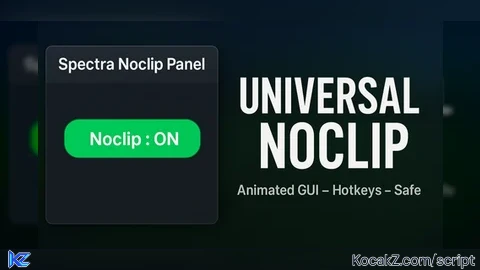
titleLabel.Text = "Noclip Panel"
titleLabel.Font = Enum.Font.GothamBold
titleLabel.TextScaled = true
titleLabel.TextColor3 = Color3.fromRGB(235, 235, 255)
titleLabel.TextXAlignment = Enum.TextXAlignment.Left
titleLabel.LayoutOrder = 1
titleLabel.Parent = titleRow

local closeBtn = Instance.new("TextButton")
closeBtn.Size = UDim2.new(0, 24, 0, 24)
closeBtn.BackgroundColor3 = Color3.fromRGB(90, 25, 25)
closeBtn.TextColor3 = Color3.new(1, 1, 1)
closeBtn.Text = "X"
closeBtn.Font = Enum.Font.GothamBold
closeBtn.TextScaled = true
closeBtn.AutoButtonColor = false
closeBtn.LayoutOrder = 2
closeBtn.Parent = titleRow

local closeCorner = Instance.new("UICorner")
closeCorner.CornerRadius = UDim.new(1, 0)
closeCorner.Parent = closeBtn

local closeStroke = Instance.new("UIStroke")
closeStroke.Thickness = 1
closeStroke.Color = Color3.fromRGB(230, 120, 120)
closeStroke.Transparency = 0.2
closeStroke.Parent = closeBtn

-- LINE
local divider = Instance.new("Frame")
divider.Size = UDim2.new(1, -16, 0, 1)
divider.BackgroundColor3 = Color3.fromRGB(80, 90, 140)
divider.BorderSizePixel = 0
divider.LayoutOrder = 2
divider.Parent = mainFrame

--// ROW: BUTTON + STATUS
local btnRow = Instance.new("Frame")
btnRow.Size = UDim2.new(1, -16, 0, 32)
btnRow.BackgroundTransparency = 1
btnRow.LayoutOrder = 3
btnRow.Parent = mainFrame

local btnRowLayout = Instance.new("UIListLayout")
btnRowLayout.FillDirection = Enum.FillDirection.Horizontal
btnRowLayout.HorizontalAlignment = Enum.HorizontalAlignment.Left
btnRowLayout.VerticalAlignment = Enum.VerticalAlignment.Center
btnRowLayout.Padding = UDim.new(0, 4) -- БЫЛА ОШИБКА, ТУТ ИСПРАВЛЕНО
btnRowLayout.Parent = btnRow

local noclipBtn = Instance.new("TextButton")
noclipBtn.Size = UDim2.new(0, 130, 1, 0)
noclipBtn.BackgroundColor3 = Color3.fromRGB(120, 40, 40)
noclipBtn.TextColor3 = Color3.new(1, 1, 1)
noclipBtn.Text = "Noclip : OFF"
noclipBtn.Font = Enum.Font.GothamBold
noclipBtn.TextScaled = true
noclipBtn.AutoButtonColor = false
noclipBtn.LayoutOrder = 1
noclipBtn.Parent = btnRow

local noclipCorner = Instance.new("UICorner")
noclipCorner.CornerRadius = UDim.new(0, 6)
noclipCorner.Parent = noclipBtn

local noclipStroke = Instance.new("UIStroke")
noclipStroke.Thickness = 1.2
noclipStroke.Color = Color3.fromRGB(220, 80, 80)
noclipStroke.Transparency = 0.15
noclipStroke.Parent = noclipBtn

local statusLabel = Instance.new("TextLabel")
statusLabel.Size = UDim2.new(1, -135, 1, 0)
statusLabel.BackgroundTransparency = 1
statusLabel.Text = "Status: OFF"
statusLabel.Font = Enum.Font.Gotham
statusLabel.TextScaled = true
statusLabel.TextColor3 = Color3.fromRGB(210, 210, 230)
statusLabel.TextXAlignment = Enum.TextXAlignment.Left
statusLabel.LayoutOrder = 2
statusLabel.Parent = btnRow

--// BOTTOM HINT
local hintLabel = Instance.new("TextLabel")
hintLabel.Size = UDim2.new(1, -16, 0, 24)
hintLabel.BackgroundTransparency = 1
hintLabel.TextColor3 = Color3.fromRGB(175, 180, 210)
hintLabel.TextXAlignment = Enum.TextXAlignment.Left
hintLabel.Font = Enum.Font.Gotham
hintLabel.TextScaled = true
hintLabel.Text = "Toggle menu: M   |   Exit script: RightCtrl or X"
hintLabel.LayoutOrder = 4
hintLabel.Parent = mainFrame

--// DRAGGING
local function enableDragging(gui)
    local dragging = false
    local dragInput, dragStart, startPos

    gui.InputBegan:Connect(function(input)
        if input.UserInputType == Enum.UserInputType.MouseButton1 then
            dragging = true
            dragStart = input.Position
            startPos = gui.Position
            input.Changed:Connect(function()
                if input.UserInputState == Enum.UserInputState.End then
                    dragging = false
                end
            end)
        end
    end)

    gui.InputChanged:Connect(function(input)
        if input.UserInputType == Enum.UserInputType.MouseMovement then
            dragInput = input
        end
    end)

    UIS.InputChanged:Connect(function(input)
        if input == dragInput and dragging then
            local delta = input.Position - dragStart
            gui.Position = UDim2.new(
                startPos.X.Scale,
                startPos.X.Offset + delta.X,
                startPos.Y.Scale,
                startPos.Y.Offset + delta.Y
            )
        end
    end)
end

enableDragging(mainFrame)

--// TWEEN HELPER
local function tween(obj, props, t)
    TweenService:Create(
        obj,
        TweenInfo.new(t or 0.15, Enum.EasingStyle.Quad, Enum.EasingDirection.Out),
        props
    ):Play()
end

-- BUTTON ANIMS
local defaultBtnColor = noclipBtn.BackgroundColor3

noclipBtn.MouseEnter:Connect(function()
    tween(noclipBtn, {BackgroundColor3 = defaultBtnColor:Lerp(Color3.fromRGB(255,255,255),0.18)}, 0.12)
    tween(noclipStroke, {Thickness = 2}, 0.12)
end)

noclipBtn.MouseLeave:Connect(function()
    tween(noclipBtn, {BackgroundColor3 = defaultBtnColor}, 0.12)
    tween(noclipStroke, {Thickness = 1.2}, 0.12)
end)

noclipBtn.MouseButton1Down:Connect(function()
    tween(noclipBtn, {Size = UDim2.new(0, 125, 1, 0)}, 0.07)
end)

noclipBtn.MouseButton1Up:Connect(function()
    tween(noclipBtn, {Size = UDim2.new(0, 130, 1, 0)}, 0.07)
end)

-- CLOSE BUTTON ANIMS
closeBtn.MouseEnter:Connect(function()
    tween(closeBtn, {BackgroundColor3 = Color3.fromRGB(130, 30, 30)}, 0.12)
end)

closeBtn.MouseLeave:Connect(function()
    tween(closeBtn, {BackgroundColor3 = Color3.fromRGB(90, 25, 25)}, 0.12)
end)

--// NOCLIP LOGIC
local function setNoclip(state)
    if destroyed then return end
    noclipEnabled = state

    noclipBtn.Text = "Noclip : " .. (state and "ON" or "OFF")
    statusLabel.Text = state and "Status: ON" or "Status: OFF"

    defaultBtnColor = state and Color3.fromRGB(40,120,60) or Color3.fromRGB(120,40,40)
    noclipBtn.BackgroundColor3 = defaultBtnColor
    noclipStroke.Color = state and Color3.fromRGB(120,230,150) or Color3.fromRGB(220,80,80)

    local char = player.Character
    if char then
        for _, part in ipairs(char:GetDescendants()) do
            if part:IsA("BasePart") then
                part.CanCollide = not state
            end
        end
    end
end

local steppedConnection = RunService.Stepped:Connect(function()
    if destroyed or not noclipEnabled then return end
    local char = player.Character
    if not char then return end
    for _, part in ipairs(char:GetDescendants()) do
        if part:IsA("BasePart") and part.CanCollide then
            part.CanCollide = false
        end
    end
end)

noclipBtn.MouseButton1Click:Connect(function()
    setNoclip(not noclipEnabled)
end)

local charAddedConnection = player.CharacterAdded:Connect(function(char)
    if destroyed then return end
    char:WaitForChild("HumanoidRootPart",5)
    for _, part in ipairs(char:GetDescendants()) do
        if part:IsA("BasePart") then
            part.CanCollide = not noclipEnabled
        end
    end
end)

--// MENU ANIM (M)
local function playOpenAnim()
    mainFrame.Visible = true
    uiScale.Scale = 0.85
    mainFrame.BackgroundTransparency = 1
    stroke.Transparency = 1
    tween(uiScale, {Scale = 1}, 0.18)
    tween(mainFrame, {BackgroundTransparency = 0}, 0.18)
    tween(stroke, {Transparency = 0.25}, 0.18)
end

local function playCloseAnim(callback)
    tween(uiScale, {Scale = 0.85}, 0.18)
    tween(mainFrame, {BackgroundTransparency = 1}, 0.18)
    tween(stroke, {Transparency = 1}, 0.18)
    task.delay(0.19, function()
        mainFrame.Visible = false
        if callback then callback() end
    end)
end

local function setGuiVisible(state)
    if destroyed then return end
    guiVisible = state
    if state then
        playOpenAnim()
    else
        playCloseAnim()
    end
end

local inputConnection
inputConnection = UIS.InputBegan:Connect(function(input,gp)
    if gp or destroyed then return end

    if input.KeyCode == Enum.KeyCode.M then
        setGuiVisible(not guiVisible)

    elseif input.KeyCode == Enum.KeyCode.RightControl then
        -- silent hotkey exit
        if not destroyed then
            destroyed = true
            noclipEnabled = false

            local char = player.Character
            if char then
                for _, part in ipairs(char:GetDescendants()) do
                    if part:IsA("BasePart") then
                        part.CanCollide = true
                    end
                end
            end

            if steppedConnection then steppedConnection:Disconnect() end
            if charAddedConnection then charAddedConnection:Disconnect() end
            if inputConnection then inputConnection:Disconnect() end

            playCloseAnim(function()
                if screenGui then screenGui:Destroy() end
            end)
        end
    end
end)

-- стартовая анимация
playOpenAnim()

--// FULL DESTROY BY X
local function destroyScriptByButton()
    if destroyed then return end
    destroyed = true
    noclipEnabled = false

    local char = player.Character
    if char then
        for _, part in ipairs(char:GetDescendants()) do
            if part:IsA("BasePart") then
                part.CanCollide = true
            end
        end
    end

    if steppedConnection then steppedConnection:Disconnect() end
    if charAddedConnection then charAddedConnection:Disconnect() end
    if inputConnection then inputConnection:Disconnect() end

    playCloseAnim(function()
        if screenGui then screenGui:Destroy() end
    end)
end

closeBtn.MouseButton1Click:Connect(destroyScriptByButton)


Working?
@DeathHubReal Yes