KeylessUniversal
-- Delta Executor Optimized Slippery UI with Rainbow RGB & Max Level 15
local Players = game:GetService("Players")
local UserInputService = game:GetService("UserInputService")
local RunService = game:GetService("RunService")

local player = Players.LocalPlayer or Players.PlayerAdded:Wait()

-- 1. Create Core Container Bypassing via gethui()
local ScreenGui = Instance.new("ScreenGui")
ScreenGui.Name = "Delta_Slippery_Engine"
ScreenGui.ResetOnSpawn = false
ScreenGui.IgnoreGuiInset = true

if gethui then
    ScreenGui.Parent = gethui()
elseif game:GetService("CoreGui") then
    ScreenGui.Parent = game:GetService("CoreGui")
else
    ScreenGui.Parent = player:WaitForChild("PlayerGui")
end

-- 2. Toggle Menu Button (With Rainbow Glow)
local ToggleButton = Instance.new("TextButton")
ToggleButton.Name = "ToggleMenu"
ToggleButton.Size = UDim2.new(0, 130, 0, 40)
ToggleButton.Position = UDim2.new(0.05, 0, 0.2, 0)
ToggleButton.BackgroundColor3 = Color3.fromRGB(20, 20, 20)
ToggleButton.TextColor3 = Color3.fromRGB(255, 255, 255)
ToggleButton.TextSize = 14
ToggleButton.Font = Enum.Font.SourceSansBold
ToggleButton.Text = "Hide/Show Menu"
ToggleButton.BorderSizePixel = 2
ToggleButton.ZIndex = 1000
ToggleButton.Parent = ScreenGui

-- 3. Main Windows Frame (Centered with Rainbow Glow)
local MainFrame = Instance.new("Frame")
MainFrame.Name = "MainFrame"
MainFrame.Size = UDim2.new(0, 250, 0, 340)
MainFrame.Position = UDim2.new(0.5, 0, 0.5, 0)
MainFrame.AnchorPoint = Vector2.new(0.5, 0.5)
MainFrame.BackgroundColor3 = Color3.fromRGB(20, 20, 20)
MainFrame.BorderSizePixel = 2
MainFrame.ZIndex = 500
MainFrame.Parent = ScreenGui

-- 4. Top Header Text
local TitleLabel = Instance.new("TextLabel")
TitleLabel.Size = UDim2.new(1, 0, 0, 45)
TitleLabel.BackgroundColor3 = Color3.fromRGB(30, 30, 30)
TitleLabel.TextColor3 = Color3.fromRGB(255, 255, 255)
TitleLabel.TextSize = 18
TitleLabel.Font = Enum.Font.SourceSansBold
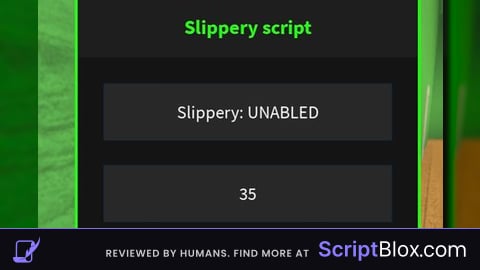
TitleLabel.Text = "Slippery script"
TitleLabel.BorderSizePixel = 0
TitleLabel.ZIndex = 501
TitleLabel.Parent = MainFrame

-- 5. Button 1: Slippery On/Off Toggle
local SlipperyButton = Instance.new("TextButton")
SlipperyButton.Size = UDim2.new(0, 210, 0, 40)
SlipperyButton.Position = UDim2.new(0, 20, 0, 65)
SlipperyButton.BackgroundColor3 = Color3.fromRGB(40, 40, 40)
SlipperyButton.TextColor3 = Color3.fromRGB(255, 255, 255)
SlipperyButton.TextSize = 16
SlipperyButton.Font = Enum.Font.SourceSans
SlipperyButton.Text = "Slippery: UNABLED"
SlipperyButton.ZIndex = 501
SlipperyButton.Parent = MainFrame

-- 6. Button 2: Custom Speed Input
local SpeedTextBox = Instance.new("TextBox")
SpeedTextBox.Size = UDim2.new(0, 210, 0, 40)
SpeedTextBox.Position = UDim2.new(0, 20, 0, 125)
SpeedTextBox.BackgroundColor3 = Color3.fromRGB(40, 40, 40)
SpeedTextBox.TextColor3 = Color3.fromRGB(255, 255, 255)
SpeedTextBox.PlaceholderColor3 = Color3.fromRGB(150, 150, 150)
SpeedTextBox.TextSize = 16
SpeedTextBox.Font = Enum.Font.SourceSans
SpeedTextBox.PlaceholderText = "Enter Walk Speed (e.g. 16)"
SpeedTextBox.Text = ""
SpeedTextBox.ClearTextOnFocus = false
SpeedTextBox.ZIndex = 501
SpeedTextBox.Parent = MainFrame

-- Button 4: Slipperiness Severity Input Box (Now scales to 15)
local SlipperyTextBox = Instance.new("TextBox")
SlipperyTextBox.Size = UDim2.new(0, 210, 0, 40)
SlipperyTextBox.Position = UDim2.new(0, 20, 0, 185)
SlipperyTextBox.BackgroundColor3 = Color3.fromRGB(40, 40, 40)
SlipperyTextBox.TextColor3 = Color3.fromRGB(255, 255, 255)
SlipperyTextBox.PlaceholderColor3 = Color3.fromRGB(150, 150, 150)
SlipperyTextBox.TextSize = 16
SlipperyTextBox.Font = Enum.Font.SourceSans
SlipperyTextBox.PlaceholderText = "Ice Level 1-15 (e.g. 5)"
SlipperyTextBox.Text = ""
SlipperyTextBox.ClearTextOnFocus = false
SlipperyTextBox.ZIndex = 501
SlipperyTextBox.Parent = MainFrame

-- 7. Button 3: Destroy Application Button
local DestroyButton = Instance.new("TextButton")
DestroyButton.Size = UDim2.new(0, 210, 0, 40)
DestroyButton.Position = UDim2.new(0, 20, 0, 260)
DestroyButton.BackgroundColor3 = Color3.fromRGB(180, 40, 40)
DestroyButton.TextColor3 = Color3.fromRGB(255, 255, 255)
DestroyButton.TextSize = 16
DestroyButton.Font = Enum.Font.SourceSansBold
DestroyButton.Text = "DESTROY GUI"
DestroyButton.ZIndex = 501
DestroyButton.Parent = MainFrame

---------------------------------------------------------
-- RAINBOW RGB EFFECT SYSTEM
---------------------------------------------------------

local function initRainbowColor()
    RunService.RenderStepped:Connect(function()
        local hue = (tick() % 4) / 4
        local color = Color3.fromHSV(hue, 1, 1)

        MainFrame.BorderColor3 = color
        ToggleButton.BorderColor3 = color
        TitleLabel.TextColor3 = color
    end)
end
initRainbowColor()

---------------------------------------------------------
-- DELTA DRAG ENGINE
---------------------------------------------------------

local function makeDraggable(frame)
    local dragging, dragInput, dragStart, startPos
    frame.InputBegan:Connect(function(input)
        if input.UserInputType == Enum.UserInputType.MouseButton1 or input.UserInputType == Enum.UserInputType.Touch then
            dragging = true dragStart = input.Position startPos = frame.Position
            input.Changed:Connect(function() if input.UserInputState == Enum.UserInputState.End then dragging = false end end)
        end
    end)
    UserInputService.InputChanged:Connect(function(input)
        if dragging and (input.UserInputType == Enum.UserInputType.MouseMovement or input.UserInputType == Enum.UserInputType.Touch) then
            local delta = input.Position - dragStart
            frame.Position = UDim2.new(startPos.X.Scale, startPos.X.Offset + delta.X, startPos.Y.Scale, startPos.Y.Offset + delta.Y)
        end
    end)
end
makeDraggable(MainFrame)
makeDraggable(ToggleButton)

ToggleButton.MouseButton1Click:Connect(function()
    MainFrame.Visible = not MainFrame.Visible
end)

---------------------------------------------------------
-- ICE PHYSICS LOOPS
---------------------------------------------------------

local slipperyEnabled = false
local slideVelocity = Vector3.zero
local maxSpeed = 16
local accelerationRate = 0.05
local frictionDecay = 0.015

local function getIcePhysicsObjects(hrp)
    local attachment = hrp:FindFirstChild("IceAttachment") or Instance.new("Attachment", hrp)
    attachment.Name = "IceAttachment"
    local lv = hrp:FindFirstChild("IceVelocity") or Instance.new("LinearVelocity", hrp)
    lv.Name = "IceVelocity"
    lv.ForceLimitMode = Enum.ForceLimitMode.PerAxis
    lv.MaxAxesForce = Vector3.new(35000, 0, 35000)
    lv.VelocityConstraintMode = Enum.VelocityConstraintMode.Vector
    lv.Attachment0 = attachment
    lv.RelativeTo = Enum.ActuatorRelativeTo.World
    return lv
end

local function cleanIcePhysics(char)
    if char and char:FindFirstChild("HumanoidRootPart") then
        if char.HumanoidRootPart:FindFirstChild("IceVelocity") then char.HumanoidRootPart.IceVelocity:Destroy() end
        if char.HumanoidRootPart:FindFirstChild("IceAttachment") then char.HumanoidRootPart.IceAttachment:Destroy() end
    end
end

SlipperyButton.MouseButton1Click:Connect(function()
    slipperyEnabled = not slipperyEnabled
    if slipperyEnabled then
        SlipperyButton.Text = "Slippery: ENABLED"
        SlipperyButton.BackgroundColor3 = Color3.fromRGB(0, 135, 200)
    else
        SlipperyButton.Text = "Slippery: UNABLED"
        SlipperyButton.BackgroundColor3 = Color3.fromRGB(40, 40, 40)
        slideVelocity = Vector3.zero
        cleanIcePhysics(player.Character)
    end
end)

-- Math configuration tracking updated up to level 15 safely
SlipperyTextBox.FocusLost:Connect(function()
    local level = tonumber(SlipperyTextBox.Text)
    if level then
        level = math.clamp(level, 1, 15) -- Increased ceiling cap to 15

        -- Keeps tuning math smooth across the new higher boundaries
        accelerationRate = 0.4 / (level ^ 1.7)
        frictionDecay = 0.25 / (level ^ 1.8)

        SlipperyTextBox.Text = "Level " .. tostring(level)
    else
        SlipperyTextBox.Text = ""
    end
end)

RunService.RenderStepped:Connect(function()
    if player.Character and player.Character:FindFirstChild("Humanoid") and player.Character:FindFirstChild("HumanoidRootPart") then
        local hum = player.Character.Humanoid
        local hrp = player.Character.HumanoidRootPart
        maxSpeed = hum.WalkSpeed
        if slipperyEnabled then
            local iceVel = getIcePhysicsObjects(hrp)
            if hum.MoveDirection.Magnitude > 0 then
                slideVelocity = slideVelocity:Lerp(hum.MoveDirection * maxSpeed, accelerationRate)
            else
                slideVelocity = slideVelocity:Lerp(Vector3.zero, frictionDecay)
            end
            iceVel.VectorVelocity = Vector3.new(slideVelocity.X, 0, slideVelocity.Z)
        else
            cleanIcePhysics(player.Character)
        end
    end
end)

SpeedTextBox.FocusLost:Connect(function()
    local s = tonumber(SpeedTextBox.Text)
    if s and player.Character and player.Character:FindFirstChild("Humanoid") then
        player.Character.Humanoid.WalkSpeed = s
    else
        SpeedTextBox.Text = ""
    end
end)

DestroyButton.MouseButton1Click:Connect(function()
    slipperyEnabled = false
    cleanIcePhysics(player.Character)
    if player.Character and player.Character:FindFirstChild("Humanoid") then player.Character.Humanoid.WalkSpeed = 16 end
    ScreenGui:Destroy()
end)No comments yet for this script.