


KeylessUniversal
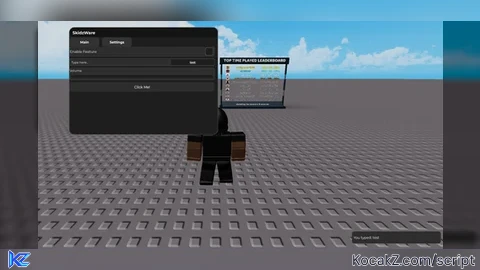
local url = "https://raw.githubusercontent.com/randomuser832/R22222222222222/refs/heads/main/SkidzUiLib.lua"

local SkidzWare
local success, err = pcall(function()
    local source = game:HttpGet(url)
    SkidzWare = loadstring(source)()
end)


if not success then
    warn("Failed to load SkidzWare UI Library: "..tostring(err))
    return
end


local tab1 = SkidzWare:CreateTab("Main")
local tab2 = SkidzWare:CreateTab("Settings")

-- Add Button
tab1.CreateButton("Click Me!", function()
    print("Button clicked!")
    SkidzWare.Notify("Button Clicked!",3)
end)

tab1.CreateToggle("Enable Feature", function(state)
    print("Toggle is now:", state)
end)


-- Add Textbox
tab1.CreateTextbox("Type here...", function(text)
    print("Textbox input:", text)
    SkidzWare.Notify("You typed: "..text,2)
end)

-- Add Slider
tab1.CreateSlider("Volume",0,100,function(val)
    print("Slider value:", math.floor(val))
end)

-- Keybind setup for menu toggle
local UserInputService = game:GetService("UserInputService")
local menuKey = Enum.KeyCode.Insert -- default key

-- Special key name mappings
local specialKeys = {
    ["rightshift"] = Enum.KeyCode.RightShift,
    ["leftshift"]  = Enum.KeyCode.LeftShift,
    ["space"]      = Enum.KeyCode.Space,
    ["tab"]        = Enum.KeyCode.Tab,
    ["enter"]      = Enum.KeyCode.Return,
    ["escape"]     = Enum.KeyCode.Escape,
    ["capslock"]   = Enum.KeyCode.CapsLock,
    ["leftalt"]    = Enum.KeyCode.LeftAlt,
    ["rightalt"]   = Enum.KeyCode.RightAlt,
    ["leftcontrol"] = Enum.KeyCode.LeftControl,
    ["rightcontrol"] = Enum.KeyCode.RightControl
}


tab2.CreateTextbox("Enter key to toggle menu (e.g., R, F, Insert, RightShift)", function(text)
    local keyName = text:lower() -- normalize to lowercase
    local key = specialKeys[keyName]

    -- In your keybind textbox handler:
if key then
    menuKey = key
    SkidzWare.Notify("Menu toggle key set to: "..tostring(key), 2)
else
    -- Fallback: check if it's a valid UserInputType
    local success, result = pcall(function()
        return Enum.UserInputType[keyName:upper()]
    end)
    if success and result then
        menuKey = result
        SkidzWare.Notify("Menu toggle key set to: "..tostring(result), 2)
    else
        SkidzWare.Notify("Invalid key: "..text, 2)
    end
end
end)
-- Detect key press to toggle menu
UserInputService.InputBegan:Connect(function(input, gpe)
    if gpe then return end -- ignore if typing in TextBox
    if input.KeyCode == menuKey then
        local mainFrame = SkidzWare.MainFrame or game:GetService("Players").LocalPlayer.PlayerGui:FindFirstChild("SkidzWare"):FindFirstChild("MainFrame")
        if mainFrame then
            mainFrame.Visible = not mainFrame.Visible
            SkidzWare.Notify("Menu "..(mainFrame.Visible and "Shown" or "Hidden"), 2)
        end
    end
end)

-- Notifications test
SkidzWare.Notify("UI Loaded Successfully!",3)

-- Test multiple notifications
task.delay(1,function() SkidzWare.Notify("Second Notification!",3) end)
task.delay(2,function() SkidzWare.Notify("Third Notification!",3) end)![[KEYLESS] Moondiety Script | 17+ supported Games](https://scriptblox.com/images/sb/0-1753093706828.png)


@Tyrone_darealest
obfuscating a ui library is top ten loser moves