

Key RequiredUniversal
local player = game.Players.LocalPlayer
local currentHumanoid = nil


local function updateHumanoid()
    local character = player.Character or player.CharacterAdded:Wait()
    currentHumanoid = character:WaitForChild("Humanoid")
end

local function createGui()
    local screenGui = Instance.new("ScreenGui")
    screenGui.Parent = game.CoreGui

        local frame = Instance.new("Frame")
    frame.Size = UDim2.new(0, 300, 0, 150)
    frame.Position = UDim2.new(0.5, -150, 0.5, -75)
    frame.BackgroundColor3 = Color3.fromRGB(50, 50, 50)
    frame.Parent = screenGui
    frame.Active = true
    frame.Draggable = true


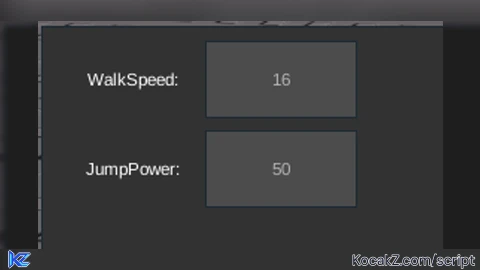
        local walkSpeedLabel = Instance.new("TextLabel")
    walkSpeedLabel.Text = "WalkSpeed:"
    walkSpeedLabel.Size = UDim2.new(0, 100, 0, 50)
    walkSpeedLabel.Position = UDim2.new(0, 10, 0, 10)
    walkSpeedLabel.TextColor3 = Color3.new(1, 1, 1)
    walkSpeedLabel.BackgroundTransparency = 1
    walkSpeedLabel.Parent = frame


    local walkSpeedBox = Instance.new("TextBox")
    walkSpeedBox.PlaceholderText = tostring(currentHumanoid.WalkSpeed)
    walkSpeedBox.Size = UDim2.new(0, 100, 0, 50)
    walkSpeedBox.Position = UDim2.new(0, 110, 0, 10)
    walkSpeedBox.TextColor3 = Color3.new(1, 1, 1)
    walkSpeedBox.BackgroundColor3 = Color3.new(0.3, 0.3, 0.3)
    walkSpeedBox.Parent = frame


    local jumpPowerLabel = Instance.new("TextLabel")
    jumpPowerLabel.Text = "JumpPower:"
    jumpPowerLabel.Size = UDim2.new(0, 100, 0, 50)
    jumpPowerLabel.Position = UDim2.new(0, 10, 0, 70)
    jumpPowerLabel.TextColor3 = Color3.new(1, 1, 1)
    jumpPowerLabel.BackgroundTransparency = 1
    jumpPowerLabel.Parent = frame

      local jumpPowerBox = Instance.new("TextBox")
    jumpPowerBox.PlaceholderText = tostring(currentHumanoid.JumpPower)
    jumpPowerBox.Size = UDim2.new(0, 100, 0, 50)
    jumpPowerBox.Position = UDim2.new(0, 110, 0, 70)
    jumpPowerBox.TextColor3 = Color3.new(1, 1, 1)
    jumpPowerBox.BackgroundColor3 = Color3.new(0.3, 0.3, 0.3)
    jumpPowerBox.Parent = frame


    walkSpeedBox.FocusLost:Connect(function(enterPressed)
        if enterPressed then
            local newWalkSpeed = tonumber(walkSpeedBox.Text)
            if newWalkSpeed then
                currentHumanoid.WalkSpeed = newWalkSpeed
            end
        end
    end)


    jumpPowerBox.FocusLost:Connect(function(enterPressed)
        if enterPressed then
            local newJumpPower = tonumber(jumpPowerBox.Text)
            if newJumpPower then
                currentHumanoid.JumpPower = newJumpPower
            end
        end
    end)
end


local function onCharacterAdded(character)
    updateHumanoid()
end


player.CharacterAdded:Connect(onCharacterAdded)

if player.Character then
    updateHumanoid()
    createGui()
endNo comments yet for this script.


