

KeylessUniversal
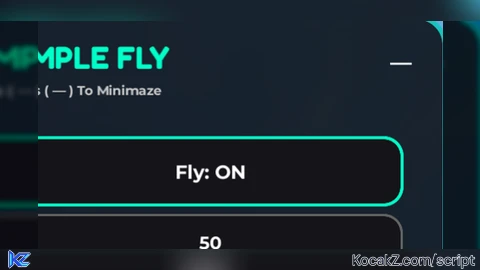
local Players = game:GetService("Players")
local UserInputService = game:GetService("UserInputService")
local RunService = game:GetService("RunService")
local TweenService = game:GetService("TweenService")

local player = Players.LocalPlayer
local flying = false
local speed = 50
local speedMultiplier = 3

local character, humanoid, currentRoot
local attachment, lv, ao

local guiParent = gethui and gethui() or game:GetService("CoreGui")

pcall(function()
	local old = guiParent:FindFirstChild("SimpleFlyUI")
	if old then old:Destroy() end
end)

local ScreenGui = Instance.new("ScreenGui")
ScreenGui.Name = "SimpleFlyUI"
ScreenGui.ResetOnSpawn = false
ScreenGui.DisplayOrder = 999999999
ScreenGui.ZIndexBehavior = Enum.ZIndexBehavior.Sibling
ScreenGui.Parent = guiParent

local MainFrame = Instance.new("Frame")
MainFrame.Parent = ScreenGui
MainFrame.Size = UDim2.fromOffset(330,195)
MainFrame.Position = UDim2.new(0.5,-165,0.18,0)
MainFrame.BackgroundColor3 = Color3.fromRGB(10,10,14)
MainFrame.BackgroundTransparency = 0.15
MainFrame.BorderSizePixel = 0
MainFrame.Active = true
MainFrame.ClipsDescendants = true
MainFrame.ZIndex = 1
Instance.new("UICorner", MainFrame).CornerRadius = UDim.new(0,18)

local MainStroke = Instance.new("UIStroke", MainFrame)
MainStroke.Thickness = 3
MainStroke.ApplyStrokeMode = Enum.ApplyStrokeMode.Border
MainStroke.Color = Color3.fromRGB(0,200,180)
MainStroke.Transparency = 0.25

local Title = Instance.new("TextLabel", MainFrame)
Title.BackgroundTransparency = 1
Title.Position = UDim2.new(0,18,0,10)
Title.Size = UDim2.new(1,-60,0,34)
Title.Font = Enum.Font.FredokaOne
Title.Text = "SIMPLE FLY"
Title.TextSize = 25
Title.TextColor3 = Color3.new(1,1,1)
Title.TextXAlignment = Enum.TextXAlignment.Left
Title.ZIndex = 2

local UIGradient = Instance.new("UIGradient", Title)
UIGradient.Color = ColorSequence.new({
	ColorSequenceKeypoint.new(0, Color3.fromRGB(0, 255, 200)),
	ColorSequenceKeypoint.new(0.5, Color3.fromRGB(0, 150, 255)),
	ColorSequenceKeypoint.new(1, Color3.fromRGB(0, 255, 200))
})

local SubTitle = Instance.new("TextLabel", MainFrame)
SubTitle.BackgroundTransparency = 1
SubTitle.Position = UDim2.new(0,18,0,40)
SubTitle.Size = UDim2.new(1,-20,0,20)
SubTitle.Font = Enum.Font.GothamBold
SubTitle.Text = "Press ( — ) To Minimaze"
SubTitle.TextSize = 11
SubTitle.TextColor3 = Color3.fromRGB(200,200,200)
SubTitle.TextXAlignment = Enum.TextXAlignment.Left
SubTitle.ZIndex = 2

local HideButton = Instance.new("TextButton", MainFrame)
HideButton.Size = UDim2.fromOffset(30,30)
HideButton.Position = UDim2.new(1,-45,0,15)
HideButton.BackgroundTransparency = 1
HideButton.Text = "—"
HideButton.TextColor3 = Color3.new(1,1,1)
HideButton.TextSize = 18
HideButton.Font = Enum.Font.GothamBold
HideButton.ZIndex = 3

local Toggle = Instance.new("TextButton", MainFrame)
Toggle.Size = UDim2.new(0.82,0,0,46)
Toggle.Position = UDim2.new(0.09,0,0,85)
Toggle.Text = "Fly: OFF"
Toggle.Font = Enum.Font.GothamBold
Toggle.TextSize = 16
Toggle.TextColor3 = Color3.new(1,1,1)
Toggle.BackgroundColor3 = Color3.fromRGB(20,20,25)
Toggle.AutoButtonColor = false
Toggle.ZIndex = 2
Instance.new("UICorner", Toggle).CornerRadius = UDim.new(0,12)

local ToggleStroke = Instance.new("UIStroke", Toggle)
ToggleStroke.Thickness = 2
ToggleStroke.Color = Color3.fromRGB(0, 255, 200)
ToggleStroke.ApplyStrokeMode = Enum.ApplyStrokeMode.Border

local SpeedBox = Instance.new("TextBox", MainFrame)
SpeedBox.Size = UDim2.new(0.82,0,0,38)
SpeedBox.Position = UDim2.new(0.09,0,0,140)
SpeedBox.Text = tostring(speed)
SpeedBox.PlaceholderText = "Input Speed..."
SpeedBox.Font = Enum.Font.GothamBold
SpeedBox.TextSize = 15
SpeedBox.TextColor3 = Color3.new(1,1,1)
SpeedBox.BackgroundColor3 = Color3.fromRGB(20,20,25)
SpeedBox.ZIndex = 2
Instance.new("UICorner", SpeedBox).CornerRadius = UDim.new(0,12)

local SpeedStroke = Instance.new("UIStroke", SpeedBox)
SpeedStroke.Thickness = 1.5
SpeedStroke.Color = Color3.fromRGB(100, 100, 100)
SpeedStroke.ApplyStrokeMode = Enum.ApplyStrokeMode.Border

local Mini = Instance.new("ImageButton", ScreenGui)
Mini.Visible = false
Mini.Active = true
Mini.Size = UDim2.fromOffset(50,50)
Mini.Position = UDim2.new(0.5,-25,0.05,0)
Mini.BackgroundColor3 = Color3.fromRGB(10,10,14)
Mini.Image = "rbxassetid://3926307971"
Mini.ImageRectOffset = Vector2.new(324, 364)
Mini.ImageRectSize = Vector2.new(36, 36)
Mini.ImageColor3 = Color3.new(1,1,1)
Mini.ZIndex = 10
Instance.new("UICorner", Mini).CornerRadius = UDim.new(1,0)

local MiniStroke = Instance.new("UIStroke", Mini)
MiniStroke.Color = Color3.fromRGB(0,255,200)
MiniStroke.Thickness = 2

local function setupDrag(gui)
	local dragging, dragStart, startPos
	gui.InputBegan:Connect(function(input)
		if (input.UserInputType == Enum.UserInputType.MouseButton1 or input.UserInputType == Enum.UserInputType.Touch) then
			dragging = true
			dragStart = input.Position
			startPos = gui.Position
		end
	end)
	UserInputService.InputChanged:Connect(function(input)
		if dragging and (input.UserInputType == Enum.UserInputType.MouseMovement or input.UserInputType == Enum.UserInputType.Touch) then
			local delta = input.Position - dragStart
			local cam = workspace.CurrentCamera
			local screenSize = cam.ViewportSize
			local newX = startPos.X.Offset + delta.X
			local newY = startPos.Y.Offset + delta.Y
			newX = math.clamp(newX, 0, screenSize.X - gui.AbsoluteSize.X)
			newY = math.clamp(newY, 0, screenSize.Y - gui.AbsoluteSize.Y)
			gui.Position = UDim2.new(0, newX, 0, newY)
		end
	end)
	UserInputService.InputEnded:Connect(function(input)
		if (input.UserInputType == Enum.UserInputType.MouseButton1 or input.UserInputType == Enum.UserInputType.Touch) then
			dragging = false
		end
	end)
end

setupDrag(MainFrame)
setupDrag(Mini)

HideButton.MouseButton1Click:Connect(function()
	local tween = TweenService:Create(MainFrame, TweenInfo.new(0.3, Enum.EasingStyle.Back, Enum.EasingDirection.In), {Size = UDim2.fromOffset(0, 0)})
	tween:Play()
	tween.Completed:Wait()
	MainFrame.Visible = false
	Mini.Visible = true
	Mini.Position = UDim2.new(0, MainFrame.AbsolutePosition.X, 0, MainFrame.AbsolutePosition.Y)
	Mini.Size = UDim2.fromOffset(0, 0)
	TweenService:Create(Mini, TweenInfo.new(0.3, Enum.EasingStyle.Back, Enum.EasingDirection.Out), {Size = UDim2.fromOffset(50, 50)}):Play()
end)

Mini.MouseButton1Click:Connect(function()
	local tweenMini = TweenService:Create(Mini, TweenInfo.new(0.3, Enum.EasingStyle.Back, Enum.EasingDirection.In), {Size = UDim2.fromOffset(0, 0)})
	tweenMini:Play()
	tweenMini.Completed:Wait()
	Mini.Visible = false
	MainFrame.Visible = true
	MainFrame.Position = UDim2.new(0, Mini.AbsolutePosition.X, 0, Mini.AbsolutePosition.Y)
	MainFrame.Size = UDim2.fromOffset(0, 0)
	TweenService:Create(MainFrame, TweenInfo.new(0.3, Enum.EasingStyle.Back, Enum.EasingDirection.Out), {Size = UDim2.fromOffset(330, 195)}):Play()
end)

local function stopFly()
	flying = false
	if humanoid then humanoid.PlatformStand = false end
	if attachment then attachment:Destroy() end
	attachment, lv, ao, currentRoot = nil, nil, nil, nil
	Toggle.Text = "Fly: OFF"
end

local function startFly()
	character = player.Character or player.CharacterAdded:Wait()
	humanoid = character:FindFirstChildOfClass("Humanoid")

	if humanoid and humanoid.SeatPart then
		currentRoot = humanoid.SeatPart
	else
		currentRoot = character:FindFirstChild("HumanoidRootPart")
	end

	if not currentRoot then return end
	if attachment then attachment:Destroy() end

	attachment = Instance.new("Attachment", currentRoot)
	lv = Instance.new("LinearVelocity", currentRoot)
	lv.Attachment0 = attachment
	lv.MaxForce = math.huge
	lv.VectorVelocity = Vector3.zero
	ao = Instance.new("AlignOrientation", currentRoot)
	ao.Attachment0 = attachment
	ao.MaxTorque = math.huge
	ao.Responsiveness = 200
	ao.Mode = Enum.OrientationAlignmentMode.OneAttachment
	flying = true
	Toggle.Text = "Fly: ON"
end

Toggle.MouseButton1Click:Connect(function()
	if flying then stopFly() else startFly() end
end)

SpeedBox.FocusLost:Connect(function()
	speed = tonumber(SpeedBox.Text) or 50
	SpeedBox.Text = tostring(speed)
end)

local PlayerModule = require(player.PlayerScripts:WaitForChild("PlayerModule"))
local Controls = PlayerModule:GetControls()

RunService.RenderStepped:Connect(function()
	local t = tick()
	UIGradient.Offset = Vector2.new(math.sin(t*2)*1, 0)

	if flying and currentRoot and lv and ao then
		if not currentRoot.Parent then stopFly() return end

		-- PENDEKETSI DUDUK: Biar gak turun dari mobil
		if humanoid and humanoid.SeatPart then
			humanoid.PlatformStand = false
		else
			humanoid.PlatformStand = true
		end

		local cam = workspace.CurrentCamera
		local moveVector = Controls:GetMoveVector()
		local direction = (cam.CFrame.LookVector * -moveVector.Z) + (cam.CFrame.RightVector * moveVector.X)
		if UserInputService:IsKeyDown(Enum.KeyCode.Space) then direction += Vector3.new(0, 1, 0) end
		if UserInputService:IsKeyDown(Enum.KeyCode.LeftControl) then direction += Vector3.new(0, -1, 0) end
		lv.VectorVelocity = (direction.Magnitude > 0) and (direction.Unit * (speed * speedMultiplier)) or Vector3.zero
		ao.CFrame = cam.CFrame
	end
end)

player.CharacterAdded:Connect(function()
	task.wait(1)
	if flying then startFly() end
end)![[KEYLESS] Moondiety Script | 17+ supported Games](https://scriptblox.com/images/sb/0-1753093706828.png)


I don't know why I made it again even though there's already a fly script :v
Comment tu fais pour créer un script , j'y arrive pas
Si vous ne comprenez pas, essayez d'apprendre le Lua, ou utilisez ChatGPT si vous ne comprenez toujours pas.
Ok merci
Tu peux créer un script pour avoir de la chance stp