


KeylessUniversal
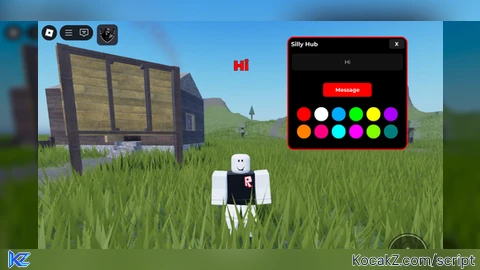
-- Delta-friendly: Silly Hub with 12 color squircles + big floating message + red outline
local CoreGui = game:GetService("CoreGui")
local UserInputService = game:GetService("UserInputService")
local TweenService = game:GetService("TweenService")

-- Cleanup old GUI
local old = CoreGui:FindFirstChild("SillyHubGUI")
if old then old:Destroy() end

local screenGui = Instance.new("ScreenGui")
screenGui.Name = "SillyHubGUI"
screenGui.ResetOnSpawn = false
screenGui.Parent = CoreGui

-- Main Frame
local frame = Instance.new("Frame")
frame.Name = "Main"
frame.Size = UDim2.new(0, 340, 0, 320) -- increased height to fit 2 rows of color buttons
frame.Position = UDim2.new(0.5, -170, 0.5, -160)
frame.BackgroundColor3 = Color3.fromRGB(0,0,0)
frame.BorderSizePixel = 0
frame.Active = true
frame.Parent = screenGui

local frameCorner = Instance.new("UICorner")
frameCorner.CornerRadius = UDim.new(0, 16)
frameCorner.Parent = frame

-- 🔴 Red outline
local outline = Instance.new("UIStroke")
outline.Color = Color3.fromRGB(255,0,0)
outline.Thickness = 3
outline.Parent = frame

-- Title bar
local titleBar = Instance.new("Frame")
titleBar.Size = UDim2.new(1, 0, 0, 36)
titleBar.BackgroundTransparency = 1
titleBar.Parent = frame

local titleLabel = Instance.new("TextLabel")
titleLabel.Size = UDim2.new(1, -60, 1, 0)
titleLabel.Position = UDim2.new(0, 8, 0, 0)
titleLabel.BackgroundTransparency = 1
titleLabel.Font = Enum.Font.GothamBold
titleLabel.TextSize = 20
titleLabel.TextColor3 = Color3.fromRGB(255,255,255)
titleLabel.Text = "Silly Hub"
titleLabel.TextXAlignment = Enum.TextXAlignment.Left
titleLabel.Parent = titleBar

local closeBtn = Instance.new("TextButton")
closeBtn.Size = UDim2.new(0, 44, 0, 28)
closeBtn.Position = UDim2.new(1, -50, 0, 4)
closeBtn.BackgroundColor3 = Color3.fromRGB(30,30,30)
closeBtn.BorderSizePixel = 0
closeBtn.Font = Enum.Font.GothamBold
closeBtn.TextSize = 18
closeBtn.TextColor3 = Color3.fromRGB(255,255,255)
closeBtn.Text = "X"
closeBtn.Parent = titleBar

local closeCorner = Instance.new("UICorner")
closeCorner.CornerRadius = UDim.new(0, 8)
closeCorner.Parent = closeBtn

-- TextBox
local textBox = Instance.new("TextBox")
textBox.Size = UDim2.new(1, -20, 0, 48)
textBox.Position = UDim2.new(0, 10, 0, 46)
textBox.BackgroundColor3 = Color3.fromRGB(18,18,18)
textBox.BorderSizePixel = 0
textBox.PlaceholderText = "Type a message..."
textBox.Font = Enum.Font.Gotham
textBox.TextSize = 18
textBox.TextColor3 = Color3.fromRGB(255,255,255)
textBox.ClearTextOnFocus = false
textBox.Parent = frame

local inputCorner = Instance.new("UICorner")
inputCorner.CornerRadius = UDim.new(0, 8)
inputCorner.Parent = textBox

-- Message button
local messageBtn = Instance.new("TextButton")
messageBtn.Size = UDim2.new(0, 140, 0, 40)
messageBtn.AnchorPoint = Vector2.new(0.5, 1)
messageBtn.Position = UDim2.new(0.5, 0, 1, -150)
messageBtn.BackgroundColor3 = Color3.fromRGB(255,0,0)
messageBtn.BorderSizePixel = 0
messageBtn.Font = Enum.Font.GothamBold
messageBtn.TextSize = 18
messageBtn.TextColor3 = Color3.fromRGB(255,255,255)
messageBtn.Text = "Message"
messageBtn.Parent = frame

local msgCorner = Instance.new("UICorner")
msgCorner.CornerRadius = UDim.new(0, 8)
msgCorner.Parent = messageBtn

-- Color grid for squircles
local colorGrid = Instance.new("Frame")
colorGrid.Size = UDim2.new(1, -20, 0, 100) -- taller to fit 2 rows
colorGrid.Position = UDim2.new(0, 10, 1, -120)
colorGrid.BackgroundTransparency = 1
colorGrid.Parent = frame

local uiList = Instance.new("UIGridLayout")
uiList.CellSize = UDim2.new(0, 40, 0, 40)
uiList.CellPadding = UDim2.new(0, 10, 0, 10)
uiList.FillDirectionMaxCells = 6 -- 6 buttons per row
uiList.HorizontalAlignment = Enum.HorizontalAlignment.Center
uiList.SortOrder = Enum.SortOrder.LayoutOrder
uiList.Parent = colorGrid

-- Floating message text
local floatText = Instance.new("TextLabel")
floatText.Size = UDim2.new(1, 0, 0, 80)
floatText.AnchorPoint = Vector2.new(0.5, 0)
floatText.Position = UDim2.new(0.5, 0, 0, -100)
floatText.BackgroundTransparency = 1
floatText.Font = Enum.Font.GothamBlack
floatText.TextSize = 48
floatText.TextColor3 = Color3.fromRGB(255,0,0)
floatText.TextStrokeTransparency = 0
floatText.TextStrokeColor3 = Color3.fromRGB(0,0,0)
floatText.Text = ""
floatText.Visible = false
floatText.Parent = screenGui

-- Current color
local currentColor = Color3.fromRGB(255,0,0)

-- Show floating text function
local function showText(msg)
    floatText.Text = msg
    floatText.TextColor3 = currentColor
    floatText.Position = UDim2.new(0.5, 0, 0, -100)
    floatText.Visible = true

    local tweenIn = TweenService:Create(floatText, TweenInfo.new(0.3, Enum.EasingStyle.Quad), {Position = UDim2.new(0.5, 0, 0, 30)})
    tweenIn:Play()
    tweenIn.Completed:Wait()

    task.wait(5)

    local tweenOut = TweenService:Create(floatText, TweenInfo.new(0.3, Enum.EasingStyle.Quad), {Position = UDim2.new(0.5, 0, 0, -100)})
    tweenOut:Play()
    tweenOut.Completed:Wait()

    floatText.Visible = false
    floatText.Text = ""
end

-- Button actions
messageBtn.MouseButton1Click:Connect(function()
    local txt = textBox.Text:match("%S") and textBox.Text or ""
    if txt ~= "" then
        task.spawn(function()
            showText(txt)
        end)
    end
end)

closeBtn.MouseButton1Click:Connect(function()
    screenGui:Destroy()
end)

-- Dragging
local dragging, dragInput, dragStart, startPos
titleBar.InputBegan:Connect(function(input)
    if input.UserInputType == Enum.UserInputType.MouseButton1 or input.UserInputType == Enum.UserInputType.Touch then
        dragging = true
        dragStart = input.Position
        startPos = frame.Position
        dragInput = input
        input.Changed:Connect(function()
            if input.UserInputState == Enum.UserInputState.End then dragging = false end
        end)
    end
end)
UserInputService.InputChanged:Connect(function(input)
    if dragging and input == dragInput then
        local delta = input.Position - dragStart
        frame.Position = UDim2.new(startPos.X.Scale, startPos.X.Offset + delta.X, startPos.Y.Scale, startPos.Y.Offset + delta.Y)
    end
end)

-- Utility: make squircle color button
local function makeColorButton(name, color)
    local btn = Instance.new("TextButton")
    btn.Name = name
    btn.Size = UDim2.new(0,40,0,40)
    btn.BackgroundColor3 = color
    btn.Text = ""
    btn.Parent = colorGrid

    local corner = Instance.new("UICorner")
    corner.CornerRadius = UDim.new(1,0)
    corner.Parent = btn

    btn.MouseButton1Click:Connect(function()
        currentColor = color
    end)
end

-- Add 12 colors (2 full rows)
makeColorButton("Red", Color3.fromRGB(255,0,0))
makeColorButton("White", Color3.fromRGB(255,255,255))
makeColorButton("Blue", Color3.fromRGB(0,170,255))
makeColorButton("Green", Color3.fromRGB(0,255,0))
makeColorButton("Yellow", Color3.fromRGB(255,255,0))
makeColorButton("Purple", Color3.fromRGB(170,0,255))
makeColorButton("Orange", Color3.fromRGB(255,128,0))
makeColorButton("Pink", Color3.fromRGB(255,0,128))
makeColorButton("Cyan", Color3.fromRGB(0,255,255))
makeColorButton("Magenta", Color3.fromRGB(255,0,255))
makeColorButton("Lime", Color3.fromRGB(128,255,0))
makeColorButton("Teal", Color3.fromRGB(0,128,128))


can other people see the text?.
It says client sided in the *le
*le
*
Tltle