


KeylessUniversal
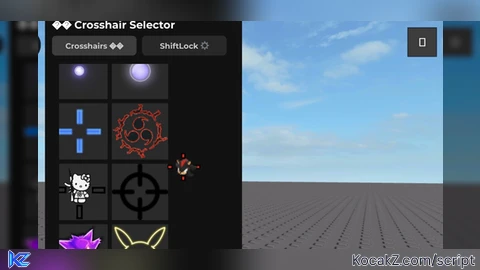
local Players = game:GetService("Players")
local ContentProvider = game:GetService("ContentProvider")
local RunService = game:GetService("RunService")
local UserInputService = game:GetService("UserInputService")
local TweenService = game:GetService("TweenService")
local HttpService = game:GetService("HttpService")
local LocalPlayer = Players.LocalPlayer
local PlayerGui = LocalPlayer:WaitForChild("PlayerGui")

local SETTINGS_KEY = "ShiftLockSettings_v2"

local function SaveSettings(settingsData)
    pcall(function()
        LocalPlayer:SetAttribute(SETTINGS_KEY, HttpService:JSONEncode(settingsData))
    end)
end

local function LoadSettings()
    local savedData = LocalPlayer:GetAttribute(SETTINGS_KEY)
    if type(savedData) == "string" then
        local success, decoded = pcall(HttpService.JSONDecode, HttpService, savedData)
        if success and type(decoded) == "table" then
            return decoded
        end
    end
    return nil
end

local ShiftLockGui = Instance.new("ScreenGui")
ShiftLockGui.Name = "shiftlockk"
ShiftLockGui.ResetOnSpawn = false
ShiftLockGui.ZIndexBehavior = Enum.ZIndexBehavior.Sibling
ShiftLockGui.Parent = PlayerGui

local LockButton = Instance.new("ImageButton")
LockButton.Name = "LockButton"
LockButton.Parent = ShiftLockGui
LockButton.AnchorPoint = Vector2.new(0.5, 0.5)
LockButton.Position = UDim2.new(0.85, 0, 0.88, 0)
LockButton.Size = UDim2.new(0, 50, 0, 50)
LockButton.BackgroundColor3 = Color3.fromRGB(40, 40, 40)
LockButton.BackgroundTransparency = 0.3
LockButton.BorderSizePixel = 0
LockButton.AutoButtonColor = true
LockButton.Image = ""

local ButtonIcon = Instance.new("ImageLabel")
ButtonIcon.Name = "btnIcon"
ButtonIcon.Parent = LockButton
ButtonIcon.BackgroundTransparency = 1
ButtonIcon.Position = UDim2.new(0.15, 0, 0.15, 0)
ButtonIcon.Size = UDim2.new(0.7, 0, 0.7, 0)
ButtonIcon.Image = "rbxasset://textures/ui/mouseLock_off.png"
ButtonIcon.ScaleType = Enum.ScaleType.Fit
ButtonIcon.ImageColor3 = Color3.fromRGB(255, 255, 255)

Instance.new("UICorner", LockButton).CornerRadius = UDim.new(1, 0)

local ButtonStroke = Instance.new("UIStroke", LockButton)
ButtonStroke.Color = Color3.fromRGB(0, 133, 199)
ButtonStroke.Thickness = 2
ButtonStroke.Transparency = 0.3

local function MakeDraggable(guiObject)
    local isDragging = nil
    local dragInput = nil
    local dragStart = nil
    local startPosition = nil

    guiObject.InputBegan:Connect(function(input)
        if input.UserInputType == Enum.UserInputType.Touch or input.UserInputType == Enum.UserInputType.MouseButton1 then
            isDragging = true
            dragStart = input.Position
            startPosition = guiObject.Position
            input.Changed:Connect(function()
                if input.UserInputState == Enum.UserInputState.End then
                    isDragging = false
                end
            end)
        end
    end)

    guiObject.InputChanged:Connect(function(input)
        if input.UserInputType == Enum.UserInputType.MouseMovement or input.UserInputType == Enum.UserInputType.Touch then
            dragInput = input
        end
    end)

    UserInputService.InputChanged:Connect(function(input)
        if isDragging and input == dragInput then
            local delta = input.Position - dragStart
            local parentSize = guiObject.Parent.AbsoluteSize
            local newX = startPosition.X.Scale + delta.X / parentSize.X
            local newY = startPosition.Y.Scale + delta.Y / parentSize.Y
            guiObject.Position = UDim2.new(newX, 0, newY, 0)
        end
    end)

    guiObject.Active = true
end

MakeDraggable(LockButton)

local isShiftLockEnabled = false
local userGameSettings = nil
local rotationConnection = nil

local function ToggleShiftLock(enabled)
    isShiftLockEnabled = enabled

    if enabled then
        ButtonIcon.ImageColor3 = Color3.fromRGB(0, 170, 255)
        ButtonStroke.Thickness = math.max(2, ButtonStroke.Thickness)

        if not rotationConnection then
            local success, settings = pcall(function()
                return UserSettings():GetService("UserGameSettings")
            end)
            userGameSettings = success and settings or nil
        end

        if userGameSettings and not rotationConnection then
            rotationConnection = RunService.RenderStepped:Connect(function()
                pcall(function()
                    userGameSettings.RotationType = Enum.RotationType.CameraRelative
                end)
            end)
        end
    else
        ButtonIcon.ImageColor3 = Color3.fromRGB(255, 255, 255)
        ButtonStroke.Color = ButtonStroke.Color
        ButtonStroke.Thickness = ButtonStroke.Thickness

        if rotationConnection then
            rotationConnection:Disconnect()
            rotationConnection = nil
        end

        if userGameSettings then
            pcall(function()
                userGameSettings.RotationType = Enum.RotationType.MovementRelative
            end)
        end
    end
end

LockButton.MouseButton1Click:Connect(function()
    ToggleShiftLock(not isShiftLockEnabled)
end)

local CROSSHAIR_GUI_NAME = "CrosshairSelector_Mobile"

if PlayerGui:FindFirstChild(CROSSHAIR_GUI_NAME) then
    PlayerGui[CROSSHAIR_GUI_NAME]:Destroy()
end

local CrosshairGui = Instance.new("ScreenGui", PlayerGui)
CrosshairGui.Name = CROSSHAIR_GUI_NAME
CrosshairGui.ResetOnSpawn = false
CrosshairGui.IgnoreGuiInset = true

local MainFrame = Instance.new("Frame", CrosshairGui)
MainFrame.Size = UDim2.new(0, 280, 0, 420)
MainFrame.Position = UDim2.new(0.5, -140, 0.5, -210)
MainFrame.BackgroundColor3 = Color3.fromRGB(18, 18, 18)
MainFrame.BorderSizePixel = 0
MainFrame.Active = true
MainFrame.Draggable = true

local TitleLabel = Instance.new("TextLabel", MainFrame)
TitleLabel.Size = UDim2.new(1, -20, 0, 28)
TitleLabel.Position = UDim2.new(0, 10, 0, 6)
TitleLabel.BackgroundTransparency = 1
TitleLabel.Font = Enum.Font.GothamBold
TitleLabel.Text = "🎯 Crosshair Selector"
TitleLabel.TextColor3 = Color3.fromRGB(255, 255, 255)
TitleLabel.TextSize = 18
TitleLabel.TextXAlignment = Enum.TextXAlignment.Left

local TabContainer = Instance.new("Frame", MainFrame)
TabContainer.Size = UDim2.new(1, -20, 0, 30)
TabContainer.Position = UDim2.new(0, 10, 0, 36)
TabContainer.BackgroundTransparency = 1

local function CreateTabButton(parent, text, xOffset)
    local button = Instance.new("TextButton", parent)
    button.Size = UDim2.new(0, 120, 0, 28)
    button.Position = UDim2.new(0, xOffset, 0, 0)
    button.BackgroundColor3 = Color3.fromRGB(40, 40, 40)
    button.BorderSizePixel = 0
    button.Font = Enum.Font.GothamBold
    button.Text = text
    button.TextSize = 13
    button.TextColor3 = Color3.fromRGB(200, 200, 200)
    button.AutoButtonColor = true
    Instance.new("UICorner", button).CornerRadius = UDim.new(0, 6)
    return button
end

local CrosshairsTabButton = CreateTabButton(TabContainer, "Crosshairs 🎯", 0)
local ShiftLockTabButton = CreateTabButton(TabContainer, "ShiftLock ⚙", 128)

local CrosshairsPanel = Instance.new("Frame", MainFrame)
CrosshairsPanel.Size = UDim2.new(1, -20, 0, 320)
CrosshairsPanel.Position = UDim2.new(0, 10, 0, 76)
CrosshairsPanel.BackgroundTransparency = 1

local ShiftLockPanel = Instance.new("Frame", MainFrame)
ShiftLockPanel.Size = CrosshairsPanel.Size
ShiftLockPanel.Position = CrosshairsPanel.Position
ShiftLockPanel.BackgroundTransparency = 1
ShiftLockPanel.Visible = false

local PreviewImage = Instance.new("ImageLabel", MainFrame)
PreviewImage.Size = UDim2.new(0, 120, 0, 120)
PreviewImage.Position = UDim2.new(0.5, -60, 0, 40)
PreviewImage.BackgroundTransparency = 1
PreviewImage.Visible = false
PreviewImage.ZIndex = 50

local ResetCursorButton = Instance.new("TextButton", MainFrame)
ResetCursorButton.Size = UDim2.new(0, 80, 0, 28)
ResetCursorButton.Position = UDim2.new(0, 10, 1, -36)
ResetCursorButton.Text = "Reset Cursor"
ResetCursorButton.Font = Enum.Font.Gotham
ResetCursorButton.TextSize = 14
ResetCursorButton.BackgroundColor3 = Color3.fromRGB(60, 60, 60)
ResetCursorButton.TextColor3 = Color3.fromRGB(255, 255, 255)
ResetCursorButton.AutoButtonColor = true

local BlockedPrefixes = {"101", "7527", "11716", "139", "119"}

local ReplacementCrosshairs = {
    11719595104, 11810229301, 12233185690, 12275825245, 6239163275,
    11830989304, 11747999946, 11723817205, 121132287, 139241837,
    137215705, 11988231127, 11916210777, 8390115370, 5143056985,
    3259050989, 51838212, 8360620314, 137215752, 11754037423,
    11867337948, 11986603133, 11915656516, 11867351018, 12232793816,
    12701650978, 12881238785, 11747026230, 10696045527, 7051824015,
    11754048481, 11718192673, 11754247597, 11121461899, 11756692076,
    11756696859
}

local function StartsWithPrefix(value, prefix)
    return tostring(value):sub(1, #prefix) == prefix
end

local function PreloadAsset(assetId)
    return pcall(function()
        ContentProvider:PreloadAsync({"rbxassetid://" .. tostring(assetId)})
    end)
end

local replacementIndex = 1

local function GetNextReplacement()
    for _ = 1, #ReplacementCrosshairs do
        local crosshairId = ReplacementCrosshairs[replacementIndex]
        replacementIndex = replacementIndex % #ReplacementCrosshairs + 1
        if PreloadAsset(crosshairId) then
            return crosshairId
        end
    end
    return 121132287
end

local CrosshairAssetIds = {
    10104198910, 10181263741, 12275825245, 11988231127, 6239163275,
    11767069582, 11754489642, 11779925287, 11722554017, 11722865980,
    12472046162, 11350518862, 11722153703, 51838212, 11716452453,
    240080505, 11716559277, 7527551515, 11718810615, 251435889,
    11719595104, 11719890577, 12534101433, 13956623874, 8360620314,
    11722080838, 3259050989, 1489774661, 8390115370, 8954541580,
    9841536429, 11916210777, 11830987244, 5143056985, 11759293285,
    11754499452
}

local ValidCrosshairs = {}
local ReplacementLog = {}

for index, assetId in ipairs(CrosshairAssetIds) do
    local wasReplaced = false

    for _, prefix in ipairs(BlockedPrefixes) do
        if StartsWithPrefix(assetId, prefix) then
            local replacement = GetNextReplacement()
            table.insert(ValidCrosshairs, replacement)
            table.insert(ReplacementLog, {
                index = index,
                original = assetId,
                replacement = replacement,
                reason = "prefix"
            })
            wasReplaced = true
            break
        end
    end

    if not wasReplaced then
        if PreloadAsset(assetId) then
            table.insert(ValidCrosshairs, assetId)
        else
            local replacement = GetNextReplacement()
            table.insert(ValidCrosshairs, replacement)
            table.insert(ReplacementLog, {
                index = index,
                original = assetId,
                replacement = replacement,
                reason = "preload"
            })
        end
    end
end

local ScrollingFrame = Instance.new("ScrollingFrame", CrosshairsPanel)
ScrollingFrame.Position = UDim2.new(0, 10, 0, 0)
ScrollingFrame.Size = UDim2.new(1, -20, 1, 0)
ScrollingFrame.BackgroundTransparency = 1
ScrollingFrame.ScrollBarThickness = 10
ScrollingFrame.ClipsDescendants = true
ScrollingFrame.AutomaticCanvasSize = Enum.AutomaticSize.Y

local GridLayout = Instance.new("UIGridLayout", ScrollingFrame)
GridLayout.CellSize = UDim2.new(0, 80, 0, 80)
GridLayout.CellPadding = UDim2.new(0, 6, 0, 6)
GridLayout.FillDirectionMaxCells = 3

GridLayout:GetPropertyChangedSignal("AbsoluteContentSize"):Connect(function()
    ScrollingFrame.CanvasSize = UDim2.new(0, 0, 0, GridLayout.AbsoluteContentSize.Y + 12)
end)

local CustomCursor = nil
local CursorConnection = nil

local function ResetCursor()
    if CursorConnection then
        CursorConnection:Disconnect()
        CursorConnection = nil
    end
    if CustomCursor then
        CustomCursor:Destroy()
        CustomCursor = nil
    end
    UserInputService.MouseIconEnabled = true
end

local function SetCustomCursor(crosshairId)
    ResetCursor()

    CustomCursor = Instance.new("ImageLabel", CrosshairGui)
    CustomCursor.Size = UDim2.new(0, 48, 0, 48)
    CustomCursor.BackgroundTransparency = 1
    CustomCursor.Image = "rbxassetid://" .. tostring(crosshairId)
    CustomCursor.ZIndex = 9999

    UserInputService.MouseIconEnabled = false

    CursorConnection = RunService.RenderStepped:Connect(function()
        local mousePosition
        if UserInputService.TouchEnabled then
            mousePosition = Vector2.new(
                workspace.CurrentCamera.ViewportSize.X / 2,
                workspace.CurrentCamera.ViewportSize.Y / 2
            )
        else
            mousePosition = UserInputService:GetMouseLocation()
        end
        CustomCursor.Position = UDim2.new(0, mousePosition.X - 24, 0, mousePosition.Y - 24)
    end)
end

for _, crosshairId in ipairs(ValidCrosshairs) do
    local container = Instance.new("Frame", ScrollingFrame)
    container.Size = UDim2.new(0, 80, 0, 80)
    container.BackgroundTransparency = 1

    local crosshairButton = Instance.new("ImageButton", container)
    crosshairButton.Size = UDim2.new(1, 0, 1, 0)
    crosshairButton.Image = "rbxassetid://" .. tostring(crosshairId)
    crosshairButton.BackgroundColor3 = Color3.fromRGB(42, 42, 42)
    crosshairButton.AutoButtonColor = true
    crosshairButton.BorderSizePixel = 0

    crosshairButton.MouseEnter:Connect(function()
        PreviewImage.Visible = true
        PreviewImage.Image = crosshairButton.Image
    end)

    crosshairButton.MouseLeave:Connect(function()
        PreviewImage.Visible = false
    end)

    crosshairButton.MouseButton1Click:Connect(function()
        SetCustomCursor(crosshairId)
    end)
end

ResetCursorButton.MouseButton1Click:Connect(function()
    ResetCursor()
end)

local ToggleMenuButton = Instance.new("TextButton", CrosshairGui)
ToggleMenuButton.Size = UDim2.new(0, 40, 0, 40)
ToggleMenuButton.Position = UDim2.new(1, -50, 0, 10)
ToggleMenuButton.Text = "🎯"
ToggleMenuButton.Font = Enum.Font.Gotham
ToggleMenuButton.TextSize = 20
ToggleMenuButton.BackgroundColor3 = Color3.fromRGB(60, 60, 60)
ToggleMenuButton.TextColor3 = Color3.fromRGB(255, 255, 255)
ToggleMenuButton.ZIndex = 999
ToggleMenuButton.AutoButtonColor = true

local isToggleDragging = false
local toggleDragInput = nil
local toggleDragStart = nil
local toggleStartPosition = nil

ToggleMenuButton.InputBegan:Connect(function(input)
    if input.UserInputType == Enum.UserInputType.Touch or input.UserInputType == Enum.UserInputType.MouseButton1 then
        isToggleDragging = true
        toggleDragStart = input.Position
        toggleStartPosition = ToggleMenuButton.Position
        input.Changed:Connect(function()
            if input.UserInputState == Enum.UserInputState.End then
                isToggleDragging = false
            end
        end)
    end
end)

ToggleMenuButton.InputChanged:Connect(function(input)
    if input.UserInputType == Enum.UserInputType.MouseMovement or input.UserInputType == Enum.UserInputType.Touch then
        toggleDragInput = input
    end
end)

UserInputService.InputChanged:Connect(function(input)
    if isToggleDragging and input == toggleDragInput then
        local delta = input.Position - toggleDragStart
        ToggleMenuButton.Position = UDim2.new(
            toggleStartPosition.X.Scale,
            toggleStartPosition.X.Offset + delta.X,
            toggleStartPosition.Y.Scale,
            toggleStartPosition.Y.Offset + delta.Y
        )
    end
end)

ToggleMenuButton.MouseButton1Click:Connect(function()
    MainFrame.Visible = not MainFrame.Visible
end)

local DefaultSettings = {
    size = 50,
    strokeColor = {r = 0, g = 133, b = 199},
    activeColor = {r = 0, g = 170, b = 255},
    thickness = 2,
    glow = 0.35
}

local CurrentSettings = LoadSettings() or DefaultSettings

local function CreateSlider(parent, xOffset, yOffset, width)
    local sliderFrame = Instance.new("Frame", parent)
    sliderFrame.Size = UDim2.new(0, width, 0, 12)
    sliderFrame.Position = UDim2.new(0, xOffset, 0, yOffset)
    sliderFrame.BackgroundColor3 = Color3.fromRGB(40, 40, 40)
    sliderFrame.BorderSizePixel = 0
    Instance.new("UICorner", sliderFrame)

    local fillBar = Instance.new("Frame", sliderFrame)
    fillBar.Size = UDim2.new(0, 1, 1, 0)
    fillBar.BackgroundColor3 = Color3.fromRGB(0, 170, 255)
    fillBar.BorderSizePixel = 0
    Instance.new("UICorner", fillBar)

    local knob = Instance.new("Frame", sliderFrame)
    knob.Size = UDim2.new(0, 14, 0, 14)
    knob.AnchorPoint = Vector2.new(0.5, 0.5)
    knob.Position = UDim2.new(0, 6, 0, 6)
    knob.BackgroundColor3 = Color3.fromRGB(220, 220, 220)
    Instance.new("UICorner", knob)

    local isDragging = false

    local function UpdateSlider(positionX)
        local frameX = sliderFrame.AbsolutePosition.X
        local frameWidth = sliderFrame.AbsoluteSize.X
        local percent = math.clamp((positionX - frameX) / frameWidth, 0, 1)
        fillBar.Size = UDim2.new(percent, 0, 1, 0)
        knob.Position = UDim2.new(0, math.clamp(percent * frameWidth, 7, frameWidth - 7), 0, 6)
        return percent
    end

    knob.InputBegan:Connect(function(input)
        if input.UserInputType == Enum.UserInputType.MouseButton1 or input.UserInputType == Enum.UserInputType.Touch then
            isDragging = true
        end
    end)

    knob.InputEnded:Connect(function(input)
        if input.UserInputType == Enum.UserInputType.MouseButton1 or input.UserInputType == Enum.UserInputType.Touch then
            isDragging = false
        end
    end)

    sliderFrame.InputBegan:Connect(function(input)
        if input.UserInputType == Enum.UserInputType.MouseButton1 or input.UserInputType == Enum.UserInputType.Touch then
            UpdateSlider(input.Position.X)
            isDragging = true
        end
    end)

    UserInputService.InputChanged:Connect(function(input)
        if isDragging and (input.UserInputType == Enum.UserInputType.MouseMovement or input.UserInputType == Enum.UserInputType.Touch) then
            UpdateSlider(input.Position.X)
        end
    end)

    return {
        set = function(value)
            local percent = math.clamp(value, 0, 1)
            local frameWidth = sliderFrame.AbsoluteSize.X
            fillBar.Size = UDim2.new(percent, 0, 1, 0)
            knob.Position = UDim2.new(0, math.clamp(percent * frameWidth, 7, frameWidth - 7), 0, 6)
        end,
        get = function()
            return fillBar.Size.X.Scale
        end,
        raw = sliderFrame
    }
end

local SettingsTitle = Instance.new("TextLabel", ShiftLockPanel)
SettingsTitle.Size = UDim2.new(1, 0, 0, 20)
SettingsTitle.Position = UDim2.new(0, 0, 0, 0)
SettingsTitle.BackgroundTransparency = 1
SettingsTitle.Font = Enum.Font.GothamBold
SettingsTitle.TextSize = 14
SettingsTitle.Text = "ShiftLock Settings"
SettingsTitle.TextColor3 = Color3.fromRGB(240, 240, 240)
SettingsTitle.TextXAlignment = Enum.TextXAlignment.Left

local SettingsDescription = Instance.new("TextLabel", ShiftLockPanel)
SettingsDescription.Size = UDim2.new(1, 0, 0, 28)
SettingsDescription.Position = UDim2.new(0, 0, 0, 28)
SettingsDescription.BackgroundTransparency = 1
SettingsDescription.Font = Enum.Font.Gotham
SettingsDescription.TextSize = 12
SettingsDescription.TextColor3 = Color3.fromRGB(200, 200, 200)
SettingsDescription.Text = "Live preview updates the floating ShiftLock button."

local SizeLabel = Instance.new("TextLabel", ShiftLockPanel)
SizeLabel.Size = UDim2.new(0, 110, 0, 18)
SizeLabel.Position = UDim2.new(0, 0, 0, 60)
SizeLabel.BackgroundTransparency = 1
SizeLabel.Font = Enum.Font.Gotham
SizeLabel.TextSize = 12
SizeLabel.TextColor3 = Color3.fromRGB(220, 220, 220)
SizeLabel.Text = "Size (px)"

local SizeSlider = CreateSlider(ShiftLockPanel, 110, 64, 140)

local SizeValueLabel = Instance.new("TextLabel", ShiftLockPanel)
SizeValueLabel.Size = UDim2.new(0, 40, 0, 18)
SizeValueLabel.Position = UDim2.new(0, 255, 0, 60)
SizeValueLabel.BackgroundTransparency = 1
SizeValueLabel.Font = Enum.Font.Gotham
SizeValueLabel.TextSize = 12
SizeValueLabel.TextColor3 = Color3.fromRGB(220, 220, 220)

local BorderColorLabel = Instance.new("TextLabel", ShiftLockPanel)
BorderColorLabel.Size = UDim2.new(0, 140, 0, 18)
BorderColorLabel.Position = UDim2.new(0, 0, 0, 96)
BorderColorLabel.BackgroundTransparency = 1
BorderColorLabel.Font = Enum.Font.Gotham
BorderColorLabel.TextSize = 12
BorderColorLabel.TextColor3 = Color3.fromRGB(220, 220, 220)
BorderColorLabel.Text = "Border Color"

local ColorOptions = {
    {name = "Blue", color = Color3.fromRGB(0, 133, 199)},
    {name = "Red", color = Color3.fromRGB(220, 60, 60)},
    {name = "Green", color = Color3.fromRGB(60, 200, 120)},
    {name = "White", color = Color3.fromRGB(255, 255, 255)},
    {name = "Purple", color = Color3.fromRGB(160, 80, 255)},
    {name = "Yellow", color = Color3.fromRGB(255, 200, 60)}
}

local ColorButtons = {}

local function RGBTableToColor3(rgbTable)
    return Color3.fromRGB(
        math.clamp(rgbTable.r or 0, 0, 255),
        math.clamp(rgbTable.g or 0, 0, 255),
        math.clamp(rgbTable.b or 0, 0, 255)
    )
end

for index, colorData in ipairs(ColorOptions) do
    local colorButton = Instance.new("TextButton", ShiftLockPanel)
    colorButton.Size = UDim2.new(0, 36, 0, 28)
    colorButton.Position = UDim2.new(0, (index - 1) * 40, 0, 118)
    colorButton.BackgroundColor3 = colorData.color
    colorButton.BorderSizePixel = 0
    colorButton.Text = ""
    colorButton.AutoButtonColor = true
    Instance.new("UICorner", colorButton).CornerRadius = UDim.new(0, 6)

    colorButton.MouseButton1Click:Connect(function()
        ButtonStroke.Color = colorData.color
        CurrentSettings.strokeColor = {
            r = colorData.color.R * 255,
            g = colorData.color.G * 255,
            b = colorData.color.B * 255
        }
        SaveSettings(CurrentSettings)
    end)

    ColorButtons[index] = colorButton
end

local GlowLabel = Instance.new("TextLabel", ShiftLockPanel)
GlowLabel.Size = UDim2.new(0, 120, 0, 18)
GlowLabel.Position = UDim2.new(0, 0, 0, 158)
GlowLabel.BackgroundTransparency = 1
GlowLabel.Font = Enum.Font.Gotham
GlowLabel.TextSize = 12
GlowLabel.TextColor3 = Color3.fromRGB(220, 220, 220)
GlowLabel.Text = "Glow Intensity"

local GlowSlider = CreateSlider(ShiftLockPanel, 110, 162, 140)

local GlowValueLabel = Instance.new("TextLabel", ShiftLockPanel)
GlowValueLabel.Size = UDim2.new(0, 40, 0, 18)
GlowValueLabel.Position = UDim2.new(0, 255, 0, 158)
GlowValueLabel.BackgroundTransparency = 1
GlowValueLabel.Font = Enum.Font.Gotham
GlowValueLabel.TextSize = 12
GlowValueLabel.TextColor3 = Color3.fromRGB(220, 220, 220)

local ThicknessLabel = Instance.new("TextLabel", ShiftLockPanel)
ThicknessLabel.Size = UDim2.new(0, 110, 0, 18)
ThicknessLabel.Position = UDim2.new(0, 0, 0, 188)
ThicknessLabel.BackgroundTransparency = 1
ThicknessLabel.Font = Enum.Font.Gotham
ThicknessLabel.TextSize = 12
ThicknessLabel.TextColor3 = Color3.fromRGB(220, 220, 220)
ThicknessLabel.Text = "Stroke Thickness"

local ThicknessMinusButton = Instance.new("TextButton", ShiftLockPanel)
ThicknessMinusButton.Size = UDim2.new(0, 26, 0, 22)
ThicknessMinusButton.Position = UDim2.new(0, 120, 0, 186)
ThicknessMinusButton.Text = "-"
ThicknessMinusButton.Font = Enum.Font.GothamBold
ThicknessMinusButton.TextSize = 18
ThicknessMinusButton.BackgroundColor3 = Color3.fromRGB(50, 50, 50)
ThicknessMinusButton.TextColor3 = Color3.fromRGB(255, 255, 255)
ThicknessMinusButton.AutoButtonColor = true

local ThicknessPlusButton = ThicknessMinusButton:Clone()
ThicknessPlusButton.Parent = ShiftLockPanel
ThicknessPlusButton.Position = UDim2.new(0, 152, 0, 186)
ThicknessPlusButton.Text = "+"
ThicknessPlusButton.Name = "plus"

local ThicknessValueLabel = Instance.new("TextLabel", ShiftLockPanel)
ThicknessValueLabel.Size = UDim2.new(0, 36, 0, 18)
ThicknessValueLabel.Position = UDim2.new(0, 184, 0, 188)
ThicknessValueLabel.BackgroundTransparency = 1
ThicknessValueLabel.Font = Enum.Font.Gotham
ThicknessValueLabel.TextSize = 12
ThicknessValueLabel.TextColor3 = Color3.fromRGB(220, 220, 220)

local ResetSettingsButton = Instance.new("TextButton", ShiftLockPanel)
ResetSettingsButton.Size = UDim2.new(0, 80, 0, 26)
ResetSettingsButton.Position = UDim2.new(1, -90, 1, -36)
ResetSettingsButton.Text = "Reset"
ResetSettingsButton.Font = Enum.Font.GothamBold
ResetSettingsButton.TextSize = 14
ResetSettingsButton.BackgroundColor3 = Color3.fromRGB(60, 60, 60)
ResetSettingsButton.TextColor3 = Color3.fromRGB(255, 255, 255)
ResetSettingsButton.AutoButtonColor = true
Instance.new("UICorner", ResetSettingsButton)

local function SwitchTab(tabName)
    if tabName == "cross" then
        CrosshairsPanel.Visible = true
        ShiftLockPanel.Visible = false
        CrosshairsTabButton.BackgroundColor3 = Color3.fromRGB(60, 60, 60)
        ShiftLockTabButton.BackgroundColor3 = Color3.fromRGB(40, 40, 40)
    else
        CrosshairsPanel.Visible = false
        ShiftLockPanel.Visible = true
        CrosshairsTabButton.BackgroundColor3 = Color3.fromRGB(40, 40, 40)
        ShiftLockTabButton.BackgroundColor3 = Color3.fromRGB(60, 60, 60)
    end
end

CrosshairsTabButton.MouseButton1Click:Connect(function()
    SwitchTab("cross")
end)

ShiftLockTabButton.MouseButton1Click:Connect(function()
    SwitchTab("shift")
end)

SwitchTab("cross")

local glowConnection = nil

local function ApplySettings()
    local size = math.clamp(tonumber(CurrentSettings.size) or DefaultSettings.size, 40, 100)
    LockButton.Size = UDim2.new(0, size, 0, size)

    local strokeColor = CurrentSettings.strokeColor or DefaultSettings.strokeColor
    ButtonStroke.Color = Color3.fromRGB(
        math.clamp(strokeColor.r, 0, 255),
        math.clamp(strokeColor.g, 0, 255),
        math.clamp(strokeColor.b, 0, 255)
    )
    ButtonStroke.Thickness = tonumber(CurrentSettings.thickness) or DefaultSettings.thickness

    if isShiftLockEnabled then
        local activeColor = CurrentSettings.activeColor or DefaultSettings.activeColor
        ButtonIcon.ImageColor3 = Color3.fromRGB(
            math.clamp(activeColor.r, 0, 255),
            math.clamp(activeColor.g, 0, 255),
            math.clamp(activeColor.b, 0, 255)
        )
    end

    if glowConnection then
        glowConnection:Disconnect()
        glowConnection = nil
    end

    local glowIntensity = math.clamp(tonumber(CurrentSettings.glow) or DefaultSettings.glow, 0, 1)

    if isShiftLockEnabled and glowIntensity > 0 then
        local baseTransparency = 0.3
        local glowRange = glowIntensity * 0.45

        glowConnection = RunService.Heartbeat:Connect(function()
            local currentTime = tick()
            local transparency = baseTransparency + math.sin(currentTime * 2.5) * glowRange
            ButtonStroke.Transparency = math.clamp(transparency, 0, 1)
        end)
    else
        ButtonStroke.Transparency = 0.3
    end
end

SizeSlider.set(CurrentSettings.size and (CurrentSettings.size - 40) / 60 or (DefaultSettings.size - 40) / 60)
SizeValueLabel.Text = tostring(CurrentSettings.size or DefaultSettings.size)
GlowSlider.set(CurrentSettings.glow or DefaultSettings.glow)
GlowValueLabel.Text = tostring(math.floor((CurrentSettings.glow or DefaultSettings.glow) * 100))
ThicknessValueLabel.Text = tostring(CurrentSettings.thickness or DefaultSettings.thickness)

for index, colorData in ipairs(ColorOptions) do
    ColorButtons[index].MouseButton1Click:Connect(function()
        CurrentSettings.strokeColor = {
            r = colorData.color.R * 255,
            g = colorData.color.G * 255,
            b = colorData.color.B * 255
        }
        SaveSettings(CurrentSettings)
        ApplySettings()
    end)
end

local lastUpdateTime = 0

RunService.RenderStepped:Connect(function()
    local currentTime = tick()
    if currentTime - lastUpdateTime >= 0.05 then
        lastUpdateTime = currentTime

        local sizePercent = SizeSlider.get()
        local sizeValue = math.floor(40 + sizePercent * 60 + 0.5)
        CurrentSettings.size = sizeValue
        SizeValueLabel.Text = tostring(sizeValue)

        CurrentSettings.glow = GlowSlider.get()
        GlowValueLabel.Text = tostring(math.floor(CurrentSettings.glow * 100))

        CurrentSettings.thickness = tonumber(ThicknessValueLabel.Text) or DefaultSettings.thickness

        SaveSettings(CurrentSettings)
        ApplySettings()
    end
end)

ThicknessMinusButton.MouseButton1Click:Connect(function()
    local currentThickness = tonumber(ThicknessValueLabel.Text) or DefaultSettings.thickness
    local newThickness = math.max(0, currentThickness - 1)
    ThicknessValueLabel.Text = tostring(newThickness)
end)

ThicknessPlusButton.MouseButton1Click:Connect(function()
    local currentThickness = tonumber(ThicknessValueLabel.Text) or DefaultSettings.thickness
    local newThickness = math.min(10, currentThickness + 1)
    ThicknessValueLabel.Text = tostring(newThickness)
end)

ResetSettingsButton.MouseButton1Click:Connect(function()
    CurrentSettings = table.clone(DefaultSettings)
    SizeSlider.set((DefaultSettings.size - 40) / 60)
    SizeValueLabel.Text = tostring(DefaultSettings.size)
    GlowSlider.set(DefaultSettings.glow)
    GlowValueLabel.Text = tostring(math.floor(DefaultSettings.glow * 100))
    ThicknessValueLabel.Text = tostring(DefaultSettings.thickness)
    ButtonStroke.Color = RGBTableToColor3(DefaultSettings.strokeColor)
    SaveSettings(CurrentSettings)
    ApplySettings()
end)

CurrentSettings.strokeColor = CurrentSettings.strokeColor or DefaultSettings.strokeColor
CurrentSettings.activeColor = CurrentSettings.activeColor or DefaultSettings.activeColor
CurrentSettings.size = CurrentSettings.size or DefaultSettings.size
CurrentSettings.thickness = CurrentSettings.thickness or DefaultSettings.thickness
CurrentSettings.glow = CurrentSettings.glow or DefaultSettings.glow

ApplySettings()

if isShiftLockEnabled then
    ApplySettings()
end

print("Crosshair + ShiftLock Settings loaded. Replacements:", #ReplacementLog)No comments yet for this script.


