
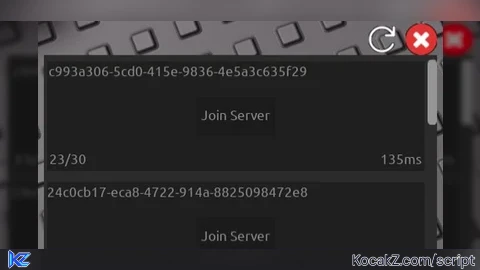

local screenGui = Instance.new("ScreenGui", game:GetService("CoreGui"))
local mainFrame = Instance.new("Frame", screenGui)
mainFrame.AnchorPoint = Vector2.new(0.5, 0.5)
mainFrame.Size = UDim2.new(0, 500, 0, 400)
mainFrame.Position = UDim2.new(0.5, 0, 0.5, 0)
mainFrame.BorderSizePixel = 0
mainFrame.BackgroundColor3 = Color3.new(0.168627, 0.168627, 0.168627)

local scrollFrame = Instance.new("ScrollingFrame", mainFrame)
scrollFrame.AnchorPoint = Vector2.new(0.5, 0.5)
scrollFrame.Size = UDim2.new(1, 0, 1, 0)
scrollFrame.Position = UDim2.new(0.5, 0, 0.5, 0)
scrollFrame.AutomaticCanvasSize = Enum.AutomaticSize.Y
scrollFrame.BackgroundTransparency = 1
scrollFrame.BorderSizePixel = 0

function getServers()
    local request = request({
        Url = "https://games.roblox.com/v1/games/" .. game.PlaceId .. "/servers/Public?sortOrder=Desc&limit=100",
        Method = "GET",
    })

    if request.StatusCode == 200 then
        local serverData = game:GetService("HttpService"):JSONDecode(request.Body)
        local serverList = {}

        for _, server in pairs(serverData.data) do
            local serverInfo = {
                serverId = server.id or "N/A",
                players = server.playing or 0,
                maxPlayers = server.maxPlayers or 0,
                ping = server.ping or "N/A",
            }

            table.insert(serverList, serverInfo)
        end

        return serverList
    else
        return nil
    end
end

local posChange = 8

local serverFrames = {}
function refreshServers()

    local servers = getServers()
    if servers then
        for _, server in pairs(servers) do
            local serverFrame = Instance.new("Frame", scrollFrame)
            serverFrame.Position = UDim2.new(0, 4, 0, posChange)
            serverFrame.Size = UDim2.new(0, 480, 0, 140)
            serverFrame.BackgroundColor3 = Color3.new(0.121568, 0.121568, 0.121568)
            serverFrame.BorderSizePixel = 0

            local jobIdLabel = Instance.new("TextLabel", serverFrame)
            jobIdLabel.AnchorPoint = Vector2.new(0.5, 0.5)
            jobIdLabel.Size = UDim2.new(0, 320, 0, 28)
            jobIdLabel.Position = UDim2.new(0.5, -74, 0.5, -56)
            jobIdLabel.Font = Enum.Font.Ubuntu
            jobIdLabel.BackgroundTransparency = 1
            jobIdLabel.Text = server.serverId
            jobIdLabel.TextColor3 = Color3.new(0.541176, 0.541176, 0.541176)
            jobIdLabel.TextSize = 18

            jobIdLabel.InputBegan:Connect(function(input)
                if input.UserInputType == Enum.UserInputType.MouseButton1 then
                    setclipboard(server.serverId)

                    game:GetService("StarterGui"):SetCore("SendNotification", {
                        Title = "COPIED!",
                        Text = "Server id has been copied to clipboard.",
                        Time = 4
                    })
                end
            end)

            local playersLabel = Instance.new("TextLabel", serverFrame)
            playersLabel.AnchorPoint = Vector2.new(0.5, 0.5)
            playersLabel.Size = UDim2.new(0, 50, 0, 50)
            playersLabel.Position = UDim2.new(0.5, -214, 0.5, 56)
            playersLabel.Font = Enum.Font.Ubuntu
            playersLabel.BackgroundTransparency = 1
            playersLabel.Text = server.players .. "/" .. server.maxPlayers
            playersLabel.TextColor3 = Color3.new(0.541176, 0.541176, 0.541176)
            playersLabel.TextSize = 18

            local pingLabel = Instance.new("TextLabel", serverFrame)
            pingLabel.AnchorPoint = Vector2.new(0.5, 0.5)
            pingLabel.Size = UDim2.new(0, 50, 0, 50)
            pingLabel.Position = UDim2.new(1, -30, 0.5, 56)
            pingLabel.Font = Enum.Font.Ubuntu
            pingLabel.BackgroundTransparency = 1
            pingLabel.Text = server.ping .. "ms"
            pingLabel.TextColor3 = Color3.new(0.541176, 0.541176, 0.541176)
            pingLabel.TextSize = 18

            local joinserverBtn = Instance.new("TextButton", serverFrame)
            joinserverBtn.AnchorPoint = Vector2.new(0.5, 0.5)
            joinserverBtn.Size = UDim2.new(0, 100, 0, 50)
            joinserverBtn.Position = UDim2.new(0.5, 0, 0.5, 0)
            joinserverBtn.BackgroundColor3 = Color3.new(0.105882, 0.105882, 0.105882)
            joinserverBtn.TextColor3 = Color3.new(0.541176, 0.541176, 0.541176)
            joinserverBtn.Font = Enum.Font.Ubuntu
            joinserverBtn.BorderSizePixel = 0
            joinserverBtn.Text = "Join Server"
            joinserverBtn.TextSize = 18

            joinserverBtn.MouseButton1Click:Connect(function()
                game:GetService("TeleportService"):TeleportToPlaceInstance(game.PlaceId, server.serverId, game.Players.LocalPlayer)
            end)

            local refreshBtn = Instance.new("ImageButton", mainFrame)
            refreshBtn.AnchorPoint = Vector2.new(0.5, 0.5)
            refreshBtn.Size = UDim2.new(0, 50, 0, 50)
            refreshBtn.Position = UDim2.new(0.5, 180, 0.5, -220)
            refreshBtn.Image = "http://www.roblox.com/asset/?id=13825976376"
            refreshBtn.BackgroundTransparency = 1

            refreshBtn.MouseButton1Click:Connect(function()
                for _, v in pairs(serverFrames) do
                    v:Destroy()
                end
                posChange = 8

                table.clear(serverFrames)
                refreshServers()
            end)

            local closeBtn = Instance.new("ImageButton", mainFrame)
            closeBtn.AnchorPoint = Vector2.new(0.5, 0.5)
            closeBtn.Size = UDim2.new(0, 40, 0, 40)
            closeBtn.Position = UDim2.new(0.5, 230, 0.5, -220)
            closeBtn.Image = "http://www.roblox.com/asset/?id=101399572361146"
            closeBtn.BackgroundTransparency = 1

            closeBtn.MouseButton1Click:Connect(function()
                screenGui:Destroy()
            end)

            table.insert(serverFrames, serverFrame)

            posChange += 154
        end
    end

end

refreshServers()

game:GetService("UserInputService").InputBegan:Connect(function(input, gameProcessedEvent)
    if gameProcessedEvent == true then return end

    if input.KeyCode == Enum.KeyCode.RightControl then
        screenGui:Destroy()
    end
end)
How to Execute Universal Script – Server Finder
Step 1: Copy Code: Click the Copy Code button in the viewer above to grab the clean Lua loadstring.
Step 2: Launch Executor: Open a compatible, unpatched executor. If you need one, check our Roblox Executors Directory.
Step 3: Join Experience: Launch Roblox and join Universal Script.
Step 4: Attach & Run: Attach/inject your executor into the Roblox process, paste the code into the script tab, and press Execute.
Features & Information
Script Changelog (1)
Community Comments (2)
Frequently Asked Questions
How do I execute Universal Script – Server Finder in Roblox?
To run Universal Script – Server Finder, copy the Lua loadstring from the code viewer above, launch Roblox and join Universal Script, attach a working executor (such as Potassium, Solara, or Delta from our Executors directory), paste the code into your executor console, and click Execute.
Is Universal Script – Server Finder keyless or does it require an access key?
Universal Script – Server Finder requires an access key. You can retrieve the official key directly using the Get Script Key link provided above.
Is Universal Script – Server Finder currently safe and working?
This script is active and operational. Always test scripts using a secondary (alt) Roblox account to safeguard your main profile against anti-cheat bans.


![Ez Hub [Open Source] [150+ games] - Verified script for Universal Script](https://media.kocakz.me/b74a9ac15370ba766b2fa9531f17c9dad2c0befb2b951693ae723e4c7d2c3fb6.webp)


![[KEYLESS] Moondiety Script | 20+ supported Games - Verified script for Universal Script](https://media.kocakz.me/6834c33a36c9fbe66afae4c6754c2b80386ce636b2f972464a95866f4b6a42eb.webp)




@azhars2007 wym
can you add server timestamp