


KeylessUniversal
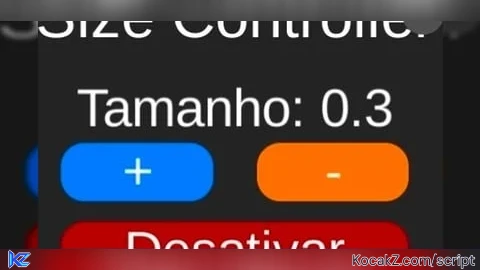
local Players = game:GetService("Players")
local UIS = game:GetService("UserInputService")

local player = Players.LocalPlayer
local camera = workspace.CurrentCamera

-- GUI
local gui = Instance.new("ScreenGui")
gui.Parent = player:WaitForChild("PlayerGui")
gui.ResetOnSpawn = false

-- FRAME
local frame = Instance.new("Frame")
frame.Parent = gui
frame.Size = UDim2.new(0,260,0,190)
frame.Position = UDim2.new(0.4,0,0.4,0)
frame.BackgroundColor3 = Color3.fromRGB(35,35,35)
frame.Active = true
frame.Selectable = true

Instance.new("UICorner", frame).CornerRadius = UDim.new(0,18)
Instance.new("UIStroke", frame).Color = Color3.fromRGB(255,0,0)

----------------------------------------------------------------
-- 🔥 SISTEMA DE DRAG UNIVERSAL (FUNCIONA EM PC E MOBILE)
----------------------------------------------------------------
local function makeDraggable(obj)
	local dragging = false
	local dragStart
	local startPos

	obj.InputBegan:Connect(function(input)
		if input.UserInputType == Enum.UserInputType.MouseButton1
		or input.UserInputType == Enum.UserInputType.Touch then

			dragging = true
			dragStart = input.Position
			startPos = obj.Position

			input.Changed:Connect(function()
				if input.UserInputState == Enum.UserInputState.End then
					dragging = false
				end
			end)
		end
	end)

	obj.InputChanged:Connect(function(input)
		if input.UserInputType == Enum.UserInputType.MouseMovement
		or input.UserInputType == Enum.UserInputType.Touch then

			if dragging then
				local delta = input.Position - dragStart
				obj.Position = UDim2.new(
					startPos.X.Scale,
					startPos.X.Offset + delta.X,
					startPos.Y.Scale,
					startPos.Y.Offset + delta.Y
				)
			end
		end
	end)
end

makeDraggable(frame)

-- FUNÇÃO PARA FORMATAR NÚMERO
local function formatNumber(num)
	num = math.round(num * 10) / 10

	if num % 1 == 0 then
		return tostring(math.floor(num))
	else
		return tostring(num)
	end
end

-- TITLE
local title = Instance.new("TextLabel")
title.Parent = frame
title.Size = UDim2.new(1,0,0,40)
title.BackgroundTransparency = 1
title.Text = "Size Controller"
title.TextColor3 = Color3.new(1,1,1)
title.TextScaled = true

-- SCALE VALUE
local currentScale = 1
local enabled = false

local scaleLabel = Instance.new("TextLabel")
scaleLabel.Parent = frame
scaleLabel.Size = UDim2.new(1,0,0,35)
scaleLabel.Position = UDim2.new(0,0,0.3,0)
scaleLabel.BackgroundTransparency = 1
scaleLabel.TextColor3 = Color3.new(1,1,1)
scaleLabel.TextScaled = true
scaleLabel.Text = "Tamanho: 1"

-- BOTÕES
local plus = Instance.new("TextButton")
plus.Parent = frame
plus.Size = UDim2.new(0.35,0,0,35)
plus.Position = UDim2.new(0.1,0,0.5,0)
plus.Text = "+"
plus.TextScaled = true
plus.BackgroundColor3 = Color3.fromRGB(0,120,255)
plus.TextColor3 = Color3.new(1,1,1)
Instance.new("UICorner", plus).CornerRadius = UDim.new(0,14)

local minus = Instance.new("TextButton")
minus.Parent = frame
minus.Size = UDim2.new(0.35,0,0,35)
minus.Position = UDim2.new(0.55,0,0.5,0)
minus.Text = "-"
minus.TextScaled = true
minus.BackgroundColor3 = Color3.fromRGB(255,120,0)
minus.TextColor3 = Color3.new(1,1,1)
Instance.new("UICorner", minus).CornerRadius = UDim.new(0,14)

-- CAMERA
local function updateCamera(scale)
	player.CameraMaxZoomDistance = 20 * scale
	player.CameraMinZoomDistance = 5 * scale
end

local function getStep(scale)
	if scale >= 150 then
		return 50
	elseif scale >= 50 then
		return 10
	elseif scale >= 10 then
		return 5
	elseif scale >= 1 then
		return 1
	else
		return 0.1
	end
end

local function applyScale(scale)
	local char = player.Character
	if not char then return end

	local root = char:FindFirstChild("HumanoidRootPart")
	if not root then return end

	local oldScale = char:GetScale()
	local oldPosition = root.Position

	char:ScaleTo(scale)
	task.wait()

	local heightBoost = (scale - oldScale) * 4

	root.CFrame = CFrame.new(
		oldPosition.X,
		oldPosition.Y + heightBoost,
		oldPosition.Z
	)

	updateCamera(scale)
end

local function resetScale()
	local char = player.Character
	if not char then return end

	char:ScaleTo(1)
	updateCamera(1)
	currentScale = 1
	scaleLabel.Text = "Tamanho: 1"
end

-- TOGGLE
local toggle = Instance.new("TextButton")
toggle.Parent = frame
toggle.Size = UDim2.new(0.8,0,0,35)
toggle.Position = UDim2.new(0.1,0,0.75,0)
toggle.Text = "Ativar"
toggle.TextScaled = true
toggle.BackgroundColor3 = Color3.fromRGB(0,170,0)
toggle.TextColor3 = Color3.new(1,1,1)
Instance.new("UICorner", toggle).CornerRadius = UDim.new(0,14)

toggle.MouseButton1Click:Connect(function()
	if not enabled then
		applyScale(currentScale)
		enabled = true
		toggle.Text = "Desativar"
		toggle.BackgroundColor3 = Color3.fromRGB(170,0,0)
	else
		resetScale()
		enabled = false
		toggle.Text = "Ativar"
		toggle.BackgroundColor3 = Color3.fromRGB(0,170,0)
	end
end)

-- +
plus.MouseButton1Click:Connect(function()
	local step = getStep(currentScale)
	currentScale += step
	currentScale = math.max(currentScale, 0.1)
	scaleLabel.Text = "Tamanho: "..formatNumber(currentScale)

	if enabled then
		applyScale(currentScale)
	end
end)

-- -
minus.MouseButton1Click:Connect(function()
	local step = getStep(currentScale)
	currentScale -= step
	currentScale = math.max(currentScale, 0.1)
	scaleLabel.Text = "Tamanho: "..formatNumber(currentScale)

	if enabled then
		applyScale(currentScale)
	end
end)

-- MINIMIZE
local mini = Instance.new("TextButton")
mini.Parent = gui
mini.Size = UDim2.new(0,55,0,55)
mini.Position = frame.Position
mini.Visible = false
mini.Text = "+"
mini.BackgroundColor3 = Color3.fromRGB(35,35,35)
mini.TextColor3 = Color3.new(1,1,1)
mini.TextScaled = true
mini.Active = true
Instance.new("UICorner", mini).CornerRadius = UDim.new(1,0)

makeDraggable(mini)

local minimizeBtn = Instance.new("TextButton")
minimizeBtn.Parent = frame
minimizeBtn.Size = UDim2.new(0,25,0,25)
minimizeBtn.Position = UDim2.new(1,-30,0,5)
minimizeBtn.Text = "-"
minimizeBtn.BackgroundColor3 = Color3.fromRGB(80,80,80)
minimizeBtn.TextColor3 = Color3.new(1,1,1)
Instance.new("UICorner", minimizeBtn).CornerRadius = UDim.new(1,0)

minimizeBtn.MouseButton1Click:Connect(function()
	frame.Visible = false
	mini.Position = frame.Position
	mini.Visible = true
end)

mini.MouseButton1Click:Connect(function()
	frame.Visible = true
	mini.Visible = false
	frame.Position = mini.Position
end)No comments yet for this script.


