
KeylessUniversal
player.Character.HumanoidRootPart.CFrame = CFrame.new(teleportPosition)
local S = Instance.new("ScreenGui")
local L = Instance.new("Frame")
local D = Instance.new("Frame")
local T = Instance.new("TextButton")
local X = Instance.new("TextBox")
local Z = Instance.new("TextBox")
local Y = Instance.new("TextBox")
local V = Instance.new("TextLabel")
local H = Instance.new("TextLabel")
local C = Instance.new("TextButton")

--- This sets the PlaceHolderText to the players current CFrame ---
local P = game.Players.LocalPlayer.Character.HumanoidRootPart
local CF = P.CFrame
local Cx, Cy, Cz, m11, m12, m13, m21, m22, m23, m31, m32, m33 = CF:components()
--- This sets the PlaceHolderText to the players current CFrame ---

S.Name = "S"
S.Parent = game:WaitForChild("CoreGui")
S.ZIndexBehavior = Enum.ZIndexBehavior.Sibling

L.Name = "L"
L.Parent = S
L.BackgroundColor3 = Color3.fromRGB(50, 50, 50)
L.BorderColor3 = Color3.fromRGB(110, 110, 110)
L.Position = UDim2.new(0.321100891, 0, 0.282937378, 0)
L.Size = UDim2.new(0, 350, 0, 200)
L.Active = true
L.Draggable = true

D.Name = "D"
D.Parent = L
D.BackgroundColor3 = Color3.fromRGB(34, 34, 34)
D.BorderColor3 = Color3.fromRGB(110, 110, 110)
D.Position = UDim2.new(0.042857144, 0, 0.200000003, 0)
D.Size = UDim2.new(0, 320, 0, 145)

T.Name = "T"
T.Parent = D
T.BackgroundColor3 = Color3.fromRGB(34, 34, 34)
T.BorderColor3 = Color3.fromRGB(84, 92, 38)
T.Position = UDim2.new(0.046875, 0, 0.551724136, 0)
T.Size = UDim2.new(0, 289, 0, 50)
T.Font = Enum.Font.Gotham
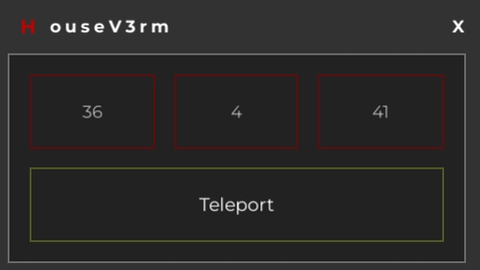
T.Text = "Teleport"
T.TextColor3 = Color3.fromRGB(255, 255, 255)
T.TextSize = 15.000
T.MouseButton1Click:connect(function()
P.CFrame = CFrame.new(X.Text, Y.Text, Z.Text)
end)

X.Name = "X"
X.Parent = D
X.BackgroundColor3 = Color3.fromRGB(34, 34, 34)
X.BorderColor3 = Color3.fromRGB(96, 12, 12)
X.Position = UDim2.new(0.046875, 0, 0.103448279, 0)
X.Size = UDim2.new(0, 86, 0, 50)
X.Font = Enum.Font.Gotham
X.PlaceholderText = Cx
X.Text = ""
X.TextColor3 = Color3.fromRGB(255, 255, 255)
X.TextSize = 14.000

Z.Name = "Z"
Z.Parent = D
Z.BackgroundColor3 = Color3.fromRGB(34, 34, 34)
Z.BorderColor3 = Color3.fromRGB(96, 12, 12)
Z.Position = UDim2.new(0.681249976, 0, 0.103448279, 0)
Z.Size = UDim2.new(0, 86, 0, 50)
Z.Font = Enum.Font.Gotham
Z.PlaceholderText = Cz
Z.Text = ""
Z.TextColor3 = Color3.fromRGB(255, 255, 255)
Z.TextSize = 14.000

Y.Name = "Y"
Y.Parent = D
Y.BackgroundColor3 = Color3.fromRGB(34, 34, 34)
Y.BorderColor3 = Color3.fromRGB(96, 12, 12)
Y.Position = UDim2.new(0.365624994, 0, 0.103448279, 0)
Y.Size = UDim2.new(0, 85, 0, 50)
Y.Font = Enum.Font.Gotham
Y.PlaceholderText = Cy
Y.Text = ""
Y.TextColor3 = Color3.fromRGB(255, 255, 255)
Y.TextSize = 14.000

V.Name = "V"
V.Parent = L
V.BackgroundColor3 = Color3.fromRGB(255, 255, 255)
V.BackgroundTransparency = 1.000
V.BorderSizePixel = 0
V.Position = UDim2.new(0.042857144, 0, 0, 0)
V.Size = UDim2.new(0, 140, 0, 40)
V.Font = Enum.Font.GothamBold
V.Text = "o u s e V 3 r m"
V.TextColor3 = Color3.fromRGB(255, 255, 255)
V.TextSize = 14.000

H.Name = "H"
H.Parent = L
H.BackgroundColor3 = Color3.fromRGB(186, 3, 3)
H.BackgroundTransparency = 1.000
H.BorderSizePixel = 0
H.Position = UDim2.new(0.042857144, 0, 0, 0)
H.Size = UDim2.new(0, 25, 0, 40)
H.Font = Enum.Font.GothamBold
H.Text = "H"
H.TextColor3 = Color3.fromRGB(186, 3, 3)
H.TextSize = 16.000

C.Name = "C"
C.Parent = L
C.BackgroundColor3 = Color3.fromRGB(255, 255, 255)
C.BackgroundTransparency = 1.000
C.BorderSizePixel = 0
C.Position = UDim2.new(0.885714352, 0, 0, 0)
C.Size = UDim2.new(0, 40, 0, 40)
C.Font = Enum.Font.GothamBold
C.Text = "X"
C.TextColor3 = Color3.fromRGB(255, 255, 255)
C.TextSize = 14.000
C.MouseButton1Click:connect(function()
S:Destroy()
end)

--- This auto-updates the PlaceHolderText to the players current CFrame ---
while true do
  function update ()
    local P = game.Players.LocalPlayer.Character.HumanoidRootPart
    local CF = P.CFrame
    local Cx, Cy, Cz, m11, m12, m13, m21, m22, m23, m31, m32, m33 = CF:components()
    X.PlaceholderText = math.floor(Cx+0.5)
    Y.PlaceholderText = math.floor(Cy+0.5)
    Z.PlaceholderText = math.floor(Cz+0.5)
  end
  pcall ( update )
  wait()
end
--- This auto-updates the PlaceHolderText to the players current CFrame ---


I will post the teleport code
I just posted the teleport code with this script, show the coordinates you are in, take that code and write the position, example: Vector3.new 0,10,0 with the script, show the coordinates and by changing the numbers you teleport