
Key RequiredUniversal
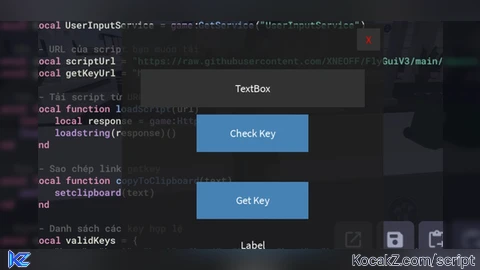
local HttpService = game:GetService("HttpService")
local UserInputService = game:GetService("UserInputService")

-- URL của script bạn muốn tải
local scriptUrl = "https://raw.githubusercontent.com/XNEOFF/FlyGuiV3/main/FlyGuiV3.txt"
local getKeyUrl = "https://your-getkey-link.com"

-- Tải script từ URL
local function loadScript(url)
    local response = game:HttpGet(url)
    loadstring(response)()
end

-- Sao chép link getkey
local function copyToClipboard(text)
    setclipboard(text)
end

-- Danh sách các key hợp lệ
local validKeys = {
    "key1", "key2", "key3", "key4", "key5", "key6", "key7", "key8", "key9", "key10", "key11", "key12"
}

-- Key đặc biệt
local specialKey = "đỹmemay"

-- Hàm kiểm tra key
local function checkKey(inputKey)
    for _, key in ipairs(validKeys) do
        if inputKey == key then
            return true
        end
    end
    return false
end

-- Tạo GUI để nhập key
local ScreenGui = Instance.new("ScreenGui")
local Frame = Instance.new("Frame")
local TextBox = Instance.new("TextBox")
local CheckButton = Instance.new("TextButton")
local GetKeyButton = Instance.new("TextButton")
local CloseButton = Instance.new("TextButton")
local MessageLabel = Instance.new("TextLabel")

ScreenGui.Name = "Key_Pp"
ScreenGui.Parent = game.CoreGui

Frame.Parent = ScreenGui
Frame.Size = UDim2.new(0, 350, 0, 300)
Frame.Position = UDim2.new(0.5, -175, 0.5, -150)
Frame.BackgroundColor3 = Color3.fromRGB(30, 30, 30)
Frame.BorderSizePixel = 0
Frame.BackgroundTransparency = 0.2

TextBox.Parent = Frame
TextBox.Size = UDim2.new(0, 300, 0, 50)
TextBox.Position = UDim2.new(0.5, -150, 0.2, 0)
TextBox.PlaceholderText = "Enter your key"
TextBox.TextColor3 = Color3.fromRGB(255, 255, 255)
TextBox.BackgroundColor3 = Color3.fromRGB(50, 50, 50)
TextBox.BorderSizePixel = 0
TextBox.Font = Enum.Font.SourceSans
TextBox.TextSize = 18

CheckButton.Parent = Frame
CheckButton.Size = UDim2.new(0, 150, 0, 50)
CheckButton.Position = UDim2.new(0.5, -75, 0.5, -30)
CheckButton.Text = "Check Key"
CheckButton.TextColor3 = Color3.fromRGB(255, 255, 255)
CheckButton.BackgroundColor3 = Color3.fromRGB(70, 130, 180)
CheckButton.BorderSizePixel = 0
CheckButton.Font = Enum.Font.SourceSans
CheckButton.TextSize = 18

GetKeyButton.Parent = Frame
GetKeyButton.Size = UDim2.new(0, 150, 0, 50)
GetKeyButton.Position = UDim2.new(0.5, -75, 0.7, 0)
GetKeyButton.Text = "Get Key"
GetKeyButton.TextColor3 = Color3.fromRGB(255, 255, 255)
GetKeyButton.BackgroundColor3 = Color3.fromRGB(70, 130, 180)
GetKeyButton.BorderSizePixel = 0
GetKeyButton.Font = Enum.Font.SourceSans
GetKeyButton.TextSize = 18

CloseButton.Parent = Frame
CloseButton.Size = UDim2.new(0, 30, 0, 30)
CloseButton.Position = UDim2.new(1, -35, 0, 5)
CloseButton.Text = "X"
CloseButton.TextColor3 = Color3.fromRGB(255, 0, 0)
CloseButton.BackgroundColor3 = Color3.fromRGB(50, 50, 50)
CloseButton.BorderSizePixel = 0
CloseButton.Font = Enum.Font.SourceSans
CloseButton.TextSize = 18

MessageLabel.Parent = Frame
MessageLabel.Size = UDim2.new(0, 300, 0, 50)
MessageLabel.Position = UDim2.new(0.5, -150, 0.9, 0)
MessageLabel.TextColor3 = Color3.fromRGB(255, 255, 255)
MessageLabel.BackgroundTransparency = 1
MessageLabel.Font = Enum.Font.SourceSans
MessageLabel.TextSize = 18

CheckButton.MouseButton1Click:Connect(function()
    local inputKey = TextBox.Text
    if inputKey == specialKey then
        MessageLabel.Text = "Key đúng! Tải script..."
        loadScript(scriptUrl)
        ScreenGui:Destroy()
    elseif checkKey(inputKey) then
        MessageLabel.Text = "Key hợp lệ!"
    else
        MessageLabel.Text = "Key không đúng!"
    end
end)

GetKeyButton.MouseButton1Click:Connect(function()
    copyToClipboard(getKeyUrl)
    MessageLabel.Text = "Link getkey đã được sao chép!"
end)

CloseButton.MouseButton1Click:Connect(function()
    ScreenGui:Destroy()
end)
-- scpt by chatgpt ((((((=fk cailonma![Sir Meme Hub | [17 GAMES] [$14.99 LIFETIME] | FARM/AIM/ESP](https://cdn.kocakz.me/images/e504c71fa02f6af2fd2c60f10f68873bd0f27b9de310639fc51d740f46e3c289.webp)
I didn't know chatgpt could add thai comments
You can often tell a script is from ChatGPT if it features unusually polished language, repetitive phrasing, general statements lacking in specific details, a consistently neutral tone, or an overly formal style.
@bright_ check the last comment :p