


KeylessUniversal
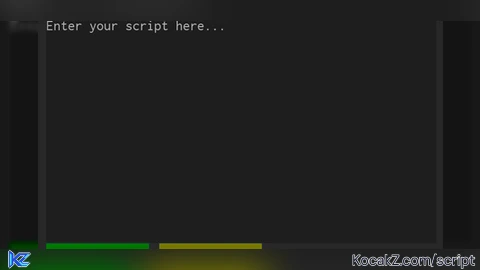
-- Services
local Players = game:GetService("Players")
local RunService = game:GetService("RunService")
local TweenService = game:GetService("TweenService")
local UserInputService = game:GetService("UserInputService")
local ReplicatedStorage = game:GetService("ReplicatedStorage")

-- Create ScreenGui
local ScreenGui = Instance.new("ScreenGui")
ScreenGui.Name = "ScriptExecutorGUI"
ScreenGui.Parent = game:GetService("CoreGui")
ScreenGui.ResetOnSpawn = false

-- Main Frame
local MainFrame = Instance.new("Frame")
MainFrame.Name = "MainFrame"
MainFrame.Size = UDim2.new(0, 400, 0, 300)
MainFrame.Position = UDim2.new(0.5, -200, 0.5, -150)
MainFrame.BackgroundColor3 = Color3.fromRGB(40, 40, 40)
MainFrame.BorderSizePixel = 0
MainFrame.Parent = ScreenGui

-- Title Bar
local TitleBar = Instance.new("Frame")
TitleBar.Name = "TitleBar"
TitleBar.Size = UDim2.new(1, 0, 0, 30)
TitleBar.BackgroundColor3 = Color3.fromRGB(60, 60, 60)
TitleBar.BorderSizePixel = 0
TitleBar.Parent = MainFrame

local TitleLabel = Instance.new("TextLabel")
TitleLabel.Name = "TitleLabel"
TitleLabel.Size = UDim2.new(1, -60, 1, 0)
TitleLabel.BackgroundTransparency = 1
TitleLabel.Text = "Script Executor"
TitleLabel.TextColor3 = Color3.fromRGB(255, 255, 255)
TitleLabel.TextSize = 18
TitleLabel.Font = Enum.Font.SourceSansBold
TitleLabel.Parent = TitleBar

local CloseButton = Instance.new("TextButton")
CloseButton.Name = "CloseButton"
CloseButton.Size = UDim2.new(0, 30, 0, 30)
CloseButton.Position = UDim2.new(1, -30, 0, 0)
CloseButton.BackgroundColor3 = Color3.fromRGB(200, 0, 0)
CloseButton.Text = "X"
CloseButton.TextColor3 = Color3.fromRGB(255, 255, 255)
CloseButton.TextSize = 18
CloseButton.Font = Enum.Font.SourceSansBold
CloseButton.Parent = TitleBar

-- Script Box
local ScriptBox = Instance.new("TextBox")
ScriptBox.Name = "ScriptBox"
ScriptBox.Size = UDim2.new(1, -20, 1, -80)
ScriptBox.Position = UDim2.new(0, 10, 0, 40)
ScriptBox.BackgroundColor3 = Color3.fromRGB(30, 30, 30)
ScriptBox.BorderSizePixel = 0
ScriptBox.TextColor3 = Color3.fromRGB(255, 255, 255)
ScriptBox.TextSize = 14
ScriptBox.Font = Enum.Font.Code
ScriptBox.TextXAlignment = Enum.TextXAlignment.Left
ScriptBox.TextYAlignment = Enum.TextYAlignment.Top
ScriptBox.ClearTextOnFocus = false
ScriptBox.MultiLine = true
ScriptBox.PlaceholderText = "Enter your script here..."
ScriptBox.Parent = MainFrame

-- Execute Button
local ExecuteButton = Instance.new("TextButton")
ExecuteButton.Name = "ExecuteButton"
ExecuteButton.Size = UDim2.new(0, 100, 0, 30)
ExecuteButton.Position = UDim2.new(0, 10, 1, -40)
ExecuteButton.BackgroundColor3 = Color3.fromRGB(0, 120, 0)
ExecuteButton.Text = "Execute"
ExecuteButton.TextColor3 = Color3.fromRGB(255, 255, 255)
ExecuteButton.TextSize = 16
ExecuteButton.Font = Enum.Font.SourceSansBold
ExecuteButton.Parent = MainFrame

-- Clear Button
local ClearButton = Instance.new("TextButton")
ClearButton.Name = "ClearButton"
ClearButton.Size = UDim2.new(0, 100, 0, 30)
ClearButton.Position = UDim2.new(0, 120, 1, -40)
ClearButton.BackgroundColor3 = Color3.fromRGB(120, 120, 0)
ClearButton.Text = "Clear"
ClearButton.TextColor3 = Color3.fromRGB(255, 255, 255)
ClearButton.TextSize = 16
ClearButton.Font = Enum.Font.SourceSansBold
ClearButton.Parent = MainFrame

-- Functionality
local dragging
local dragInput
local dragStart
local startPos

local function updateInput(input)
    local delta = input.Position - dragStart
    MainFrame.Position = UDim2.new(startPos.X.Scale, startPos.X.Offset + delta.X, startPos.Y.Scale, startPos.Y.Offset + delta.Y)
end

TitleBar.InputBegan:Connect(function(input)
    if input.UserInputType == Enum.UserInputType.MouseButton1 or input.UserInputType == Enum.UserInputType.Touch then
        dragging = true
        dragStart = input.Position
        startPos = MainFrame.Position

        input.Changed:Connect(function()
            if input.UserInputState == Enum.UserInputState.End then
                dragging = false
            end
        end)
    end
end)

TitleBar.InputChanged:Connect(function(input)
    if input.UserInputType == Enum.UserInputType.MouseMovement or input.UserInputType == Enum.UserInputType.Touch then
        dragInput = input
    end
end)

UserInputService.InputChanged:Connect(function(input)
    if input == dragInput and dragging then
        updateInput(input)
    end
end)

CloseButton.MouseButton1Click:Connect(function()
    ScreenGui:Destroy()
end)

-- Load Notification Library
local NotificationLibrary = loadstring(game:HttpGet("https://pastebin.com/raw/WQL29rXC"))()

ExecuteButton.MouseButton1Click:Connect(function()
    local script = ScriptBox.Text
    if script and script ~= "" then
        local success, err = pcall(function()
            loadstring(script)()
        end)
        if success then
            NotificationLibrary:SendNotification("Info", "You executed the script.", 5)
        else
            warn("Script execution error: " .. tostring(err))
            NotificationLibrary:SendNotification("Error", "Script execution error: " .. tostring(err), 5)
        end
    else
        NotificationLibrary:SendNotification("Warning", "No script to execute.", 5)
    end
end)

ClearButton.MouseButton1Click:Connect(function()
    ScriptBox.Text = ""
    NotificationLibrary:SendNotification("Info", "You cleared the script.", 3)
end)

-- Initial notifications
NotificationLibrary:SendNotification("Success", "Script Executor successfully loaded.", 10)
NotificationLibrary:SendNotification("Error", "Attempting to fix some coding errors.", 10)


Execute require script?
@zxcv
didnt you tell me i stole this script and edited it with ai?
bro this is made with ai
@voltex I mentioned you stole this script, and edited with ai. Of course this script is also an ai (because you clearly see the comments and variables)
Can this execute require scripts as well?