


KeylessUniversal
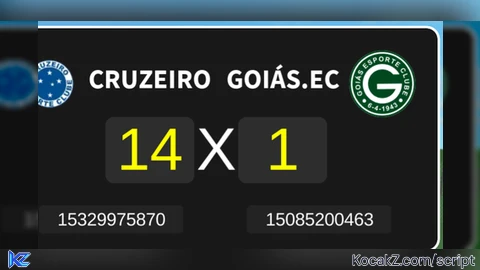
-- Multi-Team Scoreboard Script (Layout Fix)
local ScreenGui = Instance.new("ScreenGui")
local Frame = Instance.new("Frame")
local Team1Input = Instance.new("TextBox")
local Team2Input = Instance.new("TextBox")
local Score1Input = Instance.new("TextBox")
local Score2Input = Instance.new("TextBox")
local Logo1 = Instance.new("ImageLabel")
local Logo2 = Instance.new("ImageLabel")
local Logo1Input = Instance.new("TextBox")
local Logo2Input = Instance.new("TextBox")
local Divider = Instance.new("TextLabel")
local UIStroke = Instance.new("UIStroke")
local UICorner = Instance.new("UICorner")

-- Main UI Setup
ScreenGui.Name = "CustomScoreboard"
ScreenGui.Parent = (game:GetService("RunService"):IsStudio() and game.Players.LocalPlayer:WaitForChild("PlayerGui")) or game.CoreGui

Frame.Name = "MainFrame"
Frame.Parent = ScreenGui
Frame.BackgroundColor3 = Color3.fromRGB(25, 25, 25)
Frame.Position = UDim2.new(0.5, -200, 0.1, 0) -- Centered
Frame.Size = UDim2.new(0, 400, 0, 200) -- Wider frame to prevent overlapping
Frame.Active = true
Frame.Draggable = true

UICorner.CornerRadius = UDim.new(0, 10)
UICorner.Parent = Frame

UIStroke.Thickness = 2
UIStroke.Color = Color3.fromRGB(255, 255, 255)
UIStroke.Parent = Frame

--- IMAGE SETUP ---
local function setupLogo(logo, pos, defaultId)
    logo.Parent = Frame
    logo.Size = UDim2.new(0, 60, 0, 60)
    logo.Position = pos
    logo.BackgroundTransparency = 1
    logo.Image = "rbxassetid://" .. defaultId
    logo.ScaleType = Enum.ScaleType.Fit
end

-- Positions adjusted to be far apart
setupLogo(Logo1, UDim2.new(0.05, 0, 0.1, 0), "11417572718")
setupLogo(Logo2, UDim2.new(0.8, 0, 0.1, 0), "11417577534")

--- TEAM NAMES SETUP ---
local function setupTeamInput(box, defaultText, pos)
    box.Parent = Frame
    box.Size = UDim2.new(0, 120, 0, 30)
    box.Position = pos
    box.BackgroundTransparency = 1
    box.Text = defaultText
    box.TextColor3 = Color3.new(1, 1, 1)
    box.TextScaled = true
    box.Font = Enum.Font.SourceSansBold
end

-- Names now sit above the scores, properly spaced
setupTeamInput(Team1Input, "CORINTHIANS", UDim2.new(0.2, 0, 0.15, 0))
setupTeamInput(Team2Input, "FLAMENGO", UDim2.new(0.5, 0, 0.15, 0))

--- SCORE INPUT SETUP ---
local function setupScoreInput(box, pos)
    box.Parent = Frame
    box.Size = UDim2.new(0, 80, 0, 60)
    box.Position = pos
    box.BackgroundColor3 = Color3.fromRGB(45, 45, 45)
    box.Text = "0"
    box.TextColor3 = Color3.new(1, 1, 0)
    box.TextScaled = true

    local corner = Instance.new("UICorner", box)
    corner.CornerRadius = UDim.new(0, 8)

    box.FocusLost:Connect(function()
        if not tonumber(box.Text) then box.Text = "0" end
    end)
end

setupScoreInput(Score1Input, UDim2.new(0.25, 0, 0.4, 0))
setupScoreInput(Score2Input, UDim2.new(0.55, 0, 0.4, 0))

--- DIVIDER (X) ---
Divider.Parent = Frame
Divider.Size = UDim2.new(0, 40, 0, 60)
Divider.Position = UDim2.new(0.45, 0, 0.4, 0)
Divider.BackgroundTransparency = 1
Divider.Text = "X"
Divider.TextColor3 = Color3.new(1, 1, 1)
Divider.TextScaled = true

--- ID INPUTS (Bottom) ---
local function setupIdInput(box, pos, placeholder)
    box.Parent = Frame
    box.Size = UDim2.new(0, 130, 0, 25)
    box.Position = pos
    box.BackgroundColor3 = Color3.fromRGB(35, 35, 35)
    box.PlaceholderText = placeholder
    box.Text = ""
    box.TextColor3 = Color3.new(1, 1, 1)
    box.TextSize = 12

    Instance.new("UICorner", box).CornerRadius = UDim.new(0, 4)
end

setupIdInput(Logo1Input, UDim2.new(0.1, 0, 0.8, 0), "Crest ID 1")
setupIdInput(Logo2Input, UDim2.new(0.57, 0, 0.8, 0), "Crest ID 2")

Logo1Input.FocusLost:Connect(function()
    if Logo1Input.Text ~= "" then Logo1.Image = "rbxassetid://" .. Logo1Input.Text end
end)

Logo2Input.FocusLost:Connect(function()
    if Logo2Input.Text ~= "" then Logo2.Image = "rbxassetid://" .. Logo2Input.Text end
end)No comments yet for this script.


