


KeylessUniversal
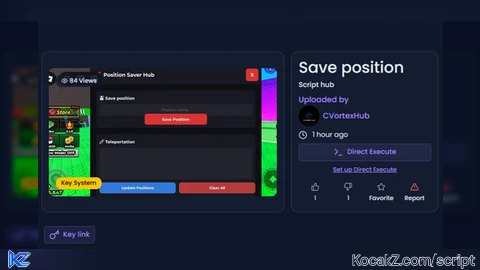
-- Script no by me im was founded a script with key im crack that xD and that script maked by ai btw

local Players = game:GetService("Players")
local Player = Players.LocalPlayer
local UserInputService = game:GetService("UserInputService")
local TweenService = game:GetService("TweenService")

local SavedPositions = {}

local ScreenGui = Instance.new("ScreenGui")
ScreenGui.Name = "PositionSaverHub"
ScreenGui.ResetOnSpawn = false
ScreenGui.ZIndexBehavior = Enum.ZIndexBehavior.Sibling
ScreenGui.Parent = game.CoreGui

local MainFrame = nil

local function Notify(title, text, duration)
    local NotifFrame = Instance.new("Frame")
    NotifFrame.Size = UDim2.new(0, 300, 0, 80)
    NotifFrame.Position = UDim2.new(1, -320, 0, 20)
    NotifFrame.BackgroundColor3 = Color3.fromRGB(25, 25, 35)
    NotifFrame.BorderSizePixel = 0
    NotifFrame.Parent = ScreenGui

    local UICorner = Instance.new("UICorner")
    UICorner.CornerRadius = UDim.new(0, 8)
    UICorner.Parent = NotifFrame

    local TitleLabel = Instance.new("TextLabel")
    TitleLabel.Size = UDim2.new(1, -20, 0, 25)
    TitleLabel.Position = UDim2.new(0, 10, 0, 10)
    TitleLabel.BackgroundTransparency = 1
    TitleLabel.Text = title
    TitleLabel.TextColor3 = Color3.fromRGB(255, 255, 255)
    TitleLabel.TextSize = 16
    TitleLabel.Font = Enum.Font.GothamBold
    TitleLabel.TextXAlignment = Enum.TextXAlignment.Left
    TitleLabel.Parent = NotifFrame

    local TextLabel = Instance.new("TextLabel")
    TextLabel.Size = UDim2.new(1, -20, 0, 35)
    TextLabel.Position = UDim2.new(0, 10, 0, 35)
    TextLabel.BackgroundTransparency = 1
    TextLabel.Text = text
    TextLabel.TextColor3 = Color3.fromRGB(200, 200, 200)
    TextLabel.TextSize = 14
    TextLabel.Font = Enum.Font.Gotham
    TextLabel.TextXAlignment = Enum.TextXAlignment.Left
    TextLabel.TextWrapped = true
    TextLabel.Parent = NotifFrame

    task.wait(duration or 3)
    NotifFrame:Destroy()
end

local function CreateToggleButton()
    local ToggleButton = Instance.new("ImageButton")
    ToggleButton.Name = "ToggleButton"
    ToggleButton.Size = UDim2.new(0, 70, 0, 70)
    ToggleButton.Position = UDim2.new(0, 20, 0.5, -35)
    ToggleButton.BackgroundColor3 = Color3.fromRGB(20, 20, 30)
    ToggleButton.BorderSizePixel = 0
    ToggleButton.Image = ""
    ToggleButton.ScaleType = Enum.ScaleType.Fit
    ToggleButton.Parent = ScreenGui

    local LogoLabel = Instance.new("TextLabel")
    LogoLabel.Size = UDim2.new(1, 0, 1, 0)
    LogoLabel.BackgroundTransparency = 1
    LogoLabel.Text = "CV"
    LogoLabel.TextColor3 = Color3.fromRGB(255, 255, 255)
    LogoLabel.TextSize = 20
    LogoLabel.Font = Enum.Font.GothamBold
    LogoLabel.TextStrokeTransparency = 0.5
    LogoLabel.TextStrokeColor3 = Color3.fromRGB(220, 50, 50)
    LogoLabel.Parent = ToggleButton

    local UICorner = Instance.new("UICorner")
    UICorner.CornerRadius = UDim.new(1, 0)
    UICorner.Parent = ToggleButton

    local UIStroke = Instance.new("UIStroke")
    UIStroke.Color = Color3.fromRGB(220, 50, 50)
    UIStroke.Thickness = 3
    UIStroke.Parent = ToggleButton

    local Shadow = Instance.new("ImageLabel")
    Shadow.Size = UDim2.new(1, 20, 1, 20)
    Shadow.Position = UDim2.new(0, -10, 0, -10)
    Shadow.BackgroundTransparency = 1
    Shadow.Image = "rbxasset://textures/ui/GuiImagePlaceholder.png"
    Shadow.ImageColor3 = Color3.fromRGB(0, 0, 0)
    Shadow.ImageTransparency = 0.7
    Shadow.ScaleType = Enum.ScaleType.Slice
    Shadow.SliceCenter = Rect.new(10, 10, 118, 118)
    Shadow.ZIndex = -1
    Shadow.Parent = ToggleButton

    ToggleButton.MouseEnter:Connect(function()
        TweenService:Create(ToggleButton, TweenInfo.new(0.2), {Size = UDim2.new(0, 80, 0, 80)}):Play()
    end)

    ToggleButton.MouseLeave:Connect(function()
        TweenService:Create(ToggleButton, TweenInfo.new(0.2), {Size = UDim2.new(0, 70, 0, 70)}):Play()
    end)

    ToggleButton.MouseButton1Click:Connect(function()
        if MainFrame then
            MainFrame.Visible = true
            ToggleButton.Visible = false
        end
    end)

    return ToggleButton
end

function CreateMainUI()
    MainFrame = Instance.new("Frame")
    MainFrame.Name = "MainHub"
    MainFrame.Size = UDim2.new(0, 550, 0, 450)
    MainFrame.Position = UDim2.new(0.5, -275, 0.5, -225)
    MainFrame.BackgroundColor3 = Color3.fromRGB(15, 15, 20)
    MainFrame.BorderSizePixel = 0
    MainFrame.Parent = ScreenGui

    local UICorner = Instance.new("UICorner")
    UICorner.CornerRadius = UDim.new(0, 12)
    UICorner.Parent = MainFrame

    local ToggleBtn = CreateToggleButton()
    ToggleBtn.Visible = false

    local Header = Instance.new("Frame")
    Header.Size = UDim2.new(1, 0, 0, 60)
    Header.BackgroundColor3 = Color3.fromRGB(25, 25, 35)
    Header.BorderSizePixel = 0
    Header.Parent = MainFrame

    local HeaderCorner = Instance.new("UICorner")
    HeaderCorner.CornerRadius = UDim.new(0, 12)
    HeaderCorner.Parent = Header

    local Title = Instance.new("TextLabel")
    Title.Size = UDim2.new(1, -20, 1, 0)
    Title.Position = UDim2.new(0, 20, 0, 0)
    Title.BackgroundTransparency = 1
    Title.Text = "📍 Position Saver Hub"
    Title.TextColor3 = Color3.fromRGB(255, 255, 255)
    Title.TextSize = 20
    Title.Font = Enum.Font.GothamBold
    Title.TextXAlignment = Enum.TextXAlignment.Left
    Title.Parent = Header

    local CloseBtn = Instance.new("TextButton")
    CloseBtn.Size = UDim2.new(0, 40, 0, 40)
    CloseBtn.Position = UDim2.new(1, -50, 0, 10)
    CloseBtn.BackgroundColor3 = Color3.fromRGB(220, 50, 50)
    CloseBtn.BorderSizePixel = 0
    CloseBtn.Text = "X"
    CloseBtn.TextColor3 = Color3.fromRGB(255, 255, 255)
    CloseBtn.TextSize = 18
    CloseBtn.Font = Enum.Font.GothamBold
    CloseBtn.Parent = Header

    local CloseBtnCorner = Instance.new("UICorner")
    CloseBtnCorner.CornerRadius = UDim.new(0, 8)
    CloseBtnCorner.Parent = CloseBtn

    CloseBtn.MouseButton1Click:Connect(function()
        MainFrame.Visible = false
        ToggleBtn.Visible = true
    end)

    -- Save section
    local SaveSection = Instance.new("Frame")
    SaveSection.Size = UDim2.new(1, -40, 0, 120)
    SaveSection.Position = UDim2.new(0, 20, 0, 80)
    SaveSection.BackgroundColor3 = Color3.fromRGB(25, 25, 35)
    SaveSection.BorderSizePixel = 0
    SaveSection.Parent = MainFrame

    local SaveCorner = Instance.new("UICorner")
    SaveCorner.CornerRadius = UDim.new(0, 10)
    SaveCorner.Parent = SaveSection

    local SaveTitle = Instance.new("TextLabel")
    SaveTitle.Size = UDim2.new(1, -20, 0, 30)
    SaveTitle.Position = UDim2.new(0, 10, 0, 10)
    SaveTitle.BackgroundTransparency = 1
    SaveTitle.Text = "💾 Save position"
    SaveTitle.TextColor3 = Color3.fromRGB(255, 255, 255)
    SaveTitle.TextSize = 16
    SaveTitle.Font = Enum.Font.GothamBold
    SaveTitle.TextXAlignment = Enum.TextXAlignment.Left
    SaveTitle.Parent = SaveSection

    local NameInput = Instance.new("TextBox")
    NameInput.Size = UDim2.new(1, -20, 0, 35)
    NameInput.Position = UDim2.new(0, 10, 0, 45)
    NameInput.BackgroundColor3 = Color3.fromRGB(35, 35, 45)
    NameInput.BorderSizePixel = 0
    NameInput.Text = ""
    NameInput.PlaceholderText = "Position name..."
    NameInput.TextColor3 = Color3.fromRGB(255, 255, 255)
    NameInput.PlaceholderColor3 = Color3.fromRGB(120, 120, 120)
    NameInput.TextSize = 14
    NameInput.Font = Enum.Font.Gotham
    NameInput.Parent = SaveSection

    local NameInputCorner = Instance.new("UICorner")
    NameInputCorner.CornerRadius = UDim.new(0, 6)
    NameInputCorner.Parent = NameInput

    local SaveBtn = Instance.new("TextButton")
    SaveBtn.Size = UDim2.new(0, 200, 0, 35)
    SaveBtn.Position = UDim2.new(0.5, -100, 1, -45)
    SaveBtn.BackgroundColor3 = Color3.fromRGB(220, 50, 50)
    SaveBtn.BorderSizePixel = 0
    SaveBtn.Text = "Save Position"
    SaveBtn.TextColor3 = Color3.fromRGB(255, 255, 255)
    SaveBtn.TextSize = 15
    SaveBtn.Font = Enum.Font.GothamBold
    SaveBtn.Parent = SaveSection

    local SaveBtnCorner = Instance.new("UICorner")
    SaveBtnCorner.CornerRadius = UDim.new(0, 8)
    SaveBtnCorner.Parent = SaveBtn

    local TpSection = Instance.new("Frame")
    TpSection.Size = UDim2.new(1, -40, 0, 200)
    TpSection.Position = UDim2.new(0, 20, 0, 220)
    TpSection.BackgroundColor3 = Color3.fromRGB(25, 25, 35)
    TpSection.BorderSizePixel = 0
    TpSection.Parent = MainFrame

    local TpCorner = Instance.new("UICorner")
    TpCorner.CornerRadius = UDim.new(0, 10)
    TpCorner.Parent = TpSection

    local TpTitle = Instance.new("TextLabel")
    TpTitle.Size = UDim2.new(1, -20, 0, 30)
    TpTitle.Position = UDim2.new(0, 10, 0, 10)
    TpTitle.BackgroundTransparency = 1
    TpTitle.Text = "🚀 Teleportation"
    TpTitle.TextColor3 = Color3.fromRGB(255, 255, 255)
    TpTitle.TextSize = 16
    TpTitle.Font = Enum.Font.GothamBold
    TpTitle.TextXAlignment = Enum.TextXAlignment.Left
    TpTitle.Parent = TpSection

    local PositionList = Instance.new("ScrollingFrame")
    PositionList.Size = UDim2.new(1, -20, 0, 100)
    PositionList.Position = UDim2.new(0, 10, 0, 45)
    PositionList.BackgroundColor3 = Color3.fromRGB(35, 35, 45)
    PositionList.BorderSizePixel = 0
    PositionList.ScrollBarThickness = 4
    PositionList.Parent = TpSection

    local ListCorner = Instance.new("UICorner")
    ListCorner.CornerRadius = UDim.new(0, 6)
    ListCorner.Parent = PositionList

    local UIListLayout = Instance.new("UIListLayout")
    UIListLayout.Padding = UDim.new(0, 5)
    UIListLayout.Parent = PositionList

    local UpdateBtn = Instance.new("TextButton")
    UpdateBtn.Size = UDim2.new(0.48, 0, 0, 35)
    UpdateBtn.Position = UDim2.new(0, 10, 1, -45)
    UpdateBtn.BackgroundColor3 = Color3.fromRGB(50, 120, 220)
    UpdateBtn.BorderSizePixel = 0
    UpdateBtn.Text = "Update Positions"
    UpdateBtn.TextColor3 = Color3.fromRGB(255, 255, 255)
    UpdateBtn.TextSize = 14
    UpdateBtn.Font = Enum.Font.GothamBold
    UpdateBtn.Parent = TpSection

    local UpdateBtnCorner = Instance.new("UICorner")
    UpdateBtnCorner.CornerRadius = UDim.new(0, 8)
    UpdateBtnCorner.Parent = UpdateBtn

    local ClearBtn = Instance.new("TextButton")
    ClearBtn.Size = UDim2.new(0.48, 0, 0, 35)
    ClearBtn.Position = UDim2.new(0.52, 0, 1, -45)
    ClearBtn.BackgroundColor3 = Color3.fromRGB(180, 60, 60)
    ClearBtn.BorderSizePixel = 0
    ClearBtn.Text = "Clear All"
    ClearBtn.TextColor3 = Color3.fromRGB(255, 255, 255)
    ClearBtn.TextSize = 14
    ClearBtn.Font = Enum.Font.GothamBold
    ClearBtn.Parent = TpSection

    local ClearBtnCorner = Instance.new("UICorner")
    ClearBtnCorner.CornerRadius = UDim.new(0, 8)
    ClearBtnCorner.Parent = ClearBtn

    local function UpdatePositionList()
        for _, child in pairs(PositionList:GetChildren()) do
            if child:IsA("TextButton") then
                child:Destroy()
            end
        end

        local count = 0
        for name, _ in pairs(SavedPositions) do
            count = count + 1
            local PosBtn = Instance.new("TextButton")
            PosBtn.Size = UDim2.new(1, -10, 0, 30)
            PosBtn.BackgroundColor3 = Color3.fromRGB(45, 45, 55)
            PosBtn.BorderSizePixel = 0
            PosBtn.Text = "📍 " .. name
            PosBtn.TextColor3 = Color3.fromRGB(255, 255, 255)
            PosBtn.TextSize = 13
            PosBtn.Font = Enum.Font.Gotham
            PosBtn.Parent = PositionList

            local PosBtnCorner = Instance.new("UICorner")
            PosBtnCorner.CornerRadius = UDim.new(0, 6)
            PosBtnCorner.Parent = PosBtn

            PosBtn.MouseButton1Click:Connect(function()
                if Player.Character and Player.Character:FindFirstChild("HumanoidRootPart") then
                    Player.Character.HumanoidRootPart.CFrame = SavedPositions[name]
                    Notify("✅ Teleportation", "You are teleported to: " .. name, 2)
                else
                    Notify("❌ Error", "Player Not Found!", 2)
                end
            end)
        end

        PositionList.CanvasSize = UDim2.new(0, 0, 0, count * 35)
    end

    SaveBtn.MouseButton1Click:Connect(function()
        if NameInput.Text ~= "" then
            if Player.Character and Player.Character:FindFirstChild("HumanoidRootPart") then
                SavedPositions[NameInput.Text] = Player.Character.HumanoidRootPart.CFrame
                Notify("✅Saved", "Position '" .. NameInput.Text .. "' сохранена!", 2)
                NameInput.Text = ""
                UpdatePositionList()
            else
                Notify("❌Error", "Character not found!", 2)
            end
        else
            Notify("⚠️Warning", "Enter the position name", 2)
        end
    end)

    UpdateBtn.MouseButton1Click:Connect(function()
        UpdatePositionList()
        local count = 0
        for _ in pairs(SavedPositions) do count = count + 1 end
        Notify("🔄 Updated", "Position found: " .. count, 2)
    end)

    ClearBtn.MouseButton1Click:Connect(function()
        SavedPositions = {}
        UpdatePositionList()
        Notify("🗑️ Cleared", "All positions have been removed!", 2)
    end)

    local dragging
    local dragInput
    local dragStart
    local startPos

    local function update(input)
        local delta = input.Position - dragStart
        MainFrame.Position = UDim2.new(startPos.X.Scale, startPos.X.Offset + delta.X, startPos.Y.Scale, startPos.Y.Offset + delta.Y)
    end

    Header.InputBegan:Connect(function(input)
        if input.UserInputType == Enum.UserInputType.MouseButton1 or input.UserInputType == Enum.UserInputType.Touch then
            dragging = true
            dragStart = input.Position
            startPos = MainFrame.Position

            input.Changed:Connect(function()
                if input.UserInputState == Enum.UserInputState.End then
                    dragging = false
                end
            end)
        end
    end)

    Header.InputChanged:Connect(function(input)
        if input.UserInputType == Enum.UserInputType.MouseMovement or input.UserInputType == Enum.UserInputType.Touch then
            dragInput = input
        end
    end)

    UserInputService.InputChanged:Connect(function(input)
        if input == dragInput and dragging then
            update(input)
        end
    end)
end

Notify("Note", "Cracked by c00lVoid_8", 3)

CreateMainUI()

nice