

KeylessUniversal
local syde = loadstring(game:HttpGet("https://raw.githubusercontent.com/essencejs/syde/refs/heads/main/source", true))()

syde:Load({
	Logo = '7488932274',
	Name = 'Syde Complete Demo',
	Status = 'Stable',
	Accent = Color3.fromRGB(251, 144, 255),
	HitBox = Color3.fromRGB(251, 144, 255),
	AutoLoad = false,
	Socials = {
		{
			Name = 'Discord';
			Style = 'Discord';
			Size = "Large";
			CopyToClip = true
		},
		{
			Name = 'GitHub';
			Style = 'GitHub';
			Size = "Small";
			CopyToClip = true
		}
	},
	ConfigurationSaving = {
		Enabled = true,
		FolderName = 'SydeDemo',
		FileName = "config"
	},
	AutoJoinDiscord = {
		Enabled = false,
		Invite = "CZRZBwPz",
		RememberJoins = false
	}
})

local Window = syde:Init({
	Title = 'Syde Complete Demo';
	SubText = 'All Library Features'
})

local ButtonsTab = Window:InitTab('Buttons & Actions')
local InputsTab = Window:InitTab('Inputs & Forms')
local VisualsTab = Window:InitTab('Visuals & Media')
local ControlsTab = Window:InitTab('Controls & Settings')
local AdvancedTab = Window:InitTab('Advanced Features')

ButtonsTab:Section('Basic Buttons', '8932620770')

ButtonsTab:Button({
	Title = 'Simple Button',
	CallBack = function()
		print('Simple button clicked!')
		syde:Notify({
			Title = 'Success',
			Content = 'Simple button was clicked!',
			Duration = 3
		})
	end,
})

ButtonsTab:Button({
	Title = 'Button with Description',
	Description = 'This button has a helpful description explaining what it does.',
	CallBack = function()
		print('Described button clicked!')
		syde:Notify({
			Title = 'Description Button',
			Content = 'Button with description was activated!',
			Duration = 2
		})
	end,
})

ButtonsTab:Button({
	Title = 'Hold Button',
	Description = 'Hold this button for 2 seconds to activate',
	Type = 'Hold',
	HoldTime = 2,
	CallBack = function()
		print('Hold button activated!')
		syde:Notify({
			Title = 'Hold Complete',
			Content = 'You successfully held the button for 2 seconds!',
			Duration = 3
		})
	end,
})

ButtonsTab:Section('Toggle Controls')

ButtonsTab:Toggle({
	Title = 'Basic Toggle',
	Value = false,
	CallBack = function(value)
		print('Basic toggle state:', value)
		syde:Notify({
			Title = 'Toggle Changed',
			Content = 'Toggle is now ' .. (value and 'ON' or 'OFF'),
			Duration = 1
		})
	end,
})

ButtonsTab:Toggle({
	Title = 'Pre-enabled Toggle',
	Description = 'This toggle starts in the ON position',
	Value = true,
	CallBack = function(value)
		print('Pre-enabled toggle state:', value)
	end,
})

ButtonsTab:Toggle({
	Title = 'Configurable Toggle',
	Description = 'This toggle can have a keybind assigned to it',
	Value = false,
	Config = true,
	CallBack = function(value)
		print('Configurable toggle state:', value)
		if value then
			game.Players.LocalPlayer.Character.Humanoid.WalkSpeed = 50
		else
			game.Players.LocalPlayer.Character.Humanoid.WalkSpeed = 16
		end
	end,
})

InputsTab:Section('Text Input Fields')

InputsTab:TextInput({
	Title = 'Player Name',
	PlaceHolder = 'Enter your name...',
	CallBack = function(text)
		print('Player name entered:', text)
		syde:Notify({
			Title = 'Name Set',
			Content = 'Hello, ' .. text .. '!',
			Duration = 2
		})
	end,
})

InputsTab:TextInput({
	Title = 'Bio (50 characters max)',
	PlaceHolder = 'Tell us about yourself...',
	MaxSize = 50,
	CallBack = function(text)
		print('Bio entered:', text)
	end,
})

InputsTab:TextInput({
	Title = 'Large Text Area',
	PlaceHolder = 'Write a longer message here...',
	MaxSize = 500,
	CallBack = function(text)
		print('Large text entered:', text)
	end,
})

InputsTab:TextInput({
	Title = 'Walk Speed',
	PlaceHolder = 'Enter speed (16-100)',
	NumberOnly = true,
	ClearOnLost = false,
	CallBack = function(speed)
		local speedNum = tonumber(speed)
		if speedNum and speedNum >= 16 and speedNum <= 100 then
			if game.Players.LocalPlayer.Character and game.Players.LocalPlayer.Character:FindFirstChild("Humanoid") then
				game.Players.LocalPlayer.Character.Humanoid.WalkSpeed = speedNum
				print('Walk speed set to:', speedNum)
				syde:Notify({
					Title = 'Speed Changed',
					Content = 'Walk speed set to ' .. speedNum,
					Duration = 2
				})
			end
		else
			syde:Notify({
				Title = 'Invalid Speed',
				Content = 'Please enter a number between 16 and 100',
				Duration = 3
			})
		end
	end,
})

InputsTab:Section('Dropdown Menus')

InputsTab:Dropdown({
	Title = 'Game Mode',
	Options = {'Adventure', 'Creative', 'Survival', 'Spectator'},
	PlaceHolder = 'Select game mode...',
	CallBack = function(option)
		print('Game mode selected:', option)
		syde:Notify({
			Title = 'Game Mode',
			Content = 'Selected: ' .. option,
			Duration = 2
		})
	end,
})

InputsTab:Dropdown({
	Title = 'Favorite Features',
	Options = {'Building', 'Combat', 'Exploration', 'Trading', 'Socializing', 'Racing'},
	PlaceHolder = 'Select your favorites...',
	Multi = true,
	CallBack = function(options)
		print('Selected features:', options)
		local message = "Selected: "
		if type(options) == "table" then
			for i, option in ipairs(options) do
				message = message .. option
				if i < #options then
					message = message .. ", "
				end
			end
		else
			message = message .. tostring(options)
		end
		syde:Notify({
			Title = 'Favorites Updated',
			Content = message,
			Duration = 3
		})
	end,
})

InputsTab:Section('Keybind Controls')

InputsTab:Keybind({
	Title = 'Toggle UI',
	Key = Enum.KeyCode.RightShift,
	CallBack = function()
		print('UI toggle keybind activated!')
		syde:Notify({
			Title = 'Keybind Pressed',
			Content = 'UI toggle key was pressed!',
			Duration = 2
		})
	end,
})

InputsTab:Keybind({
	Title = 'Quick Save',
	Description = 'Saves your current progress',
	Key = Enum.KeyCode.F5,
	CallBack = function()
		print('Quick save activated!')
		syde:Notify({
			Title = 'Game Saved',
			Content = 'Your progress has been saved!',
			Duration = 2
		})
	end,
})

VisualsTab:Section('Color Pickers')

VisualsTab:ColorPicker({
	Title = 'Theme Color',
	Color = Color3.fromRGB(255, 100, 100),
	CallBack = function(color)
		print('Theme color selected:', color)
		syde:Notify({
			Title = 'Color Changed',
			Content = 'New theme color applied!',
			Duration = 2
		})
	end,
})

VisualsTab:ColorPicker({
	Title = 'Primary Color',
	Description = 'This color can be linked to others',
	Linkable = true,
	Color = Color3.fromRGB(100, 150, 255),
	CallBack = function(color)
		print('Primary color selected:', color)
		if game.Workspace:FindFirstChild('Part') then
			game.Workspace.Part.Color = color
		end
	end,
})

VisualsTab:ColorPicker({
	Title = 'Secondary Color',
	Description = 'Links with the primary color',
	Linkable = true,
	Color = Color3.fromRGB(255, 200, 100),
	CallBack = function(color)
		print('Secondary color selected:', color)
	end,
})

VisualsTab:ColorPicker({
	Title = 'Independent Color',
	Description = 'This color picker works independently',
	Linkable = false,
	Color = Color3.fromRGB(150, 255, 150),
	CallBack = function(color)
		print('Independent color selected:', color)
	end,
})

VisualsTab:Section('Image Display')

VisualsTab:Img({
	Image = '7488932274'
})

VisualsTab:Img({
	Image = '1403980926'
})

VisualsTab:Section('Text Elements')

VisualsTab:Label('This is a left-aligned label', 'Left')
VisualsTab:Label('This is a centered label', 'Center')
VisualsTab:Label('This is a right-aligned label', 'Right')

VisualsTab:Paragraph({
	Title = 'Welcome to Syde',
	Content = 'Syde is a comprehensive UI library for Roblox that provides a wide range of elements including buttons, toggles, sliders, dropdowns, color pickers, and much more. This example demonstrates all the available features and their various configurations. You can use this as a reference for implementing Syde in your own projects.'
})

VisualsTab:Paragraph({
	Title = 'Features Overview',
	Content = 'This library includes: Interactive buttons with hold functionality, toggles with keybind support, multi-type text inputs, single and multi-select dropdowns, advanced color pickers with linking, customizable sliders, rating systems, image display, and comprehensive notification system.'
})

ControlsTab:Section('Slider Controls')

ControlsTab:CreateSlider({
	Title = 'Player Settings',
	Description = 'Adjust various player attributes and game settings',
	Sliders = {
		{
			Title = 'Walk Speed',
			Range = {16, 100},
			Increment = 1,
			StarterValue = 16,
			CallBack = function(value)
				if game.Players.LocalPlayer.Character and game.Players.LocalPlayer.Character:FindFirstChild("Humanoid") then
					game.Players.LocalPlayer.Character.Humanoid.WalkSpeed = value
				end
				print('Walk speed set to:', value)
				syde:Notify({
					Title = 'Speed Updated',
					Content = 'Walk speed: ' .. value,
					Duration = 1
				})
			end,
		},
		{
			Title = 'Jump Power',
			Range = {50, 200},
			Increment = 5,
			StarterValue = 50,
			CallBack = function(value)
				if game.Players.LocalPlayer.Character and game.Players.LocalPlayer.Character:FindFirstChild("Humanoid") then
					game.Players.LocalPlayer.Character.Humanoid.JumpPower = value
				end
				print('Jump power set to:', value)
			end,
		},
		{
			Title = 'Field of View',
			Range = {70, 120},
			Increment = 1,
			StarterValue = 70,
			CallBack = function(value)
				game.Workspace.CurrentCamera.FieldOfView = value
				print('FOV set to:', value)
			end,
		}
	}
})

ControlsTab:CreateSlider({
	Title = 'Graphics Settings',
	Description = 'Adjust visual quality and performance settings',
	Sliders = {
		{
			Title = 'Brightness',
			Range = {0, 10},
			Increment = 1,
			StarterValue = 2,
			CallBack = function(value)
				game.Lighting.Brightness = value
				print('Brightness set to:', value)
			end,
		},
		{
			Title = 'Contrast',
			Range = {0, 5},
			Increment = 0.1,
			StarterValue = 0,
			CallBack = function(value)
				print('Contrast set to:', value)
			end,
		}
	}
})

ControlsTab:CreateSlider({
	Title = 'Audio Settings',
	Sliders = {
		{
			Title = 'Master Volume',
			Range = {0, 100},
			Increment = 5,
			StarterValue = 50,
			CallBack = function(value)
				print('Master volume set to:', value)
			end,
		}
	}
})

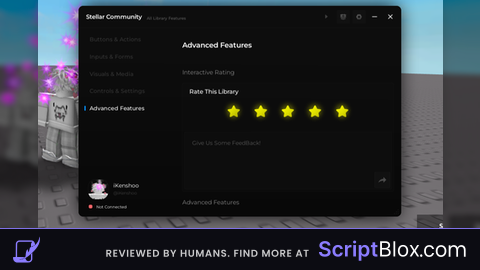
AdvancedTab:Section('Interactive Rating')

AdvancedTab:Rate({
	Title = 'Rate This Library',
	WebHook = 'your-webhook-url-here'
})

AdvancedTab:Section('Advanced Features')

AdvancedTab:Toggle({
	Title = 'Auto-Farm Mode',
	Description = 'Enables automatic farming with multiple sub-features. This toggle demonstrates complex functionality integration.',
	Value = false,
	Config = true,
	CallBack = function(value)
		print('Auto-farm mode:', value)
		if value then
			syde:Notify({
				Title = 'Auto-Farm Enabled',
				Content = 'Auto-farming is now active. Press the configured keybind to toggle.',
				Duration = 5
			})
		else
			syde:Notify({
				Title = 'Auto-Farm Disabled',
				Content = 'Auto-farming has been stopped.',
				Duration = 3
			})
		end
	end,
})

AdvancedTab:Button({
	Title = 'Add Dynamic Element',
	Description = 'Creates a new toggle element dynamically',
	CallBack = function()
		AdvancedTab:Toggle({
			Title = 'Dynamic Toggle ' .. math.random(1, 100),
			Description = 'This toggle was created dynamically',
			Value = false,
			CallBack = function(value)
				print('Dynamic toggle state:', value)
			end,
		})
		syde:Notify({
			Title = 'Element Added',
			Content = 'A new toggle has been added dynamically!',
			Duration = 3
		})
	end,
})

AdvancedTab:Button({
	Title = 'Show Modal Dialog',
	Description = 'Demonstrates the modal dialog system',
	CallBack = function()
		syde:Modal({
			Title = 'Confirmation Required',
			Content = 'Are you sure you want to proceed with this action? This cannot be undone.',
			Options = {
				{
					Text = 'Proceed',
					CallBack = function()
						syde:Notify({
							Title = 'Action Confirmed',
							Content = 'The action has been executed successfully!',
							Duration = 3
						})
					end
				},
				{
					Text = 'Cancel',
					CallBack = function()
						syde:Notify({
							Title = 'Action Cancelled',
							Content = 'The action was cancelled.',
							Duration = 2
						})
					end
				}
			}
		})
	end,
})

AdvancedTab:Button({
	Title = 'Test Notifications',
	Description = 'Shows different types of notifications',
	CallBack = function()
		syde:Notify({
			Title = 'Quick Message',
			Content = 'This is a short notification.',
			Duration = 1
		})

		task.wait(1.5)
		syde:Notify({
			Title = 'Information',
			Content = 'This is a longer notification message that demonstrates how the system handles larger amounts of text content.',
			Duration = 4
		})

		task.wait(2)
		syde:Notify({
			Title = 'Final Notice',
			Content = 'This completes the notification test sequence.',
			Duration = 3
		})
	end,
})

AdvancedTab:Section('System Information')

AdvancedTab:Paragraph({
	Title = 'Library Information',
	Content = 'Syde UI Library - Version: ' .. (syde.Build or 'Unknown') .. '\nThis comprehensive example demonstrates all available features including buttons, toggles, sliders, dropdowns, color pickers, text inputs, keybinds, images, labels, paragraphs, sections, rating systems, modals, and notifications. The library supports advanced features like element linking, dynamic creation, configuration saving, and extensive customization options.'
})

print('Syde UI library loaded successfully with all features!')
print('Available elements: Buttons, Toggles, Sliders, Dropdowns, TextInputs, ColorPickers, Keybinds, Images, Labels, Paragraphs, Sections, Rating, Modals, Notifications')

syde:Notify({
	Title = 'Syde Complete Demo',
	Content = 'All library features have been loaded successfully! Explore each tab to see different elements.',
	Duration = 5
})

cool library respect to the guy who made it
icl i like this UI
please show more!!
Add Ui Size Changer I can't drag it on mobile
W ui