


KeylessUniversal
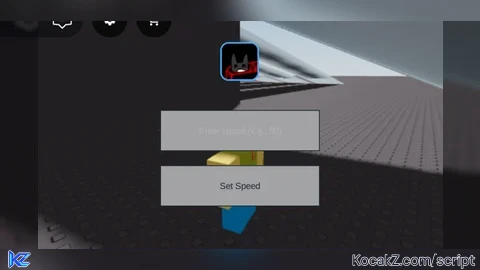
-- Create the ScreenGui
local screenGui = Instance.new("ScreenGui")
screenGui.Name = "SpeedChangerGui"
screenGui.Parent = game.Players.LocalPlayer:WaitForChild("PlayerGui")

-- Create a TextBox for custom speed input
local speedInput = Instance.new("TextBox")
speedInput.Size = UDim2.new(0, 200, 0, 50)
speedInput.Position = UDim2.new(0.5, -100, 0.5, -60)
speedInput.PlaceholderText = "Enter speed (e.g., 50)"
speedInput.Text = ""
speedInput.Parent = screenGui

-- Create a Button to apply speed
local applyButton = Instance.new("TextButton")
applyButton.Size = UDim2.new(0, 200, 0, 50)
applyButton.Position = UDim2.new(0.5, -100, 0.5, 10)
applyButton.Text = "Set Speed"
applyButton.Parent = screenGui

-- Reference to the player's humanoid
local player = game.Players.LocalPlayer
local character = player.Character or player.CharacterAdded:Wait()
local humanoid = character:WaitForChild("Humanoid")

-- Function to set speed
local function setSpeed()
    local speedText = speedInput.Text
    local speedNumber = tonumber(speedText)
    if speedNumber and speedNumber > 0 then
        humanoid.WalkSpeed = speedNumber
    else
        -- Optional: Notify the player about invalid input
        print("Please enter a valid positive number for speed.")
    end
end

-- Connect the button click
applyButton.MouseButton1Click:Connect(setSpeed)


pretty useless
Ty