

KeylessUniversal
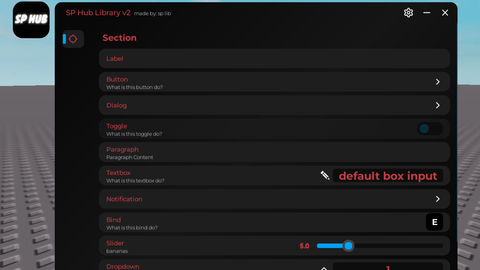
-- to see more features the docs: https://github.com/as6cd0/splibv2/blob/main/splibDocumentation.md

local splib = loadstring(game:HttpGet("https://raw.githubusercontent.com/as6cd0/SP_Hub/refs/heads/main/splibv2"))()

local Window = splib:MakeWindow({
 Name = "SP Hub Library v2",
 SubTitle = "made by: sp lib",
 HidePremium = false,
 SaveConfig = true,
 Toggle = true,
 Setting = true,
 RainbowMainFrame = false,
 RainbowTitle = false,
 RainbowSubTitle = false,
 ToggleIcon = "rbxassetid://83114982417764",
 CloseCallback = true
})


Tab = Window:MakeTab({
  IsMobile = false,
  Name = "Tab",
  Icon = "rbxassetid://4483345998"
})

Tab:AddSection("Section")

Tab:AddLabel("Label")

Tab:AddButton({
    Name = "Button",
    Desc = "What is this button do?",
    Callback = function()
    print("button pressed")
     end
})

Tab:AddButton({
    Name = "Dialog",
    Callback = function()
		local Dialog = Window:Dialog({
			Title = "Test",
			Text = "Do you want test??",
			Options = {
				{"Yes", function()
					print("YEAHH THAT SO HOT")
					splib:MakeNotification{
    Name    = "BRUHH",
    Content = "WHY YOU WANT TEST?? ITS WORK",
    Image   = "rbxassetid://6026568198",
    Time    = 5,
}
				end},
				{"Bruh no"}
			}
		})
    end
})

local printing = false

Tab:AddToggle({
    Name = "Toggle",
    Desc = "What is this toggle do?",
    Default = false,
    IsMobile = false,
	Flag = "ToggleTest",
	Save = true,
    Callback = function(Value)
        if Value == true then
            if not printing then
                printing = true
                task.spawn(function()
                    while printing do
                        print("Its Work")
                        wait(1)
                    end
                end)
            end
        else
            printing = false
        end
    end
})

Tab:AddParagraph("Paragraph","Paragraph Content")

Tab:AddTextbox({
  Name = "Textbox",
  Desc = "What is this textbox do?",
  Default = "default box input",
  TextDisappear = true,
  Flag = "textbox",
  Callback = function(Value)
    print(Value)
  end
})


Tab:AddButton({
    Name = "Notification",
    Callback = function()

splib:MakeNotification{
    Name    = "OH HELL NAH",
    Content = "Notifiction Test",
    Image   = "rbxassetid://6026568198",
    Time    = 5,
}

    end
})


Tab:AddBind({
  Name = "Bind",
  Desc = "What is this bind do?",
  Default = Enum.KeyCode.E,
  Hold = false,
  Flag = "binds",
  Save = true,
  Callback = function()
    print("pressWORLRLRLLL")
  end
})

Tab:AddSlider({
  Name = "Slider",
  Min = 0,
  Max = 20,
  Default = 10,
  Increment = 1,
  ValueName = "bananas",
  Flag = "Sliders",
  Callback = function(Value)
    print(Value)
  end
})


Tab:AddDropdown({
    Name = "Dropdown",
    Desc = "What is this dropdown do?",
    Default = "1",
    Options = {"1", "2", "3"},
    Callback = function(value)
        print(value)
    end
})

Tab:AddColorpicker({
  Name = "Colorpicker",
  Desc = "What is this colorpoicker do?",
  Default = Color3.fromRGB(255, 0, 0),
  Flag = "ColorPickerSaveTest",
  Callback = function()
  end
})

Tab:AddImageLabel({
    Name = "Image Label",
    Desc = "Cool image label",
    Image = "rbxassetid://83114982417764"
})


for the start the Ui is ok, the design is cool but its not that pretty
@HabibiBloxberg0001 ye
@HabibiBloxberg0001 ok what do you want me to do or add or edit?
also way to big
you should make it smaller, its way to big. and try making it more modern
@HabibiBloxberg0001 ok man its small you can change the size custom or you choose from the settings and im I've already optimized the size for mobile and pc
Para interface quebrada no telefone ❌
gusto ko lang lomaki sa Brookhaven