


KeylessUniversal
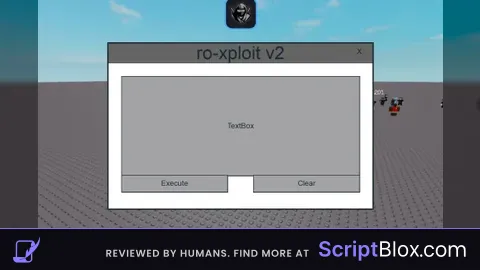
-- Function to create the main GUI
-- this is not made by chatgpt guys
local function createGui()
    -- Create a ScreenGui
    local gui = Instance.new("ScreenGui")
    gui.Parent = game.Players.LocalPlayer:WaitForChild("PlayerGui")

    -- Create a Frame for the GUI
    local frame = Instance.new("Frame")
    frame.Size = UDim2.new(0, 400, 0, 250)  -- Adjusted size
    frame.Position = UDim2.new(0.5, -200, 0.5, -125)
    frame.BackgroundColor3 = Color3.fromRGB(255, 255, 255)
    frame.BorderSizePixel = 2
    frame.Parent = gui

    -- Add "ro-xploit v2" text at the top
    local title = Instance.new("TextLabel")
    title.Text = "ro-xploit v2"
    title.TextSize = 20
    title.Position = UDim2.new(0, 0, 0, 0)
    title.Size = UDim2.new(1, 0, 0, 30)
    title.BackgroundColor3 = Color3.fromRGB(100, 100, 100)
    title.BorderSizePixel = 0
    title.Parent = frame

    -- Add a TextBox for Lua script input
    local textBox = Instance.new("TextBox")
    textBox.Size = UDim2.new(0.9, 0, 0.6, 0)
    textBox.Position = UDim2.new(0.05, 0, 0.2, 0)
    textBox.MultiLine = true
    textBox.TextWrapped = true
    textBox.Parent = frame

    -- Add an "Execute" button
    local executeButton = Instance.new("TextButton")
    executeButton.Text = "Execute"
    executeButton.Size = UDim2.new(0.4, 0, 0.1, 0)
    executeButton.Position = UDim2.new(0.05, 0, 0.8, 0)
    executeButton.Parent = frame

    -- Add a "Clear" button
    local clearButton = Instance.new("TextButton")
    clearButton.Text = "Clear"
    clearButton.Size = UDim2.new(0.4, 0, 0.1, 0)
    clearButton.Position = UDim2.new(0.55, 0, 0.8, 0)
    clearButton.Parent = frame

    -- Add a close button
    local closeButton = Instance.new("TextButton")
    closeButton.Text = "X"
    closeButton.Size = UDim2.new(0.1, 0, 0.1, 0)
    closeButton.Position = UDim2.new(0.9, 0, 0, 0)
    closeButton.BackgroundTransparency = 1
    closeButton.Parent = frame

    -- Function to execute Lua script
    executeButton.MouseButton1Click:Connect(function()
        local script = loadstring(textBox.Text)
        if script then
            script()
        else
            print("Invalid Lua script")
        end
    end)

    -- Function to clear the TextBox
    clearButton.MouseButton1Click:Connect(function()
        textBox.Text = ""
    end)

    -- Function to close the GUI
    closeButton.MouseButton1Click:Connect(function()
        gui:Destroy()
    end)
end

-- Function to prompt for password
local function promptPassword()
    -- Create a ScreenGui for password input
    local passwordGui = Instance.new("ScreenGui")
    passwordGui.Parent = game.Players.LocalPlayer:WaitForChild("PlayerGui")

    -- Create a Frame for password input
    local passwordFrame = Instance.new("Frame")
    passwordFrame.Size = UDim2.new(0, 400, 0, 250)  -- Adjusted size
    passwordFrame.Position = UDim2.new(0.5, -200, 0.5, -125)
    passwordFrame.BackgroundColor3 = Color3.fromRGB(255, 255, 255)
    passwordFrame.BorderSizePixel = 2
    passwordFrame.Parent = passwordGui

    -- Add "ro-xploit key system" text at the top
    local title = Instance.new("TextLabel")
    title.Text = "ro-xploit key system"
    title.TextSize = 20
    title.Position = UDim2.new(0, 0, 0, 0)
    title.Size = UDim2.new(1, 0, 0, 30)
    title.BackgroundColor3 = Color3.fromRGB(100, 100, 100)
    title.BorderSizePixel = 0
    title.Parent = passwordFrame

    -- Add a TextBox for password input
    local passwordTextBox = Instance.new("TextBox")
    passwordTextBox.Size = UDim2.new(0.5, 0, 0, 30)
    passwordTextBox.Position = UDim2.new(0.25, 0, 0.4, 0)
    passwordTextBox.PlaceholderText = "Enter password"
    passwordTextBox.Parent = passwordFrame

    -- Add a "Submit" button
    local submitButton = Instance.new("TextButton")
    submitButton.Text = "Submit"
    submitButton.Size = UDim2.new(0.3, 0, 0, 30)
    submitButton.Position = UDim2.new(0.35, 0, 0.6, 0)
    submitButton.Parent = passwordFrame

    -- Function to validate password
    submitButton.MouseButton1Click:Connect(function()
        if passwordTextBox.Text == "Byfron_is_bypassed" then
            passwordGui:Destroy()
            createGui()
        else
            passwordTextBox.Text = ""
        end
    end)
end

-- Prompt for password when the script starts
promptPassword()

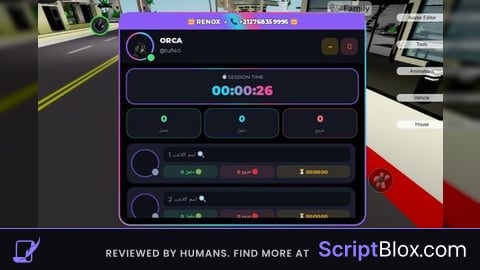
Key system is Byfron_is_bypassed
i dont wanna be mean but if your new to luau please dont post your stuff if there "Bad"
this was also made my chatgpt, even if the ui wasnt the functionality is
Ur whole scripts made by chatgpt bcuz chatgpt gives everyone same gui's if you ain't give him a good prompt.Like ur float script text labels.
well I do use chatgpt cuz I'm still learning to do Lua scripts
After all, I founded this company....