

KeylessUniversal
--// Services
local Players = game:GetService("Players")
local RunService = game:GetService("RunService")
local UserInputService = game:GetService("UserInputService")

local LocalPlayer = Players.LocalPlayer
local Camera = workspace.CurrentCamera

--// GUI Setup
local ScreenGui = Instance.new("ScreenGui", LocalPlayer:WaitForChild("PlayerGui"))
ScreenGui.ResetOnSpawn = false

--// Main Menu Frame
local MainFrame = Instance.new("Frame")
MainFrame.Size = UDim2.new(0, 360, 0, 280)
MainFrame.Position = UDim2.new(0.5, -180, 0.5, -140)
MainFrame.BackgroundColor3 = Color3.fromRGB(40, 40, 40)
MainFrame.Active = true
MainFrame.Draggable = true
MainFrame.Visible = true
MainFrame.Parent = ScreenGui

--// Tabs Setup
local language = "FR"
local function lang(en, fr)
    return language == "FR" and fr or en
end

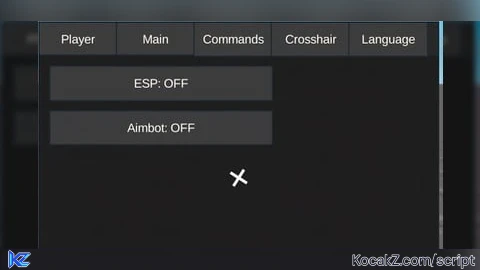
local Tabs = {"Player","Main","Commands","Crosshair","Language"}
local TabButtons, ContentFrames = {}, {}

for i, tabName in ipairs(Tabs) do
    local Button = Instance.new("TextButton")
    Button.Size = UDim2.new(0,70,0,30)
    Button.Position = UDim2.new(0, (i-1)*70, 0, 0)
    Button.Text = tabName
    Button.BackgroundColor3 = Color3.fromRGB(60,60,60)
    Button.TextColor3 = Color3.new(1,1,1)
    Button.Parent = MainFrame
    TabButtons[tabName] = Button

    local Frame = Instance.new("Frame")
    Frame.Size = UDim2.new(1,0,1,-30)
    Frame.Position = UDim2.new(0,0,0,30)
    Frame.BackgroundColor3 = Color3.fromRGB(30,30,30)
    Frame.Visible = false
    Frame.Parent = MainFrame
    ContentFrames[tabName] = Frame
end

local function ShowTab(name)
    for n,f in pairs(ContentFrames) do
        f.Visible = (n==name)
    end
end

for name, button in pairs(TabButtons) do
    button.MouseButton1Click:Connect(function()
        ShowTab(name)
    end)
end

ShowTab("Player") -- tab par défaut

----------------------------------------------------------------------
-- Toggle menu sous le menu Escape
----------------------------------------------------------------------

local toggleButton = Instance.new("TextButton")
toggleButton.Size = UDim2.new(0, 120, 0, 30)
toggleButton.Position = UDim2.new(0, 10, 0, 100) -- sous menu Escape
toggleButton.BackgroundColor3 = Color3.fromRGB(50,50,50)
toggleButton.TextColor3 = Color3.new(1,1,1)
toggleButton.Text = "Menu ON"
toggleButton.Parent = ScreenGui

toggleButton.MouseButton1Click:Connect(function()
    MainFrame.Visible = not MainFrame.Visible
    toggleButton.Text = MainFrame.Visible and "Menu ON" or "Menu OFF"
end)

----------------------------------------------------------------------
-- ESP & Aimbot
----------------------------------------------------------------------

local espEnabled = false
local aiming = false
local espFolder = Instance.new("Folder", workspace)

local function addESP(player)
    if player.Character and player.Character:FindFirstChild("Head") and espEnabled then
        if not espFolder:FindFirstChild(player.Name) then
            local billboard = Instance.new("BillboardGui")
            billboard.Name = player.Name
            billboard.Size = UDim2.new(0,100,0,20)
            billboard.Adornee = player.Character.Head
            billboard.AlwaysOnTop = true
            billboard.Parent = espFolder

            local label = Instance.new("TextLabel")
            label.Size = UDim2.new(1,0,1,0)
            label.BackgroundTransparency = 1
            label.Text = player.Name
            label.TextColor3 = Color3.fromRGB(255,0,0)
            label.TextScaled = true
            label.Parent = billboard
        end
    end
end

local function clearESP()
    espFolder:ClearAllChildren()
end

RunService.RenderStepped:Connect(function()
    if espEnabled then
        for _,plr in pairs(Players:GetPlayers()) do
            if plr ~= LocalPlayer then addESP(plr) end
        end
    end
end)

local function getClosestToCenter()
    local closest, dist = nil, math.huge
    for _,plr in pairs(Players:GetPlayers()) do
        if plr~=LocalPlayer and plr.Character and plr.Character:FindFirstChild("Head") then
            local pos, onScreen = Camera:WorldToViewportPoint(plr.Character.Head.Position)
            if onScreen then
                local center = Vector2.new(Camera.ViewportSize.X/2, Camera.ViewportSize.Y/2)
                local diff = (Vector2.new(pos.X,pos.Y)-center).Magnitude
                if diff < dist then
                    dist = diff
                    closest = plr
                end
            end
        end
    end
    return closest
end

RunService.RenderStepped:Connect(function()
    if aiming then
        local target = getClosestToCenter()
        if target and target.Character and target.Character:FindFirstChild("Head") then
            Camera.CFrame = CFrame.new(Camera.CFrame.Position,target.Character.Head.Position)
        end
    end
end)

-- Main Tab Buttons
local mainFrame = ContentFrames["Main"]
local function createMainBtn(text,yPos,callback)
    local btn = Instance.new("TextButton")
    btn.Size = UDim2.new(0,200,0,30)
    btn.Position = UDim2.new(0,10,0,yPos)
    btn.Text = text
    btn.BackgroundColor3 = Color3.fromRGB(60,60,60)
    btn.TextColor3 = Color3.new(1,1,1)
    btn.Parent = mainFrame
    btn.MouseButton1Click:Connect(callback)
    return btn
end

local espBtn = createMainBtn(lang("ESP: OFF","ESP: OFF"),10,function()
    espEnabled = not espEnabled
    espBtn.Text = lang("ESP: ","ESP: ")..(espEnabled and "ON" or "OFF")
    if not espEnabled then clearESP() end
end)

local aimBtn = createMainBtn(lang("Aimbot: OFF","Aimbot: OFF"),50,function()
    aiming = not aiming
    aimBtn.Text = lang("Aimbot: ","Aimbot: ")..(aiming and "ON" or "OFF")
end)

----------------------------------------------------------------------
-- CROSSHAIR
----------------------------------------------------------------------
local CrosshairFrame = Instance.new("Frame")
CrosshairFrame.Size = UDim2.new(0,40,0,40)
CrosshairFrame.Position = UDim2.new(0.5,0,0.5,0)
CrosshairFrame.AnchorPoint = Vector2.new(0.5,0.5)
CrosshairFrame.BackgroundTransparency = 1
CrosshairFrame.Parent = ScreenGui

local CrosshairImage = Instance.new("ImageLabel")
CrosshairImage.Size = UDim2.new(1,0,1,0)
CrosshairImage.BackgroundTransparency = 1
CrosshairImage.Image = "rbxasset://textures/SpawnLocation.png"
CrosshairImage.Parent = CrosshairFrame

local CrosshairText = Instance.new("TextLabel")
CrosshairText.Size = UDim2.new(1,0,1,0)
CrosshairText.BackgroundTransparency = 1
CrosshairText.Text = ""
CrosshairText.TextScaled = true
CrosshairText.TextColor3 = Color3.new(1,1,1)
CrosshairText.Parent = CrosshairFrame

local rotating = false
local rotationSpeed = 90
RunService.RenderStepped:Connect(function(dt)
    if rotating then
        CrosshairFrame.Rotation = CrosshairFrame.Rotation + rotationSpeed*dt
    end
end)

local crosshairFrame = ContentFrames["Crosshair"]
local function createCrosshairBtn(text,yPos,callback)
    local btn = Instance.new("TextButton")
    btn.Size = UDim2.new(0,200,0,30)
    btn.Position = UDim2.new(0,10,0,yPos)
    btn.Text = text
    btn.BackgroundColor3 = Color3.fromRGB(60,60,60)
    btn.TextColor3 = Color3.new(1,1,1)
    btn.Parent = crosshairFrame
    btn.MouseButton1Click:Connect(callback)
end

createCrosshairBtn("Checkpoint",10,function()
    CrosshairImage.Image = "rbxasset://textures/SpawnLocation.png"
    CrosshairText.Text = ""
end)
createCrosshairBtn("Croix (+)",50,function()
    CrosshairImage.Image = ""
    CrosshairText.Text = "+"
end)
createCrosshairBtn("Croix (×)",90,function()
    CrosshairImage.Image = ""
    CrosshairText.Text = "×"
end)

local RotateBtn = Instance.new("TextButton")
RotateBtn.Size = UDim2.new(0,200,0,30)
RotateBtn.Position = UDim2.new(0,10,0,140)
RotateBtn.Text = lang("Rotation: OFF","Rotation: OFF")
RotateBtn.BackgroundColor3 = Color3.fromRGB(60,60,60)
RotateBtn.TextColor3 = Color3.new(1,1,1)
RotateBtn.Parent = crosshairFrame
RotateBtn.MouseButton1Click:Connect(function()
    rotating = not rotating
    RotateBtn.Text = lang("Rotation: ","Rotation: ")..(rotating and "ON" or "OFF")
end)

----------------------------------------------------------------------
-- LANGUAGE TAB
----------------------------------------------------------------------
local langFrame = ContentFrames["Language"]
local function createLangBtn(text,yPos,callback)
    local btn = Instance.new("TextButton")
    btn.Size = UDim2.new(0,200,0,30)
    btn.Position = UDim2.new(0,10,0,yPos)
    btn.Text = text
    btn.BackgroundColor3 = Color3.fromRGB(60,60,60)
    btn.TextColor3 = Color3.new(1,1,1)
    btn.Parent = langFrame
    btn.MouseButton1Click:Connect(callback)
end

createLangBtn("Français",10,function() language="FR" end)
createLangBtn("English",50,function() language="EN" end)


I don't say it but script get created by chat gpt so there bug and possibly new options a the future