
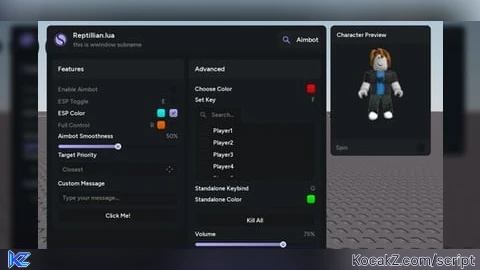

local Library = loadstring(game:HttpGet("https://raw.githubusercontent.com/BugBuster3000/sametlibs/refs/heads/main/Reptillian/Source"))()

local Window = Library:Window({
    Name = "Reptillian.lua",
    SubName = "this is wwindow subname",
    Logo = "rbxassetid://87164893498141"
})

Window:KeybindList({
    Name = "Active Keybinds"
})

Window:ESPPreview({
    Name = "Character Preview"
})

local MainPage = Window:Page({
    Name = "Aimbot",
    Icon = "rbxassetid://132783180980031"
})

local LeftColumn = MainPage:Section({
    Name = "Features",
    Side = 1
})

LeftColumn:Toggle({
    Name = "Enable Aimbot",
    Flag = "Aimbot",
    Default = false,
    Callback = function(Value)
        print("[Aimbot] Status:", Value)
    end
})

local ToggleWithKeybind = LeftColumn:Toggle({
    Name = "ESP Toggle",
    Flag = "ESP",
    Default = true,
    Callback = function(Value)
        print("[ESP] Status:", Value)
    end
})

ToggleWithKeybind:Keybind({
    Name = "ESP Key",
    Flag = "ESPKey",
    Default = Enum.KeyCode.E,
    Mode = "Toggle",
    Callback = function(Toggled)
        ToggleWithKeybind:Set(Toggled)
        print("[ESP] Key pressed:", Toggled)
    end
})

local ToggleWithColor = LeftColumn:Toggle({
    Name = "ESP Color",
    Flag = "ESPColorToggle",
    Default = true,
    Callback = function(Value)
        print("[ESP Color] Toggle:", Value)
    end
})

ToggleWithColor:Colorpicker({
    Flag = "ESPColor",
    Default = Color3.fromRGB(0, 255, 255),
    Alpha = 0.8,
    Callback = function(Color, Alpha)
        print("[ESP Color] Color:", Color, "Alpha:", Alpha)
    end
})

local FullToggle = LeftColumn:Toggle({
    Name = "Full Control",
    Flag = "FullControl",
    Default = false,
    Callback = function(Value)
        print("[Full] Status:", Value)
    end
})

FullToggle:Keybind({
    Name = "Full Key",
    Flag = "FullKey",
    Default = Enum.KeyCode.R,
    Mode = "Toggle",
    Callback = function(Toggled)
        FullToggle:Set(Toggled)
    end
})

FullToggle:Colorpicker({
    Flag = "FullColor",
    Default = Color3.fromRGB(255, 100, 0),
    Alpha = 1,
    Callback = function(Color, Alpha)
        print("[Full] Color updated:", Color)
    end
})

LeftColumn:Slider({
    Name = "Aimbot Smoothness",
    Flag = "Smoothness",
    Min = 0,
    Max = 100,
    Default = 50,
    Decimals = 1,
    Suffix = "%",
    Callback = function(Value)
        print("[Slider] Value:", Value)
    end
})

LeftColumn:Dropdown({
    Name = "Target Priority",
    Flag = "Priority",
    Items = {"Closest", "Lowest HP", "Highest HP", "Crosshair"},
    Default = "Closest",
    Callback = function(Value)
        print("[Dropdown] Selected:", Value)
    end
})

LeftColumn:Textbox({
    Name = "Custom Message",
    Flag = "Message",
    Placeholder = "Type your message...",
    Finished = true,
    Callback = function(Value)
        if Value and Value ~= "" then
            print("[Textbox] Message:", Value)
        end
    end
})

LeftColumn:Button({
    Name = "Click Me!",
    Callback = function()
        print("[Button] Pressed!")
        Library:Notification({
            Name = "Button",
            Description = "You clicked the button!",
            Duration = 2,
            Color = Color3.fromRGB(52, 255, 126)
        })
    end
})

local RightColumn = MainPage:Section({
    Name = "Advanced",
    Side = 2
})

local ColorLabel = RightColumn:Label({
    Name = "Choose Color"
})

ColorLabel:Colorpicker({
    Flag = "ColorPicker",
    Default = Color3.fromRGB(255, 0, 0),
    Alpha = 1,
    Callback = function(Color, Alpha)
        print("[Colorpicker] Color:", Color, "Alpha:", Alpha)
    end
})

local KeyLabel = RightColumn:Label({
    Name = "Set Key"
})

KeyLabel:Keybind({
    Name = "Action Key",
    Flag = "ActionKey",
    Default = Enum.KeyCode.F,
    Mode = "Toggle",
    Callback = function(Toggled)
        print("[Keybind] Key pressed, state:", Toggled)
    end
})

RightColumn:ListBox({
    Name = "Select Players",
    Flag = "Players",
    Items = {"Player1", "Player2", "Player3", "Player4", "Player5"},
    Default = "Player1",
    Multi = true,
    Height = 150,
    Callback = function(Value)
        print("[ListBox] Selected:", Value)
    end
})

RightColumn:Label({
    Name = "Standalone Keybind"
}):Keybind({
    Name = "Standalone Key",
    Flag = "StandaloneKey",
    Default = Enum.KeyCode.G,
    Mode = "Hold",
    Callback = function(Toggled)
        print("[Standalone] Key held:", Toggled)
    end
})

RightColumn:Label({
    Name = "Standalone Color"
}):Colorpicker({
    Flag = "StandaloneColor",
    Default = Color3.fromRGB(0, 255, 0),
    Alpha = 0.5,
    Callback = function(Color, Alpha)
        print("[Standalone Color] Color:", Color, "Alpha:", Alpha)
    end
})

RightColumn:Divider()

RightColumn:Button({
    Name = "Kill All",
    Callback = function()
        print("[Button] Kill All pressed!")
        Library:Notification({
            Name = "Kill All",
            Description = "All enemies eliminated!",
            Duration = 3,
            Color = Color3.fromRGB(255, 80, 80)
        })
    end
})

RightColumn:Slider({
    Name = "Volume",
    Flag = "Volume",
    Min = 0,
    Max = 100,
    Default = 75,
    Suffix = "%",
    Callback = function(Value)
        print("[Volume] Set to:", Value)
    end
})

RightColumn:Dropdown({
    Name = "Weapon",
    Flag = "Weapon",
    Items = {"AK-47", "M4A1", "AWP", "Shotgun"},
    Default = "AK-47",
    Multi = false,
    Callback = function(Value)
        print("[Weapon] Selected:", Value)
    end
})
How to Execute Universal Script – Reptillian Library
Step 1: Copy Code: Click the Copy Code button in the viewer above to grab the clean Lua loadstring.
Step 2: Launch Executor: Open a compatible, unpatched executor. If you need one, check our Roblox Executors Directory.
Step 3: Join Experience: Launch Roblox and join Universal Script.
Step 4: Attach & Run: Attach/inject your executor into the Roblox process, paste the code into the script tab, and press Execute.
Features & Information
Script Changelog (1)
Community Comments (0)
No comments yet for this script.
Frequently Asked Questions
How do I execute Universal Script – Reptillian Library in Roblox?
To run Universal Script – Reptillian Library, copy the Lua loadstring from the code viewer above, launch Roblox and join Universal Script, attach a working executor (such as Potassium, Solara, or Delta from our Executors directory), paste the code into your executor console, and click Execute.
Is Universal Script – Reptillian Library keyless or does it require an access key?
Universal Script – Reptillian Library requires an access key. You can retrieve the official key directly using the Get Script Key link provided above.
Is Universal Script – Reptillian Library currently safe and working?
This script is active and operational. Always test scripts using a secondary (alt) Roblox account to safeguard your main profile against anti-cheat bans.


![Ez Hub [Open Source] [150+ games] - Verified script for Universal Script](https://media.kocakz.me/b74a9ac15370ba766b2fa9531f17c9dad2c0befb2b951693ae723e4c7d2c3fb6.webp)


![[KEYLESS] Moondiety Script | 20+ supported Games - Verified script for Universal Script](https://media.kocakz.me/6834c33a36c9fbe66afae4c6754c2b80386ce636b2f972464a95866f4b6a42eb.webp)



