

KeylessUniversal
--[[
	This script has been verified by ScriptBlox :D Use at your own risk!
]]
local Rayfield = loadstring(game:HttpGet('https://sirius.menu/rayfield'))()

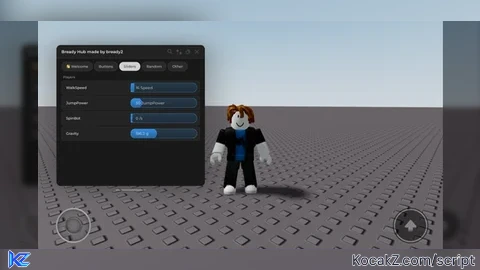
local Window = Rayfield:CreateWindow({
   Name = "Bready Hub made by bready2",
   Icon = 0, -- Icon in Topbar. Can use Lucide Icons (string) or Roblox Image (number). 0 to use no icon (default).
   LoadingTitle = "Awesome Universal hub",
   LoadingSubtitle = "by Bready2",
   ShowText = "Rayfield", -- for mobile users to unhide rayfield, change if you'd like
   Theme = "Default", -- Check https://[Log in to view URL]

   ToggleUIKeybind = "K", -- The keybind to toggle the UI visibility (string like "K" or Enum.KeyCode)

   DisableRayfieldPrompts = false,
   DisableBuildWarnings = false, -- Prevents Rayfield from warning when the script has a version mismatch with the interface

   ConfigurationSaving = {
      Enabled = true,
      FolderName = nil, -- Create a custom folder for your hub/game
      FileName = "Main script"
   },

   Discord = {
      Enabled = false, -- Prompt the user to join your Discord server if their executor supports it
      Invite = "noinvitelink", -- The Discord invite code, do not include discord.gg/. E.g. discord.gg/ ABCD would be ABCD
      RememberJoins = true -- Set this to false to make them join the discord every time they load it up
   },

   KeySystem = false, -- Set this to true to use our key system
   KeySettings = {
      Title = "Untitled",
      Subtitle = "Key System",
      Note = "No method of obtaining the key is provided", -- Use this to tell the user how to get a key
      FileName = "Key", -- It is recommended to use something unique as other scripts using Rayfield may overwrite your key file
      SaveKey = true, -- The user's key will be saved, but if you change the key, they will be unable to use your script
      GrabKeyFromSite = false, -- If this is true, set Key below to the RAW site you would like Rayfield to get the key from
      Key = {"Hello"} -- List of keys that will be accepted by the system, can be RAW file links (pastebin, github etc) or simple strings ("hello","key22")
   }
})

local Players = game:GetService("Players")
local LocalPlayer = Players.LocalPlayer
local username = LocalPlayer.Name

local WelcomeTab = Window:CreateTab("👋 Welcome", nil) -- You can use any icon ID

WelcomeTab:CreateParagraph({
    Title = "Hello, " .. username .. "!",
    Content = "Welcome to the game! Feel free to explore the features in the other tabs.",
})


local MainTab = Window:CreateTab("Buttons", nil) -- Title, Image
local MainSection = MainTab:CreateSection("Player")

local SlideTab = Window:CreateTab("Sliders", nil) -- Title, Image
local MainSection = SlideTab:CreateSection("Players")

Rayfield:Notify({
   Title = "Opened the script :D",
   Content = "Yessir",
   Duration = 5,
   Image = nil,
})

local Button = MainTab:CreateButton({
   Name = "Aimbot (only camera)",
   Callback = function()
      -- Place this LocalScript in StarterPlayerScripts

local Players = game:GetService("Players")
local RunService = game:GetService("RunService")

local localPlayer = Players.LocalPlayer
local camera = workspace.CurrentCamera

-- Function to get the closest other player
local function getClosestPlayer()
	local closestPlayer = nil
	local shortestDistance = math.huge

	for _, player in pairs(Players:GetPlayers()) do
		if player ~= localPlayer and player.Character and player.Character:FindFirstChild("HumanoidRootPart") then
			local myPos = localPlayer.Character and localPlayer.Character:FindFirstChild("HumanoidRootPart") and localPlayer.Character.HumanoidRootPart.Position
			local otherPos = player.Character.HumanoidRootPart.Position
			if myPos then
				local distance = (myPos - otherPos).Magnitude
				if distance < shortestDistance then
					shortestDistance = distance
					closestPlayer = player
				end
			end
		end
	end

	return closestPlayer
end

-- Update camera to look at the closest player
RunService.RenderStepped:Connect(function()
	local target = getClosestPlayer()
	if target and target.Character and target.Character:FindFirstChild("HumanoidRootPart") then
		local targetPart = target.Character.HumanoidRootPart
		camera.CFrame = CFrame.new(camera.CFrame.Position, targetPart.Position)
	end
end)

   end,
})

local Slider = SlideTab:CreateSlider({
   Name = "WalkSpeed",
   Range = {0, 300},
   Increment = 1,
   Suffix = "Speed",
   CurrentValue = 16,
   Flag = "Slider1", -- A flag is the identifier for the configuration file
   Callback = function(Value)
       game.Players.localPlayer.Character.Humanoid.WalkSpeed = (Value)
   end,
})

local Slider = SlideTab:CreateSlider({
   Name = "JumpPower",
   Range = {0, 300},
   Increment = 1,
   Suffix = "JumpPower",
   CurrentValue = 50,
   Flag = "Slider1", -- A flag is the identifier for the configuration file
   Callback = function(Value)
        game.Players.LocalPlayer.Character.Humanoid.JumpPower = (Value)
    end,
})

local RunService = game:GetService("RunService")
local player = game.Players.LocalPlayer
local spinSpeed = 0
local rootPart

-- Setup character and HumanoidRootPart
local function setupCharacter()
	local character = player.Character or player.CharacterAdded:Wait()
	rootPart = character:WaitForChild("HumanoidRootPart")
end

if player.Character then
	setupCharacter()
else
	player.CharacterAdded:Connect(setupCharacter)
end

-- Spin loop (runs once)
RunService.RenderStepped:Connect(function(dt)
	if rootPart and spinSpeed > 0 then
		rootPart.CFrame = rootPart.CFrame * CFrame.Angles(0, math.rad(spinSpeed * dt), 0)
	end
end)

-- Your Rayfield Slider
local Slider = SlideTab:CreateSlider({
	Name = "SpinBot",
	Range = {0, 5000},
	Increment = 10,
	Suffix = "/s",
	CurrentValue = 0,
	Flag = "Slider1",
	Callback = function(Value)
		spinSpeed = Value
	end,
})

local Button = MainTab:CreateButton({
   Name = "ESP",
   Callback = function()
   local Players = game:GetService("Players")
local LocalPlayer = Players.LocalPlayer

-- Function to add highlight to a player's character
local function addESP(player)
	if player == LocalPlayer then return end

	local function highlightCharacter(character)
		if character:FindFirstChild("ESP_Highlight") then return end

		local highlight = Instance.new("Highlight")
		highlight.Name = "ESP_Highlight"
		highlight.FillColor = Color3.fromRGB(255, 0, 0) -- red glow
		highlight.OutlineColor = Color3.fromRGB(255, 255, 255) -- white border
		highlight.FillTransparency = 0.5
		highlight.OutlineTransparency = 0
		highlight.Adornee = character
		highlight.Parent = character
		highlight.DepthMode = Enum.HighlightDepthMode.AlwaysOnTop -- Always visible
	end

	-- If character already exists
	if player.Character then
		highlightCharacter(player.Character)
	end

	-- When character is added
	player.CharacterAdded:Connect(function(character)
		character:WaitForChild("HumanoidRootPart") -- Wait to be sure it's loaded
		highlightCharacter(character)
	end)
end

-- Add ESP to existing players
for _, player in ipairs(Players:GetPlayers()) do
	addESP(player)
end

-- Add ESP when new players join
Players.PlayerAdded:Connect(addESP)
   end,
})

local Slider = SlideTab:CreateSlider({
   Name = "Gravity",
   Range = {0, 500}, -- Gravity range (default is 196.2)
   Increment = 1,
   Suffix = "g",
   CurrentValue = 196.2,
   Flag = "GravitySlider",
   Callback = function(value)
       workspace.Gravity = value
   end,
})


local FunTab = Window:CreateTab("Random", nil) -- Use any icon ID you like

FunTab:CreateSection("Cursed ahh") -- 🔥 Section title

FunTab:CreateButton({
    Name = "Self Destruction",
    Callback = function()
        local character = game.Players.LocalPlayer.Character
        if character then
            local explosion = Instance.new("Explosion")
            explosion.Position = character:FindFirstChild("HumanoidRootPart").Position
            explosion.BlastRadius = 10
            explosion.BlastPressure = 500000
            explosion.DestroyJointRadiusPercent = 1
            explosion.Parent = workspace
        end
    end,
})

FunTab:CreateButton({
    Name = "Launch Me",
    Callback = function()
        local character = game.Players.LocalPlayer.Character
        local hrp = character and character:FindFirstChild("HumanoidRootPart")
        if hrp then
            local bodyVelocity = Instance.new("BodyVelocity")
            bodyVelocity.Velocity = Vector3.new(0, 200, 0) -- Strong upward launch
            bodyVelocity.MaxForce = Vector3.new(0, math.huge, 0)
            bodyVelocity.P = 5000
            bodyVelocity.Parent = hrp

            -- Remove after 1 second
            game.Debris:AddItem(bodyVelocity, 1)
        end
    end,
})

local OtherTab = Window:CreateTab("Other", nil) -- Use any icon ID you like

local Players = game:GetService("Players")
local player = Players.LocalPlayer

-- Forward dash
local forwardDashDistance = 50
OtherTab:CreateSlider({
    Name = "Forward Teleport Distance",
    Range = {10, 200},
    Increment = 5,
    Suffix = " studs",
    CurrentValue = forwardDashDistance,
    Callback = function(value)
        forwardDashDistance = value
    end,
})

OtherTab:CreateButton({
    Name = "Teleport Forward",
    Callback = function()
        local character = player.Character
        if not character then return end
        local hrp = character:FindFirstChild("HumanoidRootPart")
        if not hrp then return end

        local dashVector = hrp.CFrame.LookVector * forwardDashDistance
        hrp.CFrame = CFrame.new(hrp.Position + dashVector, hrp.Position + dashVector + hrp.CFrame.LookVector)
    end,
})

-- Back dash
local backDashDistance = 30
OtherTab:CreateSlider({
    Name = "Back Teleport distance",
    Range = {10, 200},
    Increment = 5,
    Suffix = " studs",
    CurrentValue = backDashDistance,
    Callback = function(value)
        backDashDistance = value
    end,
})

OtherTab:CreateButton({
    Name = "Teleport Backward",
    Callback = function()
        local character = player.Character
        if not character then return end
        local hrp = character:FindFirstChild("HumanoidRootPart")
        if not hrp then return end

        local dashVector = -hrp.CFrame.LookVector * backDashDistance
        hrp.CFrame = CFrame.new(hrp.Position + dashVector, hrp.Position + dashVector + hrp.CFrame.LookVector)
    end,
})

local Button = MainTab:CreateButton({
   Name = "Teleport GUI",
   Callback = function()
   -- Teleport to player GUI script (Draggable)

local Player = game.Players.LocalPlayer
local PlayerGui = Player:WaitForChild("PlayerGui")

if PlayerGui:FindFirstChild("FlingGui") then
    PlayerGui.FlingGui:Destroy()
end

local ScreenGui = Instance.new("ScreenGui")
ScreenGui.Name = "TeleportGui"
ScreenGui.Parent = PlayerGui
ScreenGui.ResetOnSpawn = false

local Frame = Instance.new("Frame")
Frame.Size = UDim2.new(0, 300, 0, 150)
Frame.Position = UDim2.new(0.5, -150, 0.4, -75)
Frame.BackgroundColor3 = Color3.fromRGB(35, 35, 35)
Frame.BorderSizePixel = 0
Frame.Active = true           -- Required for dragging
Frame.Draggable = true        -- Enables dragging
Frame.Parent = ScreenGui

local UICorner = Instance.new("UICorner")
UICorner.CornerRadius = UDim.new(0, 8)
UICorner.Parent = Frame

local Title = Instance.new("TextLabel")
Title.Size = UDim2.new(1, 0, 0, 30)
Title.BackgroundTransparency = 1
Title.Text = "Teleport to Player"
Title.TextColor3 = Color3.new(1, 1, 1)
Title.Font = Enum.Font.SourceSansBold
Title.TextSize = 22
Title.Parent = Frame

local InputBox = Instance.new("TextBox")
InputBox.PlaceholderText = "Enter player name"
InputBox.Size = UDim2.new(0.8, 0, 0, 40)
InputBox.Position = UDim2.new(0.1, 0, 0.3, 0)
InputBox.BackgroundColor3 = Color3.fromRGB(50, 50, 50)
InputBox.TextColor3 = Color3.new(1, 1, 1)
InputBox.ClearTextOnFocus = false
InputBox.Parent = Frame

local TeleportButton = Instance.new("TextButton")
TeleportButton.Size = UDim2.new(0.8, 0, 0, 40)
TeleportButton.Position = UDim2.new(0.1, 0, 0.65, 0)
TeleportButton.BackgroundColor3 = Color3.fromRGB(50, 150, 50)
TeleportButton.TextColor3 = Color3.new(1, 1, 1)
TeleportButton.Font = Enum.Font.SourceSansBold
TeleportButton.TextSize = 20
TeleportButton.Text = "Teleport to Player"
TeleportButton.Parent = Frame

local CloseButton = Instance.new("TextButton")
CloseButton.Size = UDim2.new(0, 25, 0, 25)
CloseButton.Position = UDim2.new(1, -30, 0, 5)
CloseButton.BackgroundColor3 = Color3.fromRGB(150, 0, 0)
CloseButton.TextColor3 = Color3.new(1, 1, 1)
CloseButton.Text = "X"
CloseButton.Font = Enum.Font.SourceSansBold
CloseButton.TextSize = 18
CloseButton.Parent = Frame

CloseButton.MouseButton1Click:Connect(function()
    ScreenGui:Destroy()
end)

TeleportButton.MouseButton1Click:Connect(function()
    local targetName = InputBox.Text
    if targetName == "" then return end

    local targetPlayer = nil
    for _, player in pairs(game.Players:GetPlayers()) do
        if player.Name:lower() == targetName:lower() then
            targetPlayer = player
            break
        end
    end

    if not targetPlayer then
        print("Player not found")
        return
    end

    local targetCharacter = targetPlayer.Character
    local myCharacter = Player.Character

    if targetCharacter and targetCharacter:FindFirstChild("HumanoidRootPart") and myCharacter and myCharacter:FindFirstChild("HumanoidRootPart") then
        local targetHRP = targetCharacter.HumanoidRootPart
        local myHRP = myCharacter.HumanoidRootPart

        local teleportPosition = targetHRP.CFrame * CFrame.new(0, 0, 3)
        myHRP.CFrame = teleportPosition
    else
        print("Could not teleport. Missing HumanoidRootPart.")
    end
end)

   end,
})

local Button = MainTab:CreateButton({
   Name = "Noclip",
   Callback = function()
   -- LocalScript in StarterPlayer > StarterPlayerScripts

local RunService = game:GetService("RunService")
local Players = game:GetService("Players")
local LocalPlayer = Players.LocalPlayer
local noclipEnabled = true -- starts immediately

-- Function to enable or disable collisions
local function setNoClipState(state)
	local character = LocalPlayer.Character
	if not character then return end

	for _, part in ipairs(character:GetDescendants()) do
		if part:IsA("BasePart") then
			part.CanCollide = not state
		end
	end
end

-- Keep noclip active every frame
RunService.Stepped:Connect(function()
	if noclipEnabled then
		setNoClipState(true)
	end
end)

-- Reapply after respawn
LocalPlayer.CharacterAdded:Connect(function()
	wait(1)
	if noclipEnabled then
		setNoClipState(true)
	end
end)
   end,
})


Ai
what file do i put it?
@remotecontrol this ain’t fully made by ai, I only used ai to fix some bugs