


KeylessUniversal
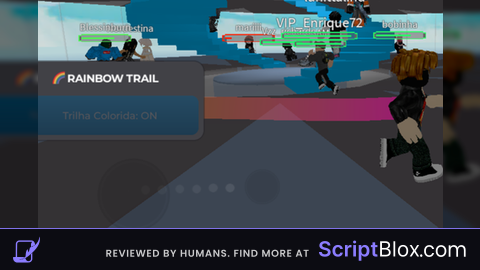
-- 🌈 RAINBOW TRAIL FE - Trilha colorida atrás do personagem
-- Outros jogadores conseguem ver (FE Compatible)

local Players = game:GetService("Players")
local RunService = game:GetService("RunService")
local TweenService = game:GetService("TweenService")
local LocalPlayer = Players.LocalPlayer

-- Configurações
local trailEnabled = false
local rainbowSpeed = 1 -- Velocidade da mudança de cor
local trailWidth = 1 -- Largura da trilha
local trailTransparency = 0.5 -- Transparência (0 = opaco, 1 = invisível)
local trailLifetime = 2 -- Tempo que a trilha fica visível (segundos)

-- Variáveis
local trailObjects = {}
local rainbowConnection = nil

-- Mini Hub GUI (Cinza e Simples)
local screenGui = Instance.new("ScreenGui")
screenGui.Name = "RainbowTrailHub"
screenGui.Parent = LocalPlayer:WaitForChild("PlayerGui")
screenGui.ResetOnSpawn = false

-- Frame principal
local mainFrame = Instance.new("Frame")
mainFrame.Size = UDim2.new(0, 200, 0, 80)
mainFrame.Position = UDim2.new(0, 10, 0.5, -40)
mainFrame.BackgroundColor3 = Color3.fromRGB(65, 65, 70)
mainFrame.BorderSizePixel = 0
mainFrame.Active = true
mainFrame.Draggable = true
mainFrame.Parent = screenGui

local corner = Instance.new("UICorner")
corner.CornerRadius = UDim.new(0, 10)
corner.Parent = mainFrame

local shadow = Instance.new("UIStroke")
shadow.Color = Color3.fromRGB(35, 35, 40)
shadow.Thickness = 1
shadow.Transparency = 0.5
shadow.Parent = mainFrame

-- Título
local title = Instance.new("TextLabel")
title.Size = UDim2.new(1, 0, 0, 25)
title.Position = UDim2.new(0, 0, 0, 5)
title.BackgroundTransparency = 1
title.Text = "🌈 RAINBOW TRAIL"
title.TextColor3 = Color3.fromRGB(255, 255, 255)
title.TextSize = 13
title.Font = Enum.Font.GothamBold
title.Parent = mainFrame

-- Botão Toggle
local toggleButton = Instance.new("TextButton")
toggleButton.Size = UDim2.new(0, 170, 0, 35)
toggleButton.Position = UDim2.new(0, 15, 0, 35)
toggleButton.BackgroundColor3 = Color3.fromRGB(85, 85, 90)
toggleButton.BorderSizePixel = 0
toggleButton.Text = "Trilha Colorida: OFF"
toggleButton.TextColor3 = Color3.fromRGB(255, 255, 255)
toggleButton.TextSize = 12
toggleButton.Font = Enum.Font.GothamMedium
toggleButton.Parent = mainFrame

local buttonCorner = Instance.new("UICorner")
buttonCorner.CornerRadius = UDim.new(0, 8)
buttonCorner.Parent = toggleButton

-- Gradiente no botão
local buttonGradient = Instance.new("UIGradient")
buttonGradient.Color = ColorSequence.new{
    ColorSequenceKeypoint.new(0, Color3.fromRGB(95, 95, 100)),
    ColorSequenceKeypoint.new(1, Color3.fromRGB(75, 75, 80))
}
buttonGradient.Rotation = 90
buttonGradient.Parent = toggleButton

-- Função para criar cores do arco-íris
local function getRainbowColor(offset)
    local hue = (tick() * rainbowSpeed + (offset or 0)) % 1
    return Color3.fromHSV(hue, 1, 1)
end

-- Função para criar a trilha no personagem
local function createTrail()
    if not LocalPlayer.Character then return end

    local character = LocalPlayer.Character
    local humanoidRootPart = character:FindFirstChild("HumanoidRootPart")

    if not humanoidRootPart then return end

    -- Limpar trilhas antigas
    for _, trail in pairs(trailObjects) do
        if trail then trail:Destroy() end
    end
    trailObjects = {}

    -- Criar attachments (pontos de ancoragem da trilha)
    local attachment0 = Instance.new("Attachment")
    attachment0.Name = "TrailAttachment0"
    attachment0.Position = Vector3.new(-0.5, 0, 0) -- Lado esquerdo
    attachment0.Parent = humanoidRootPart

    local attachment1 = Instance.new("Attachment")
    attachment1.Name = "TrailAttachment1"
    attachment1.Position = Vector3.new(0.5, 0, 0) -- Lado direito
    attachment1.Parent = humanoidRootPart

    -- Criar o Trail object
    local trail = Instance.new("Trail")
    trail.Name = "RainbowTrail"
    trail.Attachment0 = attachment0
    trail.Attachment1 = attachment1

    -- Propriedades da trilha
    trail.Lifetime = trailLifetime
    trail.MinLength = 0
    trail.WidthScale = NumberSequence.new(trailWidth)
    trail.FaceCamera = true

    -- Transparência da trilha (fade out)
    trail.Transparency = NumberSequence.new{
        NumberSequenceKeypoint.new(0, trailTransparency), -- Começo
        NumberSequenceKeypoint.new(1, 1) -- Fim (desaparece)
    }

    -- Cor inicial (será animada)
    trail.Color = ColorSequence.new(getRainbowColor())

    trail.Parent = humanoidRootPart

    -- Salvar referências
    table.insert(trailObjects, trail)
    table.insert(trailObjects, attachment0)
    table.insert(trailObjects, attachment1)

    return trail
end

-- Função para animar cores do arco-íris
local function startRainbowAnimation()
    if rainbowConnection then rainbowConnection:Disconnect() end

    rainbowConnection = RunService.Heartbeat:Connect(function()
        if not trailEnabled or not LocalPlayer.Character then return end

        -- Atualizar cor da trilha
        for _, obj in pairs(trailObjects) do
            if obj and obj:IsA("Trail") then
                local color1 = getRainbowColor(0)
                local color2 = getRainbowColor(0.5)

                obj.Color = ColorSequence.new{
                    ColorSequenceKeypoint.new(0, color1),
                    ColorSequenceKeypoint.new(0.5, getRainbowColor(0.25)),
                    ColorSequenceKeypoint.new(1, color2)
                }
            end
        end
    end)
end

-- Função para remover trilha
local function removeTrail()
    for _, obj in pairs(trailObjects) do
        if obj then obj:Destroy() end
    end
    trailObjects = {}

    if rainbowConnection then
        rainbowConnection:Disconnect()
        rainbowConnection = nil
    end
end

-- Toggle da trilha
local function toggleTrail()
    trailEnabled = not trailEnabled

    if trailEnabled then
        -- Ativar
        toggleButton.Text = "Trilha Colorida: ON"
        toggleButton.BackgroundColor3 = Color3.fromRGB(100, 200, 255)

        -- Animação do botão
        local tween = TweenService:Create(toggleButton,
            TweenInfo.new(0.3, Enum.EasingStyle.Bounce),
            {Size = UDim2.new(0, 180, 0, 40)}
        )
        tween:Play()

        -- Criar trilha
        createTrail()
        startRainbowAnimation()

        print("🌈 Rainbow Trail ATIVADO!")

    else
        -- Desativar
        toggleButton.Text = "Trilha Colorida: OFF"
        toggleButton.BackgroundColor3 = Color3.fromRGB(85, 85, 90)

        -- Restaurar tamanho
        local tween = TweenService:Create(toggleButton,
            TweenInfo.new(0.2, Enum.EasingStyle.Quad),
            {Size = UDim2.new(0, 170, 0, 35)}
        )
        tween:Play()

        -- Remover trilha
        removeTrail()

        print("🌈 Rainbow Trail DESATIVADO!")
    end
end

-- Evento do botão
toggleButton.MouseButton1Click:Connect(toggleTrail)

-- Recriar trilha quando personagem respawna
LocalPlayer.CharacterAdded:Connect(function()
    task.wait(1) -- Aguardar carregar
    if trailEnabled then
        removeTrail()
        createTrail()
        startRainbowAnimation()
    end
end)

-- Hover effect
toggleButton.MouseEnter:Connect(function()
    if trailEnabled then
        toggleButton.BackgroundColor3 = Color3.fromRGB(120, 220, 255)
    else
        toggleButton.BackgroundColor3 = Color3.fromRGB(105, 105, 110)
    end
end)

toggleButton.MouseLeave:Connect(function()
    if trailEnabled then
        toggleButton.BackgroundColor3 = Color3.fromRGB(100, 200, 255)
    else
        toggleButton.BackgroundColor3 = Color3.fromRGB(85, 85, 90)
    end
end)

-- Atalho de teclado (T)
game:GetService("UserInputService").InputBegan:Connect(function(input, gameProcessed)
    if gameProcessed then return end
    if input.KeyCode == Enum.KeyCode.T then
        toggleTrail()
    end
end)

print("🌈 Rainbow Trail FE carregado!")
print("✨ Trilha colorida visível para TODOS os jogadores!")
print("🎮 Clique no botão ou pressione 'T' para ativar")
print("🌈 Efeito arco-íris suave e contínuo")

Po mano pelo menos dá os créditos pra a ia
@remotecontrol valeu. Tinha esquecido disso mano, obrigado
@Yukari sim, precisa de ajuda?, bugs?, gostou?, obrigado por comentar.