


KeylessUniversal
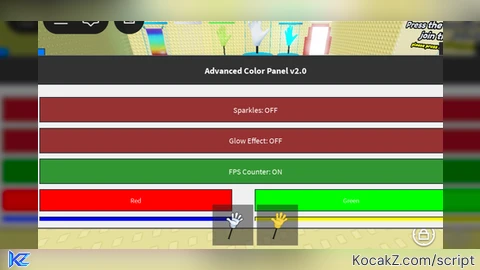
local Players = game:GetService("Players")
local RunService = game:GetService("RunService")
local UserInputService = game:GetService("UserInputService")
local TweenService = game:GetService("TweenService")
local GuiService = game:GetService("GuiService")

local player = Players.LocalPlayer
local playerGui = player:WaitForChild("PlayerGui")

-- Определяем тип устройства
local isMobile = UserInputService.TouchEnabled and not UserInputService.KeyboardEnabled
local isPC = not isMobile

-- Настройки по умолчанию
local settings = {
    glowEnabled = false,
    sparkleEnabled = false,
    showFPS = true,
    menuKey = Enum.KeyCode.F5
}

-- Переменные для управления эффектами
local rainbowConnection = nil
local sparkleConnection = nil
local glowEffect = nil
local fpsCounter = nil
local isMenuOpen = false
local mainMenu = nil
local openButton = nil

-- Создаем кнопку для открытия меню (для мобильных устройств)
local function createOpenButton()
    if not isMobile then return end

    local screenGui = Instance.new("ScreenGui")
    screenGui.Name = "OpenMenuButton"
    screenGui.Parent = playerGui
    screenGui.ResetOnSpawn = false

    local button = Instance.new("TextButton")
    button.Size = UDim2.new(0, 50, 0, 50)
    button.Position = UDim2.new(0, 20, 0, 20)
    button.BackgroundColor3 = Color3.fromRGB(0, 120, 255)
    button.TextColor3 = Color3.fromRGB(255, 255, 255)
    button.Text = "Меню"
    button.Font = Enum.Font.SourceSansBold
    button.TextSize = 16
    button.Parent = screenGui

    openButton = button

    button.MouseButton1Click:Connect(function()
        if mainMenu then
            isMenuOpen = not isMenuOpen
            mainMenu.Enabled = isMenuOpen
        end
    end)
end

-- Функция для создания основного меню
local function createMainMenu()
    local screenGui = Instance.new("ScreenGui")
    screenGui.Name = "AdvancedColorPanel"
    screenGui.Parent = playerGui
    screenGui.ResetOnSpawn = false
    screenGui.Enabled = false

    -- Фон меню (адаптивный размер)
    local background = Instance.new("Frame")
    background.Size = isMobile and UDim2.new(0.95, 0, 0.8, 0) or UDim2.new(0.8, 0, 0.8, 0)
    background.Position = isMobile and UDim2.new(0.025, 0, 0.1, 0) or UDim2.new(0.1, 0, 0.1, 0)
    background.BackgroundColor3 = Color3.fromRGB(240, 240, 240)
    background.BorderSizePixel = 2
    background.BorderColor3 = Color3.fromRGB(100, 100, 100)
    background.Parent = screenGui

    -- Заголовок
    local title = Instance.new("TextLabel")
    title.Size = UDim2.new(1, 0, 0, 40)
    title.Position = UDim2.new(0, 0, 0, 0)
    title.BackgroundColor3 = Color3.fromRGB(50, 50, 50)
    title.TextColor3 = Color3.fromRGB(255, 255, 255)
    title.Text = "Advanced Color Panel v2.0"
    title.Font = Enum.Font.SourceSansBold
    title.TextSize = isMobile and 16 or 20
    title.Parent = background

    -- Кнопка закрытия
    local closeButton = Instance.new("TextButton")
    closeButton.Size = UDim2.new(0, 30, 0, 30)
    closeButton.Position = UDim2.new(1, -35, 0, 5)
    closeButton.BackgroundColor3 = Color3.fromRGB(200, 50, 50)
    closeButton.TextColor3 = Color3.fromRGB(255, 255, 255)
    closeButton.Text = "X"
    closeButton.Font = Enum.Font.SourceSansBold
    closeButton.TextSize = 18
    closeButton.Parent = title

    -- Контейнер для настроек
    local settingsFrame = Instance.new("ScrollingFrame")
    settingsFrame.Size = UDim2.new(1, -20, 1, -60)
    settingsFrame.Position = UDim2.new(0, 10, 0, 50)
    settingsFrame.BackgroundTransparency = 1
    settingsFrame.ScrollBarThickness = 8
    settingsFrame.Parent = background

    -- Настройки эффектов
    local yOffset = 10

    -- Переключатель блёсток
    local sparkleToggle = Instance.new("TextButton")
    sparkleToggle.Size = UDim2.new(0.9, 0, 0, isMobile and 35 or 30)
    sparkleToggle.Position = UDim2.new(0.05, 0, 0, yOffset)
    sparkleToggle.BackgroundColor3 = settings.sparkleEnabled and Color3.fromRGB(50, 150, 50) or Color3.fromRGB(150, 50, 50)
    sparkleToggle.TextColor3 = Color3.fromRGB(255, 255, 255)
    sparkleToggle.Text = "Sparkles: " .. (settings.sparkleEnabled and "ON" or "OFF")
    sparkleToggle.Font = Enum.Font.SourceSans
    sparkleToggle.TextSize = isMobile and 14 or 16
    sparkleToggle.Parent = settingsFrame
    yOffset = yOffset + (isMobile and 45 or 40)

    -- Переключатель свечения
    local glowToggle = Instance.new("TextButton")
    glowToggle.Size = UDim2.new(0.9, 0, 0, isMobile and 35 or 30)
    glowToggle.Position = UDim2.new(0.05, 0, 0, yOffset)
    glowToggle.BackgroundColor3 = settings.glowEnabled and Color3.fromRGB(50, 150, 50) or Color3.fromRGB(150, 50, 50)
    glowToggle.TextColor3 = Color3.fromRGB(255, 255, 255)
    glowToggle.Text = "Glow Effect: " .. (settings.glowEnabled and "ON" or "OFF")
    glowToggle.Font = Enum.Font.SourceSans
    glowToggle.TextSize = isMobile and 14 or 16
    glowToggle.Parent = settingsFrame
    yOffset = yOffset + (isMobile and 45 or 40)

    -- Переключатель FPS
    local fpsToggle = Instance.new("TextButton")
    fpsToggle.Size = UDim2.new(0.9, 0, 0, isMobile and 35 or 30)
    fpsToggle.Position = UDim2.new(0.05, 0, 0, yOffset)
    fpsToggle.BackgroundColor3 = settings.showFPS and Color3.fromRGB(50, 150, 50) or Color3.fromRGB(150, 50, 50)
    fpsToggle.TextColor3 = Color3.fromRGB(255, 255, 255)
    fpsToggle.Text = "FPS Counter: " .. (settings.showFPS and "ON" or "OFF")
    fpsToggle.Font = Enum.Font.SourceSans
    fpsToggle.TextSize = isMobile and 14 or 16
    fpsToggle.Parent = settingsFrame
    yOffset = yOffset + (isMobile and 45 or 40)

    -- Кнопки цветов
    local colors = {
        {Name = "Red", Color = Color3.fromRGB(255, 0, 0)},
        {Name = "Green", Color = Color3.fromRGB(0, 255, 0)},
        {Name = "Blue", Color = Color3.fromRGB(0, 0, 255)},
        {Name = "Yellow", Color = Color3.fromRGB(255, 255, 0)},
        {Name = "Purple", Color = Color3.fromRGB(255, 0, 255)},
        {Name = "Cyan", Color = Color3.fromRGB(0, 255, 255)},
    }

    for i, colorInfo in ipairs(colors) do
        local colorButton = Instance.new("TextButton")
        colorButton.Size = UDim2.new(0.4, 0, 0, isMobile and 30 or 25)
        colorButton.Position = UDim2.new(i % 2 == 0 and 0.5 or 0.05, 0, 0, yOffset + math.floor((i-1)/2)*40)
        colorButton.BackgroundColor3 = colorInfo.Color
        colorButton.TextColor3 = Color3.fromRGB(255, 255, 255)
        colorButton.Text = colorInfo.Name
        colorButton.Font = Enum.Font.SourceSans
        colorButton.TextSize = isMobile and 12 or 14
        colorButton.Parent = settingsFrame

        colorButton.MouseButton1Click:Connect(function()
            applyColor(colorInfo.Color)
            stopRainbow()
        end)
    end
    yOffset = yOffset + 100

    -- Кнопка радуги
    local rainbowButton = Instance.new("TextButton")
    rainbowButton.Size = UDim2.new(0.9, 0, 0, isMobile and 35 or 30)
    rainbowButton.Position = UDim2.new(0.05, 0, 0, yOffset)
    rainbowButton.BackgroundColor3 = Color3.fromRGB(60, 60, 60)
    rainbowButton.TextColor3 = Color3.fromRGB(255, 255, 255)
    rainbowButton.Text = "Toggle Rainbow"
    rainbowButton.Font = Enum.Font.SourceSans
    rainbowButton.TextSize = isMobile and 14 or 16
    rainbowButton.Parent = settingsFrame
    yOffset = yOffset + (isMobile and 45 or 40)

    -- Кнопка сброса
    local resetButton = Instance.new("TextButton")
    resetButton.Size = UDim2.new(0.9, 0, 0, isMobile and 35 or 30)
    resetButton.Position = UDim2.new(0.05, 0, 0, yOffset)
    resetButton.BackgroundColor3 = Color3.fromRGB(100, 0, 0)
    resetButton.TextColor3 = Color3.fromRGB(255, 255, 255)
    resetButton.Text = "Reset All Effects"
    resetButton.Font = Enum.Font.SourceSans
    resetButton.TextSize = isMobile and 14 or 16
    resetButton.Parent = settingsFrame

    -- Устанавливаем размер контента
    settingsFrame.CanvasSize = UDim2.new(0, 0, 0, yOffset + 50)

    -- Обработчики событий
    closeButton.MouseButton1Click:Connect(function()
        screenGui.Enabled = false
        isMenuOpen = false
    end)

    sparkleToggle.MouseButton1Click:Connect(function()
        settings.sparkleEnabled = not settings.sparkleEnabled
        sparkleToggle.BackgroundColor3 = settings.sparkleEnabled and Color3.fromRGB(50, 150, 50) or Color3.fromRGB(150, 50, 50)
        sparkleToggle.Text = "Sparkles: " .. (settings.sparkleEnabled and "ON" or "OFF")

        if settings.sparkleEnabled then
            startSparkles()
        else
            stopSparkles()
        end
    end)

    glowToggle.MouseButton1Click:Connect(function()
        settings.glowEnabled = not settings.glowEnabled
        glowToggle.BackgroundColor3 = settings.glowEnabled and Color3.fromRGB(50, 150, 50) or Color3.fromRGB(150, 50, 50)
        glowToggle.Text = "Glow Effect: " .. (settings.glowEnabled and "ON" or "OFF")

        if settings.glowEnabled then
            applyGlowEffect()
        else
            removeGlowEffect()
        end
    end)

    fpsToggle.MouseButton1Click:Connect(function()
        settings.showFPS = not settings.showFPS
        fpsToggle.BackgroundColor3 = settings.showFPS and Color3.fromRGB(50, 150, 50) or Color3.fromRGB(150, 50, 50)
        fpsToggle.Text = "FPS Counter: " .. (settings.showFPS and "ON" or "OFF")

        if settings.showFPS then
            createFPSCounter()
        else
            removeFPSCounter()
        end
    end)

    rainbowButton.MouseButton1Click:Connect(function()
        if rainbowConnection then
            stopRainbow()
        else
            startRainbow()
        end
    end)

    resetButton.MouseButton1Click:Connect(function()
        resetAllEffects()
        sparkleToggle.BackgroundColor3 = Color3.fromRGB(150, 50, 50)
        sparkleToggle.Text = "Sparkles: OFF"
        glowToggle.BackgroundColor3 = Color3.fromRGB(150, 50, 50)
        glowToggle.Text = "Glow Effect: OFF"
        fpsToggle.BackgroundColor3 = settings.showFPS and Color3.fromRGB(50, 150, 50) or Color3.fromRGB(150, 50, 50)
        fpsToggle.Text = "FPS Counter: " .. (settings.showFPS and "ON" or "OFF")
    end)

    return screenGui
end

-- Функция применения цвета
function applyColor(color)
    local character = player.Character
    if not character then return end

    for _, part in ipairs(character:GetDescendants()) do
        if part:IsA("BasePart") then
            part.Color = color
            part.Material = Enum.Material.Neon
        end
    end
end

-- Функция сброса цвета
function resetColor()
    local character = player.Character
    if not character then return end

    for _, part in ipairs(character:GetDescendants()) do
        if part:IsA("BasePart") then
            part.Color = Color3.fromRGB(170, 170, 170)
            part.Material = Enum.Material.Plastic
        end
    end
end

-- Функция радужного эффекта
function startRainbow()
    stopRainbow()

    rainbowConnection = RunService.Heartbeat:Connect(function()
        local hue = tick() % 5 / 5
        local color = Color3.fromHSV(hue, 1, 1)
        applyColor(color)
    end)
end

-- Функция остановки радужного эффекта
function stopRainbow()
    if rainbowConnection then
        rainbowConnection:Disconnect()
        rainbowConnection = nil
    end
end

-- Функция эффекта блёсток
function startSparkles()
    stopSparkles()

    sparkleConnection = RunService.Heartbeat:Connect(function()
        local character = player.Character
        if not character then return end

        for _, part in ipairs(character:GetDescendants()) do
            if part:IsA("BasePart") then
                local sparkle = Instance.new("Sparkles")
                sparkle.Parent = part
                sparkle.SparkleColor = part.Color

                game:GetService("Debris"):AddItem(sparkle, 0.5)
            end
        end
    end)
end

-- Функция остановки эффекта блёсток
function stopSparkles()
    if sparkleConnection then
        sparkleConnection:Disconnect()
        sparkleConnection = nil
    end

    local character = player.Character
    if not character then return end

    for _, part in ipairs(character:GetDescendants()) do
        if part:IsA("BasePart") then
            for _, sparkle in ipairs(part:GetChildren()) do
                if sparkle:IsA("Sparkles") then
                    sparkle:Destroy()
                end
            end
        end
    end
end

-- Функция эффекта свечения
function applyGlowEffect()
    removeGlowEffect()

    local character = player.Character
    if not character then return end

    for _, part in ipairs(character:GetDescendants()) do
        if part:IsA("BasePart") then
            local surfaceGui = Instance.new("SurfaceGui")
            surfaceGui.Parent = part
            surfaceGui.Face = Enum.NormalId.Top
            surfaceGui.AlwaysOnTop = true

            local frame = Instance.new("Frame")
            frame.Size = UDim2.new(1, 0, 1, 0)
            frame.BackgroundColor3 = part.Color
            frame.BackgroundTransparency = 0.7
            frame.BorderSizePixel = 0
            frame.Parent = surfaceGui

            glowEffect = surfaceGui
        end
    end
end

-- Функция удаления эффекта свечения
function removeGlowEffect()
    local character = player.Character
    if not character then return end

    for _, part in ipairs(character:GetDescendants()) do
        if part:IsA("BasePart") then
            for _, child in ipairs(part:GetChildren()) do
                if child:IsA("SurfaceGui") then
                    child:Destroy()
                end
            end
        end
    end
end

-- Функция создания счётчика FPS
function createFPSCounter()
    removeFPSCounter()

    local screenGui = Instance.new("ScreenGui")
    screenGui.Name = "FPSCounter"
    screenGui.Parent = playerGui
    screenGui.ResetOnSpawn = false

    local frame = Instance.new("Frame")
    frame.Size = UDim2.new(0, 100, 0, 30)
    frame.Position = UDim2.new(1, -110, 0, 10)
    frame.BackgroundColor3 = Color3.fromRGB(40, 40, 40)
    frame.BorderSizePixel = 0
    frame.Parent = screenGui

    local label = Instance.new("TextLabel")
    label.Size = UDim2.new(1, 0, 1, 0)
    label.BackgroundTransparency = 1
    label.TextColor3 = Color3.fromRGB(255, 255, 255)
    label.Text = "FPS: 0"
    label.Font = Enum.Font.SourceSansBold
    label.TextSize = 18
    label.Parent = frame

    local lastTime = tick()
    local frameCount = 0

    RunService.Heartbeat:Connect(function()
        frameCount = frameCount + 1
        local currentTime = tick()

        if currentTime - lastTime >= 1 then
            local fps = math.floor(frameCount / (currentTime - lastTime))
            label.Text = "FPS: " .. fps

            frameCount = 0
            lastTime = currentTime
        end
    end)

    fpsCounter = screenGui
end

-- Функция удаления счётчика FPS
function removeFPSCounter()
    if fpsCounter then
        fpsCounter:Destroy()
        fpsCounter = nil
    end
end

-- Функция сброса всех эффектов
function resetAllEffects()
    stopRainbow()
    stopSparkles()
    removeGlowEffect()
    resetColor()

    settings.sparkleEnabled = false
    settings.glowEnabled = false
end

-- Создаем основное меню
mainMenu = createMainMenu()

-- Создаем кнопку для мобильных устройств
createOpenButton()

-- Обработка открытия/закрытия меню по клавише (только для ПК)
if isPC then
    UserInputService.InputBegan:Connect(function(input, gameProcessed)
        if gameProcessed then return end

        if input.KeyCode == settings.menuKey then
            isMenuOpen = not isMenuOpen
            mainMenu.Enabled = isMenuOpen
        end
    end)
end

-- Обработка смены персонажа
player.CharacterAdded:Connect(function(character)
    if settings.sparkleEnabled then
        wait(1)
        startSparkles()
    end

    if settings.glowEnabled then
        wait(1)
        applyGlowEffect()
    end

    if rainbowConnection then
        wait(1)
        startRainbow()
    end
end)

-- Автозапуск FPS-счётчика если включен
if settings.showFPS then
    createFPSCounter()
end

-- Сообщение для пользователей
if isPC then
    print("Advanced Color Panel v2.0 loaded! Press F5 to open the menu.")
else
    print("Advanced Color Panel v2.0 loaded! Tap the menu button to open the menu.")
end

-- Создаем сообщение для пользователей ПК о том, как открыть меню
local function createHelpMessage()
    if not isPC then return end

    local screenGui = Instance.new("ScreenGui")
    screenGui.Name = "HelpMessage"
    screenGui.Parent = playerGui
    screenGui.ResetOnSpawn = false

    local frame = Instance.new("Frame")
    frame.Size = UDim2.new(0, 250, 0, 40)
    frame.Position = UDim2.new(0.5, -125, 0, 10)
    frame.BackgroundColor3 = Color3.fromRGB(40, 40, 40)
    frame.BorderSizePixel = 0
    frame.Parent = screenGui

    local label = Instance.new("TextLabel")
    label.Size = UDim2.new(1, 0, 1, 0)
    label.BackgroundTransparency = 1
    label.TextColor3 = Color3.fromRGB(255, 255, 255)
    label.Text = "Press F5 to open Color Panel"
    label.Font = Enum.Font.SourceSansBold
    label.TextSize = 16
    label.Parent = frame

    -- Автоматически скрываем сообщение через 5 секунд
    delay(5, function()
        screenGui:Destroy()
    end)
end

createHelpMessage()No comments yet for this script.


