


KeylessUniversal
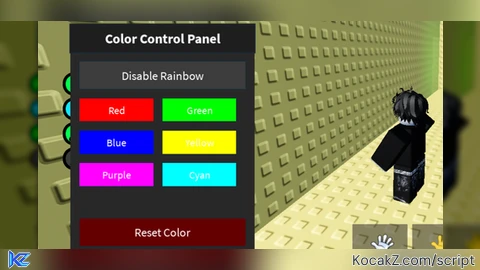
local Players = game:GetService("Players")
local RunService = game:GetService("RunService")
local UserInputService = game:GetService("UserInputService")
local TweenService = game:GetService("TweenService")

local player = Players.LocalPlayer
local playerGui = player:WaitForChild("PlayerGui")

-- Create interface
local screenGui = Instance.new("ScreenGui")
screenGui.Name = "ColorPanel"
screenGui.Parent = playerGui
screenGui.ResetOnSpawn = false

local frame = Instance.new("Frame")
frame.Size = UDim2.new(0, 200, 0, 250)
frame.Position = UDim2.new(0, 10, 0.5, -125)
frame.BackgroundColor3 = Color3.fromRGB(40, 40, 40)
frame.BorderSizePixel = 0
frame.Active = true
frame.Draggable = true
frame.Parent = screenGui

local title = Instance.new("TextLabel")
title.Size = UDim2.new(1, 0, 0, 30)
title.Position = UDim2.new(0, 0, 0, 0)
title.BackgroundColor3 = Color3.fromRGB(30, 30, 30)
title.TextColor3 = Color3.fromRGB(255, 255, 255)
title.Text = "Color Control Panel"
title.Font = Enum.Font.SourceSansBold
title.TextSize = 18
title.Parent = frame

-- Rainbow effect button
local rainbowButton = Instance.new("TextButton")
rainbowButton.Size = UDim2.new(0.9, 0, 0, 30)
rainbowButton.Position = UDim2.new(0.05, 0, 0, 40)
rainbowButton.BackgroundColor3 = Color3.fromRGB(60, 60, 60)
rainbowButton.TextColor3 = Color3.fromRGB(255, 255, 255)
rainbowButton.Text = "Enable Rainbow"
rainbowButton.Font = Enum.Font.SourceSans
rainbowButton.TextSize = 16
rainbowButton.Parent = frame

-- Color selection buttons
local colors = {
    {Name = "Red", Color = Color3.fromRGB(255, 0, 0)},
    {Name = "Green", Color = Color3.fromRGB(0, 255, 0)},
    {Name = "Blue", Color = Color3.fromRGB(0, 0, 255)},
    {Name = "Yellow", Color = Color3.fromRGB(255, 255, 0)},
    {Name = "Purple", Color = Color3.fromRGB(255, 0, 255)},
    {Name = "Cyan", Color = Color3.fromRGB(0, 255, 255)},
}

local buttonPosition = 0.15
for i, colorInfo in ipairs(colors) do
    local colorButton = Instance.new("TextButton")
    colorButton.Size = UDim2.new(0.4, 0, 0, 25)
    colorButton.Position = UDim2.new(i % 2 == 0 and 0.5 or 0.05, 0, 0, 80 + math.floor((i-1)/2)*35)
    colorButton.BackgroundColor3 = colorInfo.Color
    colorButton.TextColor3 = Color3.fromRGB(255, 255, 255)
    colorButton.Text = colorInfo.Name
    colorButton.Font = Enum.Font.SourceSans
    colorButton.TextSize = 14
    colorButton.Parent = frame
    buttonPosition = buttonPosition + 0.1

    colorButton.MouseButton1Click:Connect(function()
        applyColor(colorInfo.Color)
        stopRainbow()
        rainbowButton.Text = "Enable Rainbow"
    end)
end

-- Reset button
local resetButton = Instance.new("TextButton")
resetButton.Size = UDim2.new(0.9, 0, 0, 30)
resetButton.Position = UDim2.new(0.05, 0, 0, 210)
resetButton.BackgroundColor3 = Color3.fromRGB(100, 0, 0)
resetButton.TextColor3 = Color3.fromRGB(255, 255, 255)
resetButton.Text = "Reset Color"
resetButton.Font = Enum.Font.SourceSans
resetButton.TextSize = 16
resetButton.Parent = frame

-- Variables for effect management
local rainbowConnection = nil
local isRainbowActive = false

-- Color application function
function applyColor(color)
    local character = player.Character
    if not character then return end

    for _, part in ipairs(character:GetDescendants()) do
        if part:IsA("BasePart") then
            part.Color = color
            part.Material = Enum.Material.Neon
        end
    end
end

-- Color reset function
function resetColor()
    local character = player.Character
    if not character then return end

    for _, part in ipairs(character:GetDescendants()) do
        if part:IsA("BasePart") then
            part.Color = Color3.fromRGB(170, 170, 170) -- Default gray color
            part.Material = Enum.Material.Plastic
        end
    end
end

-- Rainbow effect function
function startRainbow()
    stopRainbow()
    isRainbowActive = true

    rainbowConnection = RunService.Heartbeat:Connect(function()
        local hue = tick() % 5 / 5
        local color = Color3.fromHSV(hue, 1, 1)
        applyColor(color)
    end)
end

-- Rainbow effect stop function
function stopRainbow()
    isRainbowActive = false
    if rainbowConnection then
        rainbowConnection:Disconnect()
        rainbowConnection = nil
    end
end

-- Button handlers
rainbowButton.MouseButton1Click:Connect(function()
    if isRainbowActive then
        stopRainbow()
        rainbowButton.Text = "Enable Rainbow"
    else
        startRainbow()
        rainbowButton.Text = "Disable Rainbow"
    end
end)

resetButton.MouseButton1Click:Connect(function()
    stopRainbow()
    resetColor()
    rainbowButton.Text = "Enable Rainbow"
end)

-- Handle character changes
player.CharacterAdded:Connect(function(character)
    if isRainbowActive then
        wait(1) -- Wait for character to fully load
        startRainbow()
    end
end)

print("Color panel loaded! Drag the panel by the top bar.")


Chatgpt script
@Xeryt Oh yeah, sorry I didn't tell you right away.