


Key RequiredUniversal
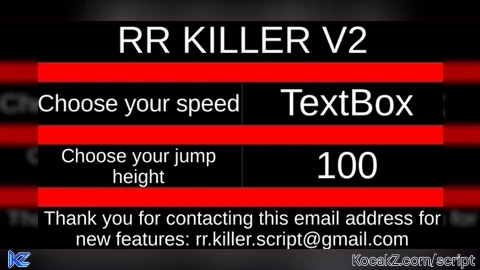
-- Local Script (Place this in StarterGui)

local player = game.Players.LocalPlayer
local mouse = player:GetMouse()

-- Create the GUI
local screenGui = Instance.new("ScreenGui")
screenGui.Parent = player:WaitForChild("PlayerGui")

local mainFrame = Instance.new("Frame")
mainFrame.Parent = screenGui
mainFrame.Size = UDim2.new(0, 400, 0, 200)
mainFrame.Position = UDim2.new(0.5, -200, 0.5, -100)
mainFrame.BackgroundColor3 = Color3.fromRGB(255, 0, 0)
mainFrame.Draggable = true -- Allows the menu to be moved
mainFrame.Active = true -- Makes the menu interactive
mainFrame.Selectable = true -- Makes the menu selectable

local titleLabel = Instance.new("TextLabel")
titleLabel.Parent = mainFrame
titleLabel.Size = UDim2.new(1, 0, 0.2, 0)
titleLabel.Position = UDim2.new(0, 0, 0, 0)
titleLabel.Text = "RR KILLER V2"
titleLabel.TextScaled = true
titleLabel.BackgroundColor3 = Color3.fromRGB(0, 0, 0)
titleLabel.TextColor3 = Color3.fromRGB(255, 255, 255)

-- Label for speed
local speedLabel = Instance.new("TextLabel")
speedLabel.Parent = mainFrame
speedLabel.Size = UDim2.new(0.5, 0, 0.2, 0)
speedLabel.Position = UDim2.new(0, 0, 0.3, 0)
speedLabel.Text = "Choose your speed"
speedLabel.TextScaled = true
speedLabel.BackgroundColor3 = Color3.fromRGB(0, 0, 0)
speedLabel.TextColor3 = Color3.fromRGB(255, 255, 255)

-- Input box for speed
local speedInput = Instance.new("TextBox")
speedInput.Parent = mainFrame
speedInput.Size = UDim2.new(0.5, 0, 0.2, 0)
speedInput.Position = UDim2.new(0.5, 0, 0.3, 0)
speedInput.PlaceholderText = "0 - ∞"
speedInput.TextScaled = true
speedInput.BackgroundColor3 = Color3.fromRGB(0, 0, 0)
speedInput.TextColor3 = Color3.fromRGB(255, 255, 255)

-- Label for jump height
local jumpLabel = Instance.new("TextLabel")
jumpLabel.Parent = mainFrame
jumpLabel.Size = UDim2.new(0.5, 0, 0.2, 0)
jumpLabel.Position = UDim2.new(0, 0, 0.6, 0)
jumpLabel.Text = "Choose your jump height"
jumpLabel.TextScaled = true
jumpLabel.BackgroundColor3 = Color3.fromRGB(0, 0, 0)
jumpLabel.TextColor3 = Color3.fromRGB(255, 255, 255)

-- Input box for jump height
local jumpInput = Instance.new("TextBox")
jumpInput.Parent = mainFrame
jumpInput.Size = UDim2.new(0.5, 0, 0.2, 0)
jumpInput.Position = UDim2.new(0.5, 0, 0.6, 0)
jumpInput.PlaceholderText = "0 - ∞"
jumpInput.TextScaled = true
jumpInput.BackgroundColor3 = Color3.fromRGB(0, 0, 0)
jumpInput.TextColor3 = Color3.fromRGB(255, 255, 255)

-- Label for contact message
local contactLabel = Instance.new("TextLabel")
contactLabel.Parent = mainFrame
contactLabel.Size = UDim2.new(1, 0, 0.2, 0)
contactLabel.Position = UDim2.new(0, 0, 0.9, 0)
contactLabel.Text = "Thank you for contacting this email address for new features: rr.killer.script@gmail.com"
contactLabel.TextScaled = true
contactLabel.BackgroundColor3 = Color3.fromRGB(0, 0, 0)
contactLabel.TextColor3 = Color3.fromRGB(255, 255, 255)

-- Function to update speed and jump height
local function updatePlayerSettings()
    local speed = tonumber(speedInput.Text)
    local jumpPower = tonumber(jumpInput.Text)

    -- Set player speed
    if speed and speed >= 0 then
        player.Character.Humanoid.WalkSpeed = speed
    end

    -- Set player jump height (fixed issue by using JumpPower and setting JumpHeight to 0)
    if jumpPower and jumpPower >= 0 then
        player.Character.Humanoid.JumpPower = jumpPower
        player.Character.Humanoid.UseJumpPower = true -- Ensure JumpPower is used
    end
end

-- Connect the function to text changes
speedInput.FocusLost:Connect(updatePlayerSettings)
jumpInput.FocusLost:Connect(updatePlayerSettings)No comments yet for this script.


