
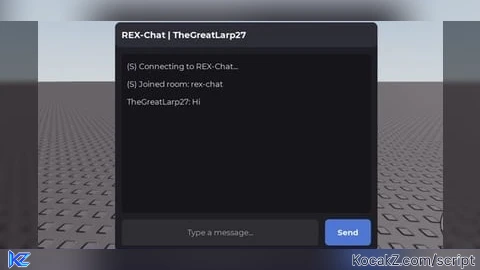
-- since i abandoned lua completely and switched to javascript, i vibdecoded it

local Players = game:GetService("Players")
local HttpService = game:GetService("HttpService")

local Player = Players.LocalPlayer
local Username = Player.Name

local ROOM = "REX-Chat"
local PASSWORD = "6xrxDelnel7@/:.4!"
local ENDPOINT = "wss://chatroom.openfun.app/ws"

-- Connect to OpenFun
local Socket = WebSocket.connect(ENDPOINT)

-- GUI setup
local ScreenGui = Instance.new("ScreenGui")
ScreenGui.Name = "ZDChatGUI"
ScreenGui.ResetOnSpawn = false
ScreenGui.Parent = game:GetService("CoreGui")

-- Main window
local Main = Instance.new("Frame")
Main.Name = "Main"
Main.Size = UDim2.new(0, 400, 0, 350)
Main.Position = UDim2.new(0.5, -200, 0.5, -175)
Main.BackgroundColor3 = Color3.fromRGB(30, 30, 35)
Main.BorderSizePixel = 0
Main.Parent = ScreenGui

local MainCorner = Instance.new("UICorner")
MainCorner.CornerRadius = UDim.new(0, 8)
MainCorner.Parent = Main

-- Built-in drag detector
local DragDetector = Instance.new("UIDragDetector")
DragDetector.Parent = Main

-- Title bar
local TitleBar = Instance.new("Frame")
TitleBar.Name = "TitleBar"
TitleBar.Size = UDim2.new(1, 0, 0, 38)
TitleBar.BackgroundColor3 = Color3.fromRGB(45, 45, 55)
TitleBar.BorderSizePixel = 0
TitleBar.Parent = Main

local TitleCorner = Instance.new("UICorner")
TitleCorner.CornerRadius = UDim.new(0, 8)
TitleCorner.Parent = TitleBar

local Title = Instance.new("TextLabel")
Title.Size = UDim2.new(1, -20, 1, 0)
Title.Position = UDim2.new(0, 10, 0, 0)
Title.BackgroundTransparency = 1
Title.Text = "REX-Chat | " .. Username
Title.TextColor3 = Color3.fromRGB(255, 255, 255)
Title.TextSize = 16
Title.Font = Enum.Font.GothamBold
Title.TextXAlignment = Enum.TextXAlignment.Left
Title.Parent = TitleBar

-- Messages panel
local Messages = Instance.new("ScrollingFrame")
Messages.Name = "Messages"
Messages.Position = UDim2.new(0, 10, 0, 48)
Messages.Size = UDim2.new(1, -20, 1, -108)
Messages.BackgroundColor3 = Color3.fromRGB(22, 22, 26)
Messages.BorderSizePixel = 0
Messages.ScrollBarThickness = 5
Messages.CanvasSize = UDim2.new(0, 0, 0, 0)
Messages.AutomaticCanvasSize = Enum.AutomaticSize.Y
Messages.Parent = Main

local MessagesCorner = Instance.new("UICorner")
MessagesCorner.CornerRadius = UDim.new(0, 6)
MessagesCorner.Parent = Messages

local MessageLayout = Instance.new("UIListLayout")
MessageLayout.Padding = UDim.new(0, 5)
MessageLayout.SortOrder = Enum.SortOrder.LayoutOrder
MessageLayout.Parent = Messages

local MessagePadding = Instance.new("UIPadding")
MessagePadding.PaddingTop = UDim.new(0, 8)
MessagePadding.PaddingBottom = UDim.new(0, 8)
MessagePadding.PaddingLeft = UDim.new(0, 8)
MessagePadding.PaddingRight = UDim.new(0, 8)
MessagePadding.Parent = Messages

-- Add a message to the GUI
local function AddMessage(Text)
    local Label = Instance.new("TextLabel")
    Label.BackgroundTransparency = 1
    Label.Size = UDim2.new(1, -4, 0, 22)
    Label.AutomaticSize = Enum.AutomaticSize.Y
    Label.Text = tostring(Text)
    Label.TextColor3 = Color3.fromRGB(230, 230, 230)
    Label.TextSize = 14
    Label.Font = Enum.Font.Gotham
    Label.TextXAlignment = Enum.TextXAlignment.Left
    Label.TextWrapped = true
    Label.Parent = Messages

    task.defer(function()
        Messages.CanvasPosition = Vector2.new(
            0,
            math.max(
                0,
                Messages.AbsoluteCanvasSize.Y - Messages.AbsoluteSize.Y
            )
        )
    end)
end

-- Message input
local Input = Instance.new("TextBox")
Input.Name = "Input"
Input.Position = UDim2.new(0, 10, 1, -50)
Input.Size = UDim2.new(1, -100, 0, 40)
Input.BackgroundColor3 = Color3.fromRGB(45, 45, 52)
Input.BorderSizePixel = 0
Input.PlaceholderText = "Type a message..."
Input.Text = ""
Input.TextColor3 = Color3.fromRGB(255, 255, 255)
Input.PlaceholderColor3 = Color3.fromRGB(170, 170, 170)
Input.TextSize = 14
Input.Font = Enum.Font.Gotham
Input.ClearTextOnFocus = false
Input.Parent = Main

local InputCorner = Instance.new("UICorner")
InputCorner.CornerRadius = UDim.new(0, 6)
InputCorner.Parent = Input

-- Send button
local SendButton = Instance.new("TextButton")
SendButton.Name = "Send"
SendButton.Position = UDim2.new(1, -80, 1, -50)
SendButton.Size = UDim2.new(0, 70, 0, 40)
SendButton.BackgroundColor3 = Color3.fromRGB(65, 120, 220)
SendButton.BorderSizePixel = 0
SendButton.Text = "Send"
SendButton.TextColor3 = Color3.fromRGB(255, 255, 255)
SendButton.TextSize = 14
SendButton.Font = Enum.Font.GothamBold
SendButton.Parent = Main

local SendCorner = Instance.new("UICorner")
SendCorner.CornerRadius = UDim.new(0, 6)
SendCorner.Parent = SendButton

-- Send a chat message using OpenFun's protocol
local function SendMessage()
    local Message = Input.Text

    if not Message:match("%S") then
        return
    end

    if #Message > 100 then
        AddMessage("(S) Messages must be 100 characters or fewer.")
        return
    end

    local Success = pcall(function()
        Socket:Send(HttpService:JSONEncode({
            type = "say",
            payload = {
                type = "chat",
                text = Message
            }
        }))
    end)

    if Success then
        Input.Text = ""
    else
        AddMessage("(S) Failed to send message.")
    end
end

SendButton.MouseButton1Click:Connect(SendMessage)

Input.FocusLost:Connect(function(EnterPressed)
    if EnterPressed then
        SendMessage()
    end
end)

-- Receive OpenFun events
Socket.OnMessage:Connect(function(RawMessage)
    local Success, Data = pcall(function()
        return HttpService:JSONDecode(tostring(RawMessage))
    end)

    if not Success or type(Data) ~= "table" then
        return
    end

    if Data.type == "joined" then
        Title.Text = "REX-Chat | " .. Username

        AddMessage("(S) Joined room: " .. tostring(Data.room))

        -- Display recent chat history
        if type(Data.history) == "table" then
            for _, Entry in ipairs(Data.history) do
                local Payload = Entry.payload

                if type(Payload) == "table"
                    and Payload.type == "chat"
                    and type(Payload.text) == "string" then

                    AddMessage(
                        tostring(Entry.username) .. ": " .. Payload.text
                    )
                end
            end
        end

    elseif Data.type == "say" then
        local Payload = Data.payload

        if type(Payload) == "table"
            and Payload.type == "chat"
            and type(Payload.text) == "string" then

            AddMessage(
                tostring(Data.username) .. ": " .. Payload.text
            )
        end

    elseif Data.type == "user-joined" then
        AddMessage("(S) " .. tostring(Data.username) .. " joined the room.")

    elseif Data.type == "user-left" then
        AddMessage("(S) " .. tostring(Data.username) .. " left the room.")

    elseif Data.type == "error" then
        AddMessage(
            "(S) " .. tostring(Data.code) .. ": " ..
            tostring(Data.message)
        )
    end
end)

Socket.OnClose:Connect(function()
    AddMessage("(S) Disconnected from OpenFun.")
end)

-- Join the password-protected room
local JoinSuccess, JoinError = pcall(function()
    Socket:Send(HttpService:JSONEncode({
        type = "join",
        room = ROOM,
        username = Username,
        password = PASSWORD
    }))
end)

if JoinSuccess then
    AddMessage("(S) Connecting to " .. ROOM .. "...")
else
    AddMessage("(S) Failed to send join request: " .. tostring(JoinError))
end
How to Execute Universal Script – REX Chat
Step 1: Copy Code: Click the Copy Code button in the viewer above to grab the clean Lua loadstring.
Step 2: Launch Executor: Open a compatible, unpatched executor. If you need one, check our Roblox Executors Directory.
Step 3: Join Experience: Launch Roblox and join Universal Script.
Step 4: Attach & Run: Attach/inject your executor into the Roblox process, paste the code into the script tab, and press Execute.
Features & Information
Script Changelog (1)
Community Comments (1)
Frequently Asked Questions
How do I execute Universal Script – REX Chat in Roblox?
To run Universal Script – REX Chat, copy the Lua loadstring from the code viewer above, launch Roblox and join Universal Script, attach a working executor (such as Potassium, Solara, or Delta from our Executors directory), paste the code into your executor console, and click Execute.
Is Universal Script – REX Chat keyless or does it require an access key?
Universal Script – REX Chat requires an access key. You can retrieve the official key directly using the Get Script Key link provided above.
Is Universal Script – REX Chat currently safe and working?
This script is active and operational. Always test scripts using a secondary (alt) Roblox account to safeguard your main profile against anti-cheat bans.


![Ez Hub [Open Source] [150+ games] - Verified script for Universal Script](https://media.kocakz.me/b74a9ac15370ba766b2fa9531f17c9dad2c0befb2b951693ae723e4c7d2c3fb6.webp)



![[KEYLESS] Moondiety Script | 20+ supported Games - Verified script for Universal Script](https://media.kocakz.me/6834c33a36c9fbe66afae4c6754c2b80386ce636b2f972464a95866f4b6a42eb.webp)




only the 30th of its kind