


KeylessUniversal
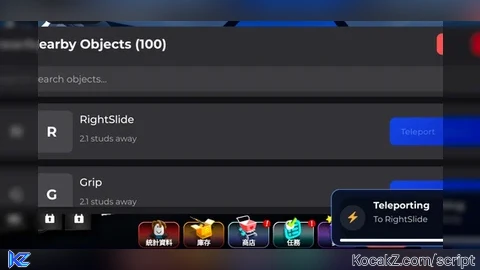
local Players = game:GetService("Players")
local TweenService = game:GetService("TweenService")
local UserInputService = game:GetService("UserInputService")

local player = Players.LocalPlayer
local playerGui = player:WaitForChild("PlayerGui")

-- Create the main UI
local screenGui = Instance.new("ScreenGui")
screenGui.Name = "ObjectListUI"
screenGui.ResetOnSpawn = false
screenGui.ZIndexBehavior = Enum.ZIndexBehavior.Sibling
screenGui.Parent = playerGui

-- Create the main frame
local mainFrame = Instance.new("Frame")
mainFrame.Name = "MainFrame"
mainFrame.BackgroundColor3 = Color3.fromRGB(30, 30, 35)
mainFrame.BorderSizePixel = 0
mainFrame.Position = UDim2.new(0.5, 0, 0.5, 0)
mainFrame.AnchorPoint = Vector2.new(0.5, 0.5)
mainFrame.Size = UDim2.new(0.9, 0, 0.8, 0)
mainFrame.Parent = screenGui

-- Add corner radius to main frame
local cornerRadius = Instance.new("UICorner")
cornerRadius.CornerRadius = UDim.new(0, 12)
cornerRadius.Parent = mainFrame

-- Add shadow
local shadow = Instance.new("ImageLabel")
shadow.Name = "Shadow"
shadow.BackgroundTransparency = 1
shadow.Position = UDim2.new(0.5, 0, 0.5, 0)
shadow.AnchorPoint = Vector2.new(0.5, 0.5)
shadow.Size = UDim2.new(1, 20, 1, 20)
shadow.ZIndex = -1
shadow.Image = "rbxassetid://6014261993"
shadow.ImageColor3 = Color3.fromRGB(0, 0, 0)
shadow.ImageTransparency = 0.5
shadow.ScaleType = Enum.ScaleType.Slice
shadow.SliceCenter = Rect.new(49, 49, 450, 450)
shadow.Parent = mainFrame

-- Create the title bar
local titleBar = Instance.new("Frame")
titleBar.Name = "TitleBar"
titleBar.BackgroundColor3 = Color3.fromRGB(45, 45, 50)
titleBar.BorderSizePixel = 0
titleBar.Size = UDim2.new(1, 0, 0, 50)
titleBar.Parent = mainFrame

-- Add corner radius to title bar
local titleCorner = Instance.new("UICorner")
titleCorner.CornerRadius = UDim.new(0, 12)
titleCorner.Parent = titleBar

-- Create the title text
local titleText = Instance.new("TextLabel")
titleText.Name = "TitleText"
titleText.BackgroundTransparency = 1
titleText.Position = UDim2.new(0, 20, 0, 0)
titleText.Size = UDim2.new(1, -40, 1, 0)
titleText.Font = Enum.Font.GothamBold
titleText.Text = "Nearby Objects"
titleText.TextColor3 = Color3.fromRGB(255, 255, 255)
titleText.TextSize = 22
titleText.TextXAlignment = Enum.TextXAlignment.Left
titleText.Parent = titleBar

-- Create minimize button (previously close button)
local minimizeButton = Instance.new("TextButton")
minimizeButton.Name = "MinimizeButton"
minimizeButton.BackgroundColor3 = Color3.fromRGB(255, 80, 80)
minimizeButton.Position = UDim2.new(1, -40, 0.5, 0)
minimizeButton.AnchorPoint = Vector2.new(0, 0.5)
minimizeButton.Size = UDim2.new(0, 30, 0, 30)
minimizeButton.Font = Enum.Font.GothamBold
minimizeButton.Text = "X"
minimizeButton.TextColor3 = Color3.fromRGB(255, 255, 255)
minimizeButton.TextSize = 18
minimizeButton.Parent = titleBar

-- Add corner radius to minimize button
local minimizeCorner = Instance.new("UICorner")
minimizeCorner.CornerRadius = UDim.new(0, 8)
minimizeCorner.Parent = minimizeButton

-- Create the search bar container
local searchContainer = Instance.new("Frame")
searchContainer.Name = "SearchContainer"
searchContainer.BackgroundColor3 = Color3.fromRGB(45, 45, 50)
searchContainer.BorderSizePixel = 0
searchContainer.Position = UDim2.new(0, 0, 0, 50)
searchContainer.Size = UDim2.new(1, 0, 0, 50)
searchContainer.Parent = mainFrame

-- Create the search bar
local searchBar = Instance.new("TextBox")
searchBar.Name = "SearchBar"
searchBar.BackgroundColor3 = Color3.fromRGB(60, 60, 65)
searchBar.Position = UDim2.new(0, 15, 0.5, 0)
searchBar.AnchorPoint = Vector2.new(0, 0.5)
searchBar.Size = UDim2.new(1, -30, 0, 36)
searchBar.Font = Enum.Font.Gotham
searchBar.PlaceholderText = "Search objects..."
searchBar.PlaceholderColor3 = Color3.fromRGB(180, 180, 180)
searchBar.Text = ""
searchBar.TextColor3 = Color3.fromRGB(255, 255, 255)
searchBar.TextSize = 16
searchBar.TextXAlignment = Enum.TextXAlignment.Left
searchBar.ClearTextOnFocus = false
searchBar.Parent = searchContainer

-- Add padding to search bar text
local searchPadding = Instance.new("UIPadding")
searchPadding.PaddingLeft = UDim.new(0, 10)
searchPadding.Parent = searchBar

-- Add corner radius to search bar
local searchCorner = Instance.new("UICorner")
searchCorner.CornerRadius = UDim.new(0, 8)
searchCorner.Parent = searchBar

-- Create the scroll frame for object list
local scrollFrame = Instance.new("ScrollingFrame")
scrollFrame.Name = "ObjectList"
scrollFrame.BackgroundTransparency = 1
scrollFrame.Position = UDim2.new(0, 0, 0, 100) -- Adjusted for search bar
scrollFrame.Size = UDim2.new(1, 0, 1, -110) -- Adjusted for search bar
scrollFrame.CanvasSize = UDim2.new(0, 0, 0, 0)
scrollFrame.ScrollBarThickness = 6
scrollFrame.ScrollBarImageColor3 = Color3.fromRGB(100, 100, 100)
scrollFrame.BorderSizePixel = 0
scrollFrame.Parent = mainFrame

-- Create UIListLayout for organizing items
local listLayout = Instance.new("UIListLayout")
listLayout.Name = "ListLayout"
listLayout.Padding = UDim.new(0, 10)
listLayout.HorizontalAlignment = Enum.HorizontalAlignment.Center
listLayout.SortOrder = Enum.SortOrder.LayoutOrder
listLayout.Parent = scrollFrame

-- Create UIPadding for the scroll frame
local scrollPadding = Instance.new("UIPadding")
scrollPadding.PaddingLeft = UDim.new(0, 15)
scrollPadding.PaddingRight = UDim.new(0, 15)
scrollPadding.PaddingTop = UDim.new(0, 10)
scrollPadding.PaddingBottom = UDim.new(0, 10)
scrollPadding.Parent = scrollFrame

-- Create the minimized ball button (initially hidden)
local ballButton = Instance.new("ImageButton")
ballButton.Name = "BallButton"
ballButton.BackgroundColor3 = Color3.fromRGB(70, 130, 240)
ballButton.Position = UDim2.new(1, -60, 0.5, 0)
ballButton.AnchorPoint = Vector2.new(0, 0.5)
ballButton.Size = UDim2.new(0, 50, 0, 50)
ballButton.Image = ""
ballButton.Visible = false
ballButton.Parent = screenGui

-- Add corner radius to make it a circle
local ballCorner = Instance.new("UICorner")
ballCorner.CornerRadius = UDim.new(1, 0)
ballCorner.Parent = ballButton

-- Add shadow to ball button
local ballShadow = Instance.new("ImageLabel")
ballShadow.Name = "Shadow"
ballShadow.BackgroundTransparency = 1
ballShadow.Position = UDim2.new(0.5, 0, 0.5, 0)
ballShadow.AnchorPoint = Vector2.new(0.5, 0.5)
ballShadow.Size = UDim2.new(1, 10, 1, 10)
ballShadow.ZIndex = -1
ballShadow.Image = "rbxassetid://6014261993"
ballShadow.ImageColor3 = Color3.fromRGB(0, 0, 0)
ballShadow.ImageTransparency = 0.5
ballShadow.ScaleType = Enum.ScaleType.Slice
ballShadow.SliceCenter = Rect.new(49, 49, 450, 450)
ballShadow.Parent = ballButton

-- Add icon to ball button
local ballIcon = Instance.new("TextLabel")
ballIcon.Name = "Icon"
ballIcon.BackgroundTransparency = 1
ballIcon.Size = UDim2.new(1, 0, 1, 0)
ballIcon.Font = Enum.Font.GothamBold
ballIcon.Text = "📋"
ballIcon.TextColor3 = Color3.fromRGB(255, 255, 255)
ballIcon.TextSize = 24
ballIcon.Parent = ballButton

-- Create notification container
local notificationContainer = Instance.new("Frame")
notificationContainer.Name = "NotificationContainer"
notificationContainer.BackgroundTransparency = 1
notificationContainer.Position = UDim2.new(1, -20, 1, -20)
notificationContainer.AnchorPoint = Vector2.new(1, 1)
notificationContainer.Size = UDim2.new(0, 300, 0, 0) -- Height will be determined by notifications
notificationContainer.ZIndex = 10
notificationContainer.Parent = screenGui

-- Create UIListLayout for organizing notifications
local notificationListLayout = Instance.new("UIListLayout")
notificationListLayout.Name = "NotificationListLayout"
notificationListLayout.Padding = UDim.new(0, 10)
notificationListLayout.HorizontalAlignment = Enum.HorizontalAlignment.Right
notificationListLayout.VerticalAlignment = Enum.VerticalAlignment.Bottom
notificationListLayout.SortOrder = Enum.SortOrder.LayoutOrder
notificationListLayout.Parent = notificationContainer

-- Function to create a teleport notification
local function createTeleportNotification(objectName)
    -- Creating a stylish notification
    local notification = Instance.new("Frame")
    notification.Name = "TeleportNotification"
    notification.BackgroundColor3 = Color3.fromRGB(40, 40, 45)
    notification.BorderSizePixel = 0
    notification.Size = UDim2.new(1, 0, 0, 0) -- Start with no height for animation
    notification.AnchorPoint = Vector2.new(1, 1)
    notification.Position = UDim2.new(1, 0, 1, 0)
    notification.BackgroundTransparency = 0
    notification.ZIndex = 11
    notification.Parent = notificationContainer

    -- Add rounded corners
    local notifCorner = Instance.new("UICorner")
    notifCorner.CornerRadius = UDim.new(0, 12)
    notifCorner.Parent = notification

    -- Add a gradient for a more stylish look
    local gradient = Instance.new("UIGradient")
    gradient.Color = ColorSequence.new({
        ColorSequenceKeypoint.new(0, Color3.fromRGB(70, 130, 240)),
        ColorSequenceKeypoint.new(1, Color3.fromRGB(80, 100, 220))
    })
    gradient.Rotation = 45
    gradient.Parent = notification

    -- Add a border glow
    local borderGlow = Instance.new("UIStroke")
    borderGlow.Color = Color3.fromRGB(100, 150, 255)
    borderGlow.Thickness = 2
    borderGlow.Transparency = 0.3
    borderGlow.Parent = notification

    -- Add shadow to notification
    local notifShadow = Instance.new("ImageLabel")
    notifShadow.Name = "Shadow"
    notifShadow.BackgroundTransparency = 1
    notifShadow.Position = UDim2.new(0.5, 0, 0.5, 0)
    notifShadow.AnchorPoint = Vector2.new(0.5, 0.5)
    notifShadow.Size = UDim2.new(1, 20, 1, 20)
    notifShadow.ZIndex = 10
    notifShadow.Image = "rbxassetid://6014261993"
    notifShadow.ImageColor3 = Color3.fromRGB(0, 0, 0)
    notifShadow.ImageTransparency = 0.5
    notifShadow.ScaleType = Enum.ScaleType.Slice
    notifShadow.SliceCenter = Rect.new(49, 49, 450, 450)
    notifShadow.Parent = notification

    -- Add icon container
    local iconContainer = Instance.new("Frame")
    iconContainer.Name = "IconContainer"
    iconContainer.BackgroundColor3 = Color3.fromRGB(255, 255, 255)
    iconContainer.BackgroundTransparency = 0.9
    iconContainer.Position = UDim2.new(0, 12, 0.5, 0)
    iconContainer.AnchorPoint = Vector2.new(0, 0.5)
    iconContainer.Size = UDim2.new(0, 36, 0, 36)
    iconContainer.ZIndex = 12
    iconContainer.Parent = notification

    -- Add rounded corners to icon container
    local iconContainerCorner = Instance.new("UICorner")
    iconContainerCorner.CornerRadius = UDim.new(1, 0)
    iconContainerCorner.Parent = iconContainer

    -- Create teleport icon
    local teleportIcon = Instance.new("TextLabel")
    teleportIcon.Name = "TeleportIcon"
    teleportIcon.BackgroundTransparency = 1
    teleportIcon.Size = UDim2.new(1, 0, 1, 0)
    teleportIcon.ZIndex = 13
    teleportIcon.Font = Enum.Font.GothamBold
    teleportIcon.Text = "⚡"
    teleportIcon.TextColor3 = Color3.fromRGB(255, 255, 255)
    teleportIcon.TextSize = 18
    teleportIcon.Parent = iconContainer

    -- Create notification title
    local notifTitle = Instance.new("TextLabel")
    notifTitle.Name = "NotificationTitle"
    notifTitle.BackgroundTransparency = 1
    notifTitle.Position = UDim2.new(0, 60, 0, 12)
    notifTitle.Size = UDim2.new(1, -75, 0, 20)
    notifTitle.ZIndex = 12
    notifTitle.Font = Enum.Font.GothamBold
    notifTitle.Text = "Teleporting"
    notifTitle.TextColor3 = Color3.fromRGB(255, 255, 255)
    notifTitle.TextSize = 16
    notifTitle.TextXAlignment = Enum.TextXAlignment.Left
    notifTitle.Parent = notification

    -- Create notification message
    local notifMessage = Instance.new("TextLabel")
    notifMessage.Name = "NotificationMessage"
    notifMessage.BackgroundTransparency = 1
    notifMessage.Position = UDim2.new(0, 60, 0, 32)
    notifMessage.Size = UDim2.new(1, -75, 0, 20)
    notifMessage.ZIndex = 12
    notifMessage.Font = Enum.Font.Gotham
    notifMessage.Text = "To " .. objectName
    notifMessage.TextColor3 = Color3.fromRGB(220, 220, 220)
    notifMessage.TextSize = 14
    notifMessage.TextXAlignment = Enum.TextXAlignment.Left
    notifMessage.Parent = notification

    -- Progress bar for visual effect
    local progressBarContainer = Instance.new("Frame")
    progressBarContainer.Name = "ProgressBarContainer"
    progressBarContainer.BackgroundColor3 = Color3.fromRGB(30, 30, 35)
    progressBarContainer.BackgroundTransparency = 0.7
    progressBarContainer.Position = UDim2.new(0, 12, 1, -10)
    progressBarContainer.Size = UDim2.new(1, -24, 0, 4)
    progressBarContainer.ZIndex = 12
    progressBarContainer.Parent = notification

    -- Add rounded corners to progress bar container
    local progressContainerCorner = Instance.new("UICorner")
    progressContainerCorner.CornerRadius = UDim.new(1, 0)
    progressContainerCorner.Parent = progressBarContainer

    -- Create progress bar
    local progressBar = Instance.new("Frame")
    progressBar.Name = "ProgressBar"
    progressBar.BackgroundColor3 = Color3.fromRGB(255, 255, 255)
    progressBar.Position = UDim2.new(0, 0, 0, 0)
    progressBar.Size = UDim2.new(1, 0, 1, 0)
    progressBar.ZIndex = 13
    progressBar.Parent = progressBarContainer

    -- Add rounded corners to progress bar
    local progressBarCorner = Instance.new("UICorner")
    progressBarCorner.CornerRadius = UDim.new(1, 0)
    progressBarCorner.Parent = progressBar

    -- Animation for the notification
    notification:TweenSize(
        UDim2.new(1, 0, 0, 80),
        Enum.EasingDirection.Out,
        Enum.EasingStyle.Quart,
        0.3,
        true
    )

    -- Animate the progress bar
    TweenService:Create(
        progressBar,
        TweenInfo.new(3, Enum.EasingStyle.Linear),
        {Size = UDim2.new(0, 0, 1, 0)}
    ):Play()

    -- Schedule the removal of the notification
    delay(3.2, function()
        -- Fade out animation
        local fadeOutTween = TweenService:Create(
            notification,
            TweenInfo.new(0.5, Enum.EasingStyle.Quart, Enum.EasingDirection.Out),
            {Size = UDim2.new(1, 0, 0, 0), BackgroundTransparency = 1}
        )

        fadeOutTween:Play()
        fadeOutTween.Completed:Connect(function()
            notification:Destroy()
        end)
    end)

    return notification
end

-- Function to create an object entry
local function createObjectEntry(object, distance)
    local entryFrame = Instance.new("Frame")
    entryFrame.Name = "ObjectEntry"
    entryFrame.BackgroundColor3 = Color3.fromRGB(50, 50, 55)
    entryFrame.BorderSizePixel = 0
    entryFrame.Size = UDim2.new(1, 0, 0, 80)

    -- Add corner radius to entry
    local entryCorner = Instance.new("UICorner")
    entryCorner.CornerRadius = UDim.new(0, 8)
    entryCorner.Parent = entryFrame

    -- Create object icon background
    local iconBg = Instance.new("Frame")
    iconBg.Name = "IconBackground"
    iconBg.BackgroundColor3 = Color3.fromRGB(70, 70, 75)
    iconBg.Position = UDim2.new(0, 10, 0.5, 0)
    iconBg.AnchorPoint = Vector2.new(0, 0.5)
    iconBg.Size = UDim2.new(0, 60, 0, 60)
    iconBg.Parent = entryFrame

    -- Add corner radius to icon background
    local iconCorner = Instance.new("UICorner")
    iconCorner.CornerRadius = UDim.new(0, 8)
    iconCorner.Parent = iconBg

    -- Create object icon
    local icon = Instance.new("TextLabel")
    icon.Name = "Icon"
    icon.BackgroundTransparency = 1
    icon.Size = UDim2.new(1, 0, 1, 0)
    icon.Font = Enum.Font.GothamBold
    icon.Text = string.sub(object.Name, 1, 1)
    icon.TextColor3 = Color3.fromRGB(255, 255, 255)
    icon.TextSize = 24
    icon.Parent = iconBg

    -- Create object name label
    local nameLabel = Instance.new("TextLabel")
    nameLabel.Name = "NameLabel"
    nameLabel.BackgroundTransparency = 1
    nameLabel.Position = UDim2.new(0, 80, 0, 10)
    nameLabel.Size = UDim2.new(1, -180, 0, 25)
    nameLabel.Font = Enum.Font.GothamSemibold
    nameLabel.Text = object.Name
    nameLabel.TextColor3 = Color3.fromRGB(255, 255, 255)
    nameLabel.TextSize = 18
    nameLabel.TextXAlignment = Enum.TextXAlignment.Left
    nameLabel.TextTruncate = Enum.TextTruncate.AtEnd
    nameLabel.Parent = entryFrame

    -- Create distance label
    local distanceLabel = Instance.new("TextLabel")
    distanceLabel.Name = "DistanceLabel"
    distanceLabel.BackgroundTransparency = 1
    distanceLabel.Position = UDim2.new(0, 80, 0, 40)
    distanceLabel.Size = UDim2.new(1, -180, 0, 20)
    distanceLabel.Font = Enum.Font.Gotham
    distanceLabel.Text = string.format("%.1f studs away", distance)
    distanceLabel.TextColor3 = Color3.fromRGB(180, 180, 180)
    distanceLabel.TextSize = 14
    distanceLabel.TextXAlignment = Enum.TextXAlignment.Left
    distanceLabel.Parent = entryFrame

    -- Create a more stylish teleport button
    local teleportButton = Instance.new("TextButton")
    teleportButton.Name = "TeleportButton"
    teleportButton.BackgroundColor3 = Color3.fromRGB(70, 130, 240)
    teleportButton.Position = UDim2.new(1, -90, 0.5, 0)
    teleportButton.AnchorPoint = Vector2.new(0, 0.5)
    teleportButton.Size = UDim2.new(0, 80, 0, 40)
    teleportButton.Font = Enum.Font.GothamSemibold
    teleportButton.Text = "Teleport"
    teleportButton.TextColor3 = Color3.fromRGB(255, 255, 255)
    teleportButton.TextSize = 14
    teleportButton.Parent = entryFrame

    -- Add corner radius to teleport button
    local buttonCorner = Instance.new("UICorner")
    buttonCorner.CornerRadius = UDim.new(0, 8)
    buttonCorner.Parent = teleportButton

    -- Add a gradient to the teleport button for a more stylish look
    local buttonGradient = Instance.new("UIGradient")
    buttonGradient.Color = ColorSequence.new({
        ColorSequenceKeypoint.new(0, Color3.fromRGB(70, 130, 240)),
        ColorSequenceKeypoint.new(1, Color3.fromRGB(60, 100, 220))
    })
    buttonGradient.Rotation = 45
    buttonGradient.Parent = teleportButton

    -- Add hover effect to teleport button
    teleportButton.MouseEnter:Connect(function()
        TweenService:Create(teleportButton, TweenInfo.new(0.2), {BackgroundColor3 = Color3.fromRGB(90, 150, 255)}):Play()
    end)

    teleportButton.MouseLeave:Connect(function()
        TweenService:Create(teleportButton, TweenInfo.new(0.2), {BackgroundColor3 = Color3.fromRGB(70, 130, 240)}):Play()
    end)

    -- Add teleport functionality with notification
    teleportButton.MouseButton1Click:Connect(function()
        local character = player.Character
        if character and object:IsA("BasePart") then
            local humanoidRootPart = character:FindFirstChild("HumanoidRootPart")
            if humanoidRootPart then
                -- Show teleport notification
                createTeleportNotification(object.Name)

                -- Create a teleport effect at player's position (optional)
                local teleportEffect = Instance.new("Part")
                teleportEffect.Shape = Enum.PartType.Ball
                teleportEffect.Size = Vector3.new(1, 1, 1)
                teleportEffect.Position = humanoidRootPart.Position
                teleportEffect.Anchored = true
                teleportEffect.CanCollide = false
                teleportEffect.Material = Enum.Material.Neon
                teleportEffect.Color = Color3.fromRGB(70, 130, 240)
                teleportEffect.Transparency = 0.5
                teleportEffect.Parent = workspace

                -- Animate the teleport effect
                spawn(function()
                    for i = 1, 10 do
                        teleportEffect.Size = Vector3.new(i * 0.5, i * 0.5, i * 0.5)
                        teleportEffect.Transparency = 0.5 + (i * 0.05)
                        wait(0.02)
                    end
                    teleportEffect:Destroy()
                end)

                -- Teleport with a small offset above the object
                humanoidRootPart.CFrame = object.CFrame + Vector3.new(0, 5, 0)
            end
        end
    end)

    return entryFrame
end

-- Function to update the object list with search filter
local function updateObjectList(searchQuery)
    -- Clear existing entries
    for _, child in pairs(scrollFrame:GetChildren()) do
        if child:IsA("Frame") then
            child:Destroy()
        end
    end

    local character = player.Character
    if not character then return end

    local humanoidRootPart = character:FindFirstChild("HumanoidRootPart")
    if not humanoidRootPart then return end

    local objectsWithDistance = {}

    -- Find all BaseParts in the workspace
    for _, object in pairs(workspace:GetDescendants()) do
        if object:IsA("BasePart") and object ~= humanoidRootPart and not object:IsDescendantOf(character) then
            -- Apply search filter if provided
            if not searchQuery or searchQuery == "" or string.find(string.lower(object.Name), string.lower(searchQuery)) then
                local distance = (object.Position - humanoidRootPart.Position).Magnitude
                table.insert(objectsWithDistance, {
                    Object = object,
                    Distance = distance
                })
            end
        end
    end

    -- Sort objects by distance (nearest to farthest)
    table.sort(objectsWithDistance, function(a, b)
        return a.Distance < b.Distance
    end)

    -- Create entries for each object (limit to 100 for performance)
    local maxObjects = math.min(100, #objectsWithDistance)
    for i = 1, maxObjects do
        local data = objectsWithDistance[i]
        local entry = createObjectEntry(data.Object, data.Distance)
        entry.LayoutOrder = i
        entry.Parent = scrollFrame
    end

    -- Update canvas size
    scrollFrame.CanvasSize = UDim2.new(0, 0, 0, listLayout.AbsoluteContentSize.Y + 20)

    -- Update title to show count
    titleText.Text = "Nearby Objects (" .. maxObjects .. ")"
end

-- Make the UI draggable
local isDragging = false
local dragStart = nil
local startPos = nil

titleBar.InputBegan:Connect(function(input)
    if input.UserInputType == Enum.UserInputType.MouseButton1 or input.UserInputType == Enum.UserInputType.Touch then
        isDragging = true
        dragStart = input.Position
        startPos = mainFrame.Position
    end
end)

UserInputService.InputChanged:Connect(function(input)
    if isDragging and (input.UserInputType == Enum.UserInputType.MouseMovement or input.UserInputType == Enum.UserInputType.Touch) then
        local delta = input.Position - dragStart
        mainFrame.Position = UDim2.new(
            startPos.X.Scale,
            startPos.X.Offset + delta.X,
            startPos.Y.Scale,
            startPos.Y.Offset + delta.Y
        )
    end
end)

UserInputService.InputEnded:Connect(function(input)
    if input.UserInputType == Enum.UserInputType.MouseButton1 or input.UserInputType == Enum.UserInputType.Touch then
        isDragging = false
    end
end)

-- Function to minimize the UI
local function minimizeUI()
    -- Store the current position for when we restore
    local currentPos = mainFrame.Position

    -- Animate the main frame shrinking
    local shrinkTween = TweenService:Create(
        mainFrame,
        TweenInfo.new(0.3, Enum.EasingStyle.Back, Enum.EasingDirection.In),
        {Size = UDim2.new(0, 0, 0, 0), Position = UDim2.new(currentPos.X.Scale, currentPos.X.Offset, currentPos.Y.Scale, currentPos.Y.Offset)}
    )

    shrinkTween:Play()
    shrinkTween.Completed:Connect(function()
        mainFrame.Visible = false

        -- Show and animate the ball button appearing
        ballButton.Position = UDim2.new(1, -60, 0.5, 0)
        ballButton.Size = UDim2.new(0, 0, 0, 0)
        ballButton.Visible = true

        local expandBallTween = TweenService:Create(
            ballButton,
            TweenInfo.new(0.3, Enum.EasingStyle.Back, Enum.EasingDirection.Out),
            {Size = UDim2.new(0, 50, 0, 50)}
        )

        expandBallTween:Play()
    end)
end

-- Function to restore the UI from minimized state
local function restoreUI()
    -- Hide the ball button with animation
    local shrinkBallTween = TweenService:Create(
        ballButton,
        TweenInfo.new(0.2, Enum.EasingStyle.Back, Enum.EasingDirection.In),
        {Size = UDim2.new(0, 0, 0, 0)}
    )

    shrinkBallTween:Play()
    shrinkBallTween.Completed:Connect(function()
        ballButton.Visible = false

        -- Show and animate the main frame expanding
        mainFrame.Size = UDim2.new(0, 0, 0, 0)
        mainFrame.Visible = true

        local expandTween = TweenService:Create(
            mainFrame,
            TweenInfo.new(0.3, Enum.EasingStyle.Back, Enum.EasingDirection.Out),
            {Size = UDim2.new(0.9, 0, 0.8, 0), Position = UDim2.new(0.5, 0, 0.5, 0)}
        )

        expandTween:Play()
        expandTween.Completed:Connect(function()
            updateObjectList(searchBar.Text)
        end)
    end)
end

-- Minimize button functionality
minimizeButton.MouseButton1Click:Connect(minimizeUI)

-- Ball button functionality
ballButton.MouseButton1Click:Connect(restoreUI)

-- Search functionality
local debounceTimer = nil
searchBar.Changed:Connect(function(property)
    if property == "Text" then
        -- Debounce the search to avoid excessive updates
        if debounceTimer then
            debounceTimer:Disconnect()
            debounceTimer = nil
        end

        debounceTimer = game:GetService("RunService").Heartbeat:Connect(function()
            debounceTimer:Disconnect()
            debounceTimer = nil
            updateObjectList(searchBar.Text)
        end)
    end
end)

-- Make ball button draggable
local isBallDragging = false
local ballDragStart = nil
local ballStartPos = nil

ballButton.InputBegan:Connect(function(input)
    if input.UserInputType == Enum.UserInputType.MouseButton1 or input.UserInputType == Enum.UserInputType.Touch then
        isBallDragging = true
        ballDragStart = input.Position
        ballStartPos = ballButton.Position
    end
end)

UserInputService.InputChanged:Connect(function(input)
    if isBallDragging and (input.UserInputType == Enum.UserInputType.MouseMovement or input.UserInputType == Enum.UserInputType.Touch) then
        local delta = input.Position - ballDragStart
        ballButton.Position = UDim2.new(
            ballStartPos.X.Scale,
            ballStartPos.X.Offset + delta.X,
            ballStartPos.Y.Scale,
            ballStartPos.Y.Offset + delta.Y
        )
    end
end)

UserInputService.InputEnded:Connect(function(input)
    if input.UserInputType == Enum.UserInputType.MouseButton1 or input.UserInputType == Enum.UserInputType.Touch then
        isBallDragging = false
    end
end)

-- Update UI when screen size changes
local function updateUIForScreenSize()
    local viewportSize = workspace.CurrentCamera.ViewportSize

    -- Adjust for mobile screens
    if viewportSize.X < 700 then
        mainFrame.Size = UDim2.new(0.95, 0, 0.7, 0)
        titleText.TextSize = 18
        searchBar.TextSize = 14
        ballButton.Size = UDim2.new(0, 40, 0, 40)

        -- Ensure notification container is properly sized for mobile
        notificationContainer.Size = UDim2.new(0, math.min(250, viewportSize.X * 0.8), 0, 0)

        -- Ensure ball is visible on mobile screens
        if ballButton.Position.X.Scale == 0 and ballButton.Position.X.Offset < 40 then
            ballButton.Position = UDim2.new(0, 40, ballButton.Position.Y.Scale, ballButton.Position.Y.Offset)
        elseif ballButton.Position.X.Scale == 1 and ballButton.Position.X.Offset > -80 then
            ballButton.Position = UDim2.new(1, -80, ballButton.Position.Y.Scale, ballButton.Position.Y.Offset)
        end
    else
        mainFrame.Size = UDim2.new(0.8, 0, 0.8, 0)
        titleText.TextSize = 22
        searchBar.TextSize = 16
        ballButton.Size = UDim2.new(0, 50, 0, 50)
        notificationContainer.Size = UDim2.new(0, 300, 0, 0)
    end
end

-- Update UI when screen size changes
workspace.CurrentCamera:GetPropertyChangedSignal("ViewportSize"):Connect(updateUIForScreenSize)
updateUIForScreenSize()

-- Initial update
updateObjectList()No comments yet for this script.


