


KeylessUniversal
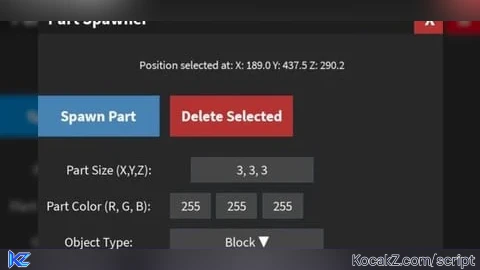
local Players = game:GetService("Players")
local UserInputService = game:GetService("UserInputService")
local player = Players.LocalPlayer
local mouse = player:GetMouse()

local ScreenGui = Instance.new("ScreenGui")
ScreenGui.Name = "PartSpawnerGui"
ScreenGui.ResetOnSpawn = false
ScreenGui.Parent = player:WaitForChild("PlayerGui")

local mainFrame = Instance.new("Frame")
mainFrame.Name = "MainFrame"
mainFrame.Position = UDim2.new(0.3, 0, 0.3, 0)
mainFrame.Size = UDim2.new(0, 420, 0, 380)
mainFrame.BackgroundColor3 = Color3.fromRGB(40, 40, 40)
mainFrame.BorderSizePixel = 0
mainFrame.Parent = ScreenGui

mainFrame.Active = true
mainFrame.Draggable = true

local titleBar = Instance.new("Frame")
titleBar.Name = "TitleBar"
titleBar.Size = UDim2.new(1, 0, 0, 30)
titleBar.BackgroundColor3 = Color3.fromRGB(30, 30, 30)
titleBar.Parent = mainFrame

local titleLabel = Instance.new("TextLabel")
titleLabel.Name = "TitleLabel"
titleLabel.Text = "Part Spawner"
titleLabel.Size = UDim2.new(0.9, 0, 1, 0)
titleLabel.BackgroundTransparency = 1
titleLabel.TextColor3 = Color3.new(1, 1, 1)
titleLabel.Font = Enum.Font.SourceSansBold
titleLabel.TextSize = 20
titleLabel.TextXAlignment = Enum.TextXAlignment.Left
titleLabel.Parent = titleBar
titleLabel.Position = UDim2.new(0.05, 0, 0, 0)

local closeButton = Instance.new("TextButton")
closeButton.Name = "CloseButton"
closeButton.Text = "X"
closeButton.Size = UDim2.new(0, 30, 1, 0)
closeButton.Position = UDim2.new(0.9, 0, 0, 0)
closeButton.BackgroundColor3 = Color3.fromRGB(180, 50, 50)
closeButton.TextColor3 = Color3.new(1, 1, 1)
closeButton.Font = Enum.Font.SourceSansBold
closeButton.TextSize = 22
closeButton.Parent = titleBar

closeButton.MouseButton1Click:Connect(function()
    ScreenGui:Destroy()
end)

local instructionLabel = Instance.new("TextLabel")
instructionLabel.Size = UDim2.new(1, -20, 0, 40)
instructionLabel.Position = UDim2.new(0, 10, 0, 40)
instructionLabel.TextColor3 = Color3.new(1, 1, 1)
instructionLabel.BackgroundTransparency = 1
instructionLabel.Text = "Click in the world to select position."
instructionLabel.Font = Enum.Font.SourceSans
instructionLabel.TextSize = 14
instructionLabel.TextWrapped = true
instructionLabel.Parent = mainFrame

local spawnButton = Instance.new("TextButton")
spawnButton.Name = "SpawnButton"
spawnButton.Text = "Spawn Part"
spawnButton.Size = UDim2.new(0, 120, 0, 40)
spawnButton.Position = UDim2.new(0, 10, 0, 90)
spawnButton.BackgroundColor3 = Color3.fromRGB(70, 130, 180)
spawnButton.TextColor3 = Color3.new(1, 1, 1)
spawnButton.Font = Enum.Font.SourceSansBold
spawnButton.TextSize = 18
spawnButton.Parent = mainFrame

local deleteButton = Instance.new("TextButton")
deleteButton.Name = "DeleteButton"
deleteButton.Text = "Delete Selected"
deleteButton.Size = UDim2.new(0, 120, 0, 40)
deleteButton.Position = UDim2.new(0, 140, 0, 90)
deleteButton.BackgroundColor3 = Color3.fromRGB(180, 50, 50)
deleteButton.TextColor3 = Color3.new(1, 1, 1)
deleteButton.Font = Enum.Font.SourceSansBold
deleteButton.TextSize = 18
deleteButton.Parent = mainFrame

local xyzSizeLabel = Instance.new("TextLabel")
xyzSizeLabel.Text = "Part Size (X,Y,Z):"
xyzSizeLabel.Size = UDim2.new(0, 140, 0, 25)
xyzSizeLabel.Position = UDim2.new(0, 10, 0, 150)
xyzSizeLabel.BackgroundTransparency = 1
xyzSizeLabel.TextColor3 = Color3.new(1, 1, 1)
xyzSizeLabel.Font = Enum.Font.SourceSans
xyzSizeLabel.TextSize = 16
xyzSizeLabel.Parent = mainFrame

local xyzSizeInput = Instance.new("TextBox")
xyzSizeInput.Text = "3, 3, 3"
xyzSizeInput.Size = UDim2.new(0, 120, 0, 25)
xyzSizeInput.Position = UDim2.new(0, 160, 0, 150)
xyzSizeInput.ClearTextOnFocus = false
xyzSizeInput.Parent = mainFrame
xyzSizeInput.BackgroundColor3 = Color3.fromRGB(70, 70, 70)
xyzSizeInput.TextColor3 = Color3.new(1, 1, 1)
xyzSizeInput.Font = Enum.Font.SourceSans
xyzSizeInput.TextSize = 16

local colorLabel = Instance.new("TextLabel")
colorLabel.Text = "Part Color (R, G, B):"
colorLabel.Size = UDim2.new(0, 120, 0, 25)
colorLabel.Position = UDim2.new(0, 10, 0, 185)
colorLabel.BackgroundTransparency = 1
colorLabel.TextColor3 = Color3.new(1, 1, 1)
colorLabel.Font = Enum.Font.SourceSans
colorLabel.TextSize = 16
colorLabel.Parent = mainFrame

local redInput = Instance.new("TextBox")
redInput.Text = "255"
redInput.Size = UDim2.new(0, 40, 0, 25)
redInput.Position = UDim2.new(0, 140, 0, 185)
redInput.ClearTextOnFocus = false
redInput.Parent = mainFrame
redInput.BackgroundColor3 = Color3.fromRGB(70, 70, 70)
redInput.TextColor3 = Color3.new(1, 1, 1)
redInput.Font = Enum.Font.SourceSans
redInput.TextSize = 16

local greenInput = Instance.new("TextBox")
greenInput.Text = "255"
greenInput.Size = UDim2.new(0, 40, 0, 25)
greenInput.Position = UDim2.new(0, 185, 0, 185)
greenInput.ClearTextOnFocus = false
greenInput.Parent = mainFrame
greenInput.BackgroundColor3 = Color3.fromRGB(70, 70, 70)
greenInput.TextColor3 = Color3.new(1, 1, 1)
greenInput.Font = Enum.Font.SourceSans
greenInput.TextSize = 16

local blueInput = Instance.new("TextBox")
blueInput.Text = "255"
blueInput.Size = UDim2.new(0, 40, 0, 25)
blueInput.Position = UDim2.new(0, 230, 0, 185)
blueInput.ClearTextOnFocus = false
blueInput.Parent = mainFrame
blueInput.BackgroundColor3 = Color3.fromRGB(70, 70, 70)
blueInput.TextColor3 = Color3.new(1, 1, 1)
blueInput.Font = Enum.Font.SourceSans
blueInput.TextSize = 16

local typeLabel = Instance.new("TextLabel")
typeLabel.Text = "Object Type:"
typeLabel.Size = UDim2.new(0, 120, 0, 25)
typeLabel.Position = UDim2.new(0, 10, 0, 220)
typeLabel.BackgroundTransparency = 1
typeLabel.TextColor3 = Color3.new(1, 1, 1)
typeLabel.Font = Enum.Font.SourceSans
typeLabel.TextSize = 16
typeLabel.Parent = mainFrame

local dropdown = Instance.new("TextButton")
dropdown.Name = "Dropdown"
dropdown.Text = "Block ▼"
dropdown.Size = UDim2.new(0, 150, 0, 25)
dropdown.Position = UDim2.new(0, 140, 0, 220)
dropdown.BackgroundColor3 = Color3.fromRGB(70, 70, 70)
dropdown.TextColor3 = Color3.new(1, 1, 1)
dropdown.Font = Enum.Font.SourceSans
dropdown.TextSize = 16
dropdown.Parent = mainFrame

local optionsFrame = Instance.new("Frame")
optionsFrame.Size = UDim2.new(0, 150, 0, 125)
optionsFrame.Position = UDim2.new(0, 140, 0, 245)
optionsFrame.BackgroundColor3 = Color3.fromRGB(50, 50, 50)
optionsFrame.Visible = false
optionsFrame.Parent = mainFrame

local objectTypes = {"Block", "Sphere", "Cylinder", "Wedge", "CornerWedge"}

local function createOption(text)
    local option = Instance.new("TextButton")
    option.Text = text
    option.Size = UDim2.new(1, 0, 0, 25)
    option.BackgroundColor3 = Color3.fromRGB(70, 70, 70)
    option.TextColor3 = Color3.new(1, 1, 1)
    option.Font = Enum.Font.SourceSans
    option.TextSize = 16
    option.Parent = optionsFrame
    option.MouseEnter:Connect(function()
        option.BackgroundColor3 = Color3.fromRGB(100, 100, 100)
    end)
    option.MouseLeave:Connect(function()
        option.BackgroundColor3 = Color3.fromRGB(70, 70, 70)
    end)
    return option
end

for i, objType in pairs(objectTypes) do
    local option = createOption(objType)
    option.Position = UDim2.new(0, 0, 0, (i - 1) * 25)
    option.MouseButton1Click:Connect(function()
        dropdown.Text = objType .. " ▼"
        optionsFrame.Visible = false
    end)
end

dropdown.MouseButton1Click:Connect(function()
    optionsFrame.Visible = not optionsFrame.Visible
end)

local staticLabel = Instance.new("TextLabel")
staticLabel.Text = "Static (No Physics):"
staticLabel.Size = UDim2.new(0, 140, 0, 25)
staticLabel.Position = UDim2.new(0, 10, 0, 290)
staticLabel.BackgroundTransparency = 1
staticLabel.TextColor3 = Color3.new(1, 1, 1)
staticLabel.Font = Enum.Font.SourceSans
staticLabel.TextSize = 16
staticLabel.Parent = mainFrame

local staticCheckbox = Instance.new("TextButton")
staticCheckbox.Name = "StaticCheckbox"
staticCheckbox.Text = "☐"
staticCheckbox.Size = UDim2.new(0, 35, 0, 25)
staticCheckbox.Position = UDim2.new(0, 160, 0, 290)
staticCheckbox.BackgroundColor3 = Color3.fromRGB(70, 70, 70)
staticCheckbox.TextColor3 = Color3.new(1, 1, 1)
staticCheckbox.Font = Enum.Font.SourceSans
staticCheckbox.TextSize = 20
staticCheckbox.Parent = mainFrame

local staticEnabled = false
staticCheckbox.MouseButton1Click:Connect(function()
    staticEnabled = not staticEnabled
    staticCheckbox.Text = staticEnabled and "☑" or "☐"
end)

local spawnPosition = nil
local deleteMode = false

local function parseNumber(text, min, max, default)
    local num = tonumber(text)
    if num == nil then return default end
    if num < min then return min end
    if num > max then return max end
    return num
end

local function parseVector3(text)
    local nums = {}
    for num in text:gmatch("([^,%s]+)") do
        table.insert(nums, tonumber(num))
    end
    if #nums ~= 3 then
        return nil
    end
    return Vector3.new(nums[1], nums[2], nums[3])
end

mouse.Button1Down:Connect(function()
    if deleteMode then return end
    local target = mouse.Target
    if target then
        spawnPosition = mouse.Hit.p
        instructionLabel.Text = "Position selected at: " ..
            string.format("X: %.1f Y: %.1f Z: %.1f", spawnPosition.X, spawnPosition.Y, spawnPosition.Z)
    end
end)

spawnButton.MouseButton1Click:Connect(function()
    if not spawnPosition then
        instructionLabel.Text = "Please click somewhere in the world first to select spawn position."
        return
    end

    local xyzSize = parseVector3(xyzSizeInput.Text)
    if not xyzSize then
        instructionLabel.Text = "Invalid XYZ size format. Use: x, y, z"
        return
    end

    local finalSize = Vector3.new(
        math.clamp(xyzSize.X, 1, 50),
        math.clamp(xyzSize.Y, 1, 50),
        math.clamp(xyzSize.Z, 1, 50)
    )

    local r = parseNumber(redInput.Text, 0, 255, 255) / 255
    local g = parseNumber(greenInput.Text, 0, 255, 255) / 255
    local b = parseNumber(blueInput.Text, 0, 255, 255) / 255
    local color = Color3.new(r, g, b)

    local objType = dropdown.Text:match("^(%w+)")

    local newPart
    if objType == "Sphere" then
        newPart = Instance.new("Part")
        newPart.Shape = Enum.PartType.Ball
    elseif objType == "Cylinder" then
        newPart = Instance.new("Part")
        newPart.Shape = Enum.PartType.Cylinder
    elseif objType == "Wedge" then
        newPart = Instance.new("WedgePart")
    elseif objType == "CornerWedge" then
        newPart = Instance.new("CornerWedgePart")
    else
        newPart = Instance.new("Part")
        newPart.Shape = Enum.PartType.Block
    end

    newPart.Anchored = staticEnabled
    newPart.Size = finalSize
    newPart.Position = spawnPosition
    newPart.BrickColor = BrickColor.new(color)
    newPart.Material = Enum.Material.Plastic
    newPart.Parent = workspace
    newPart.CanCollide = true
end)

deleteButton.MouseButton1Click:Connect(function()
    deleteMode = not deleteMode
    if deleteMode then
        deleteButton.Text = "Click parts to Delete"
        instructionLabel.Text = "Delete mode active. Click a part to delete."
    else
        deleteButton.Text = "Delete Selected"
        instructionLabel.Text = "Click in the world to select position."
    end
end)

mouse.Button1Down:Connect(function()
    if deleteMode then
        local target = mouse.Target
        if target and target.Parent == workspace and
           (target:IsA("Part") or target:IsA("WedgePart") or target:IsA("CornerWedgePart")) then
            target:Destroy()
            instructionLabel.Text = "Part deleted! Click in the world to select position."
            deleteMode = false
            deleteButton.Text = "Delete Selected"
        end
    end
end)

local toggleButton = Instance.new("TextButton")
toggleButton.Name = "ToggleButton"
toggleButton.Text = "Toggle GUI"
toggleButton.Size = UDim2.new(0, 80, 0, 30)
toggleButton.Position = UDim2.new(1, -85, 0, 5)
toggleButton.BackgroundColor3 = Color3.fromRGB(50, 50, 50)
toggleButton.TextColor3 = Color3.new(1, 1, 1)
toggleButton.Font = Enum.Font.SourceSansBold
toggleButton.TextSize = 16
toggleButton.Parent = ScreenGui

-- Make toggle button draggable
toggleButton.Active = true
toggleButton.Selectable = true

local draggingToggle = false
local dragInputToggle
local dragStartToggle
local startPosToggle

local function updateToggle(input)
    local delta = input.Position - dragStartToggle
    toggleButton.Position = UDim2.new(
        startPosToggle.X.Scale,
        startPosToggle.X.Offset + delta.X,
        startPosToggle.Y.Scale,
        startPosToggle.Y.Offset + delta.Y)
end

toggleButton.InputBegan:Connect(function(input)
    if input.UserInputType == Enum.UserInputType.MouseButton1 or
       input.UserInputType == Enum.UserInputType.Touch then
        draggingToggle = true
        dragStartToggle = input.Position
        startPosToggle = toggleButton.Position

        input.Changed:Connect(function()
            if input.UserInputState == Enum.UserInputState.End then
                draggingToggle = false
            end
        end)
    end
end)

toggleButton.InputChanged:Connect(function(input)
    if input.UserInputType == Enum.UserInputType.MouseMovement or
       input.UserInputType == Enum.UserInputType.Touch then
        dragInputToggle = input
    end
end)

UserInputService.InputChanged:Connect(function(input)
    if input == dragInputToggle and draggingToggle then
        updateToggle(input)
    end
end)

toggleButton.MouseButton1Click:Connect(function()
    -- Only toggle visibility if not dragging
    if not draggingToggle then
        mainFrame.Visible = not mainFrame.Visible
    end
end)


gpt user lol.