


KeylessUniversal
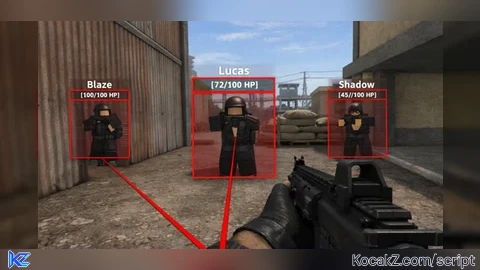
local ENABLED_BY_DEFAULT = true
local MAX_DISTANCE = 2500
local REFRESH_RATE = 1/60
local BOX_FILL_TRANSPARENCY = 0.8
local BOX_OUTLINE_THICKNESS = 2
local BOX_COLOR = Color3.fromRGB(255, 0, 0)
local BOX_FILL_COLOR = Color3.fromRGB(30, 30, 30)
local HEALTH_BAR_WIDTH = 6
local HEALTH_BAR_MARGIN = 4
local SNAPLINE_THICKNESS = 2
local NAME_TEXT_SIZE = 14
local SHOW_SKELETON = false
local TRACER_ORIGIN = "Bottom"

local Players = game:GetService("Players")
local RunService = game:GetService("RunService")
local UserInputService = game:GetService("UserInputService")

local LocalPlayer = Players.LocalPlayer
local PlayerGui = LocalPlayer:WaitForChild("PlayerGui")

if not PlayerGui then
    error("PlayerGui not available")
end

local rootGui = Instance.new("ScreenGui")
rootGui.Name = "ESP_RootGui_rx"
rootGui.ResetOnSpawn = false
rootGui.DisplayOrder = 9999
rootGui.Parent = PlayerGui

local UIs = {}

local function makeFrame(parent)
    local f = Instance.new("Frame")
    f.BackgroundTransparency = 1
    f.BorderSizePixel = 0
    f.AnchorPoint = Vector2.new(0,0)
    f.Position = UDim2.new(0,0,0,0)
    f.Size = UDim2.new(0,0,0,0)
    f.Parent = parent
    f.Visible = false
    return f
end

local function makeLabel(parent)
    local t = Instance.new("TextLabel")
    t.BackgroundTransparency = 1
    t.BorderSizePixel = 0
    t.AnchorPoint = Vector2.new(0.5,0.5)
    t.Position = UDim2.new(0.5,0,0,0)
    t.Size = UDim2.new(0,100,0,16)
    t.Font = Enum.Font.SourceSansBold
    t.TextSize = NAME_TEXT_SIZE
    t.TextScaled = true
    t.TextStrokeTransparency = 0
    t.TextColor3 = Color3.new(1,1,1)
    t.Parent = parent
    t.Visible = false
    return t
end

local function createPlayerUI(player)
    if player == LocalPlayer then return end
    if UIs[player] then return end

    local container = Instance.new("Frame")
    container.Name = "ESP_Container_" .. player.Name
    container.Size = UDim2.new(0,0,0,0)
    container.Position = UDim2.new(0,0,0,0)
    container.BackgroundTransparency = 1
    container.BorderSizePixel = 0
    container.Parent = rootGui
    container.Visible = false

    local boxFill = Instance.new("Frame")
    boxFill.Name = "BoxFill"
    boxFill.Size = UDim2.new(1,0,1,0)
    boxFill.Position = UDim2.new(0,0,0,0)
    boxFill.AnchorPoint = Vector2.new(0,0)
    boxFill.BackgroundColor3 = BOX_FILL_COLOR
    boxFill.BackgroundTransparency = BOX_FILL_TRANSPARENCY
    boxFill.BorderSizePixel = 0
    boxFill.Parent = container

    local topEdge = Instance.new("Frame")
    topEdge.Name = "TopEdge"
    topEdge.BackgroundColor3 = BOX_COLOR
    topEdge.BorderSizePixel = 0
    topEdge.Size = UDim2.new(1,0,0,BOX_OUTLINE_THICKNESS)
    topEdge.Position = UDim2.new(0,0,0,0)
    topEdge.Parent = container

    local bottomEdge = topEdge:Clone()
    bottomEdge.Name = "BottomEdge"
    bottomEdge.Position = UDim2.new(0,0,1, -BOX_OUTLINE_THICKNESS)
    bottomEdge.Parent = container

    local leftEdge = Instance.new("Frame")
    leftEdge.Name = "LeftEdge"
    leftEdge.BackgroundColor3 = BOX_COLOR
    leftEdge.BorderSizePixel = 0
    leftEdge.Size = UDim2.new(0,BOX_OUTLINE_THICKNESS,1,0)
    leftEdge.Position = UDim2.new(0,0,0,0)
    leftEdge.Parent = container

    local rightEdge = leftEdge:Clone()
    rightEdge.Name = "RightEdge"
    rightEdge.Position = UDim2.new(1, -BOX_OUTLINE_THICKNESS, 0, 0)
    rightEdge.Parent = container

    local nameLabel = makeLabel(container)
    nameLabel.Name = "NameLabel"
    nameLabel.AnchorPoint = Vector2.new(0.5,1)
    nameLabel.Position = UDim2.new(0.5,0,0, -6)

    local healthLabel = makeLabel(container)
    healthLabel.Name = "HealthLabel"
    healthLabel.AnchorPoint = Vector2.new(0.5,0)
    healthLabel.Position = UDim2.new(0.5,0,0,2)

    local healthOutline = Instance.new("Frame")
    healthOutline.Name = "HealthOutline"
    healthOutline.Size = UDim2.new(0, HEALTH_BAR_WIDTH + 2, 1, 0)
    healthOutline.Position = UDim2.new(0, -HEALTH_BAR_WIDTH - HEALTH_BAR_MARGIN - 2, 0, 0)
    healthOutline.AnchorPoint = Vector2.new(0,0)
    healthOutline.BackgroundColor3 = Color3.fromRGB(30,30,30)
    healthOutline.BorderSizePixel = 0
    healthOutline.Parent = container

    local healthFill = Instance.new("Frame")
    healthFill.Name = "HealthFill"
    healthFill.Size = UDim2.new(1, -2, 0, 10)
    healthFill.Position = UDim2.new(0,1,1, -11)
    healthFill.AnchorPoint = Vector2.new(0,1)
    healthFill.BackgroundColor3 = Color3.fromRGB(0,255,0)
    healthFill.BorderSizePixel = 0
    healthFill.Parent = healthOutline

    local snapline = Instance.new("Frame")
    snapline.Name = "Snapline_" .. player.Name
    snapline.Size = UDim2.new(0, 0, 0, SNAPLINE_THICKNESS)
    snapline.Position = UDim2.new(0,0,0,0)
    snapline.BorderSizePixel = 0
    snapline.BackgroundColor3 = BOX_COLOR
    snapline.Rotation = 0
    snapline.AnchorPoint = Vector2.new(0,0)
    snapline.Parent = rootGui
    snapline.Visible = false

    UIs[player] = {
        Container = container,
        BoxFill = boxFill,
        TopEdge = topEdge,
        BottomEdge = bottomEdge,
        LeftEdge = leftEdge,
        RightEdge = rightEdge,
        NameLabel = nameLabel,
        HealthLabel = healthLabel,
        HealthOutline = healthOutline,
        HealthFill = healthFill,
        Snapline = snapline,
    }
end

local function cleanup(player)
    local entry = UIs[player]
    if not entry then return end
    if entry.Snapline and entry.Snapline.Parent then entry.Snapline:Destroy() end
    if entry.Container and entry.Container.Parent then entry.Container:Destroy() end
    UIs[player] = nil
end

local function worldToScreenPoint(pos, camera)
    camera = camera or workspace.CurrentCamera
    local screenPoint, onScreen = camera:WorldToViewportPoint(pos)
    return Vector2.new(screenPoint.X, screenPoint.Y), onScreen, screenPoint.Z
end

local camera = workspace.CurrentCamera
local lastTick = 0
local function update(delta)
    if not ENABLED_BY_DEFAULT then return end
    if not camera or not camera.Parent then camera = workspace.CurrentCamera end

    local localChar = LocalPlayer.Character
    local localHrp = localChar and localChar:FindFirstChild("HumanoidRootPart")
    if not localHrp then
        for p, ui in pairs(UIs) do
            ui.Container.Visible = false
            ui.Snapline.Visible = false
        end
        return
    end

    for player, ui in pairs(UIs) do
        local char = player.Character
        local hrp = char and char:FindFirstChild("HumanoidRootPart")
        local hum = char and char:FindFirstChildOfClass("Humanoid")
        ui.Container.Visible = false
        ui.Snapline.Visible = false

        if char and hrp and hum and hum.Health > 0 then
            local dist = (localHrp.Position - hrp.Position).Magnitude
            if dist <= MAX_DISTANCE then
                local size = char:GetExtentsSize() or Vector3.new(2,5,1)
                local cf = hrp.CFrame
                local topWorld = cf * CFrame.new(0, size.Y/2, 0).p
                local bottomWorld = cf * CFrame.new(0, -size.Y/2, 0).p
                local leftWorld = cf * CFrame.new(-size.X/2, 0, 0).p
                local rightWorld = cf * CFrame.new(size.X/2, 0, 0).p

                local top2, _, topZ = worldToScreenPoint(topWorld, camera)
                local bottom2, _, bottomZ = worldToScreenPoint(bottomWorld, camera)
                local left2, _, _ = worldToScreenPoint(leftWorld, camera)
                local right2, _, _ = worldToScreenPoint(rightWorld, camera)

                if topZ > 0 and bottomZ > 0 then
                    local centerX = (left2.X + right2.X) / 2
                    local topY = top2.Y
                    local bottomY = bottom2.Y
                    local height = math.max(20, bottomY - topY)
                    local width = math.max(10, math.abs(right2.X - left2.X))
                    local tlX = centerX - width/2
                    local tlY = topY

                    ui.Container.Position = UDim2.new(0, math.floor(tlX), 0, math.floor(tlY))
                    ui.Container.Size = UDim2.new(0, math.ceil(width), 0, math.ceil(height))
                    ui.Container.Visible = true

                    ui.TopEdge.Size = UDim2.new(1,0,0, BOX_OUTLINE_THICKNESS)
                    ui.BottomEdge.Size = UDim2.new(1,0,0, BOX_OUTLINE_THICKNESS)
                    ui.LeftEdge.Size = UDim2.new(0, BOX_OUTLINE_THICKNESS, 1, 0)
                    ui.RightEdge.Size = UDim2.new(0, BOX_OUTLINE_THICKNESS, 1, 0)

                    ui.TopEdge.BackgroundColor3 = BOX_COLOR
                    ui.BottomEdge.BackgroundColor3 = BOX_COLOR
                    ui.LeftEdge.BackgroundColor3 = BOX_COLOR
                    ui.RightEdge.BackgroundColor3 = BOX_COLOR
                    ui.BoxFill.BackgroundColor3 = BOX_FILL_COLOR
                    ui.BoxFill.BackgroundTransparency = BOX_FILL_TRANSPARENCY

                    ui.NameLabel.Text = player.DisplayName or player.Name
                    ui.NameLabel.TextColor3 = BOX_COLOR
                    ui.NameLabel.Position = UDim2.new(0.5, 0, 0, -6)
                    ui.NameLabel.Visible = true

                    local health = math.max(0, math.floor(hum.Health))
                    local maxH = math.max(1, math.floor(hum.MaxHealth or 100))
                    ui.HealthLabel.Text = string.format("[%d/%d HP]", health, maxH)
                    ui.HealthLabel.TextColor3 = Color3.fromRGB(230,230,230)
                    ui.HealthLabel.Position = UDim2.new(0.5, 0, 0, 6)
                    ui.HealthLabel.Visible = true

                    local hbOutline = ui.HealthOutline
                    local hbFill = ui.HealthFill
                    hbOutline.Size = UDim2.new(0, HEALTH_BAR_WIDTH + 2, 1, 0)
                    hbOutline.Position = UDim2.new(0, -HEALTH_BAR_WIDTH - HEALTH_BAR_MARGIN - 2, 0, 0)
                    hbOutline.Visible = true

                    local percent = math.clamp(health / maxH, 0, 1)
                    local outlinePxHeight = ui.Container.AbsoluteSize.Y - 4
                    local fillPx = math.max(1, math.floor(outlinePxHeight * percent))
                    hbFill.Size = UDim2.new(1, -2, 0, fillPx)
                    hbFill.Position = UDim2.new(0, 1, 1, -2)

                    if percent > 0.66 then
                        hbFill.BackgroundColor3 = Color3.fromRGB(0,200,0)
                    elseif percent > 0.33 then
                        hbFill.BackgroundColor3 = Color3.fromRGB(255,200,0)
                    else
                        hbFill.BackgroundColor3 = Color3.fromRGB(255,50,50)
                    end
                    hbFill.Visible = true

                    local screenCenterX = camera.ViewportSize.X/2
                    local screenBottomY = camera.ViewportSize.Y
                    local targetX = centerX
                    local targetY = topY + height/2
                    local dx = targetX - screenCenterX
                    local dy = targetY - screenBottomY
                    local length = math.sqrt(dx*dx + dy*dy)

                    if length < 2 then
                        ui.Snapline.Visible = false
                    else
                        ui.Snapline.Size = UDim2.new(0, math.max(2, math.floor(length)), 0, SNAPLINE_THICKNESS)
                        ui.Snapline.Position = UDim2.new(0, screenCenterX, 0, screenBottomY - SNAPLINE_THICKNESS)
                        ui.Snapline.Rotation = math.deg(math.atan2(dy, dx))
                        ui.Snapline.BackgroundColor3 = BOX_COLOR
                        ui.Snapline.Visible = true
                    end
                end
            end
        end
    end
end

for _, p in ipairs(Players:GetPlayers()) do
    if p ~= LocalPlayer then
        createPlayerUI(p)
    end
end
Players.PlayerAdded:Connect(function(p)
    if p ~= LocalPlayer then
        createPlayerUI(p)
    end
end)
Players.PlayerRemoving:Connect(function(p)
    cleanup(p)
end)
Players.PlayerRemoving:Connect(function() end)

local accum = 0
RunService.RenderStepped:Connect(function(dt)
    accum = accum + dt
    if accum >= REFRESH_RATE then
        local ok, err = pcall(update, accum)
        if not ok then
            warn("ESP update error:", err)
        end
        accum = 0
    end
end)

print("GUI-based ESP loaded.")No comments yet for this script.


