

KeylessUniversal
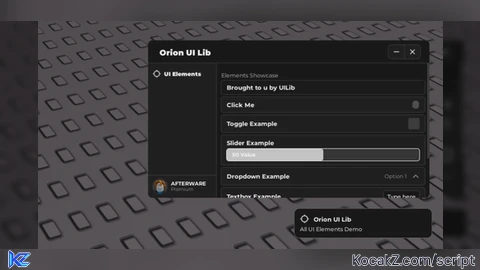
local OrionLib = loadstring(
    game:HttpGet(
        'https://raw.githubusercontent.com/DozeIsOkLol/UILibarySource/refs/heads/main/Orion'
    )
)()

-- Startup notification
OrionLib:MakeNotification({
    Name = 'Orion UI Lib',
    Content = 'All UI Elements Demo',
    Image = 'rbxassetid://4483345998',
    Time = 10,
})

-- Window
local Window = OrionLib:MakeWindow({
    Name = 'Orion UI Lib',
    HidePremium = false,
    SaveConfig = true,
    ConfigFolder = 'OrionUILib',
})

-- Test Tab
local TestTab = Window:MakeTab({
    Name = 'UI Elements',
    Icon = 'rbxassetid://4483345998',
    PremiumOnly = false,
})

local Section = TestTab:AddSection({
    Name = 'Elements Showcase',
})

-- Label
Section:AddLabel('Brought to u by UILib')

-- Button
Section:AddButton({
    Name = 'Click Me',
    Callback = function()
        print('Button pressed!')
    end,
})

-- Toggle
Section:AddToggle({
    Name = 'Toggle Example',
    Default = false,
    Callback = function(Value)
        print('Toggle is now: ', Value)
    end,
})

-- Slider
Section:AddSlider({
    Name = 'Slider Example',
    Min = 0,
    Max = 100,
    Default = 50,
    Color = Color3.fromRGB(255, 255, 255),
    Increment = 1,
    ValueName = 'Value',
    Callback = function(Value)
        print('Slider set to:', Value)
    end,
})

-- Dropdown
Section:AddDropdown({
    Name = 'Dropdown Example',
    Options = { 'Option 1', 'Option 2', 'Option 3' },
    Default = 'Option 1',
    Callback = function(Value)
        print('Selected:', Value)
    end,
})

-- Textbox
Section:AddTextbox({
    Name = 'Textbox Example',
    Default = 'Type here',
    TextDisappear = true,
    Callback = function(Value)
        print('Textbox input:', Value)
    end,
})

-- Color Picker
Section:AddColorpicker({
    Name = 'Color Example',
    Default = Color3.fromRGB(255, 0, 0),
    Callback = function(Value)
        print('Picked color:', Value)
    end,
})

-- Destroy button
Section:AddButton({
    Name = 'Destroy UI',
    Callback = function()
        OrionLib:Destroy()
    end,
})

-- Init UI
OrionLib:Init()![[KEYLESS] Moondiety Script | 17+ supported Games](https://scriptblox.com/images/sb/0-1753093706828.png)


But... We already have Orion ui library. 💔
@RedScripter102 yeah, im just uploading UI's i have
@faulty yeah man, ofc i am
@UILib ok