

KeylessUniversal
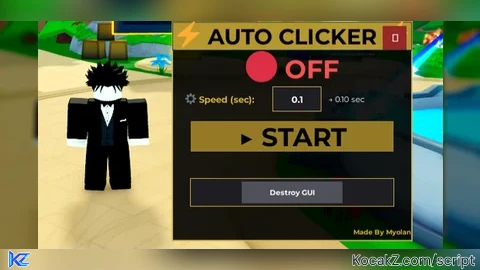
-- Made By Myolan
-- Auto Clicker with Custom Speed Input

local player = game.Players.LocalPlayer
local userInputService = game:GetService("UserInputService")

local clickEnabled = false
local clickDelay = 0.1
local clicking = false
local guiVisible = true

local screenGui = Instance.new("ScreenGui")
screenGui.Name = "AutoClickerGUI"
screenGui.ResetOnSpawn = false
screenGui.Parent = player:WaitForChild("PlayerGui")

local mainFrame = Instance.new("Frame")
mainFrame.Name = "MainFrame"
mainFrame.Size = UDim2.new(0, 350, 0, 320)
mainFrame.Position = UDim2.new(0.5, -175, 0.5, -160)
mainFrame.BackgroundColor3 = Color3.fromRGB(0, 0, 0)
mainFrame.BackgroundTransparency = 0.1
mainFrame.BorderSizePixel = 2
mainFrame.BorderColor3 = Color3.fromRGB(212, 175, 55)
mainFrame.Active = true
mainFrame.Draggable = true
mainFrame.Visible = true
mainFrame.Parent = screenGui

local title = Instance.new("TextLabel")
title.Size = UDim2.new(1, 0, 0, 40)
title.Position = UDim2.new(0, 0, 0, 0)
title.BackgroundColor3 = Color3.fromRGB(212, 175, 55)
title.BackgroundTransparency = 0.15
title.Text = "⚡ AUTO CLICKER ⚡"
title.TextColor3 = Color3.fromRGB(0, 0, 0)
title.TextScaled = true
title.Font = Enum.Font.GothamBold
title.Parent = mainFrame

local statusLabel = Instance.new("TextLabel")
statusLabel.Size = UDim2.new(1, 0, 0, 45)
statusLabel.Position = UDim2.new(0, 0, 0, 45)
statusLabel.BackgroundTransparency = 1
statusLabel.Text = "🔴 OFF"
statusLabel.TextColor3 = Color3.fromRGB(255, 80, 80)
statusLabel.TextScaled = true
statusLabel.Font = Enum.Font.GothamBold
statusLabel.Parent = mainFrame

local speedLabel = Instance.new("TextLabel")
speedLabel.Size = UDim2.new(0.35, 0, 0, 35)
speedLabel.Position = UDim2.new(0.05, 0, 0, 95)
speedLabel.BackgroundTransparency = 1
speedLabel.Text = "⚙️ Speed (sec):"
speedLabel.TextColor3 = Color3.fromRGB(212, 175, 55)
speedLabel.TextSize = 15
speedLabel.Font = Enum.Font.GothamBold
speedLabel.TextXAlignment = Enum.TextXAlignment.Left
speedLabel.Parent = mainFrame

local speedInput = Instance.new("TextBox")
speedInput.Size = UDim2.new(0.2, 0, 0, 35)
speedInput.Position = UDim2.new(0.42, 0, 0, 95)
speedInput.BackgroundColor3 = Color3.fromRGB(30, 30, 35)
speedInput.BorderColor3 = Color3.fromRGB(212, 175, 55)
speedInput.BorderSizePixel = 1
speedInput.Text = "0.1"
speedInput.TextColor3 = Color3.fromRGB(255, 255, 255)
speedInput.TextSize = 15
speedInput.Font = Enum.Font.GothamBold
speedInput.PlaceholderText = "0.1"
speedInput.Parent = mainFrame

local currentSpeedLabel = Instance.new("TextLabel")
currentSpeedLabel.Size = UDim2.new(0.3, 0, 0, 35)
currentSpeedLabel.Position = UDim2.new(0.65, 0, 0, 95)
currentSpeedLabel.BackgroundTransparency = 1
currentSpeedLabel.Text = "→ 0.10 sec"
currentSpeedLabel.TextColor3 = Color3.fromRGB(255, 255, 255)
currentSpeedLabel.TextSize = 13
currentSpeedLabel.Font = Enum.Font.Gotham
currentSpeedLabel.TextXAlignment = Enum.TextXAlignment.Left
currentSpeedLabel.Parent = mainFrame

speedInput.FocusLost:Connect(function(enterPressed)
    local num = tonumber(speedInput.Text)
    if num and num > 0 then
        clickDelay = num
        currentSpeedLabel.Text = "→ " .. string.format("%.2f", clickDelay) .. " sec"
    else
        speedInput.Text = tostring(clickDelay)
    end
end)

local toggleButton = Instance.new("TextButton")
toggleButton.Size = UDim2.new(0.85, 0, 0, 45)
toggleButton.Position = UDim2.new(0.075, 0, 0, 145)
toggleButton.BackgroundColor3 = Color3.fromRGB(212, 175, 55)
toggleButton.Text = "▶ START"
toggleButton.TextColor3 = Color3.fromRGB(0, 0, 0)
toggleButton.TextScaled = true
toggleButton.Font = Enum.Font.GothamBold
toggleButton.BorderSizePixel = 0
toggleButton.Parent = mainFrame

local closeButton = Instance.new("TextButton")
closeButton.Size = UDim2.new(0, 35, 0, 35)
closeButton.Position = UDim2.new(1, -42, 0, 5)
closeButton.BackgroundColor3 = Color3.fromRGB(150, 40, 40)
closeButton.Text = "✕"
closeButton.TextColor3 = Color3.fromRGB(255, 255, 255)
closeButton.TextSize = 18
closeButton.Font = Enum.Font.GothamBold
closeButton.BorderSizePixel = 0
closeButton.Parent = mainFrame

local miscFrame = Instance.new("Frame")
miscFrame.Size = UDim2.new(0.85, 0, 0, 40)
miscFrame.Position = UDim2.new(0.075, 0, 1, -90)
miscFrame.BackgroundColor3 = Color3.fromRGB(30, 30, 35)
miscFrame.BorderSizePixel = 1
miscFrame.BorderColor3 = Color3.fromRGB(212, 175, 55)
miscFrame.Parent = mainFrame

local destroyButton = Instance.new("TextButton")
destroyButton.Size = UDim2.new(0.5, 0, 0.8, 0)
destroyButton.Position = UDim2.new(0.25, 0, 0.1, 0)
destroyButton.BackgroundColor3 = Color3.fromRGB(80, 80, 90)
destroyButton.Text = "Destroy GUI"
destroyButton.TextColor3 = Color3.fromRGB(255, 255, 255)
destroyButton.TextSize = 12
destroyButton.Font = Enum.Font.GothamBold
destroyButton.BorderSizePixel = 0
destroyButton.Parent = miscFrame

local madeBy = Instance.new("TextLabel")
madeBy.Size = UDim2.new(1, 0, 0, 25)
madeBy.Position = UDim2.new(0, 0, 1, -25)
madeBy.BackgroundTransparency = 1
madeBy.Text = "Made By Myolan"
madeBy.TextColor3 = Color3.fromRGB(212, 175, 55)
madeBy.TextSize = 11
madeBy.Font = Enum.Font.GothamBold
madeBy.TextXAlignment = Enum.TextXAlignment.Right
madeBy.Parent = mainFrame

local avatarButton = Instance.new("ImageButton")
avatarButton.Name = "AvatarButton"
avatarButton.Size = UDim2.new(0, 70, 0, 70)
avatarButton.Position = UDim2.new(0.85, 0, 0.85, 0)
avatarButton.BackgroundColor3 = Color3.fromRGB(212, 175, 55)
avatarButton.BackgroundTransparency = 0.15
avatarButton.BorderSizePixel = 2
avatarButton.BorderColor3 = Color3.fromRGB(212, 175, 55)
avatarButton.Image = ""
avatarButton.Visible = false
avatarButton.Parent = screenGui

local avatarImage = Instance.new("ImageLabel")
avatarImage.Size = UDim2.new(1, -4, 1, -4)
avatarImage.Position = UDim2.new(0, 2, 0, 2)
avatarImage.BackgroundTransparency = 1
avatarImage.Image = ""
avatarImage.Parent = avatarButton

local statusRing = Instance.new("Frame")
statusRing.Size = UDim2.new(1, 0, 1, 0)
statusRing.BackgroundTransparency = 1
statusRing.BorderSizePixel = 3
statusRing.BorderColor3 = Color3.fromRGB(255, 0, 0)
statusRing.ZIndex = 2
statusRing.Parent = avatarButton

local function updateAvatar()
    local userId = player.UserId
    local headshotUrl = "https://www.roblox.com/headshot-thumbnail/image?userId=" .. userId .. "&width=200&height=200&format=png"
    avatarImage.Image = headshotUrl
    avatarButton.Image = headshotUrl
end

local function startClicking()
    if clicking then return end
    clicking = true
    while clickEnabled and clicking do
        mouse1click()
        task.wait(clickDelay)
    end
end

local function toggleClicker()
    clickEnabled = not clickEnabled
    if clickEnabled then
        statusLabel.Text = "🟢 ACTIVE"
        statusLabel.TextColor3 = Color3.fromRGB(100, 255, 100)
        toggleButton.BackgroundColor3 = Color3.fromRGB(200, 60, 60)
        toggleButton.Text = "⏹ STOP"
        toggleButton.TextColor3 = Color3.fromRGB(255, 255, 255)
        statusRing.BorderColor3 = Color3.fromRGB(0, 255, 0)
        task.spawn(startClicking)
    else
        statusLabel.Text = "🔴 OFF"
        statusLabel.TextColor3 = Color3.fromRGB(255, 80, 80)
        toggleButton.BackgroundColor3 = Color3.fromRGB(212, 175, 55)
        toggleButton.Text = "▶ START"
        toggleButton.TextColor3 = Color3.fromRGB(0, 0, 0)
        statusRing.BorderColor3 = Color3.fromRGB(255, 0, 0)
        clicking = false
    end
end

local function toggleGUI()
    guiVisible = not guiVisible
    mainFrame.Visible = guiVisible
    avatarButton.Visible = not guiVisible
    if clickEnabled then
        statusRing.BorderColor3 = Color3.fromRGB(0, 255, 0)
    else
        statusRing.BorderColor3 = Color3.fromRGB(255, 0, 0)
    end
end

local function destroyGUI()
    screenGui:Destroy()
end

closeButton.MouseButton1Click:Connect(toggleGUI)
closeButton.TouchTap:Connect(toggleGUI)

destroyButton.MouseButton1Click:Connect(destroyGUI)
destroyButton.TouchTap:Connect(destroyGUI)

avatarButton.MouseButton1Click:Connect(toggleGUI)
avatarButton.TouchTap:Connect(toggleGUI)

toggleButton.MouseButton1Click:Connect(toggleClicker)
toggleButton.TouchTap:Connect(toggleClicker)

userInputService.InputBegan:Connect(function(input, gameProcessed)
    if gameProcessed then return end
    if input.KeyCode == Enum.KeyCode.F then
        toggleClicker()
    end
end)

player.CharacterAdded:Connect(function()
    task.wait(0.5)
    updateAvatar()
end)

updateAvatar()
statusRing.BorderColor3 = Color3.fromRGB(255, 0, 0)

print("Auto Clicker Loaded - Made By Myolan")


how i can start use it?
press f or click start