


KeylessUniversal
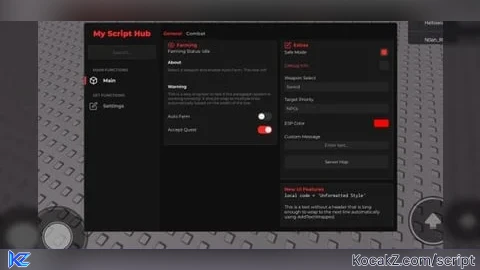
local LibraryUrl = "https://raw.githubusercontent.com/Vovabro46/trash/refs/heads/main/Test.lua"

local Success, Library = pcall(function()
    return loadstring(game:HttpGet(LibraryUrl))()
end)

if not Success or not Library then
    return warn("Error loading UI library!")
end

local Players = game:GetService("Players")
local LocalPlayer = Players.LocalPlayer
local RunService = game:GetService("RunService")
local UserInputService = game:GetService("UserInputService")
local Workspace = game:GetService("Workspace")

-- 1. Initialize the Window
Library:Watermark("My Script Name | v1.0")
local Window = Library:Window("My Script Hub")

-- Key System if you want
-- local Window = Library:Window("KeySystem", {
    -- Enabled = true,               -- Включить систему ключей?
    -- Key = "1234",                 -- Ключ для входа
   --  Link = "https://discord.gg/example", -- Ссылка на ключ
  --   SiteName = "Discord",         -- Название сайта
    -- SaveKey = true                -- Сохранять ключ (авто-вход в следующий раз)
--})

-- NEW! ADDED SUPPORT FOR LUCIDE ICONS!
-- go to https://lucide.dev/icons/ and find your icon
--after past "eye" or another
-- LET'S GO

-- 2. Create a Tab
-- Note: This library requires Tabs to contain SubTabs.
Window:Section("Main Functions")
local MainTab = Window:Tab("Main", "eye") -- also can without icon: local TestTab = Window:Tab("Your Page")
Window:Section("Set Functions")
local SettingsTab = Window:Tab("Settings", "7733771472" )

-- 3. Create a SubTab (Required hierarchy: Window -> Tab -> SubTab)
local GeneralPage = MainTab:SubTab("General")
local CombatPage = MainTab:SubTab("Combat")

-- 4. Create Groupboxes (Containers for items)
-- You can choose "Left" or "Right" side
-- You can also add collapsible groupbox: local FarmGroup = GeneralPage:Groupbox("Farming", "Left", "7733774602",  "true")
local FarmGroup = GeneralPage:Groupbox("Farming", "Left", "7733774602", "true")
local ExtraGroup = GeneralPage:Groupbox("Extras", "Right", "eye")
local CombatGroup = CombatPage:Groupbox("pvp Settings", "Left")
local NewUiGroup = GeneralPage:Groupbox("New UI Features", "Right")
local VisualsGroup = CombatPage:Groupbox("Visuals", "Right")

-------------------------------------------------------------------------
-- EXAMPLES OF FUNCTIONS
-------------------------------------------------------------------------

-- LABEL & PARAGRAPH
FarmGroup:AddLabel("Farming Status: Idle")
FarmGroup:AddParagraph({
    Title = "About",
    Content = "Select a weapon and enable Auto Farm. This text will automatically wrap if it gets too long for the line.",
    TextWrapped = true
})

-- 3. Example with very long text for testing
FarmGroup:AddParagraph({
    Title = "Warning",
    Content = "This is a very long text to test if the paragraph system is working correctly. It should wrap to multiple lines automatically based on the width of the box."
})

-- TOGGLES (The examples you asked for)
FarmGroup:AddToggle({
    Title = "Auto Farm",
    Default = false,
    Flag = "AutoFarmFlag", -- Unique identifier for configs
    Callback = function(Value)
        print("Auto Farm is now:", Value)
        -- Your Auto Farm Loop here
    end
})

FarmGroup:AddToggle({
    Title = "Accept Quest",
    Default = true,
    Callback = function(Value)
        print("Auto Quest:", Value)
    end
})

VisualsGroup:AddColorPicker({
    Title = "ESP Color",
    Default = Color3.fromRGB(255, 0, 0),
    Transparency = 0.2, -- Transparency (0.2 = 20%)
    Flag = "ESP_Color2",
    Callback = function(Color, Alpha)
        -- Color = Color3, Alpha = Number (0-1)
        -- Example usage:
        -- workspace.Part.Color = Color
        -- workspace.Part.Transparency = Alpha
        print("Visuals ESP Color changed to:", Color, "Alpha:", Alpha)
    end
})

CombatGroup:AddToggle({
    Title = "Auto Parry",
    Default = false,
    Callback = function(Value)
        print("Parry enabled:", Value)
    end
})

ExtraGroup:AddCheckbox({
    Title = "Safe Mode",
    Default = true,
    Description = "This is a new square checkbox. Different from Toggle in appearance.",
    Callback = function(Value)
        print("Safe Mode State:", Value)
    end
})

ExtraGroup:AddCheckbox({
    Title = "Debug Info",
    Default = false,
    Risky = true, -- Red text
    Callback = function(Value)
        print("Debug:", Value)
    end
})

CombatGroup:AddDropdown({
    Title = "ESP Mode",
    Values = {"Box", "Tracer", "Highlight"},
    Default = "Box",
    Description = "Choose the type of player highlighting.",
    Callback = function(Value)
        print("ESP Type:", Value)
    end
})

CombatGroup:AddTextbox({
    Title = "Spam Chat",
    Placeholder = "Enter message...",
    ClearOnFocus = true, -- Clears text when clicked for easy new input
    Description = "The message that will be sent to chat.",
    Callback = function(Value)
        print("Will spam:", Value)
    end
})

CombatGroup:AddToggle({
    Title = "Auto Attack",
    Default = false,
    Risky = true, -- Will make text red to warn user
    Description = "Automatically attacks players within 15 stud radius.", -- Pop-up description
    Callback = function(Value)
        print("Auto Attack:", Value)
    end
})

CombatGroup:AddSlider({
    Title = "WalkSpeed",
    Min = 16,
    Max = 250,
    Default = 16,
    Rounding = 0,
    Suffix = " studs", -- will show "16 studs", "50 studs" etc.
    Description = "Changes character movement speed.",
    Callback = function(Value)
        if LocalPlayer.Character and LocalPlayer.Character:FindFirstChild("Humanoid") then
            LocalPlayer.Character.Humanoid.WalkSpeed = Value
        end
    end
})

-- SLIDER
CombatGroup:AddSlider({
    Title = "Attack Distance",
    Min = 1,
    Max = 50,
    Default = 15,
    Rounding = 1, -- Decimals (0 = integer)
    Callback = function(Value)
        print("Distance set to:", Value)
    end
})

-- DROPDOWN (Single)
ExtraGroup:AddDropdown({
    Title = "Weapon Select",
    Values = {"Sword", "Bow", "Magic", "Loll", "Lool", "Loool", "Looool", "Lol"},
    Default = "Sword",
    Multi = false,
    Callback = function(Value)
        print("Selected Weapon:", Value)
    end
})

-- DROPDOWN (Multi)
ExtraGroup:AddDropdown({
    Title = "Target Priority",
    Values = {"Players", "NPCs", "Bosses", "Lol", "Lol", "Lol", "Loll"},
    Default = {"NPCs"}, -- Note: Must be a table for Multi
    Multi = true,
    Callback = function(Value)
        -- Value returns a table like {Players = true, NPCs = false}
        for k, v in pairs(Value) do
            if v then print(k, "is selected") end
        end
    end
})

-- COLOR PICKER (Updated)
ExtraGroup:AddColorPicker({
    Title = "ESP Color",
    Default = Color3.fromRGB(255, 0, 0),
    Transparency = 0, -- Optional: transparency value
    Flag = "Extra_ESP_Color",
    Callback = function(Color, Alpha)
        print("New Color:", Color, "Alpha:", Alpha)
    end
})

-- KEYBIND
CombatGroup:AddKeybind({
    Title = "Kill Aura Bind",
    Default = Enum.KeyCode.R,
    Callback = function(Key)
        print("Key pressed:", Key)
    end
})

-- TEXTBOX
ExtraGroup:AddTextbox({
    Title = "Custom Message",
    Placeholder = "Enter text...",
    Callback = function(Text)
        print("User typed:", Text)
    end
})

-- BUTTON
ExtraGroup:AddButton({
    Title = "Server Hop",
    Callback = function()
        print("Hopping server...")
    end
})

-- CONFIG SYSTEM (Built into the library)
local SettingsPage = SettingsTab:SubTab("Menu Settings")

-- >> LEFT SIDE: CONFIG MANAGER <<
local ConfigGroup = SettingsPage:Groupbox("Configuration", "Left")
local Configs = Library:GetConfigs()

ConfigGroup:AddDropdown({
    Title = "Select Config",
    Values = Configs,
    Default = "default",
    Multi = false,
    Flag = "SelectedConfig",
    Callback = function(Value) end
})

ConfigGroup:AddTextbox({
    Title = "New Config Name",
    Placeholder = "Type name...",
    Flag = "NewConfigName",
    Callback = function(Value) end
})

ConfigGroup:AddButton({
    Title = "Load Selected",
    Callback = function()
        local name = Library.Flags["SelectedConfig"]
        if name then
            Library:LoadConfig(name)
        else
            Library:Notify("Error", "No config selected!", 3)
        end
    end
})

ConfigGroup:AddButton({
    Title = "Save Config",
    Callback = function()
        local name = Library.Flags["NewConfigName"]
        if name == "" or name == nil then name = Library.Flags["SelectedConfig"] end
        if name and name ~= "" then
            Library:SaveConfig(name)
            local NewList = Library:GetConfigs()
            if Library.Items["SelectedConfig"] then Library.Items["SelectedConfig"].Refresh(NewList) end
        else
            Library:Notify("Error", "Enter a name or select a config!", 3)
        end
    end
})

ConfigGroup:AddButton({
    Title = "Delete Config",
    Callback = function()
        local name = Library.Flags["SelectedConfig"]
        if name and name ~= "" then
            -- 1. Delete file
            Library:DeleteConfig(name)

            -- 2. Update list in Dropdown
            local NewList = Library:GetConfigs()
            if Library.Items["SelectedConfig"] then
                Library.Items["SelectedConfig"].Refresh(NewList)
            end

            -- 3. Reset selected config to avoid errors
            Library.Flags["SelectedConfig"] = nil
        else
            Library:Notify("Error", "Select a config first!", 3)
        end
    end
})

ConfigGroup:AddButton({
    Title = "Refresh List",
    Callback = function()
        local NewList = Library:GetConfigs()
        if Library.Items["SelectedConfig"] then Library.Items["SelectedConfig"].Refresh(NewList) end
        Library:Notify("Configs", "List refreshed", 2)
    end
})

-- >> RIGHT SIDE: THEME MANAGER <<
local ThemeGroup = SettingsPage:Groupbox("Theme Manager", "Right")

-- [[ ADDED: Theme selection ]]
local ThemeList = {}
if Library.ThemePresets then
    for ThemeName, _ in pairs(Library.ThemePresets) do
        table.insert(ThemeList, ThemeName)
    end
    table.sort(ThemeList)

    ThemeGroup:AddDropdown({
        Title = "Preset Theme",
        Values = ThemeList,
        Default = "Default",
        Multi = false,
        Callback = function(Value)
            if Library.SetTheme then
                Library:SetTheme(Value)
            else
                warn("Library is outdated, SetTheme missing!")
            end
        end
    })
    ThemeGroup:AddSeparator()
end

ThemeGroup:AddLabel("Custom Colors")

ThemeGroup:AddColorPicker({
    Title = "Accent Color",
    Default = Library.Theme.Accent,
    Transparency = 0.9,
    Flag = "ThemeAccent",
    Callback = function(Color, Alpha)
        Library:UpdateTheme("Accent", Color)
    end
})

ThemeGroup:AddColorPicker({
    Title = "Background",
    Default = Library.Theme.Background,
    Transparency = 0.9,
    Flag = "ThemeBackground",
    Callback = function(Color, Alpha)
        Library:UpdateTheme("Background", Color)
    end
})

ThemeGroup:AddColorPicker({
    Title = "Sidebar",
    Default = Library.Theme.Sidebar,
    Transparency = 0.9,
    Flag = "ThemeSidebar",
    Callback = function(Color, Alpha)
        Library:UpdateTheme("Sidebar", Color)
    end
})

ThemeGroup:AddColorPicker({
    Title = "Groupbox",
    Default = Library.Theme.Groupbox,
    Transparency = 0.9, -- Optional: transparency value
    Flag = "ThemeGroupbox",
    Callback = function(Color, Alpha)
        Library:UpdateTheme("Groupbox", Color)
    end
})

ThemeGroup:AddLabel("Text & Outlines")

ThemeGroup:AddColorPicker({
    Title = "Main Text",
    Default = Library.Theme.Text,
    Transparency = 0.9,
    Flag = "ThemeText",
    Callback = function(Color, Alpha)
        Library:UpdateTheme("Text", Color)
    end
})

ThemeGroup:AddColorPicker({
    Title = "Secondary Text",
    Default = Library.Theme.TextDark,
    Transparency = 0.9,
    Flag = "ThemeTextDark",
    Callback = function(Color, Alpha)
        Library:UpdateTheme("TextDark", Color)
    end
})

ThemeGroup:AddColorPicker({
    Title = "Outline/Stroke",
    Default = Library.Theme.Outline,
    Transparency = 0.9,
    Flag = "ThemeOutline",
    Callback = function(Color, Alpha)
        Library:UpdateTheme("Outline", Color)
    end
})

ThemeGroup:AddButton({
    Title = "Reset Theme to Default",
    Callback = function()
        Library:SetTheme("Default") -- Use function to reset to default theme
        Library:Notify("Theme", "Colors reset to default", 2)
    end
})

-- >> RIGHT SIDE (Below Theme Manager) : UI SETTINGS <<
local UISettings = SettingsPage:Groupbox("UI Settings", "Right")

UISettings:AddToggle({
    Title = "Show Watermark",
    Default = true,
    Flag = "WatermarkToggle",
    Callback = function(Value)
        Library.WatermarkSettings.Enabled = Value
    end
})

UISettings:AddTextbox({
    Title = "Watermark Text",
    Default = "RedOnyx V17", -- or your name
    Placeholder = "Enter text...",
    ClearOnFocus = false,
    Callback = function(Value)
        Library.WatermarkSettings.Text = Value
    end
})

-- Button to quickly unload interface (useful)
UISettings:AddButton({
    Title = "Unload / Destroy UI",
    Callback = function()
        local gui = game:GetService("CoreGui"):FindFirstChild("RedOnyx")
        local water = game:GetService("CoreGui"):FindFirstChild("Watermark")
        if gui then gui:Destroy() end
        if water then water:Destroy() end
    end
})

NewUiGroup:AddTextUnformatted("local code = 'Unformatted Style'") -- Monospace font
NewUiGroup:AddTextWrapped("This is a text without a header that is long enough to wrap to the next line automatically using AddTextWrapped.")

-- 3. SEPARATOR & SPACING (Separators and spacing)
NewUiGroup:AddSpacing(5) -- 5 pixel spacing
NewUiGroup:AddSeparator() -- Line
NewUiGroup:AddSpacing(5)

-- 4. LABEL TEXT (Key: Value)
NewUiGroup:AddLabelText("User:", LocalPlayer.Name)
NewUiGroup:AddLabelText("Rank:", "VIP Member")
NewUiGroup:AddLabelText("Status:", "Active")

NewUiGroup:AddSeparator()

-- 5. BULLET TEXT & ALIGNMENT (Lists and indentation)
NewUiGroup:AddBulletText("Safe Mode Enabled")
NewUiGroup:AddBulletText("Anti-Cheat Bypassed")

NewUiGroup:AddNewLine() -- Empty line (similar to Spacing)
NewUiGroup:AlignTextToFramePadding("Text aligned with padding") -- Text with small left padding

if NewUiGroup:TreeNode("Folder: Player Scripts") then
    NewUiGroup:AddLabel("Inside the folder!")
    NewUiGroup:AddToggle({
        Title = "Anti-Aim",
        Default = false
    })
    NewUiGroup:AddButton({
        Title = "Reset Character",
        Callback = function() end
    })
    NewUiGroup:TreePop() -- Exit folder
end

-- 2. Nested TreeNode (Folder in folder)
if NewUiGroup:TreeNode("Folder: Nested Example") then
    NewUiGroup:AddLabel("Level 1")

    if NewUiGroup:TreeNode("Sub-Folder (Level 2)") then
        NewUiGroup:AddLabel("We are deeper now")

        NewUiGroup:AddSlider({
            Title = "Deep Value",
            Default = 50,
            Max = 100
        })

        NewUiGroup:TreePop() -- Close Sub-Folder
    end

    NewUiGroup:TreePop() -- Close Nested Example
end

-- 3. / Header (Styled TreeNode with background)
-- SetNextItemOpen(true) will force it to be open when script starts
NewUiGroup:SetNextItemOpen(true)
if NewUiGroup:CollapsingHeader("Visuals (Header)") then
    NewUiGroup:AddCheckbox({Title = "Box ESP", Default = true})
    NewUiGroup:AddCheckbox({Title = "Tracers", Default = false})
    NewUiGroup:AddColorPicker({
        Title = "Chams Color",
        Default = Color3.new(1,1,1),
        Callback = function(Color, Alpha)
            print("Chams Color changed:", Color, "Alpha:", Alpha)
        end
    })

    NewUiGroup:TreePop()
end

NewUiGroup:AddProgressBar({
    Title = "Health Bar",
    Default = 0.75, -- From 0 to 1 (0% - 100%)
    Flag = "MyProgressBar",
    Description = "Shows health status (example)"
})

-- 2. RADIO BUTTON (Single selection from list, alternative to Dropdown)
NewUiGroup:AddRadioButton({
    Title = "Target Mode",
    Options = {"Nearest", "Lowest HP", "Mouse Position"}, -- Options
    Default = "Nearest",
    Flag = "TargetRadio",
    Callback = function(Value)
        print("Radio Selection changed to:", Value)
    end
})

-- 3. GRAPH (Chart)
-- Useful for displaying FPS, Ping or currency amounts
NewUiGroup:AddGraph({
    Title = "FPS Monitor",
    Values = {0.1, 0.4, 0.3, 0.8, 0.5, 0.9, 0.2}, -- Initial data (from 0 to 1, or scalable)
    Height = 50, -- Graph window height
    Flag = "FPSGraph",
    Description = "Real-time data visualization"
})

-- 4. IMAGE (Picture)
-- Can be used for logos or item previews
VisualsGroup:AddImage({
    Image = "rbxassetid://18216647696", -- Replace with your ID
    Size = UDim2.new(0, 100, 0, 100), -- Size
    Description = "Script logo"
})

-- 5. IMAGE BUTTON (Image button)
VisualsGroup:AddImageButton({
    Image = "rbxassetid://7733771472", -- Eye icon (example)
    Size = UDim2.new(0, 40, 0, 40),
    Description = "Click me!",
    Callback = function()
        print("Image Button Pressed!")
        Library:Notify("Action", "Image Button Clicked", 2)
    end
})

-- Vertical slider (for example, for adjusting jump height or FOV)
NewUiGroup:AddVerticalSlider({
    Title = "Height",
    Min = 0,
    Max = 100,
    Default = 50,
    Height = 120, -- Height of the element itself in pixels
    Flag = "VSlider1",
    Callback = function(v)
        print("Vertical Value:", v)
    end
})

-- Selectable element - like a button but maintains pressed state
NewUiGroup:AddSelectable({
    Title = "Silent Aim (Selectable)",
    Default = false,
    Flag = "Selectable1",
    Callback = function(val)
        print("Selected:", val)
    end
})

-------------------------------------------------------------------------
-- LIVE UPDATE EXAMPLE (FOR GRAPH AND BAR)
-------------------------------------------------------------------------
task.spawn(function()
    while true do
        wait(0.5)

        -- Update Progress Bar (HP change simulation)
        if Library.Items["MyProgressBar"] then
            local newHealth = math.random(30, 100) / 100
            Library.Items["MyProgressBar"].Set(newHealth)
        end

        -- Update Graph (FPS simulation)
        if Library.Items["FPSGraph"] then
            local graphData = {}
            for i = 1, 20 do -- Generate 20 points
                table.insert(graphData, math.random(1, 100))
            end
            Library.Items["FPSGraph"].Set(graphData)
        end
    end
end)![[KEYLESS] Moondiety Script | 17+ supported Games](https://scriptblox.com/images/sb/0-1753093706828.png)


W cool, can u add minimizer and change size with mouse scroll like obsidian?
@Wpl0o0lqW ok
@Dinas2 WWWWWW
@Wpl0o0lqW done
discord server? i uses onyx check my scripts
@zynoxiss7 not done yet
@Dinas2 just send once done thanks
@zynoxiss7 i fix problem with screen big in mobile
@zynoxiss7 ty for use onyx
Could you please add APIs such as, is it running?, how many instances are open?, and other details on getting the position/size. I can do it myself, but it will be problematic to redo it every time I update.
@2kr3kn ok
Nice but can u maks a docs
@cobru ok, I do
@Dinas2 yes please when done add it into the script description
@cobru ok
@cobru docs done
@Dinas2 ty
if you a experienced lua scripter and wanna join ona project for potenital funds send me a message me on discord at @okden6
AI Slop
Prob claude or gemini or chatgpt