
Key Required VerifiedUniversal
local Nova = loadstring(game:HttpGet("https://pastefy.app/hO2hQ15y/raw"))()

-- Create main window with title
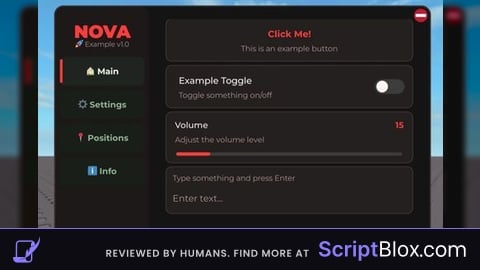
local Window = Nova:CreateWindow("NOVA", "🚀 Example v1.0")

--------------------------------------------------------------------
-- MAIN TAB - Buttons and Toggles
--------------------------------------------------------------------
local MainTab = Window:CreateTab("🏠 Main")

-- Button example
Nova:CreateButton(MainTab, "Click Me!", "This is an example button", Nova.Theme.Accent, function()
    Nova:SendNotification("Button clicked!", Nova.Theme.Green)
end)

-- Toggle example
local toggleState = false
Nova:CreateToggle(MainTab, "Example Toggle", "Toggle something on/off", function(state)
    toggleState = state
    Nova:SendNotification("Toggle: " .. tostring(state), state and Nova.Theme.Green or Nova.Theme.Red)
end)

-- Slider example
Nova:CreateSlider(MainTab, "Volume", "Adjust the volume level", 0, 100, 50, function(value)
    print("Volume set to:", value)
end)

-- Text box example
Nova:CreateTextBox(MainTab, "Enter text...", "Type something and press Enter", function(text)
    Nova:SendNotification("You typed: " .. text, Nova.Theme.Yellow)
end)

--------------------------------------------------------------------
-- SETTINGS TAB - Configuration
--------------------------------------------------------------------
local SettingsTab = Window:CreateTab("⚙️ Settings")

-- Theme selector
local themeNames = {}
for name, _ in pairs(Nova.Themes) do
    table.insert(themeNames, name)
end

for _, themeName in ipairs(themeNames) do
    Nova:CreateButton(SettingsTab, "Theme: " .. themeName, "Switch to " .. themeName .. " theme", Nova.Theme.Accent, function()
        Nova.Config.CurrentTheme = themeName
        Nova.Theme = Nova.Themes[themeName]
        Nova:SaveConfig()
        Nova:SendNotification("Theme changed to " .. themeName .. " (Reload to apply)", Nova.Theme.Green)
    end)
end

-- Keybind changer
local keys = {"RightControl", "RightShift", "Insert", "F1", "F2", "F3"}
for _, keyName in ipairs(keys) do
    Nova:CreateButton(SettingsTab, "Key: " .. keyName, "Set menu key to " .. keyName, Nova.Theme.Yellow, function()
        Nova.Config.MenuKey = keyName
        Nova:SaveConfig()
        Nova:SendNotification("Menu key set to " .. keyName, Nova.Theme.Green)
    end)
end

-- Save/Load config
Nova:CreateButton(SettingsTab, "💾 Save Config", "Save current configuration", Nova.Theme.Green, function()
    Nova:SaveConfig()
    Nova:SendNotification("Configuration saved!", Nova.Theme.Green)
end)

Nova:CreateButton(SettingsTab, "📂 Load Config", "Load saved configuration", Nova.Theme.Accent, function()
    Nova:LoadConfig()
    Nova:SendNotification("Configuration loaded!", Nova.Theme.Accent)
end)

--------------------------------------------------------------------
-- POSITIONS TAB - Location Saving
--------------------------------------------------------------------
local PositionsTab = Window:CreateTab("📍 Positions")

-- Position name input
local posNameBox = Nova:CreateTextBox(PositionsTab, "Position name...", "Enter a name for this location", function() end)

-- Save current position
Nova:CreateButton(PositionsTab, "💾 Save Position", "Save your current location", Nova.Theme.Green, function()
    if posNameBox.Text ~= "" and Player.Character and Player.Character:FindFirstChild("HumanoidRootPart") then
        local root = Player.Character.HumanoidRootPart
        local positions = Nova:GetGamePositions()
        table.insert(positions, {
            Name = posNameBox.Text,
            X = root.Position.X,
            Y = root.Position.Y,
            Z = root.Position.Z
        })
        Nova:SavePositions()
        posNameBox.Text = ""
        Nova:SendNotification("Position saved!", Nova.Theme.Green)
    else
        Nova:SendNotification("Enter a name first!", Nova.Theme.Red)
    end
end)

-- Display saved positions
local function refreshPositionList()
    local positions = Nova:GetGamePositions()

    for i, pos in ipairs(positions) do
        Nova:CreateButton(PositionsTab, pos.Name, "X: " .. math.floor(pos.X) .. " Y: " .. math.floor(pos.Y) .. " Z: " .. math.floor(pos.Z), Nova.Theme.Purple, function()
            if Player.Character and Player.Character:FindFirstChild("HumanoidRootPart") then
                Player.Character:SetPrimaryPartCFrame(CFrame.new(pos.X, pos.Y, pos.Z))
                Nova:SendNotification("Teleported to " .. pos.Name, Nova.Theme.Green)
            end
        end)
    end
end

refreshPositionList()

--------------------------------------------------------------------
-- INFO TAB - Information Display
--------------------------------------------------------------------
local InfoTab = Window:CreateTab("ℹ️ Info")

-- Create info labels using text boxes as placeholders
local function createInfoLabel(parent, labelText, initialValue)
    local box = Nova:CreateTextBox(parent, "", labelText, function() end)
    box.Text = initialValue
    box.TextEditable = false
    return box
end

createInfoLabel(InfoTab, "User:", Player.Name)
createInfoLabel(InfoTab, "User ID:", tostring(Player.UserId))
createInfoLabel(InfoTab, "Game:", game:GetService("MarketplaceService"):GetProductInfo(game.PlaceId).Name or "Unknown")
createInfoLabel(InfoTab, "Place ID:", tostring(game.PlaceId))
createInfoLabel(InfoTab, "Job ID:", game.JobId)

-- Copy Job ID button
Nova:CreateButton(InfoTab, "📋 Copy Job ID", "Copy server Job ID to clipboard", Nova.Theme.Accent, function()
    setclipboard(game.JobId)
    Nova:SendNotification("Job ID copied!", Nova.Theme.Green)
end)

--------------------------------------------------------------------
-- INITIAL NOTIFICATION
--------------------------------------------------------------------
task.wait(1)
Nova:SendNotification("Nova Library Loaded!", Nova.Theme.Green)No comments yet for this script.