

KeylessUniversal
-- Services
local Players = game:GetService("Players")
local UIS = game:GetService("UserInputService")
local player = Players.LocalPlayer

-- ScreenGui
local gui = Instance.new("ScreenGui")
gui.Name = "BookGui"
gui.ResetOnSpawn = false
gui.Parent = player:WaitForChild("PlayerGui")

-- 📕 Book Button
local bookButton = Instance.new("TextButton")
bookButton.Size = UDim2.new(0, 60, 0, 60)
bookButton.Position = UDim2.new(0, 20, 0.5, -30)
bookButton.Text = "📕"
bookButton.TextSize = 36
bookButton.BackgroundColor3 = Color3.fromRGB(200, 200, 200)
bookButton.BorderSizePixel = 0
bookButton.Parent = gui

-- Book Frame
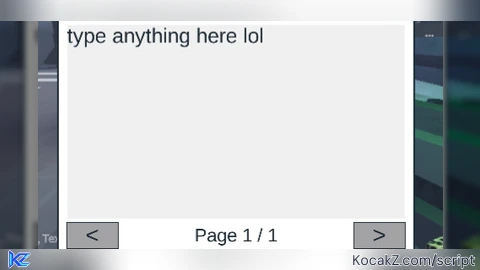
local bookFrame = Instance.new("Frame")
bookFrame.Size = UDim2.new(0, 420, 0, 320)
bookFrame.Position = UDim2.new(0.5, -210, 0.5, -160)
bookFrame.BackgroundColor3 = Color3.fromRGB(255, 255, 255)
bookFrame.Visible = false
bookFrame.Parent = gui
bookFrame.BorderSizePixel = 2

-- Top Bar
local topBar = Instance.new("Frame")
topBar.Size = UDim2.new(1, 0, 0, 35)
topBar.BackgroundColor3 = Color3.fromRGB(230, 230, 230)
topBar.Parent = bookFrame
topBar.BorderSizePixel = 0

-- Close Button
local closeButton = Instance.new("TextButton")
closeButton.Size = UDim2.new(0, 30, 0, 30)
closeButton.Position = UDim2.new(1, -35, 0, 2)
closeButton.Text = "X"
closeButton.TextSize = 18
closeButton.BackgroundColor3 = Color3.fromRGB(255, 80, 80)
closeButton.TextColor3 = Color3.fromRGB(255, 255, 255)
closeButton.BorderSizePixel = 0
closeButton.Parent = topBar

-- TextBox
local textBox = Instance.new("TextBox")
textBox.Size = UDim2.new(1, -20, 1, -90)
textBox.Position = UDim2.new(0, 10, 0, 45)
textBox.ClearTextOnFocus = false
textBox.MultiLine = true
textBox.TextWrapped = true
textBox.TextXAlignment = Enum.TextXAlignment.Left
textBox.TextYAlignment = Enum.TextYAlignment.Top
textBox.TextSize = 18
textBox.PlaceholderText = "Write anything here..."
textBox.BackgroundColor3 = Color3.fromRGB(240, 240, 240)
textBox.BorderSizePixel = 0
textBox.Parent = bookFrame

-- Page Buttons
local prevButton = Instance.new("TextButton")
prevButton.Size = UDim2.new(0, 60, 0, 30)
prevButton.Position = UDim2.new(0, 10, 1, -40)
prevButton.Text = "<"
prevButton.TextSize = 20
prevButton.Parent = bookFrame

local nextButton = Instance.new("TextButton")
nextButton.Size = UDim2.new(0, 60, 0, 30)
nextButton.Position = UDim2.new(1, -70, 1, -40)
nextButton.Text = ">"
nextButton.TextSize = 20
nextButton.Parent = bookFrame

local pageLabel = Instance.new("TextLabel")
pageLabel.Size = UDim2.new(0, 120, 0, 30)
pageLabel.Position = UDim2.new(0.5, -60, 1, -40)
pageLabel.BackgroundTransparency = 1
pageLabel.TextSize = 16
pageLabel.Parent = bookFrame

-- Page Data
local pages = {""}
local currentPage = 1

local function updatePage()
	textBox.Text = pages[currentPage]
	pageLabel.Text = "Page " .. currentPage .. " / " .. #pages
end

textBox:GetPropertyChangedSignal("Text"):Connect(function()
	pages[currentPage] = textBox.Text
end)

nextButton.MouseButton1Click:Connect(function()
	pages[currentPage] = textBox.Text
	currentPage += 1
	if not pages[currentPage] then
		pages[currentPage] = ""
	end
	updatePage()
end)

prevButton.MouseButton1Click:Connect(function()
	if currentPage > 1 then
		pages[currentPage] = textBox.Text
		currentPage -= 1
		updatePage()
	end
end)

-- Open / Close
bookButton.MouseButton1Click:Connect(function()
	bookFrame.Visible = true
	updatePage()
end)

closeButton.MouseButton1Click:Connect(function()
	bookFrame.Visible = false
end)

-- 📕 DRAGGING LOGIC
local dragging = false
local dragStart, startPos

bookButton.InputBegan:Connect(function(input)
	if input.UserInputType == Enum.UserInputType.MouseButton1
	or input.UserInputType == Enum.UserInputType.Touch then
		dragging = true
		dragStart = input.Position
		startPos = bookButton.Position
	end
end)

UIS.InputChanged:Connect(function(input)
	if dragging and (input.UserInputType == Enum.UserInputType.MouseMovement
	or input.UserInputType == Enum.UserInputType.Touch) then
		local delta = input.Position - dragStart
		bookButton.Position = UDim2.new(
			startPos.X.Scale,
			startPos.X.Offset + delta.X,
			startPos.Y.Scale,
			startPos.Y.Offset + delta.Y
		)
	end
end)

UIS.InputEnded:Connect(function(input)
	if input.UserInputType == Enum.UserInputType.MouseButton1
	or input.UserInputType == Enum.UserInputType.Touch then
		dragging = false
	end
end)No comments yet for this script.


