
![Sir Meme Hub | [16 GAMES] [$14.99 LIFETIME] | FARM/AIM/ESP](https://scriptblox.com/images/script/-1-1791044877945.webp)
Key Required VerifiedUniversal
--[[
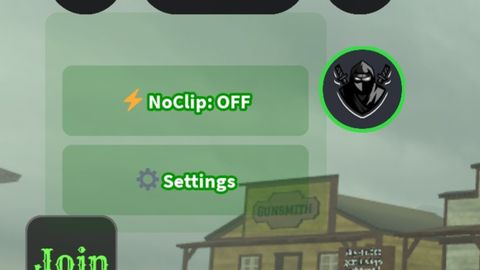
    ZHEKA22K NoClip System
    RIP ZHub - Eternal Memory
    Made with passion, no AI used
    Version: 2.3K
]]

local Plr = game:GetService("Players").LocalPlayer
local Gui = Plr:WaitForChild("PlayerGui")
local Tween = game:GetService("TweenService")
local Run = game:GetService("RunService")
local UIS = game:GetService("UserInputService")

local NoClipOn = false
local NClipConn
local CurrentColor = "light blue"
local SettingsOpen = false
local Dragging = false
local DragStartPos, MainBoxStartPos

-- Color palette (без повторок)
local Colors = {
    ["light blue"] = {Main = Color3.fromRGB(70, 130, 180), Stroke = Color3.fromRGB(100, 150, 200)},
    ["deep green"] = {Main = Color3.fromRGB(0, 100, 0), Stroke = Color3.fromRGB(0, 150, 0)},
    ["dark"] = {Main = Color3.fromRGB(40, 40, 40), Stroke = Color3.fromRGB(80, 80, 80)},
    ["white"] = {Main = Color3.fromRGB(220, 220, 220), Stroke = Color3.fromRGB(255, 255, 255)},
    ["dark yellow"] = {Main = Color3.fromRGB(204, 153, 0), Stroke = Color3.fromRGB(255, 204, 0)},
    ["dark purple"] = {Main = Color3.fromRGB(75, 0, 130), Stroke = Color3.fromRGB(120, 0, 200)},
    ["red"] = {Main = Color3.fromRGB(200, 0, 0), Stroke = Color3.fromRGB(255, 50, 50)},
    ["light red"] = {Main = Color3.fromRGB(255, 100, 100), Stroke = Color3.fromRGB(255, 150, 150)},
    ["light yellow"] = {Main = Color3.fromRGB(255, 255, 100), Stroke = Color3.fromRGB(255, 255, 150)}
}

-- Create cool loading screen
local function ShowZHekaLegacyScreen()
    local ZScreen = Instance.new("ScreenGui")
    ZScreen.Name = "ZhekaLoadScreen"
    ZScreen.Parent = Gui
    ZScreen.ZIndexBehavior = Enum.ZIndexBehavior.Sibling

    local BlackBg = Instance.new("Frame")
    BlackBg.Name = "Blackout"
    BlackBg.Size = UDim2.new(1, 0, 1, 0)
    BlackBg.Position = UDim2.new(0, 0, 0, 0)
    BlackBg.BackgroundColor3 = Color3.new(0, 0, 0)
    BlackBg.BorderSizePixel = 0
    BlackBg.ZIndex = 999
    BlackBg.Parent = ZScreen

    local LegacyText = Instance.new("TextLabel")
    LegacyText.Name = "LegacyTag"
    LegacyText.Size = UDim2.new(1, -40, 0, 80)
    LegacyText.Position = UDim2.new(0, 20, 0.4, -40)
    LegacyText.BackgroundTransparency = 1
    LegacyText.Text = "ZHEKA22K\n(RIP ZHub)"
    LegacyText.TextColor3 = Color3.fromRGB(255, 50, 50)
    LegacyText.Font = Enum.Font.SourceSansBold
    LegacyText.TextSize = 32
    LegacyText.TextStrokeTransparency = 0.7
    LegacyText.TextStrokeColor3 = Color3.fromRGB(100, 0, 0)
    LegacyText.ZIndex = 1000
    LegacyText.Parent = ZScreen

    local VersionText = Instance.new("TextLabel")
    VersionText.Name = "VersionTag"
    VersionText.Size = UDim2.new(1, -40, 0, 30)
    VersionText.Position = UDim2.new(0, 20, 0.6, 0)
    VersionText.BackgroundTransparency = 1
    VersionText.Text = "Legacy NoClip v2.3K"
    VersionText.TextColor3 = Color3.fromRGB(200, 200, 200)
    VersionText.Font = Enum.Font.SourceSans
    VersionText.TextSize = 18
    VersionText.ZIndex = 1000
    VersionText.Parent = ZScreen

    -- Appearance animation
    LegacyText.TextTransparency = 1
    VersionText.TextTransparency = 1

    spawn(function()
        wait(0.5)

        -- Flickering effect like in old games
        for i = 1, 3 do
            Tween:Create(LegacyText, TweenInfo.new(0.3), {TextTransparency = 0.3}):Play()
            wait(0.4)
            Tween:Create(LegacyText, TweenInfo.new(0.3), {TextTransparency = 0}):Play()
            wait(0.4)
        end

        Tween:Create(VersionText, TweenInfo.new(1.5), {TextTransparency = 0}):Play()

        wait(2.5)

        -- Disappearance with style
        Tween:Create(LegacyText, TweenInfo.new(1.2), {TextTransparency = 1}):Play()
        Tween:Create(VersionText, TweenInfo.new(1.2), {TextTransparency = 1}):Play()
        Tween:Create(BlackBg, TweenInfo.new(1.5), {BackgroundTransparency = 1}):Play()

        wait(1.6)
        ZScreen:Destroy()
    end)
end

-- Update UI colors
local function UpdateUIColors(noClipBtn, btnStroke, settingsBtn, settingsStroke, mainBox, settingsPanel)
    if NoClipOn then
        noClipBtn.BackgroundColor3 = Color3.fromRGB(50, 200, 100)
        btnStroke.Color = Color3.fromRGB(50, 200, 100)
    else
        noClipBtn.BackgroundColor3 = Colors[CurrentColor].Main
        btnStroke.Color = Colors[CurrentColor].Stroke
    end

    settingsBtn.BackgroundColor3 = Colors[CurrentColor].Main
    settingsStroke.Color = Colors[CurrentColor].Stroke
    mainBox.BackgroundColor3 = Colors[CurrentColor].Main

    if settingsPanel then
        settingsPanel.BackgroundColor3 = Colors[CurrentColor].Main
    end
end

-- Create ZHub style UI with settings
local function CreateZHekaUI()
    local MainGui = Instance.new("ScreenGui")
    MainGui.Name = "ZhekaNoClipUI"
    MainGui.Parent = Gui
    MainGui.ResetOnSpawn = false
    MainGui.ZIndexBehavior = Enum.ZIndexBehavior.Sibling

    -- Drag handle for moving the UI
    local DragHandle = Instance.new("Frame")
    DragHandle.Name = "DragHandle"
    DragHandle.Size = UDim2.new(1, 0, 0, 25)
    DragHandle.Position = UDim2.new(0, 0, 0, 0)
    DragHandle.BackgroundTransparency = 1
    DragHandle.BorderSizePixel = 0

    -- Main container
    local MainBox = Instance.new("Frame")
    MainBox.Name = "MainPanel"
    MainBox.Size = UDim2.new(0, 160, 0, 125)
    MainBox.Position = UDim2.new(0, 50, 0, 50)
    MainBox.BackgroundColor3 = Colors[CurrentColor].Main
    MainBox.BackgroundTransparency = 0.9
    MainBox.BorderSizePixel = 0
    MainBox.Parent = MainGui
    MainBox.ZIndex = 2

    local Corner = Instance.new("UICorner")
    Corner.CornerRadius = UDim.new(0, 8)
    Corner.Parent = MainBox

    -- Add drag handle to main box
    DragHandle.Parent = MainBox

    -- Make UI draggable
    local function UpdateDrag(input)
        if not Dragging then return end

        local delta = input.Position - DragStartPos
        MainBox.Position = UDim2.new(
            MainBoxStartPos.X.Scale,
            MainBoxStartPos.X.Offset + delta.X,
            MainBoxStartPos.Y.Scale,
            MainBoxStartPos.Y.Offset + delta.Y
        )
    end

    DragHandle.InputBegan:Connect(function(input)
        if input.UserInputType == Enum.UserInputType.MouseButton1 or input.UserInputType == Enum.UserInputType.Touch then
            Dragging = true
            DragStartPos = input.Position
            MainBoxStartPos = MainBox.Position

            input.Changed:Connect(function()
                if input.UserInputState == Enum.UserInputState.End then
                    Dragging = false
                end
            end)
        end
    end)

    DragHandle.InputChanged:Connect(function(input)
        if input.UserInputType == Enum.UserInputType.MouseMovement or input.UserInputType == Enum.UserInputType.Touch then
            UpdateDrag(input)
        end
    end)

    UIS.InputChanged:Connect(function(input)
        if Dragging and (input.UserInputType == Enum.UserInputType.MouseMovement or input.UserInputType == Enum.UserInputType.Touch) then
            UpdateDrag(input)
        end
    end)

    -- NoClip button
    local NoClipBtn = Instance.new("TextButton")
    NoClipBtn.Name = "NoClipSwitch"
    NoClipBtn.Size = UDim2.new(1, -20, 0, 40)
    NoClipBtn.Position = UDim2.new(0, 10, 0, 30)
    NoClipBtn.BackgroundColor3 = Colors[CurrentColor].Main
    NoClipBtn.BackgroundTransparency = 0.8
    NoClipBtn.Text = "⚡ NoClip: OFF"
    NoClipBtn.TextColor3 = Color3.fromRGB(255, 255, 255)
    NoClipBtn.Font = Enum.Font.SourceSansBold
    NoClipBtn.TextSize = 14
    NoClipBtn.BorderSizePixel = 0
    NoClipBtn.ZIndex = 3
    NoClipBtn.Parent = MainBox

    local BtnCorner = Instance.new("UICorner")
    BtnCorner.CornerRadius = UDim.new(0, 6)
    BtnCorner.Parent = NoClipBtn

    local BtnStroke = Instance.new("UIStroke")
    BtnStroke.Color = Colors[CurrentColor].Stroke
    BtnStroke.Thickness = 1.5
    BtnStroke.Parent = NoClipBtn

    -- Settings button
    local SettingsBtn = Instance.new("TextButton")
    SettingsBtn.Name = "SettingsButton"
    SettingsBtn.Size = UDim2.new(1, -20, 0, 40)
    SettingsBtn.Position = UDim2.new(0, 10, 0, 75)
    SettingsBtn.BackgroundColor3 = Colors[CurrentColor].Main
    SettingsBtn.BackgroundTransparency = 0.8
    SettingsBtn.Text = "⚙️ Settings"
    SettingsBtn.TextColor3 = Color3.fromRGB(255, 255, 255)
    SettingsBtn.Font = Enum.Font.SourceSansBold
    SettingsBtn.TextSize = 14
    SettingsBtn.BorderSizePixel = 0
    SettingsBtn.ZIndex = 3
    SettingsBtn.Parent = MainBox

    local SettingsCorner = Instance.new("UICorner")
    SettingsCorner.CornerRadius = UDim.new(0, 6)
    SettingsCorner.Parent = SettingsBtn

    local SettingsStroke = Instance.new("UIStroke")
    SettingsStroke.Color = Colors[CurrentColor].Stroke
    SettingsStroke.Thickness = 1.5
    SettingsStroke.Parent = SettingsBtn

    -- Settings panel (initially hidden)
    local SettingsPanel = Instance.new("Frame")
    SettingsPanel.Name = "SettingsPanel"
    SettingsPanel.Size = UDim2.new(0, 0, 0, 0)
    SettingsPanel.Position = UDim2.new(0, 170, 0, 0)
    SettingsPanel.BackgroundColor3 = Colors[CurrentColor].Main
    SettingsPanel.BackgroundTransparency = 0.9
    SettingsPanel.BorderSizePixel = 0
    SettingsPanel.ClipsDescendants = true
    SettingsPanel.ZIndex = 2
    SettingsPanel.Parent = MainBox

    local SettingsPanelCorner = Instance.new("UICorner")
    SettingsPanelCorner.CornerRadius = UDim.new(0, 8)
    SettingsPanelCorner.Parent = SettingsPanel

    local Title = Instance.new("TextLabel")
    Title.Name = "Title"
    Title.Size = UDim2.new(1, -20, 0, 30)
    Title.Position = UDim2.new(0, 10, 0, 10)
    Title.BackgroundTransparency = 1
    Title.Text = "Color Settings"
    Title.TextColor3 = Color3.fromRGB(255, 255, 255)
    Title.Font = Enum.Font.SourceSansBold
    Title.TextSize = 16
    Title.ZIndex = 3
    Title.Parent = SettingsPanel

    -- Color selection grid
    local colorGrid = Instance.new("UIGridLayout")
    colorGrid.CellSize = UDim2.new(0, 40, 0, 40)
    colorGrid.CellPadding = UDim2.new(0, 5, 0, 5)
    colorGrid.HorizontalAlignment = Enum.HorizontalAlignment.Center
    colorGrid.SortOrder = Enum.SortOrder.LayoutOrder
    colorGrid.Parent = SettingsPanel

    -- Create color buttons
    local colorNames = {"light blue", "deep green", "dark", "white", "dark yellow", "dark purple", "red", "light red", "light yellow"}

    for i, colorName in ipairs(colorNames) do
        local colorBtn = Instance.new("TextButton")
        colorBtn.Name = colorName
        colorBtn.LayoutOrder = i
        colorBtn.Size = UDim2.new(0, 40, 0, 40)
        colorBtn.BackgroundColor3 = Colors[colorName].Main
        colorBtn.BorderSizePixel = 0
        colorBtn.Text = ""
        colorBtn.ZIndex = 3
        colorBtn.Parent = SettingsPanel

        local colorCorner = Instance.new("UICorner")
        colorCorner.CornerRadius = UDim.new(0, 6)
        colorCorner.Parent = colorBtn

        local colorStroke = Instance.new("UIStroke")
        colorStroke.Color = Color3.fromRGB(255, 255, 255)
        colorStroke.Thickness = colorName == CurrentColor and 3 or 2
        colorStroke.Parent = colorBtn

        colorBtn.MouseButton1Click:Connect(function()
            CurrentColor = colorName
            UpdateUIColors(NoClipBtn, BtnStroke, SettingsBtn, SettingsStroke, MainBox, SettingsPanel)

            -- Update all color buttons to show selection
            for _, btn in ipairs(SettingsPanel:GetChildren()) do
                if btn:IsA("TextButton") and btn.Name ~= "" then
                    if btn.Name == CurrentColor then
                        btn.UIStroke.Thickness = 3
                    else
                        btn.UIStroke.Thickness = 2
                    end
                end
            end
        end)

        colorBtn.MouseEnter:Connect(function()
            Tween:Create(colorBtn, TweenInfo.new(0.2), {
                BackgroundTransparency = 0.5
            }):Play()
        end)

        colorBtn.MouseLeave:Connect(function()
            Tween:Create(colorBtn, TweenInfo.new(0.2), {
                BackgroundTransparency = 0
            }):Play()
        end)
    end

    -- Button effects
    NoClipBtn.MouseEnter:Connect(function()
        Tween:Create(NoClipBtn, TweenInfo.new(0.2), {
            BackgroundTransparency = 0.7
        }):Play()
    end)

    NoClipBtn.MouseLeave:Connect(function()
        Tween:Create(NoClipBtn, TweenInfo.new(0.2), {
            BackgroundTransparency = 0.8
        }):Play()
    end)

    SettingsBtn.MouseEnter:Connect(function()
        Tween:Create(SettingsBtn, TweenInfo.new(0.2), {
            BackgroundTransparency = 0.7
        }):Play()
    end)

    SettingsBtn.MouseLeave:Connect(function()
        Tween:Create(SettingsBtn, TweenInfo.new(0.2), {
            BackgroundTransparency = 0.8
        }):Play()
    end)

    NoClipBtn.MouseButton1Down:Connect(function()
        Tween:Create(NoClipBtn, TweenInfo.new(0.1), {Size = UDim2.new(0.95, -20, 0, 38)}):Play()
    end)

    NoClipBtn.MouseButton1Up:Connect(function()
        Tween:Create(NoClipBtn, TweenInfo.new(0.1), {Size = UDim2.new(1, -20, 0, 40)}):Play()
    end)

    SettingsBtn.MouseButton1Down:Connect(function()
        Tween:Create(SettingsBtn, TweenInfo.new(0.1), {Size = UDim2.new(0.95, -20, 0, 38)}):Play()
    end)

    SettingsBtn.MouseButton1Up:Connect(function()
        Tween:Create(SettingsBtn, TweenInfo.new(0.1), {Size = UDim2.new(1, -20, 0, 40)}):Play()
    end)

    -- Toggle settings panel with animation
    SettingsBtn.MouseButton1Click:Connect(function()
        SettingsOpen = not SettingsOpen

        if SettingsOpen then
            -- Open animation
            SettingsPanel.Visible = true
            Tween:Create(SettingsPanel, TweenInfo.new(0.3, Enum.EasingStyle.Quad, Enum.EasingDirection.Out), {
                Size = UDim2.new(0, 200, 0, 250)
            }):Play()
        else
            -- Close animation
            Tween:Create(SettingsPanel, TweenInfo.new(0.3, Enum.EasingStyle.Quad, Enum.EasingDirection.Out), {
                Size = UDim2.new(0, 0, 0, 0)
            }):Play()
            wait(0.3)
            SettingsPanel.Visible = false
        end
    end)

    -- Close settings when clicking outside
    local function onInputBegan(input, processed)
        if not processed and input.UserInputType == Enum.UserInputType.MouseButton1 and SettingsOpen then
            local mousePos = UIS:GetMouseLocation()
            local settingsAbsPos = SettingsPanel.AbsolutePosition
            local settingsSize = SettingsPanel.AbsoluteSize

            if not (mousePos.X >= settingsAbsPos.X and mousePos.X <= settingsAbsPos.X + settingsSize.X and
                   mousePos.Y >= settingsAbsPos.Y and mousePos.Y <= settingsAbsPos.Y + settingsSize.Y) then

                SettingsOpen = false
                Tween:Create(SettingsPanel, TweenInfo.new(0.3, Enum.EasingStyle.Quad, Enum.EasingDirection.Out), {
                    Size = UDim2.new(0, 0, 0, 0)
                }):Play()
                wait(0.3)
                SettingsPanel.Visible = false
            end
        end
    end

    UIS.InputBegan:Connect(onInputBegan)

    -- NoClip function
    local function ToggleNoClip()
        NoClipOn = not NoClipOn
        local Char = Plr.Character

        if not Char then return end

        if NoClipOn then
            NoClipBtn.Text = "🔥 NoClip: ON"

            local function KillCollisions()
                for _, part in ipairs(Char:GetDescendants()) do
                    if part:IsA("BasePart") then
                        part.CanCollide = false
                    end
                end
            end

            KillCollisions()
            NClipConn = Run.Stepped:Connect(KillCollisions)

        else
            NoClipBtn.Text = "⚡ NoClip: OFF"

            if NClipConn then
                NClipConn:Disconnect()
                NClipConn = nil
            end

            for _, part in ipairs(Char:GetDescendants()) do
                if part:IsA("BasePart") then
                    part.CanCollide = true
                end
            end
        end

        UpdateUIColors(NoClipBtn, BtnStroke, SettingsBtn, SettingsStroke, MainBox, SettingsPanel)
    end

    NoClipBtn.MouseButton1Click:Connect(ToggleNoClip)

    -- Smooth appearance after loading
    MainBox.BackgroundTransparency = 1
    NoClipBtn.BackgroundTransparency = 1
    NoClipBtn.TextTransparency = 1
    BtnStroke.Transparency = 1
    SettingsBtn.BackgroundTransparency = 1
    SettingsBtn.TextTransparency = 1
    SettingsStroke.Transparency = 1
    DragHandle.BackgroundTransparency = 1

    spawn(function()
        wait(4.5)
        Tween:Create(MainBox, TweenInfo.new(1), {BackgroundTransparency = 0.9}):Play()
        Tween:Create(NoClipBtn, TweenInfo.new(1), {BackgroundTransparency = 0.8}):Play()
        Tween:Create(NoClipBtn, TweenInfo.new(1), {TextTransparency = 0}):Play()
        Tween:Create(BtnStroke, TweenInfo.new(1), {Transparency = 0}):Play()
        Tween:Create(SettingsBtn, TweenInfo.new(1), {BackgroundTransparency = 0.8}):Play()
        Tween:Create(SettingsBtn, TweenInfo.new(1), {TextTransparency = 0}):Play()
        Tween:Create(SettingsStroke, TweenInfo.new(1), {Transparency = 0}):Play()
        Tween:Create(DragHandle, TweenInfo.new(1), {BackgroundTransparency = 1}):Play()
    end)

    return MainGui
end

-- System startup
spawn(function()
    ShowZHekaLegacyScreen()
    wait(1.5)
    CreateZHekaUI()
end)

-- Respawn handler
Plr.CharacterAdded:Connect(function()
    if NoClipOn then
        NoClipOn = false
        if NClipConn then
            NClipConn:Disconnect()
            NClipConn = nil
        end
    end
end)

-- Console message
print("ZHEKA22K NoClip System v2.3K loaded!")
print("RIP ZHub - Eternal memory to the legend")

W Bro Keep it up❤️
@Brbrbbrbrbr Thx!
So update.
ZHub is again coming!
W but its buggy