
Key Required VerifiedUniversal
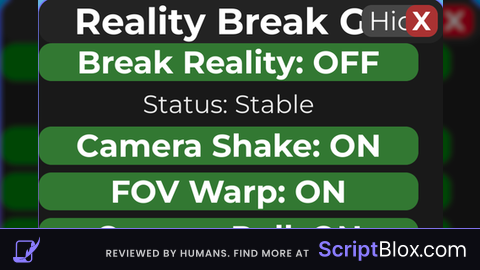
--// Reality Break GUI
--// Put this LocalScript in StarterPlayerScripts or StarterGui
--// Local-only visual effects

local Players = game:GetService("Players")
local RunService = game:GetService("RunService")
local UserInputService = game:GetService("UserInputService")

local player = Players.LocalPlayer

--========================
-- EDIT HERE
--========================
local guiTitle = "Reality Break GUI"
local mainButtonName = "Break Reality"
local smallButtonName = "Open"

local effectSpeed = 6      -- higher = faster effects
local shakeAmount = 0.25   -- camera shake strength
local fovAmount = 12       -- FOV warp strength
local rollAmount = 4       -- camera roll strength

local shakeEnabled = true
local fovEnabled = true
local rollEnabled = true
local glitchEnabled = true
--========================

local realityOn = false
local realityLoopToken = 0
local storedFOV = 70

local glitchMessages = {
	"/// REALITY ERROR ///",
	"!!! DIMENSION SHIFT !!!",
	"%%% BREAKING FRAME %%%",
	"[[[ SIGNAL LOST ]]]",
	"<<< GLITCH ACTIVE >>>"
}

local screenGui = Instance.new("ScreenGui")
screenGui.Name = "RealityBreakGui"
screenGui.ResetOnSpawn = false
screenGui.IgnoreGuiInset = true
screenGui.Parent = player:WaitForChild("PlayerGui")

local mainFrame = Instance.new("Frame")
mainFrame.Size = UDim2.new(0, 320, 0, 390)
mainFrame.Position = UDim2.new(0.5, -160, 0.5, -195)
mainFrame.BackgroundColor3 = Color3.fromRGB(25, 25, 25)
mainFrame.BorderSizePixel = 0
mainFrame.Active = true
mainFrame.ClipsDescendants = true
mainFrame.Parent = screenGui

local mainCorner = Instance.new("UICorner")
mainCorner.CornerRadius = UDim.new(0, 12)
mainCorner.Parent = mainFrame

local mainStroke = Instance.new("UIStroke")
mainStroke.Thickness = 1
mainStroke.Transparency = 0.4
mainStroke.Color = Color3.fromRGB(120, 80, 255)
mainStroke.Parent = mainFrame

local titleBar = Instance.new("TextLabel")
titleBar.Size = UDim2.new(1, 0, 0, 35)
titleBar.BackgroundColor3 = Color3.fromRGB(35, 35, 35)
titleBar.BorderSizePixel = 0
titleBar.Text = guiTitle
titleBar.TextColor3 = Color3.fromRGB(255, 255, 255)
titleBar.TextScaled = true
titleBar.Font = Enum.Font.GothamBold
titleBar.Parent = mainFrame

local titleCorner = Instance.new("UICorner")
titleCorner.CornerRadius = UDim.new(0, 12)
titleCorner.Parent = titleBar

local hideButton = Instance.new("TextButton")
hideButton.Size = UDim2.new(0, 60, 0, 25)
hideButton.Position = UDim2.new(1, -65, 0, 5)
hideButton.BackgroundColor3 = Color3.fromRGB(70, 70, 70)
hideButton.Text = "Hide"
hideButton.TextColor3 = Color3.fromRGB(255, 255, 255)
hideButton.TextScaled = true
hideButton.Font = Enum.Font.Gotham
hideButton.BorderSizePixel = 0
hideButton.Parent = mainFrame

local hideCorner = Instance.new("UICorner")
hideCorner.CornerRadius = UDim.new(0, 8)
hideCorner.Parent = hideButton

local closeButton = Instance.new("TextButton")
closeButton.Size = UDim2.new(0, 25, 0, 25)
closeButton.Position = UDim2.new(1, -30, 0, 5)
closeButton.BackgroundColor3 = Color3.fromRGB(170, 50, 50)
closeButton.Text = "X"
closeButton.TextColor3 = Color3.fromRGB(255, 255, 255)
closeButton.TextScaled = true
closeButton.Font = Enum.Font.GothamBold
closeButton.BorderSizePixel = 0
closeButton.Parent = mainFrame

local closeCorner = Instance.new("UICorner")
closeCorner.CornerRadius = UDim.new(0, 8)
closeCorner.Parent = closeButton

local scrollFrame = Instance.new("ScrollingFrame")
scrollFrame.Position = UDim2.new(0, 0, 0, 35)
scrollFrame.Size = UDim2.new(1, 0, 1, -35)
scrollFrame.BackgroundTransparency = 1
scrollFrame.BorderSizePixel = 0
scrollFrame.ScrollBarThickness = 5
scrollFrame.ScrollingDirection = Enum.ScrollingDirection.Y
scrollFrame.CanvasSize = UDim2.new(0, 0, 0, 0)
scrollFrame.Parent = mainFrame

local content = Instance.new("Frame")
content.Size = UDim2.new(1, -8, 0, 0)
content.BackgroundTransparency = 1
content.BorderSizePixel = 0
content.Parent = scrollFrame

local layout = Instance.new("UIListLayout")
layout.Padding = UDim.new(0, 6)
layout.SortOrder = Enum.SortOrder.LayoutOrder
layout.Parent = content

layout:GetPropertyChangedSignal("AbsoluteContentSize"):Connect(function()
	content.Size = UDim2.new(1, -8, 0, layout.AbsoluteContentSize.Y)
	scrollFrame.CanvasSize = UDim2.new(0, 0, 0, layout.AbsoluteContentSize.Y + 10)
end)

local function roundify(parent, radius)
	local c = Instance.new("UICorner")
	c.CornerRadius = UDim.new(0, radius)
	c.Parent = parent
	return c
end

local function makeButton(text, color, height)
	local btn = Instance.new("TextButton")
	btn.Size = UDim2.new(1, -12, 0, height or 30)
	btn.BackgroundColor3 = color
	btn.Text = text
	btn.TextColor3 = Color3.fromRGB(255, 255, 255)
	btn.TextScaled = true
	btn.Font = Enum.Font.GothamBold
	btn.BorderSizePixel = 0
	btn.Parent = content
	roundify(btn, 10)
	return btn
end

local function makeStatusLabel(text)
	local lbl = Instance.new("TextLabel")
	lbl.Size = UDim2.new(1, -12, 0, 24)
	lbl.BackgroundTransparency = 1
	lbl.Text = text
	lbl.TextColor3 = Color3.fromRGB(235, 235, 235)
	lbl.TextScaled = true
	lbl.Font = Enum.Font.Gotham
	lbl.Parent = content
	return lbl
end

local function makeToggle(text, initial)
	local btn = makeButton(text .. ": " .. (initial and "ON" or "OFF"), initial and Color3.fromRGB(50, 120, 50) or Color3.fromRGB(120, 60, 60), 30)
	return btn
end

local function makeSettingRow(labelText, defaultText)
	local row = Instance.new("Frame")
	row.Size = UDim2.new(1, -12, 0, 52)
	row.BackgroundColor3 = Color3.fromRGB(32, 32, 32)
	row.BorderSizePixel = 0
	row.Parent = content
	roundify(row, 10)

	local label = Instance.new("TextLabel")
	label.Size = UDim2.new(1, -12, 0, 20)
	label.Position = UDim2.new(0, 6, 0, 4)
	label.BackgroundTransparency = 1
	label.Text = labelText
	label.TextColor3 = Color3.fromRGB(255, 255, 255)
	label.TextScaled = true
	label.Font = Enum.Font.Gotham
	label.Parent = row

	local box = Instance.new("TextBox")
	box.Size = UDim2.new(1, -12, 0, 22)
	box.Position = UDim2.new(0, 6, 0, 26)
	box.BackgroundColor3 = Color3.fromRGB(45, 45, 45)
	box.Text = defaultText
	box.TextColor3 = Color3.fromRGB(255, 255, 255)
	box.TextScaled = true
	box.Font = Enum.Font.Gotham
	box.BorderSizePixel = 0
	box.ClearTextOnFocus = false
	box.Parent = row
	roundify(box, 8)

	return box
end

local realityButton = makeToggle(mainButtonName, false)
local statusLabel = makeStatusLabel("Status: Stable")

local shakeToggle = makeToggle("Camera Shake", shakeEnabled)
local fovToggle = makeToggle("FOV Warp", fovEnabled)
local rollToggle = makeToggle("Camera Roll", rollEnabled)
local glitchToggle = makeToggle("Glitch Flash", glitchEnabled)

local speedBox = makeSettingRow("Effect Speed", tostring(effectSpeed))
local shakeBox = makeSettingRow("Shake Amount", tostring(shakeAmount))
local fovBox = makeSettingRow("FOV Amount", tostring(fovAmount))
local rollBox = makeSettingRow("Roll Amount", tostring(rollAmount))
local nameBox = makeSettingRow("Main Button Name", mainButtonName)
local titleBox = makeSettingRow("GUI Title", guiTitle)
local smallBox = makeSettingRow("Small Button Text", smallButtonName)

local applyButton = makeButton("Apply Settings", Color3.fromRGB(80, 80, 150), 30)
local resetButton = makeButton("Reset Reality", Color3.fromRGB(120, 80, 40), 30)

local smallButton = Instance.new("TextButton")
smallButton.Size = UDim2.new(0, 70, 0, 30)
smallButton.Position = UDim2.new(0, 10, 0.5, -15)
smallButton.BackgroundColor3 = Color3.fromRGB(35, 35, 35)
smallButton.Text = smallButtonName
smallButton.TextColor3 = Color3.fromRGB(255, 255, 255)
smallButton.TextScaled = true
smallButton.Font = Enum.Font.GothamBold
smallButton.BorderSizePixel = 0
smallButton.Visible = false
smallButton.Active = true
smallButton.Parent = screenGui
roundify(smallButton, 10)

local glitchOverlay = Instance.new("Frame")
glitchOverlay.Size = UDim2.new(1, 0, 1, 0)
glitchOverlay.Position = UDim2.new(0, 0, 0, 0)
glitchOverlay.BackgroundColor3 = Color3.fromRGB(0, 0, 0)
glitchOverlay.BackgroundTransparency = 1
glitchOverlay.BorderSizePixel = 0
glitchOverlay.Visible = false
glitchOverlay.ZIndex = 50
glitchOverlay.Parent = screenGui

local glitchText = Instance.new("TextLabel")
glitchText.Size = UDim2.new(1, 0, 0, 80)
glitchText.Position = UDim2.new(0, 0, 0.45, 0)
glitchText.BackgroundTransparency = 1
glitchText.Text = ""
glitchText.TextColor3 = Color3.fromRGB(255, 255, 255)
glitchText.TextScaled = true
glitchText.Font = Enum.Font.GothamBlack
glitchText.ZIndex = 51
glitchText.Parent = glitchOverlay

local function setMainButtonText()
	realityButton.Text = mainButtonName .. ": " .. (realityOn and "ON" or "OFF")
	realityButton.BackgroundColor3 = realityOn and Color3.fromRGB(170, 60, 60) or Color3.fromRGB(50, 120, 50)
end

local function setStatus()
	if realityOn then
		statusLabel.Text = "Status: Reality breaking..."
	else
		statusLabel.Text = "Status: Stable"
	end
end

local function parseNumber(text, fallback, minValue, maxValue)
	local n = tonumber(text)
	if not n then
		return fallback
	end
	if minValue then
		n = math.max(minValue, n)
	end
	if maxValue then
		n = math.min(maxValue, n)
	end
	return n
end

local function applySettings()
	effectSpeed = parseNumber(speedBox.Text, effectSpeed, 0.1, 100)
	shakeAmount = parseNumber(shakeBox.Text, shakeAmount, 0, 10)
	fovAmount = parseNumber(fovBox.Text, fovAmount, 0, 120)
	rollAmount = parseNumber(rollBox.Text, rollAmount, 0, 45)

	if nameBox.Text ~= "" then
		mainButtonName = nameBox.Text
	end
	if titleBox.Text ~= "" then
		guiTitle = titleBox.Text
	end
	if smallBox.Text ~= "" then
		smallButtonName = smallBox.Text
	end

	titleBar.Text = guiTitle
	smallButton.Text = smallButtonName
	setMainButtonText()
	setStatus()
end

local function stopReality()
	realityOn = false
	realityLoopToken += 1

	local camera = workspace.CurrentCamera
	if camera then
		camera.FieldOfView = storedFOV
	end

	glitchOverlay.Visible = false
	setMainButtonText()
	setStatus()
end

local function startReality()
	if realityOn then return end
	realityOn = true
	realityLoopToken += 1
	local myToken = realityLoopToken

	local camera = workspace.CurrentCamera
	if camera then
		storedFOV = camera.FieldOfView
	end

	setMainButtonText()
	setStatus()

	task.spawn(function()
		while realityOn and realityLoopToken == myToken do
			local cam = workspace.CurrentCamera
			if cam then
				local t = os.clock()
				local speed = math.max(effectSpeed, 0.1)

				if fovEnabled then
					cam.FieldOfView = storedFOV + math.sin(t * speed) * fovAmount
				else
					cam.FieldOfView = storedFOV
				end

				local shakeOffset = Vector3.new(0, 0, 0)
				if shakeEnabled then
					shakeOffset = Vector3.new(
						(math.noise(t * speed, 0, 0) - 0.5) * 2 * shakeAmount,
						(math.noise(0, t * speed, 0) - 0.5) * 2 * shakeAmount,
						(math.noise(0, 0, t * speed) - 0.5) * 2 * shakeAmount
					)
				end

				local rollAngle = 0
				if rollEnabled then
					rollAngle = math.sin(t * speed * 1.25) * math.rad(rollAmount)
				end

				cam.CFrame = cam.CFrame * CFrame.new(shakeOffset) * CFrame.Angles(0, 0, rollAngle)
			end

			RunService.RenderStepped:Wait()
		end

		local cam = workspace.CurrentCamera
		if cam then
			cam.FieldOfView = storedFOV
		end
	end)

	task.spawn(function()
		while realityOn and realityLoopToken == myToken do
			if glitchEnabled then
				glitchOverlay.Visible = true
				glitchOverlay.BackgroundTransparency = math.random(70, 90) / 100
				glitchText.Text = glitchMessages[math.random(1, #glitchMessages)]
				task.wait(math.max(0.05, 0.25 / math.max(effectSpeed, 0.1)))
				glitchOverlay.Visible = false
				task.wait(math.max(0.08, 0.45 / math.max(effectSpeed, 0.1)))
			else
				task.wait(0.15)
			end
		end

		glitchOverlay.Visible = false
	end)
end

realityButton.MouseButton1Click:Connect(function()
	if realityOn then
		stopReality()
	else
		startReality()
	end
end)

shakeToggle.MouseButton1Click:Connect(function()
	shakeEnabled = not shakeEnabled
	shakeToggle.Text = "Camera Shake: " .. (shakeEnabled and "ON" or "OFF")
	shakeToggle.BackgroundColor3 = shakeEnabled and Color3.fromRGB(50, 120, 50) or Color3.fromRGB(120, 60, 60)
end)

fovToggle.MouseButton1Click:Connect(function()
	fovEnabled = not fovEnabled
	fovToggle.Text = "FOV Warp: " .. (fovEnabled and "ON" or "OFF")
	fovToggle.BackgroundColor3 = fovEnabled and Color3.fromRGB(50, 120, 50) or Color3.fromRGB(120, 60, 60)
end)

rollToggle.MouseButton1Click:Connect(function()
	rollEnabled = not rollEnabled
	rollToggle.Text = "Camera Roll: " .. (rollEnabled and "ON" or "OFF")
	rollToggle.BackgroundColor3 = rollEnabled and Color3.fromRGB(50, 120, 50) or Color3.fromRGB(120, 60, 60)
end)

glitchToggle.MouseButton1Click:Connect(function()
	glitchEnabled = not glitchEnabled
	glitchToggle.Text = "Glitch Flash: " .. (glitchEnabled and "ON" or "OFF")
	glitchToggle.BackgroundColor3 = glitchEnabled and Color3.fromRGB(50, 120, 50) or Color3.fromRGB(120, 60, 60)
end)

applyButton.MouseButton1Click:Connect(function()
	applySettings()
end)

resetButton.MouseButton1Click:Connect(function()
	stopReality()
	applySettings()
end)

hideButton.MouseButton1Click:Connect(function()
	mainFrame.Visible = false
	smallButton.Visible = true
end)

smallButton.MouseButton1Click:Connect(function()
	mainFrame.Visible = true
	smallButton.Visible = false
end)

closeButton.MouseButton1Click:Connect(function()
	stopReality()
	screenGui:Destroy()
end)

local function makeDraggable(handle, target)
	local dragging = false
	local dragInput
	local dragStart
	local startPos

	handle.InputBegan:Connect(function(input)
		if input.UserInputType == Enum.UserInputType.MouseButton1
			or input.UserInputType == Enum.UserInputType.Touch then
			dragging = true
			dragStart = input.Position
			startPos = target.Position

			input.Changed:Connect(function()
				if input.UserInputState == Enum.UserInputState.End then
					dragging = false
				end
			end)
		end
	end)

	handle.InputChanged:Connect(function(input)
		if input.UserInputType == Enum.UserInputType.MouseMovement
			or input.UserInputType == Enum.UserInputType.Touch then
			dragInput = input
		end
	end)

	UserInputService.InputChanged:Connect(function(input)
		if input == dragInput and dragging then
			local delta = input.Position - dragStart
			target.Position = UDim2.new(
				startPos.X.Scale,
				startPos.X.Offset + delta.X,
				startPos.Y.Scale,
				startPos.Y.Offset + delta.Y
			)
		end
	end)
end

makeDraggable(titleBar, mainFrame)
makeDraggable(smallButton, smallButton)

setMainButtonText()
setStatus()
applySettings()No comments yet for this script.