


KeylessUniversal
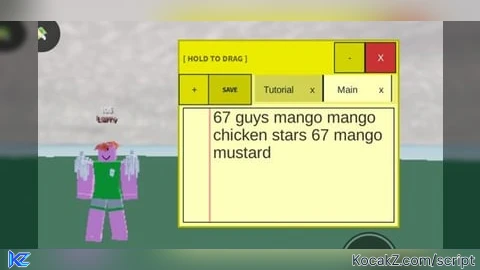
local HttpService = game:GetService("HttpService")
local UserInputService = game:GetService("UserInputService")
local RunService = game:GetService("RunService")
local Players = game:GetService("Players")

local LocalPlayer = Players.LocalPlayer
local UserId = LocalPlayer.UserId

-- [ NEW DATA SAVER V12 ]
local FileName = UserId .. "_Universal_Ultimate_V12.json"

local isMobile = UserInputService.TouchEnabled
local guiWidth = isMobile and 260 or 450
local guiHeight = isMobile and 220 or 380

local ScreenGui = Instance.new("ScreenGui")
ScreenGui.Name = "LegalPad_V12_Master"
ScreenGui.Parent = game:GetService("CoreGui")
ScreenGui.ResetOnSpawn = false

local NotebookData = {["Main"] = "Write here..."}
local CurrentTab = "Main"
local IsMinimized = false

local TutorialContent = [[--- TUTORIAL ---
1. SAVE: Saves all your work to V12.
2. ADD (+): Opens naming bar above.
3. SUBMIT: Finalizes the new note name.
4. X (Tab): Deletes specific notes.
5. - (Top): Shrinks the pad.]]

-- [ MAIN WINDOW ]
local MainFrame = Instance.new("Frame")
MainFrame.Size = UDim2.new(0, guiWidth, 0, guiHeight)
MainFrame.Position = UDim2.new(0.5, -guiWidth/2, 0.5, -guiHeight/2)
MainFrame.BackgroundColor3 = Color3.fromRGB(255, 255, 160)
MainFrame.BorderSizePixel = 2
MainFrame.Active = true
MainFrame.Parent = ScreenGui

-- [ DRAG HANDLE & TOP BUTTONS ]
local DragHandle = Instance.new("TextButton")
DragHandle.Size = UDim2.new(1, 0, 0, 35)
DragHandle.BackgroundColor3 = Color3.fromRGB(235, 235, 0)
DragHandle.Text = "  [ HOLD TO DRAG ]"
DragHandle.Font = Enum.Font.SourceSansBold
DragHandle.Parent = MainFrame

local CloseBtn = Instance.new("TextButton")
CloseBtn.Size = UDim2.new(0, 30, 0, 30); CloseBtn.Position = UDim2.new(1, -32, 0, 2.5)
CloseBtn.Text = "X"; CloseBtn.BackgroundColor3 = Color3.fromRGB(200, 50, 50); CloseBtn.Parent = DragHandle

local MinBtn = Instance.new("TextButton")
MinBtn.Size = UDim2.new(0, 30, 0, 30); MinBtn.Position = UDim2.new(1, -65, 0, 2.5)
MinBtn.Text = "-"; MinBtn.BackgroundColor3 = Color3.fromRGB(200, 200, 0); MinBtn.Parent = DragHandle

-- [ FLOATING ADD MENU ]
local AddNoteMenu = Instance.new("Frame")
AddNoteMenu.Size = UDim2.new(0, 250, 0, 50)
AddNoteMenu.Position = UDim2.new(0.5, -125, 0, -55)
AddNoteMenu.BackgroundColor3 = Color3.fromRGB(255, 255, 255)
AddNoteMenu.BorderSizePixel = 2
AddNoteMenu.Visible = false
AddNoteMenu.Parent = MainFrame

local NameInput = Instance.new("TextBox")
NameInput.Size = UDim2.new(0.7, -10, 0, 30); NameInput.Position = UDim2.new(0, 5, 0.5, -15)
NameInput.PlaceholderText = "note name..."; NameInput.Text = ""; NameInput.Parent = AddNoteMenu

local SubmitBtn = Instance.new("TextButton")
SubmitBtn.Size = UDim2.new(0.3, -5, 0, 30); SubmitBtn.Position = UDim2.new(0.7, 5, 0.5, -15)
SubmitBtn.Text = "Submit"; SubmitBtn.Parent = AddNoteMenu

-- [ TOOLBAR ]
local ToolBar = Instance.new("Frame")
ToolBar.Size = UDim2.new(1, 0, 0, 35); ToolBar.Position = UDim2.new(0, 0, 0, 35)
ToolBar.BackgroundColor3 = Color3.fromRGB(240, 240, 120); ToolBar.Parent = MainFrame

local SaveBtn = Instance.new("TextButton")
SaveBtn.Size = UDim2.new(0, 60, 1, -4); SaveBtn.Position = UDim2.new(0, 5, 0, 2)
SaveBtn.Text = "SAVE"; SaveBtn.BackgroundColor3 = Color3.fromRGB(255, 215, 0); SaveBtn.Parent = ToolBar

local AddBtn = Instance.new("TextButton")
AddBtn.Size = UDim2.new(0, 40, 1, -4); AddBtn.Position = UDim2.new(0, 70, 0, 2)
AddBtn.Text = "+"; AddBtn.BackgroundColor3 = Color3.fromRGB(220, 220, 0); AddBtn.Parent = ToolBar

local TabScroll = Instance.new("ScrollingFrame")
TabScroll.Size = UDim2.new(1, -120, 1, 0); TabScroll.Position = UDim2.new(0, 115, 0, 0)
TabScroll.BackgroundTransparency = 1; TabScroll.CanvasSize = UDim2.new(4, 0, 0, 0)
TabScroll.ScrollBarThickness = 0; TabScroll.Parent = ToolBar

local TabList = Instance.new("UIListLayout")
TabList.FillDirection = Enum.FillDirection.Horizontal; TabList.Padding = UDim.new(0, 5); TabList.Parent = TabScroll

-- [ SCROLLING CONTENT BOX ]
local ContentScroll = Instance.new("ScrollingFrame")
ContentScroll.Size = UDim2.new(1, -10, 1, -85); ContentScroll.Position = UDim2.new(0, 5, 0, 75)
ContentScroll.BackgroundColor3 = Color3.fromRGB(255, 255, 195); ContentScroll.CanvasSize = UDim2.new(0, 0, 10, 0)
ContentScroll.ScrollBarThickness = 6; ContentScroll.Parent = MainFrame

local ContentBox = Instance.new("TextBox")
ContentBox.Size = UDim2.new(1, -10, 1, 0); ContentBox.Position = UDim2.new(0, 5, 0, 0)
ContentBox.MultiLine = true; ContentBox.TextWrapped = true; ContentBox.TextXAlignment = Enum.TextXAlignment.Left; ContentBox.TextYAlignment = Enum.TextYAlignment.Top
ContentBox.BackgroundTransparency = 1; ContentBox.ClearTextOnFocus = false; ContentBox.Parent = ContentScroll

-- [ RENDER SYSTEM ]
local function Render()
	for _, v in pairs(TabScroll:GetChildren()) do if v:IsA("Frame") then v:Destroy() end end

	local function MakeTab(name, isTut)
		local f = Instance.new("Frame"); f.Size = UDim2.new(0, 95, 1, -4); f.BackgroundColor3 = (CurrentTab == name) and Color3.fromRGB(255, 255, 210) or Color3.fromRGB(210, 210, 80); f.Parent = TabScroll
		local b = Instance.new("TextButton"); b.Size = isTut and UDim2.new(1,0,1,0) or UDim2.new(0.7,0,1,0); b.Text = name; b.BackgroundTransparency = 1; b.Parent = f
		b.MouseButton1Click:Connect(function()
			if CurrentTab ~= "Tutorial" then NotebookData[CurrentTab] = ContentBox.Text end
			CurrentTab = name; ContentBox.Text = isTut and TutorialContent or NotebookData[name]; ContentBox.ReadOnly = isTut; Render()
		end)
		if not isTut and name ~= "Main" then
			local d = Instance.new("TextButton"); d.Size = UDim2.new(0.3,0,1,0); d.Position = UDim2.new(0.7,0,0,0); d.Text = "x"; d.TextColor3 = Color3.new(1,0,0); d.BackgroundTransparency = 1; d.Parent = f
			d.MouseButton1Click:Connect(function() NotebookData[name] = nil; CurrentTab = "Main"; ContentBox.Text = NotebookData["Main"]; Render() end)
		end
	end

	MakeTab("Tutorial", true)
	for n, _ in pairs(NotebookData) do if n ~= "Tutorial" then MakeTab(n, false) end end
end

-- [ CONNECTIONS ]
SubmitBtn.MouseButton1Click:Connect(function()
	if NameInput.Text ~= "" and NameInput.Text ~= "Tutorial" then
		NotebookData[CurrentTab] = ContentBox.Text
		NotebookData[NameInput.Text] = ""; CurrentTab = NameInput.Text
		ContentBox.Text = ""; AddNoteMenu.Visible = false; NameInput.Text = ""; Render()
	end
end)

MinBtn.MouseButton1Click:Connect(function()
	IsMinimized = not IsMinimized
	ContentScroll.Visible = not IsMinimized; ToolBar.Visible = not IsMinimized
	MainFrame.Size = IsMinimized and UDim2.new(0, guiWidth, 0, 35) or UDim2.new(0, guiWidth, 0, guiHeight)
end)

SaveBtn.MouseButton1Click:Connect(function()
	if writefile then
		if CurrentTab ~= "Tutorial" then NotebookData[CurrentTab] = ContentBox.Text end
		writefile(FileName, HttpService:JSONEncode(NotebookData))
		SaveBtn.Text = "OK"; task.wait(0.5); SaveBtn.Text = "SAVE"
	end
end)

AddBtn.MouseButton1Click:Connect(function() AddNoteMenu.Visible = not AddNoteMenu.Visible end)
CloseBtn.MouseButton1Click:Connect(function() ScreenGui:Destroy() end)

-- [ DRAG LOGIC ]
local dragging, dragStart, startPos
DragHandle.InputBegan:Connect(function(input) if input.UserInputType == Enum.UserInputType.MouseButton1 or input.UserInputType == Enum.UserInputType.Touch then dragging = true; dragStart = input.Position; startPos = MainFrame.Position end end)
UserInputService.InputEnded:Connect(function(input) if input.UserInputType == Enum.UserInputType.MouseButton1 or input.UserInputType == Enum.UserInputType.Touch then dragging = false end end)
RunService.RenderStepped:Connect(function() if dragging then local inputPos = UserInputService:GetMouseLocation(); MainFrame.Position = UDim2.new(0, inputPos.X - (guiWidth/2), 0, inputPos.Y - 15) end end)

-- [ INITIAL LOAD ]
if isfile and isfile(FileName) then local s, d = pcall(function() return HttpService:JSONDecode(readfile(FileName)) end) if s then NotebookData = d end end
ContentBox.Text = NotebookData["Main"] or "Write here..."; Render()No comments yet for this script.


