


KeylessUniversal
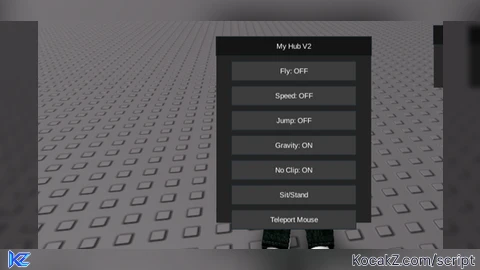
loadstring([[
local player = game.Players.LocalPlayer
local playerGui = player:WaitForChild("PlayerGui")
local userInputService = game:GetService("UserInputService")
local runService = game:GetService("RunService")
local mouse = player:GetMouse()

-- GUI Setup
local screenGui = Instance.new("ScreenGui")
screenGui.Name = "MyHubV2"
screenGui.ResetOnSpawn = false
screenGui.Parent = playerGui

local frame = Instance.new("Frame")
frame.Size = UDim2.new(0, 250, 0, 300)
frame.Position = UDim2.new(0, 50, 0, 50)
frame.BackgroundColor3 = Color3.fromRGB(35,35,35)
frame.BorderSizePixel = 0
frame.Visible = false
frame.Parent = screenGui

local title = Instance.new("TextLabel")
title.Size = UDim2.new(1,0,0,30)
title.Position = UDim2.new(0,0,0,0)
title.BackgroundColor3 = Color3.fromRGB(20,20,20)
title.Text = "My Hub V2"
title.TextColor3 = Color3.new(1,1,1)
title.Parent = frame

-- Utility function to create buttons
local function createButton(name, y)
    local btn = Instance.new("TextButton")
    btn.Size = UDim2.new(0.8,0,0,30)
    btn.Position = UDim2.new(0.1,0,0, y)
    btn.BackgroundColor3 = Color3.fromRGB(60,60,60)
    btn.TextColor3 = Color3.new(1,1,1)
    btn.Text = name
    btn.Parent = frame
    return btn
end

-- Variables for scripts
local flyEnabled = false
local bodyVelocity
local speedEnabled = false
local jumpEnabled = false
local gravityEnabled = true
local noclipEnabled = false

-- Button creation
local flyBtn = createButton("Fly: OFF", 40)
local speedBtn = createButton("Speed: OFF", 80)
local jumpBtn = createButton("Jump: OFF", 120)
local gravityBtn = createButton("Gravity: ON", 160)
local noclipBtn = createButton("No Clip: OFF", 200)
local sitBtn = createButton("Sit/Stand", 240)
local tpBtn = createButton("Teleport Mouse", 280)

local character = player.Character or player.CharacterAdded:Wait()
local hrp = character:WaitForChild("HumanoidRootPart")
local humanoid = character:WaitForChild("Humanoid")

-- Fly logic
flyBtn.MouseButton1Click:Connect(function()
    flyEnabled = not flyEnabled
    flyBtn.Text = flyEnabled and "Fly: ON" or "Fly: OFF"
    if flyEnabled then
        bodyVelocity = Instance.new("BodyVelocity")
        bodyVelocity.MaxForce = Vector3.new(400000,400000,400000)
        bodyVelocity.Velocity = Vector3.new(0,0,0)
        bodyVelocity.Parent = hrp

        runService.RenderStepped:Connect(function()
            if flyEnabled then
                local dir = Vector3.new(0,0,0)
                if userInputService:IsKeyDown(Enum.KeyCode.W) then dir = dir + hrp.CFrame.LookVector end
                if userInputService:IsKeyDown(Enum.KeyCode.S) then dir = dir - hrp.CFrame.LookVector end
                if userInputService:IsKeyDown(Enum.KeyCode.A) then dir = dir - hrp.CFrame.RightVector end
                if userInputService:IsKeyDown(Enum.KeyCode.D) then dir = dir + hrp.CFrame.RightVector end
                if userInputService:IsKeyDown(Enum.KeyCode.Space) then dir = dir + Vector3.new(0,1,0) end
                if userInputService:IsKeyDown(Enum.KeyCode.LeftShift) then dir = dir - Vector3.new(0,1,0) end
                bodyVelocity.Velocity = dir * 50
            end
        end)
    else
        if bodyVelocity then bodyVelocity:Destroy() end
    end
end)

-- Speed toggle
speedBtn.MouseButton1Click:Connect(function()
    speedEnabled = not speedEnabled
    speedBtn.Text = speedEnabled and "Speed: ON" or "Speed: OFF"
    humanoid.WalkSpeed = speedEnabled and 100 or 16
end)

-- Jump toggle
jumpBtn.MouseButton1Click:Connect(function()
    jumpEnabled = not jumpEnabled
    jumpBtn.Text = jumpEnabled and "Jump: ON" or "Jump: OFF"
    humanoid.JumpPower = jumpEnabled and 150 or 50
end)

-- Gravity toggle
gravityBtn.MouseButton1Click:Connect(function()
    gravityEnabled = not gravityEnabled
    gravityBtn.Text = gravityEnabled and "Gravity: ON" or "Gravity: OFF"
    game.Workspace.Gravity = gravityEnabled and 196.2 or 0
end)

-- No Clip toggle
noclipBtn.MouseButton1Click:Connect(function()
    noclipEnabled = not noclipEnabled
    noclipBtn.Text = noclipEnabled and "No Clip: ON" or "No Clip: OFF"
end)

-- Sit/Stand toggle
sitBtn.MouseButton1Click:Connect(function()
    humanoid.Sit = not humanoid.Sit
end)

-- Teleport to mouse
tpBtn.MouseButton1Click:Connect(function()
    local mousePos = mouse.Hit.Position
    hrp.CFrame = CFrame.new(mousePos + Vector3.new(0,3,0))
end)

-- NoClip loop
runService.Stepped:Connect(function()
    if noclipEnabled then
        for _, part in pairs(character:GetDescendants()) do
            if part:IsA("BasePart") and part.CanCollide then
                part.CanCollide = false
            end
        end
    end
end)

-- Toggle menu with Insert key
userInputService.InputBegan:Connect(function(input, gameProcessed)
    if gameProcessed then return end
    if input.KeyCode == Enum.KeyCode.Insert then
        frame.Visible = not frame.Visible
    end
end)

-- Make GUI draggable
local dragging = false
local dragInput
local dragStart
local startPos

local function update(input)
    local delta = input.Position - dragStart
    frame.Position = UDim2.new(startPos.X.Scale, startPos.X.Offset + delta.X,
                               startPos.Y.Scale, startPos.Y.Offset + delta.Y)
end

title.InputBegan:Connect(function(input)
    if input.UserInputType == Enum.UserInputType.MouseButton1 then
        dragging = true
        dragStart = input.Position
        startPos = frame.Position

        input.Changed:Connect(function()
            if input.UserInputState == Enum.UserInputState.End then
                dragging = false
            end
        end)
    end
end)

title.InputChanged:Connect(function(input)
    if input.UserInputType == Enum.UserInputType.MouseMovement then
        dragInput = input
    end
end)

userInputService.InputChanged:Connect(function(input)
    if input == dragInput and dragging then
        update(input)
    end
end)
]])()


Good but improve uo and use claude Ai next time or Ai Google both work good also tell em to remove the - - comments
@ryumachan thanks bro