


KeylessUniversal
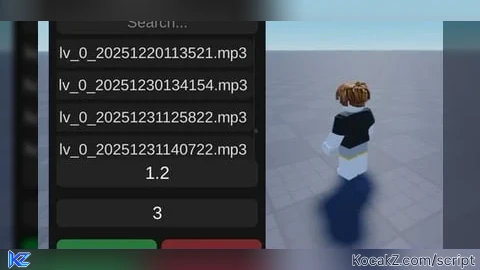
-- CONFIG
local folderName = "MusicPLVrar"

-- SERVICES
local Players = game:GetService("Players")
local UIS = game:GetService("UserInputService")
local player = Players.LocalPlayer

-- FILES
if not isfolder(folderName) then
    makefolder(folderName)
end

local soundsList = {}
for _, file in ipairs(listfiles(folderName)) do
    if file:match(".mp3") or file:match(".ogg") or file:match(".wav") then
        table.insert(soundsList, file)
    end
end

-- UI
local gui = Instance.new("ScreenGui", game.CoreGui)
gui.Name = "MusicPlayerPLV"

local main = Instance.new("Frame", gui)
main.Size = UDim2.new(0, 270, 0, 400)
main.Position = UDim2.new(0.3, 0, 0.3, 0)
main.BackgroundColor3 = Color3.fromRGB(20,20,20)
main.BorderSizePixel = 0
Instance.new("UICorner", main).CornerRadius = UDim.new(0,12)

local title = Instance.new("TextLabel", main)
title.Size = UDim2.new(1, -40, 0, 40)
title.Position = UDim2.new(0,10,0,0)
title.Text = "Music Player"
title.BackgroundTransparency = 1
title.TextColor3 = Color3.fromRGB(230,230,230)
title.TextSize = 18
title.TextXAlignment = Enum.TextXAlignment.Left

local minimize = Instance.new("TextButton", main)
minimize.Size = UDim2.new(0,30,0,30)
minimize.Position = UDim2.new(1,-35,0,5)
minimize.Text = "-"
minimize.BackgroundColor3 = Color3.fromRGB(40,40,40)
minimize.TextColor3 = Color3.new(1,1,1)
Instance.new("UICorner", minimize)

local searchBox = Instance.new("TextBox", main)
searchBox.Size = UDim2.new(1,-20,0,30)
searchBox.Position = UDim2.new(0,10,0,45)
searchBox.PlaceholderText = "Search..."
searchBox.Text = ""
searchBox.BackgroundColor3 = Color3.fromRGB(35,35,35)
searchBox.TextColor3 = Color3.new(1,1,1)
searchBox.TextSize = 14
Instance.new("UICorner", searchBox)

local scroll = Instance.new("ScrollingFrame", main)
scroll.Size = UDim2.new(1,-20,0,160)
scroll.Position = UDim2.new(0,10,0,80)
scroll.BackgroundTransparency = 1
scroll.ScrollBarThickness = 4

local layout = Instance.new("UIListLayout", scroll)
layout.Padding = UDim.new(0,5)

local speedBox = Instance.new("TextBox", main)
speedBox.Size = UDim2.new(1,-20,0,35)
speedBox.Position = UDim2.new(0,10,0,230)
speedBox.PlaceholderText = "Speed (ex: 1, 1.5, 2)"
speedBox.Text = "1"
speedBox.BackgroundColor3 = Color3.fromRGB(35,35,35)
speedBox.TextColor3 = Color3.new(1,1,1)
speedBox.TextSize = 16
Instance.new("UICorner", speedBox)

local volumeBox = Instance.new("TextBox", main)
volumeBox.Size = UDim2.new(1,-20,0,35)
volumeBox.Position = UDim2.new(0,10,0,280)
volumeBox.PlaceholderText = "Volume (ex: 1 to 10)"
volumeBox.Text = "3"
volumeBox.BackgroundColor3 = Color3.fromRGB(35,35,35)
volumeBox.TextColor3 = Color3.new(1,1,1)
volumeBox.TextSize = 16
Instance.new("UICorner", volumeBox)

local playBtn = Instance.new("TextButton", main)
playBtn.Size = UDim2.new(0.48,-5,0,40)
playBtn.Position = UDim2.new(0,10,1,-70)
playBtn.Text = "PLAY"
playBtn.BackgroundColor3 = Color3.fromRGB(40,120,60)
playBtn.TextColor3 = Color3.new(1,1,1)
playBtn.TextSize = 16
Instance.new("UICorner", playBtn)

local stopBtn = Instance.new("TextButton", main)
stopBtn.Size = UDim2.new(0.48,-5,0,40)
stopBtn.Position = UDim2.new(0.52,0,1,-70)
stopBtn.Text = "STOP"
stopBtn.BackgroundColor3 = Color3.fromRGB(120,40,40)
stopBtn.TextColor3 = Color3.new(1,1,1)
stopBtn.TextSize = 16
Instance.new("UICorner", stopBtn)

-- MINIMIZE
local minimized = false
local elements = {scroll, speedBox, volumeBox, playBtn, stopBtn, searchBox}

minimize.Activated:Connect(function()
    minimized = not minimized

    for _, v in ipairs(elements) do
        v.Visible = not minimized
    end

    main.Size = minimized and UDim2.new(0,270,0,40) or UDim2.new(0,270,0,400)
    minimize.Text = minimized and "+" or "-"
end)

-- SEARCH
local buttons = {}
searchBox:GetPropertyChangedSignal("Text"):Connect(function()
    local text = string.lower(searchBox.Text)

    for _, btn in ipairs(buttons) do
        local name = string.lower(btn.Text)
        btn.Visible = (text == "" or string.find(name, text))
    end
end)

-- SOUND
local currentSound
local selectedFile

local function playSound(path)
    if currentSound then
        currentSound:Destroy()
    end

    local sound = Instance.new("Sound")
    sound.SoundId = getcustomasset(path)
    sound.Volume = tonumber(volumeBox.Text) or 3
    sound.PlaybackSpeed = tonumber(speedBox.Text) or 1
    sound.Parent = workspace
    sound:Play()

    currentSound = sound
end

-- FILE LIST
for _, file in ipairs(soundsList) do
    local btn = Instance.new("TextButton", scroll)
    table.insert(buttons, btn)

    btn.Size = UDim2.new(1,0,0,35)
    btn.Text = file:match("[^\\/]+$")
    btn.BackgroundColor3 = Color3.fromRGB(30,30,30)
    btn.TextColor3 = Color3.fromRGB(220,220,220)
    btn.TextSize = 14
    Instance.new("UICorner", btn)

    btn.Activated:Connect(function()
        selectedFile = file
    end)
end

layout:GetPropertyChangedSignal("AbsoluteContentSize"):Connect(function()
    scroll.CanvasSize = UDim2.new(0,0,0,layout.AbsoluteContentSize.Y)
end)

-- ACTIONS
playBtn.Activated:Connect(function()
    if selectedFile then
        playSound(selectedFile)
    end
end)

stopBtn.Activated:Connect(function()
    if currentSound then
        currentSound:Stop()
    end
end)

-- DRAG (mobile)
local dragging, dragInput, dragStart, startPos

local function update(input)
    local delta = input.Position - dragStart
    main.Position = UDim2.new(
        startPos.X.Scale,
        startPos.X.Offset + delta.X,
        startPos.Y.Scale,
        startPos.Y.Offset + delta.Y
    )
end

main.InputBegan:Connect(function(input)
    if input.UserInputType == Enum.UserInputType.Touch then
        dragging = true
        dragStart = input.Position
        startPos = main.Position

        input.Changed:Connect(function()
            if input.UserInputState == Enum.UserInputState.End then
                dragging = false
            end
        end)
    end
end)

main.InputChanged:Connect(function(input)
    if input.UserInputType == Enum.UserInputType.Touch then
        dragInput = input
    end
end)

UIS.InputChanged:Connect(function(input)
    if input == dragInput and dragging then
        update(input)
    end
end)


Good but you need to update like make player profile etc.