
KeylessUniversal
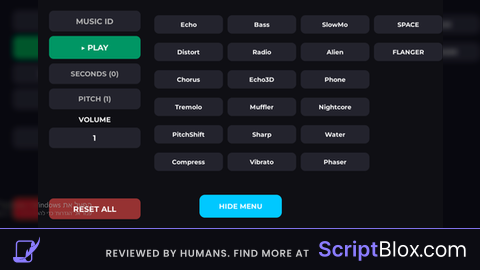
local ParentUI = game:GetService("CoreGui") or game:GetService("Players").LocalPlayer:WaitForChild("PlayerGui")

if ParentUI:FindFirstChild("ProAudioMaster") then ParentUI.ProAudioMaster:Destroy() end

local ScreenGui = Instance.new("ScreenGui", ParentUI)
ScreenGui.Name = "ProAudioMaster"
ScreenGui.ResetOnSpawn = false

local Main = Instance.new("Frame", ScreenGui)
Main.BackgroundColor3 = Color3.fromRGB(15, 15, 20)
Main.Position = UDim2.new(0.5, -450, 0.5, -270)
Main.Size = UDim2.new(0, 900, 0, 540)
Main.Active = true
Main.Draggable = true

local Corner = Instance.new("UICorner", Main)
Corner.CornerRadius = UDim.new(0, 15)

local Stroke = Instance.new("UIStroke", Main)
Stroke.Color = Color3.fromRGB(0, 200, 255)
Stroke.Thickness = 3

local Toggle = Instance.new("TextButton", ScreenGui)
Toggle.Size = UDim2.new(0, 180, 0, 50)
Toggle.Position = UDim2.new(0.5, -90, 1, -80)
Toggle.BackgroundColor3 = Color3.fromRGB(0, 200, 255)
Toggle.Text = "HIDE MENU"
Toggle.TextColor3 = Color3.new(1, 1, 1)
Toggle.TextSize = 18
Toggle.Font = Enum.Font.GothamBold
Instance.new("UICorner", Toggle).CornerRadius = UDim.new(0, 12)

Toggle.MouseButton1Click:Connect(function()
	Main.Visible = not Main.Visible
	Toggle.Text = Main.Visible and "HIDE MENU" or "SHOW MENU"
end)

local snd = Instance.new("Sound", game:GetService("SoundService"))
snd.Looped = true

local function style(obj, fontSize)
	Instance.new("UICorner", obj).CornerRadius = UDim.new(0, 10)
	obj.BackgroundColor3 = Color3.fromRGB(35, 35, 45)
	obj.TextColor3 = Color3.new(1, 1, 1)
	obj.Font = Enum.Font.GothamBold
	obj.TextSize = fontSize or 16
end

local id = Instance.new("TextBox", Main); id.Size = UDim2.new(0, 200, 0, 45); id.Position = UDim2.new(0, 30, 0, 60); id.PlaceholderText = "MUSIC ID"; style(id, 20)
id.FocusLost:Connect(function() snd.SoundId = "rbxassetid://"..id.Text:gsub("%D","") end)

local play = Instance.new("TextButton", Main); play.Size = UDim2.new(0, 200, 0, 50); play.Position = UDim2.new(0, 30, 0, 115); play.Text = "▶ PLAY"; style(play, 20)
play.BackgroundColor3 = Color3.fromRGB(0, 150, 100)
play.MouseButton1Click:Connect(function() if snd.IsPlaying then snd:Stop() play.Text = "▶ PLAY" else snd:Play() play.Text = "■ STOP" end end)

local timeInp = Instance.new("TextBox", Main); timeInp.Size = UDim2.new(0, 200, 0, 45); timeInp.Position = UDim2.new(0, 30, 0, 175); timeInp.PlaceholderText = "SECONDS (0)"; style(timeInp, 18)
timeInp.FocusLost:Connect(function() snd.TimePosition = tonumber(timeInp.Text) or 0 end)

local speedInp = Instance.new("TextBox", Main); speedInp.Size = UDim2.new(0, 200, 0, 45); speedInp.Position = UDim2.new(0, 30, 0, 230); speedInp.Text = "1"; speedInp.PlaceholderText = "PITCH (1)"; style(speedInp, 18)
speedInp.FocusLost:Connect(function() snd.PlaybackSpeed = tonumber(speedInp.Text) or 1 end)

local isSuper = false
local volText = Instance.new("TextButton", Main); volText.Size = UDim2.new(0, 200, 0, 25); volText.Position = UDim2.new(0, 30, 0, 285); volText.Text = "VOLUME"; volText.BackgroundTransparency = 1; volText.TextColor3 = Color3.new(1,1,1); volText.TextSize = 18; volText.Font = Enum.Font.GothamBold

local vol = Instance.new("TextBox", Main); vol.Size = UDim2.new(0, 200, 0, 45); vol.Position = UDim2.new(0, 30, 0, 315); vol.Text = "0.5"; style(vol, 20)
vol.FocusLost:Connect(function() snd.Volume = math.clamp(tonumber(vol.Text) or 0.5, 0, isSuper and 10 or 1) end)

volText.MouseButton1Click:Connect(function()
	isSuper = not isSuper
	volText.Text = isSuper and "!!! SUPER !!!" or "VOLUME"
	volText.TextColor3 = isSuper and Color3.new(1, 0, 0) or Color3.new(1, 1, 1)
end)

local res = Instance.new("TextButton", Main); res.Size = UDim2.new(0, 200, 0, 45); res.Position = UDim2.new(0, 30, 0, 470); res.Text = "RESET ALL"; style(res, 20)
res.BackgroundColor3 = Color3.fromRGB(150, 50, 50)
res.MouseButton1Click:Connect(function()
	for _,v in pairs(snd:GetChildren()) do if v:IsA("SoundEffect") then v.Enabled = false end end
	snd.PlaybackSpeed = 1; snd.Volume = 0.5; snd.TimePosition = 0
end)

local fxNames = {"Echo", "Distort", "Chorus", "Tremolo", "PitchShift", "Compress", "Bass", "Radio", "Echo3D", "Muffler", "Sharp", "Vibrato", "SlowMo", "Alien", "Phone", "Nightcore", "Water", "Phaser", "SPACE", "FLANGER", "Reverb", "LowPass"}

for i, name in ipairs(fxNames) do
	local b = Instance.new("TextButton", Main)
	b.Size = UDim2.new(0, 150, 0, 40)
	local col = math.floor((i-1) / 6)
	local row = (i-1) % 6
	b.Position = UDim2.new(0, 260 + (col * 160), 0, 70 + (row * 60))
	b.Text = name; style(b, 16)

	local effect = Instance.new(
		(name == "Echo" or name == "SPACE" or name == "SlowMo" or name == "Reverb") and "ReverbSoundEffect" or
		(name == "Distort") and "DistortionSoundEffect" or
		(name == "PitchShift" or name == "Nightcore") and "PitchShiftSoundEffect" or
		(name == "FLANGER") and "FlangerSoundEffect" or
		(name == "Echo3D") and "EchoSoundEffect" or
		(name == "Compress") and "CompressorSoundEffect" or "ChorusSoundEffect", snd
	)

	effect.Enabled = false
	b.MouseButton1Click:Connect(function()
		effect.Enabled = not effect.Enabled
		b.BackgroundColor3 = effect.Enabled and Color3.fromRGB(0, 200, 255) or Color3.fromRGB(35, 35, 45)
	end)
end

C00l
@Reta28366 thanks
you made this? no AI?
@moas0 i made the gui and buttons and text and AI the effects and music id player
@TheAnnoyingHackerXD Thank you so much! idk how to create these lol but thank you
no work
@bitesmig the gui not working or buttons?
@Yosef_1220 The music doesn't work, meaning everything works except playing music.
@bitesmig its works just put an id