
Universal Script – Murder duels bloxstrike rivals cheat
-- خدمات
local Players = game:GetService("Players")
local RunService = game:GetService("RunService")
local UserInputService = game:GetService("UserInputService")
local Workspace = game:GetService("Workspace")
local Lighting = game:GetService("Lighting")
local LocalPlayer = Players.LocalPlayer
local Camera = Workspace.CurrentCamera
local Mouse = LocalPlayer:GetMouse()
-- متغیرهای پیکربندی
getgenv().EspStatus = false
getgenv().LockPositionStatus = false
getgenv().BigHeadStatus = false
getgenv().NoclipStatus = false
getgenv().SpeedStatus = false
getgenv().HitboxDebugStatus = false
getgenv().PossessStatus = false
getgenv().FullBrightStatus = false
getgenv().CustomSpeedValue = 16
getgenv().CustomHeadSizeValue = 20
getgenv().LockedPosition = nil
local PossessedNPC = nil
-- ذخیره تنظیمات اصلی نور برای بازگرداندن هنگام خاموش کردن Full Bright
local OriginalBrightness = Lighting.Brightness
local OriginalClockTime = Lighting.ClockTime
local OriginalFogEnd = Lighting.FogEnd
local OriginalGlobalShadows = Lighting.GlobalShadows
local OriginalOutdoorAmbient = Lighting.OutdoorAmbient
-- ایجاد رابط کاربری پنل ادمین
local ScreenGui = Instance.new("ScreenGui")
local MainFrame = Instance.new("Frame")
local Title = Instance.new("TextLabel")
local ToggleEsp = Instance.new("TextButton")
local ToggleLockPos = Instance.new("TextButton")
local ToggleBigHead = Instance.new("TextButton")
local ToggleNoclip = Instance.new("TextButton")
local ToggleHitboxDebug = Instance.new("TextButton")
local SpeedTextBox = Instance.new("TextBox")
local ToggleSpeed = Instance.new("TextButton")
local HeadSizeTextBox = Instance.new("TextBox")
-- دکمههای جدید
local TogglePossess = Instance.new("TextButton")
local ToggleFullBright = Instance.new("TextButton")
local KeybindInfo = Instance.new("TextLabel")
ScreenGui.Name = "CustomAdminPanel"
ScreenGui.Parent = game.CoreGui
MainFrame.Name = "MainFrame"
MainFrame.Parent = ScreenGui
MainFrame.BackgroundColor3 = Color3.fromRGB(35, 35, 35)
MainFrame.Position = UDim2.new(0.5, -100, 0.3, 0)
MainFrame.Size = UDim2.new(0, 200, 0, 440) -- افزایش ارتفاع برای دکمه جدید
MainFrame.Active = true
MainFrame.Draggable = true
Title.Parent = MainFrame
Title.BackgroundColor3 = Color3.fromRGB(50, 50, 50)
Title.Size = UDim2.new(1, 0, 0, 30)
Title.Font = Enum.Font.SourceSansBold
Title.Text = "Its Do everything"
Title.TextColor3 = Color3.fromRGB(255, 255, 255)
Title.TextSize = 14
-- دکمه ESP
ToggleEsp.Parent = MainFrame
ToggleEsp.BackgroundColor3 = Color3.fromRGB(60, 60, 60)
ToggleEsp.Position = UDim2.new(0.1, 0, 0.08, 0)
ToggleEsp.Size = UDim2.new(0, 160, 0, 25)
ToggleEsp.Font = Enum.Font.SourceSansBold
ToggleEsp.Text = "Toggle ESP: OFF"
ToggleEsp.TextColor3 = Color3.fromRGB(255, 255, 255)
ToggleEsp.TextSize = 12
-- دکمه فیکس کردن موقعیت
ToggleLockPos.Parent = MainFrame
ToggleLockPos.BackgroundColor3 = Color3.fromRGB(60, 60, 60)
ToggleLockPos.Position = UDim2.new(0.1, 0, 0.15, 0)
ToggleLockPos.Size = UDim2.new(0, 160, 0, 25)
ToggleLockPos.Font = Enum.Font.SourceSansBold
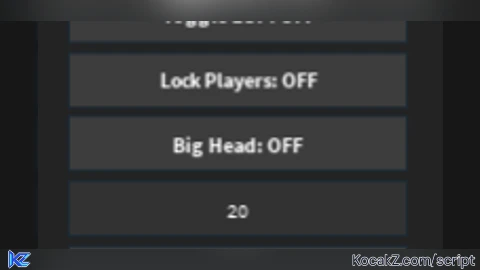
ToggleLockPos.Text = "Lock Players: OFF"
ToggleLockPos.TextColor3 = Color3.fromRGB(255, 255, 255)
ToggleLockPos.TextSize = 11
-- دکمه Big Head
ToggleBigHead.Parent = MainFrame
ToggleBigHead.BackgroundColor3 = Color3.fromRGB(60, 60, 60)
ToggleBigHead.Position = UDim2.new(0.1, 0, 0.22, 0)
ToggleBigHead.Size = UDim2.new(0, 160, 0, 25)
ToggleBigHead.Font = Enum.Font.SourceSansBold
ToggleBigHead.Text = "Big Head: OFF"
ToggleBigHead.TextColor3 = Color3.fromRGB(255, 255, 255)
ToggleBigHead.TextSize = 12
HeadSizeTextBox.Parent = MainFrame
HeadSizeTextBox.BackgroundColor3 = Color3.fromRGB(50, 50, 50)
HeadSizeTextBox.Position = UDim2.new(0.1, 0, 0.29, 0)
HeadSizeTextBox.Size = UDim2.new(0, 160, 0, 25)
HeadSizeTextBox.Font = Enum.Font.SourceSans
HeadSizeTextBox.PlaceholderText = "Head Size (e.g. 20)"
HeadSizeTextBox.Text = "20"
HeadSizeTextBox.TextColor3 = Color3.fromRGB(255, 255, 255)
HeadSizeTextBox.TextSize = 12
-- دکمه Noclip
ToggleNoclip.Parent = MainFrame
ToggleNoclip.BackgroundColor3 = Color3.fromRGB(60, 60, 60)
ToggleNoclip.Position = UDim2.new(0.1, 0, 0.36, 0)
ToggleNoclip.Size = UDim2.new(0, 160, 0, 25)
ToggleNoclip.Font = Enum.Font.SourceSansBold
ToggleNoclip.Text = "Noclip: OFF"
ToggleNoclip.TextColor3 = Color3.fromRGB(255, 255, 255)
ToggleNoclip.TextSize = 12
-- دکمه Hitbox Debug Range
ToggleHitboxDebug.Parent = MainFrame
ToggleHitboxDebug.BackgroundColor3 = Color3.fromRGB(60, 60, 60)
ToggleHitboxDebug.Position = UDim2.new(0.1, 0, 0.43, 0)
ToggleHitboxDebug.Size = UDim2.new(0, 160, 0, 25)
ToggleHitboxDebug.Font = Enum.Font.SourceSansBold
ToggleHitboxDebug.Text = "Hitbox Range: OFF"
ToggleHitboxDebug.TextColor3 = Color3.fromRGB(255, 255, 255)
ToggleHitboxDebug.TextSize = 12
-- کادر سرعت
SpeedTextBox.Parent = MainFrame
SpeedTextBox.BackgroundColor3 = Color3.fromRGB(50, 50, 50)
SpeedTextBox.Position = UDim2.new(0.1, 0, 0.50, 0)
SpeedTextBox.Size = UDim2.new(0, 160, 0, 25)
SpeedTextBox.Font = Enum.Font.SourceSans
SpeedTextBox.PlaceholderText = "Enter Speed (e.g. 32)"
SpeedTextBox.Text = "32"
SpeedTextBox.TextColor3 = Color3.fromRGB(255, 255, 255)
SpeedTextBox.TextSize = 12
ToggleSpeed.Parent = MainFrame
ToggleSpeed.BackgroundColor3 = Color3.fromRGB(60, 60, 60)
ToggleSpeed.Position = UDim2.new(0.1, 0, 0.57, 0)
ToggleSpeed.Size = UDim2.new(0, 160, 0, 25)
ToggleSpeed.Font = Enum.Font.SourceSansBold
ToggleSpeed.Text = "Custom Speed: OFF"
ToggleSpeed.TextColor3 = Color3.fromRGB(255, 255, 255)
ToggleSpeed.TextSize = 12
-- دکمه کنترل NPC با کلیک
TogglePossess.Parent = MainFrame
TogglePossess.BackgroundColor3 = Color3.fromRGB(60, 60, 60)
TogglePossess.Position = UDim2.new(0.1, 0, 0.64, 0)
TogglePossess.Size = UDim2.new(0, 160, 0, 25)
TogglePossess.Font = Enum.Font.SourceSansBold
TogglePossess.Text = "Click Possess: OFF"
TogglePossess.TextColor3 = Color3.fromRGB(255, 255, 255)
TogglePossess.TextSize = 12
-- دکمه Full Bright جدید
ToggleFullBright.Parent = MainFrame
ToggleFullBright.BackgroundColor3 = Color3.fromRGB(60, 60, 60)
ToggleFullBright.Position = UDim2.new(0.1, 0, 0.71, 0)
ToggleFullBright.Size = UDim2.new(0, 160, 0, 25)
ToggleFullBright.Font = Enum.Font.SourceSansBold
ToggleFullBright.Text = "Full Bright: OFF"
ToggleFullBright.TextColor3 = Color3.fromRGB(255, 255, 255)
ToggleFullBright.TextSize = 12
-- راهنما
KeybindInfo.Parent = MainFrame
KeybindInfo.BackgroundTransparency = 1
KeybindInfo.Position = UDim2.new(0.1, 0, 0.88, 0)
KeybindInfo.Size = UDim2.new(0, 160, 0, 20)
KeybindInfo.Font = Enum.Font.SourceSansItalic
KeybindInfo.Text = "Press [K] to Unlock Mouse"
KeybindInfo.TextColor3 = Color3.fromRGB(180, 180, 180)
KeybindInfo.TextSize = 11
-- سیستم ESP
local function applyESP(character)
if not character:FindFirstChild("SolaraESP") then
local highlight = Instance.new("Highlight")
highlight.Name = "SolaraESP"
highlight.Adornee = character
highlight.FillColor = Color3.fromRGB(255, 0, 0)
highlight.OutlineColor = Color3.fromRGB(255, 255, 255)
highlight.FillTransparency = 0.5
highlight.OutlineTransparency = 0
highlight.Enabled = getgenv().EspStatus
highlight.Parent = character
end
end
for _, player in ipairs(Players:GetPlayers()) do
if player ~= LocalPlayer and player.Character then
applyESP(player.Character)
end
end
-- رویداد دکمهها
ToggleEsp.MouseButton1Click:Connect(function()
getgenv().EspStatus = not getgenv().EspStatus
ToggleEsp.Text = getgenv().EspStatus and "Toggle ESP: ON" or "Toggle ESP: OFF"
ToggleEsp.TextColor3 = getgenv().EspStatus and Color3.fromRGB(0, 255, 0) or Color3.fromRGB(255, 255, 255)
for _, player in ipairs(Players:GetPlayers()) do
if player ~= LocalPlayer and player.Character and player.Character:FindFirstChild("SolaraESP") then
player.Character.SolaraESP.Enabled = getgenv().EspStatus
end
end
end)
ToggleLockPos.MouseButton1Click:Connect(function()
getgenv().LockPositionStatus = not getgenv().LockPositionStatus
if getgenv().LockPositionStatus and LocalPlayer.Character and LocalPlayer.Character:FindFirstChild("HumanoidRootPart") then
getgenv().LockedPosition = LocalPlayer.Character.HumanoidRootPart.CFrame * CFrame.new(0, 0, -10)
else
getgenv().LockedPosition = nil
end
ToggleLockPos.Text = getgenv().LockPositionStatus and "Lock Players: ON" or "Lock Players: OFF"
ToggleLockPos.TextColor3 = getgenv().LockPositionStatus and Color3.fromRGB(0, 255, 0) or Color3.fromRGB(255, 255, 255)
end)
ToggleBigHead.MouseButton1Click:Connect(function()
getgenv().BigHeadStatus = not getgenv().BigHeadStatus
ToggleBigHead.Text = getgenv().BigHeadStatus and "Big Head: ON" or "Big Head: OFF"
ToggleBigHead.TextColor3 = getgenv().BigHeadStatus and Color3.fromRGB(0, 255, 0) or Color3.fromRGB(255, 255, 255)
end)
ToggleNoclip.MouseButton1Click:Connect(function()
getgenv().NoclipStatus = not getgenv().NoclipStatus
ToggleNoclip.Text = getgenv().NoclipStatus and "Noclip: ON" or "Noclip: OFF"
ToggleNoclip.TextColor3 = getgenv().NoclipStatus and Color3.fromRGB(0, 255, 0) or Color3.fromRGB(255, 255, 255)
end)
ToggleHitboxDebug.MouseButton1Click:Connect(function()
getgenv().HitboxDebugStatus = not getgenv().HitboxDebugStatus
ToggleHitboxDebug.Text = getgenv().HitboxDebugStatus and "Hitbox Range: ON" or "Hitbox Range: OFF"
ToggleHitboxDebug.TextColor3 = getgenv().HitboxDebugStatus and Color3.fromRGB(0, 255, 0) or Color3.fromRGB(255, 255, 255)
end)
ToggleSpeed.MouseButton1Click:Connect(function()
getgenv().SpeedStatus = not getgenv().SpeedStatus
ToggleSpeed.Text = getgenv().SpeedStatus and "Custom Speed: ON" or "Custom Speed: OFF"
ToggleSpeed.TextColor3 = getgenv().SpeedStatus and Color3.fromRGB(0, 255, 0) or Color3.fromRGB(255, 255, 255)
end)
TogglePossess.MouseButton1Click:Connect(function()
getgenv().PossessStatus = not getgenv().PossessStatus
if getgenv().PossessStatus then
TogglePossess.Text = "Click Possess: ON"
TogglePossess.TextColor3 = Color3.fromRGB(0, 255, 0)
else
PossessedNPC = nil
if LocalPlayer.Character and LocalPlayer.Character:FindFirstChild("Humanoid") then
Camera.CameraSubject = LocalPlayer.Character.Humanoid
end
TogglePossess.Text = "Click Possess: OFF"
TogglePossess.TextColor3 = Color3.fromRGB(255, 255, 255)
end
end)
-- رویداد دکمه Full Bright
ToggleFullBright.MouseButton1Click:Connect(function()
getgenv().FullBrightStatus = not getgenv().FullBrightStatus
if getgenv().FullBrightStatus then
ToggleFullBright.Text = "Full Bright: ON"
ToggleFullBright.TextColor3 = Color3.fromRGB(0, 255, 0)
else
ToggleFullBright.Text = "Full Bright: OFF"
ToggleFullBright.TextColor3 = Color3.fromRGB(255, 255, 255)
-- بازگرداندن تنظیمات نور به حالت اول
Lighting.Brightness = OriginalBrightness
Lighting.ClockTime = OriginalClockTime
Lighting.FogEnd = OriginalFogEnd
Lighting.GlobalShadows = OriginalGlobalShadows
Lighting.OutdoorAmbient = OriginalOutdoorAmbient
end
end)
-- انتخاب NPC با کلیک
Mouse.Button1Down:Connect(function()
if getgenv().PossessStatus then
local target = Mouse.Target
if target then
local model = target:FindFirstAncestorOfClass("Model")
if model and model:FindFirstChild("Humanoid") and model:FindFirstChild("HumanoidRootPart") then
local isPlayer = false
for _, p in ipairs(Players:GetPlayers()) do
if p.Character == model then
isPlayer = true
break
end
end
if not isPlayer then
PossessedNPC = model
Camera.CameraSubject = PossessedNPC.Humanoid
PossessedNPC.Humanoid.WalkSpeed = 20
end
end
end
end
end)
SpeedTextBox.FocusLost:Connect(function()
local num = tonumber(SpeedTextBox.Text)
if num then getgenv().CustomSpeedValue = num end
end)
HeadSizeTextBox.FocusLost:Connect(function()
local num = tonumber(HeadSizeTextBox.Text)
if num then getgenv().CustomHeadSizeValue = num end
end)
-- لوپ اصلی (مدیریت Big Head، کنترل NPC و Full Bright)
RunService.RenderStepped:Connect(function()
if getgenv().BigHeadStatus then
pcall(function()
local currentSize = Vector3.new(getgenv().CustomHeadSizeValue, getgenv().CustomHeadSizeValue, getgenv().CustomHeadSizeValue)
for _, player in ipairs(Players:GetPlayers()) do
if player ~= LocalPlayer and player.Character then
local head = player.Character:FindFirstChild("Head")
if head then
head.Size = currentSize
head.Transparency = 0.4
head.CanCollide = false
head.Massless = true
end
end
end
end)
end
if getgenv().PossessStatus and PossessedNPC and PossessedNPC:FindFirstChild("Humanoid") and PossessedNPC:FindFirstChild("HumanoidRootPart") then
pcall(function()
local humanoid = PossessedNPC.Humanoid
local rootPart = PossessedNPC.HumanoidRootPart
local moveDirection = Vector3.new(0, 0, 0)
if UserInputService:IsKeyDown(Enum.KeyCode.W) then
moveDirection = moveDirection + Camera.CFrame.LookVector
end
if UserInputService:IsKeyDown(Enum.KeyCode.S) then
moveDirection = moveDirection - Camera.CFrame.LookVector
end
if UserInputService:IsKeyDown(Enum.KeyCode.A) then
moveDirection = moveDirection - Camera.CFrame.RightVector
end
if UserInputService:IsKeyDown(Enum.KeyCode.D) then
moveDirection = moveDirection + Camera.CFrame.RightVector
end
moveDirection = Vector3.new(moveDirection.X, 0, moveDirection.Z)
if moveDirection.Magnitude > 0 then
moveDirection = moveDirection.Unit
humanoid:Move(moveDirection, true)
rootPart.CFrame = CFrame.new(rootPart.Position, rootPart.Position + moveDirection)
else
humanoid:Move(Vector3.new(0, 0, 0), true)
end
end)
end
end)
-- اعمال دائمی Full Bright در طول بازی
RunService.Heartbeat:Connect(function()
if getgenv().FullBrightStatus then
pcall(function()
Lighting.Brightness = 2
Lighting.ClockTime = 14 -- تنظیم ساعت بازی روی ظهر (روشنترین حالت)
Lighting.FogEnd = 100000
Lighting.GlobalShadows = false
Lighting.OutdoorAmbient = Color3.fromRGB(255, 255, 255)
end)
end
end)
-- سایر قابلیتها
RunService.Heartbeat:Connect(function()
if getgenv().LockPositionStatus and getgenv().LockedPosition then
pcall(function()
for _, player in ipairs(Players:GetPlayers()) do
if player ~= LocalPlayer and player.Character then
local pRoot = player.Character:FindFirstChild("HumanoidRootPart")
local hum = player.Character:FindFirstChild("Humanoid")
if pRoot and hum and hum.Health > 0 then
pRoot.CFrame = getgenv().LockedPosition
pRoot.AssemblyLinearVelocity = Vector3.new(0, 0, 0)
end
end
end
end)
end
end)
RunService.Stepped:Connect(function()
if getgenv().NoclipStatus then
pcall(function()
local char = LocalPlayer.Character
if char then
for _, part in ipairs(char:GetDescendants()) do
if part:IsA("BasePart") then part.CanCollide = false end
end
end
end)
end
end)
RunService.Heartbeat:Connect(function()
pcall(function()
local char = LocalPlayer.Character
if char then
local hum = char:FindFirstChild("Humanoid")
if hum then
hum.WalkSpeed = getgenv().SpeedStatus and getgenv().CustomSpeedValue or 16
end
end
end)
end)
local mouseUnlocked = false
UserInputService.InputBegan:Connect(function(input)
if input.KeyCode == Enum.KeyCode.K then
mouseUnlocked = not mouseUnlocked
UserInputService.MouseBehavior = mouseUnlocked and Enum.MouseBehavior.Default or Enum.MouseBehavior.LockCenter
KeybindInfo.Text = mouseUnlocked and "Mouse: UNLOCKED" or "Mouse: LOCKED"
KeybindInfo.TextColor3 = mouseUnlocked and Color3.fromRGB(0, 255, 0) or Color3.fromRGB(255, 100, 100)
end
end)How to Execute Universal Script – Murder duels bloxstrike rivals cheat
Step 1: Copy Code: Click the Copy Code button in the viewer above to grab the clean Lua loadstring.
Step 2: Launch Executor: Open a compatible, unpatched executor. If you need one, check our Roblox Executors Directory.
Step 3: Join Experience: Launch Roblox and join Universal Script.
Step 4: Attach & Run: Attach/inject your executor into the Roblox process, paste the code into the script tab, and press Execute.
Features & Information
Script Changelog (1)
Community Comments (3)
Frequently Asked Questions
How do I execute Universal Script – Murder duels bloxstrike rivals cheat in Roblox?
To run Universal Script – Murder duels bloxstrike rivals cheat, copy the Lua loadstring from the code viewer above, launch Roblox and join Universal Script, attach a working executor (such as Potassium, Solara, or Delta from our Executors directory), paste the code into your executor console, and click Execute.
Is Universal Script – Murder duels bloxstrike rivals cheat keyless or does it require an access key?
Universal Script – Murder duels bloxstrike rivals cheat requires an access key. You can retrieve the official key directly using the Get Script Key link provided above.
Is Universal Script – Murder duels bloxstrike rivals cheat currently safe and working?
This script is active and operational. Always test scripts using a secondary (alt) Roblox account to safeguard your main profile against anti-cheat bans.


![Ez Hub [Open Source] [150+ games] - Verified script for Universal Script](https://media.kocakz.me/b74a9ac15370ba766b2fa9531f17c9dad2c0befb2b951693ae723e4c7d2c3fb6.webp)



![[KEYLESS] Moondiety Script | 20+ supported Games - Verified script for Universal Script](https://media.kocakz.me/6834c33a36c9fbe66afae4c6754c2b80386ce636b2f972464a95866f4b6a42eb.webp)




Hello! Please remove the game name in the title. Thankyou!
banned within one cpu cycle
@voltex ?