

KeylessUniversal
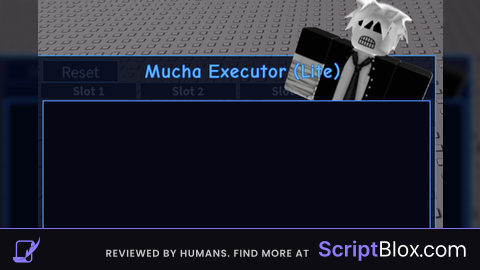
local GuiV1 = Instance.new("ScreenGui")
local MainFrame = Instance.new("Frame")
local TextLabel = Instance.new("TextLabel")
local ImageLabel = Instance.new("ImageLabel")
local SourceFrame = Instance.new("Frame")
local TabsFrame = Instance.new("Frame")


local Tab1Btn = Instance.new("TextButton")
local Tab2Btn = Instance.new("TextButton")
local Tab3Btn = Instance.new("TextButton")
local Tab4Btn = Instance.new("TextButton")


local Input1 = Instance.new("TextBox")
local Input2 = Instance.new("TextBox")
local Input3 = Instance.new("TextBox")
local Input4 = Instance.new("TextBox")

local ExecuteBtn = Instance.new("TextButton")
local ClearBtn = Instance.new("TextButton")
local ResetBtn = Instance.new("TextButton")
local R6Btn = Instance.new("TextButton")
local ResetAllBtn = Instance.new("TextButton")
local IconBtn = Instance.new("TextButton")
local ImageLabel_2 = Instance.new("ImageLabel")

GuiV1.Name = "GuiV1"
GuiV1.Parent = game.Players.LocalPlayer:WaitForChild("PlayerGui")
GuiV1.ResetOnSpawn = false


MainFrame.Name = "MainFrame"
MainFrame.Parent = GuiV1
MainFrame.BackgroundColor3 = Color3.fromRGB(8, 12, 28)
MainFrame.BackgroundTransparency = 0.15
MainFrame.BorderColor3 = Color3.fromRGB(60, 160, 255)
MainFrame.BorderSizePixel = 2
MainFrame.Position = UDim2.new(0.30769223, 0, 0.293081909, 0)
MainFrame.Size = UDim2.new(0.384615391, 0, 0.411320746, 0)
MainFrame.ZIndex = 2
MainFrame.Active = true
MainFrame.Selectable = true
MainFrame.Draggable = true

TextLabel.Parent = MainFrame
TextLabel.BackgroundTransparency = 1
TextLabel.Position = UDim2.new(0.262645155, 0, -0.00305810408, 0)
TextLabel.Size = UDim2.new(0.506976724, 0, 0.137614772, 0)
TextLabel.ZIndex = 3
TextLabel.Font = Enum.Font.Cartoon
TextLabel.Text = "Mucha Executor (Lite)"
TextLabel.TextColor3 = Color3.fromRGB(100, 180, 255)
TextLabel.TextScaled = true
TextLabel.TextStrokeTransparency = 0.4
TextLabel.TextStrokeColor3 = Color3.fromRGB(0, 80, 200)
TextLabel.TextWrapped = true

ImageLabel.Parent = MainFrame
ImageLabel.BackgroundTransparency = 1
ImageLabel.Position = UDim2.new(0.557909608, 0, -0.304188192, 0)
ImageLabel.Rotation = 20
ImageLabel.Size = UDim2.new(0.475968987, 0, 0.920489311, 0)
ImageLabel.ZIndex = 2
ImageLabel.Image = "rbxassetid://101442508100359"
ImageLabel.ScaleType = Enum.ScaleType.Fit


TabsFrame.Name = "TabsFrame"
TabsFrame.Parent = MainFrame
TabsFrame.BackgroundTransparency = 1
TabsFrame.Position = UDim2.new(0, 0, 0.12, 0)  -- pod tytułem
TabsFrame.Size = UDim2.new(1, 0, 0.07, 0)

local function CreateTabButton(btn, text, posX)
    btn.Parent = TabsFrame
    btn.BackgroundColor3 = Color3.fromRGB(12, 25, 60)
    btn.BorderColor3 = Color3.fromRGB(80, 160, 255)
    btn.BorderSizePixel = 1
    btn.Position = UDim2.new(posX, 0, 0, 0)
    btn.Size = UDim2.new(0.24, 0, 1, 0)
    btn.Font = Enum.Font.SourceSansBold
    btn.Text = text
    btn.TextColor3 = Color3.fromRGB(200, 225, 255)
    btn.TextScaled = true
end

CreateTabButton(Tab1Btn, "Slot 1", 0.01)
CreateTabButton(Tab2Btn, "Slot 2", 0.26)
CreateTabButton(Tab3Btn, "Slot 3", 0.51)
CreateTabButton(Tab4Btn, "Slot 4", 0.76)


SourceFrame.Name = "SourceFrame"
SourceFrame.Parent = MainFrame
SourceFrame.BackgroundColor3 = Color3.fromRGB(5, 8, 20)
SourceFrame.BorderColor3 = Color3.fromRGB(80, 140, 255)
SourceFrame.BorderSizePixel = 2
SourceFrame.Position = UDim2.new(0.0167014897, 0, 0.20, 0)  -- przesunięte w dół pod tabs
SourceFrame.Size = UDim2.new(0.968992233, 0, 0.66, 0)      -- mniejsze, bo tabs zabierają miejsce
SourceFrame.ZIndex = 3

local SourceScrolling = Instance.new("ScrollingFrame")
SourceScrolling.Parent = SourceFrame
SourceScrolling.BackgroundTransparency = 1
SourceScrolling.BorderSizePixel = 0
SourceScrolling.Size = UDim2.new(1, 0, 1, 0)
SourceScrolling.CanvasSize = UDim2.new(0, 0, 0, 0)  -- auto


local function SetupInput(inp)
    inp.Parent = SourceScrolling
    inp.BackgroundTransparency = 1
    inp.Size = UDim2.new(1, 0, 1, 0)
    inp.ZIndex = 3
    inp.ClearTextOnFocus = false
    inp.Font = Enum.Font.SourceSansBold
    inp.MultiLine = true
    inp.PlaceholderColor3 = Color3.fromRGB(140, 180, 255)
    inp.Text = ""
    inp.TextColor3 = Color3.fromRGB(220, 235, 255)
    inp.TextSize = 16
    inp.TextStrokeColor3 = Color3.fromRGB(40, 100, 220)
    inp.TextStrokeTransparency = 0.6
    inp.TextXAlignment = Enum.TextXAlignment.Left
    inp.TextYAlignment = Enum.TextYAlignment.Top
    inp.Visible = false
end

SetupInput(Input1) Input1.Visible = true  -- domyślnie Slot 1 aktywny
SetupInput(Input2)
SetupInput(Input3)
SetupInput(Input4)


local function CreateButtonStyle(btn)
    btn.BackgroundColor3 = Color3.fromRGB(12, 25, 60)
    btn.BorderColor3 = Color3.fromRGB(80, 160, 255)
    btn.BorderSizePixel = 2
    btn.TextColor3 = Color3.fromRGB(200, 225, 255)
    btn.TextScaled = true
    btn.TextStrokeColor3 = Color3.fromRGB(40, 100, 220)
    btn.TextStrokeTransparency = 0.7
    btn.Font = Enum.Font.SourceSans
    btn.TextSize = 14
end

ExecuteBtn.Name = "ExecuteBtn"
ExecuteBtn.Parent = MainFrame
CreateButtonStyle(ExecuteBtn)
ExecuteBtn.BackgroundColor3 = Color3.fromRGB(20, 60, 140)
ExecuteBtn.BorderColor3 = Color3.fromRGB(100, 180, 255)
ExecuteBtn.Position = UDim2.new(0.0155038759, 0, 0.889908254, 0)
ExecuteBtn.Size = UDim2.new(0.265116274, 0, 0.0917431191, 0)
ExecuteBtn.Text = "Execute"


ClearBtn.Name = "ClearBtn"
ClearBtn.Parent = MainFrame
CreateButtonStyle(ClearBtn)
ClearBtn.Position = UDim2.new(0.291472882, 0, 0.889908254, 0)
ClearBtn.Size = UDim2.new(0.265116274, 0, 0.0917431191, 0)
ClearBtn.Text = "Clear"

ResetBtn.Name = "ResetBtn"
ResetBtn.Parent = MainFrame
CreateButtonStyle(ResetBtn)
ResetBtn.Position = UDim2.new(0.568992257, 0, 0.889908254, 0)
ResetBtn.Size = UDim2.new(0.215503871, 0, 0.0917431191, 0)
ResetBtn.Text = "BOOM-RESTET"

R6Btn.Name = "R6Btn"
R6Btn.Parent = MainFrame
CreateButtonStyle(R6Btn)
R6Btn.Position = UDim2.new(0.798449636, 0, 0.889908254, 0)
R6Btn.Size = UDim2.new(0.186046511, 0, 0.0917431191, 0)
R6Btn.Text = "idk R6"

ResetAllBtn.Name = "ResetAllBtn"
ResetAllBtn.Parent = MainFrame
CreateButtonStyle(ResetAllBtn)
ResetAllBtn.Position = UDim2.new(0.0155038759, 0, 0.0214067269, 0)
ResetAllBtn.Size = UDim2.new(0.186046511, 0, 0.0917431191, 0)
ResetAllBtn.Text = "Reset"

IconBtn.Name = "IconBtn"
IconBtn.Parent = GuiV1
IconBtn.BackgroundColor3 = Color3.fromRGB(12, 25, 60)
IconBtn.BorderColor3 = Color3.fromRGB(80, 160, 255)
IconBtn.BorderSizePixel = 2
IconBtn.Position = UDim2.new(0.478831232, 0, 0.0226415098, 0)
IconBtn.Size = UDim2.new(0.0417412035, 0, 0.0880503133, 0)
IconBtn.Text = ""

ImageLabel_2.Parent = IconBtn
ImageLabel_2.BackgroundTransparency = 1
ImageLabel_2.Size = UDim2.new(1, 0, 1, 0)
ImageLabel_2.Image = "rbxassetid://7070601134"


local currentInput = Input1
local function ExecuteScript()
    local code = currentInput.Text
    local func, err = loadstring(code)
    if not func then
        warn(err)
        return
    end
    func()
end

local function ClearText()
    currentInput.Text = ""
end

local function ResetCharacter()
    local plr = game.Players.LocalPlayer
    local char = plr.Character or plr.CharacterAdded:Wait()
    char:BreakJoints()
end

local function ResetAllCharacter()
    for _, plr in pairs(game.Players:GetPlayers()) do
        if plr.Character then
            plr.Character:BreakJoints()
        end
    end
end

local function CustomizeIcon()
    MainFrame.Visible = not MainFrame.Visible
end

local function SwitchTab(input)
    Input1.Visible = false
    Input2.Visible = false
    Input3.Visible = false
    Input4.Visible = false
    input.Visible = true
    currentInput = input
end

Tab1Btn.MouseButton1Click:Connect(function() SwitchTab(Input1) end)
Tab2Btn.MouseButton1Click:Connect(function() SwitchTab(Input2) end)
Tab3Btn.MouseButton1Click:Connect(function() SwitchTab(Input3) end)
Tab4Btn.MouseButton1Click:Connect(function() SwitchTab(Input4) end)


ResetAllBtn.MouseButton1Click:Connect(ResetAllCharacter)
ResetBtn.MouseButton1Click:Connect(ResetCharacter)
ClearBtn.MouseButton1Click:Connect(ClearText)
ExecuteBtn.MouseButton1Click:Connect(ExecuteScript)
IconBtn.MouseButton1Click:Connect(CustomizeIcon)


Skidded
@KartaHub yeee fo skids! LOL
@c80lkiddk4ng use my coolkid scrpt for better results
he think what he c00lkidding🤣🤣🤣🤣