

KeylessUniversal
local MUSIC_ID = "rbxassetid://138078955295761"
local SKILL_SOUND = "rbxassetid://12222208"
local TELEPORT_SOUND = "rbxassetid://142350288"
local ABYSS_COLOR = Color3.fromRGB(10, 10, 15)
local NEON_COLOR = Color3.fromRGB(0, 255, 255)

local player = game.Players.LocalPlayer
local mouse = player:GetMouse()
local character = player.Character or player.CharacterAdded:Wait()
local root = character:WaitForChild("HumanoidRootPart")
local UIS = game:GetService("UserInputService")
local RS = game:GetService("RunService")


for _, v in pairs(character:GetChildren()) do
	if v:IsA("BasePart") and v.Name ~= "HumanoidRootPart" then
		v.Transparency = 1
		v.CanCollide = false
	elseif v:IsA("Accessory") or v:IsA("Shirt") or v:IsA("Pants") then
		v:Destroy()
	end
end


local function createAnimatedPart(name, size, targetLimb)
	local p = Instance.new("Part")
	p.Name = name .. "_Abyss"
	p.Size = size
	p.Color = ABYSS_COLOR
	p.Material = Enum.Material.Neon
	p.CanCollide = false
	p.Massless = true
	p.Parent = character

	local weld = Instance.new("Weld")
	weld.Part0 = targetLimb
	weld.Part1 = p
	weld.C0 = CFrame.new(0, 0, 0)
	weld.Parent = p

	local box = Instance.new("SelectionBox")
	box.Adornee = p; box.Color3 = NEON_COLOR; box.LineThickness = 0.04; box.Transparency = 0.4; box.Parent = p
	return p
end


local torso = createAnimatedPart("Torso", Vector3.new(2, 2, 1), character:WaitForChild("Torso"))
local lLeg = createAnimatedPart("LLeg", Vector3.new(1, 2, 1), character:WaitForChild("Left Leg"))
local rLeg = createAnimatedPart("RLeg", Vector3.new(1, 2, 1), character:WaitForChild("Right Leg"))
local lArm = createAnimatedPart("LArm", Vector3.new(1, 2, 1), character:WaitForChild("Left Arm"))
local rArm = createAnimatedPart("RArm", Vector3.new(1, 2, 1), character:WaitForChild("Right Arm"))


local headPart = character:WaitForChild("Head")
local head = createAnimatedPart("Head", Vector3.new(1.2, 1.2, 1.2), headPart)
head.Color = Color3.new(1,1,1); head.Material = "SmoothPlastic"

local bigEye = Instance.new("Part", character)
bigEye.Shape = Enum.PartType.Ball
bigEye.Size = Vector3.new(0.85, 0.85, 0.4)
bigEye.Color = NEON_COLOR
bigEye.Material = Enum.Material.Neon
bigEye.CanCollide = false
bigEye.Parent = character

local eyeWeld = Instance.new("Weld")
eyeWeld.Part0 = head
eyeWeld.Part1 = bigEye
eyeWeld.C0 = CFrame.new(0, 0, -0.5)
eyeWeld.Parent = bigEye


local halo = Instance.new("Part", character)
halo.Size = Vector3.new(2.8, 0.1, 2.8)
halo.Transparency = 1
halo.CanCollide = false
halo.Parent = character

local haloW = Instance.new("Weld", halo)
haloW.Part0 = root
haloW.C0 = CFrame.new(0, 3.2, 0)
haloW.Part1 = halo

local sBox = Instance.new("SelectionBox", halo)
sBox.Adornee = halo; sBox.Color3 = NEON_COLOR; sBox.LineThickness = 0.04; sBox.Transparency = 0.4

local fire = Instance.new("Fire", halo)
fire.Color = NEON_COLOR; fire.SecondaryColor = Color3.new(1, 1, 1); fire.Size = 6; fire.Heat = 9


local orbs = {}
for i = 1, 6 do
	local orb = Instance.new("Part", character)
	orb.Size = Vector3.new(1.5, 1.5, 1.5); orb.Shape = "Ball"; orb.Color = Color3.new(0,0,0); orb.Material = "Neon"; orb.CanCollide = false
	local p = Instance.new("Part", orb)
	p.Size = Vector3.new(0.6, 0.6, 0.3); p.Shape = "Ball"; p.Color = NEON_COLOR; p.Material = "Neon"; p.CanCollide = false
	local pw = Instance.new("Weld", p); pw.Part0 = orb; pw.Part1 = p; pw.C0 = CFrame.new(0,0,-0.6)
	table.insert(orbs, orb)
end


local bgm = Instance.new("Sound", root)
bgm.SoundId = MUSIC_ID; bgm.Volume = 4; bgm.Looped = true; bgm:Play()


RS.Heartbeat:Connect(function()
	local t = tick()


	haloW.C0 = CFrame.new(0, 3.2 + math.sin(t*2)*0.05, 0) * CFrame.Angles(0, t * 2.5, 0)


	for i, orb in ipairs(orbs) do
		local angle = (t * 2) + (i * (math.pi * 2 / #orbs))
		orb.CFrame = root.CFrame * CFrame.new(math.cos(angle) * 7, 3 + math.sin(t * 2 + i) * 1.2, math.sin(angle) * 7)
	end
end)


UIS.InputBegan:Connect(function(input, gpe)
	if gpe then return end
	if input.KeyCode == Enum.KeyCode.Q then
		local tsound = Instance.new("Sound", root)
		tsound.SoundId = TELEPORT_SOUND; tsound.Volume = 2; tsound:Play()
		root.CFrame = CFrame.new(mouse.Hit.p + Vector3.new(0, 3, 0))
	end
	if input.KeyCode == Enum.KeyCode.E then
		local spawnPos = root.Position + root.CFrame.LookVector * 15
		local orbSkill = Instance.new("Part", workspace)
		orbSkill.Size = Vector3.new(5,5,5); orbSkill.Shape = "Ball"; orbSkill.Color = Color3.new(0,0,0); orbSkill.Material = "Neon"
		orbSkill.CanCollide = false; orbSkill.CFrame = CFrame.new(spawnPos - Vector3.new(0,10,0))
		local bv = Instance.new("BodyVelocity", orbSkill); bv.Velocity = Vector3.new(0, 120, 0); bv.MaxForce = Vector3.new(math.huge, math.huge, math.huge)
		local sound = Instance.new("Sound", orbSkill); sound.SoundId = SKILL_SOUND; sound:Play()
		game.Debris:AddItem(orbSkill, 2)
	end
end)


what is this
@Scripterblabla pls make dead rails script pls inf weapon
@Scripterblabla ringta its only premium
Fr the goat is backs lol 😂
chatGPT script
@LuckyEscaper1337 son I make it ownself no AI maybe it's look like AI but it's doesn't not make by Ai
@Scripterblabla yea yea yea every skid reasons, the script has smth like "MUSIC_ID" very very not ai
@LuckyEscaper1337 son i literally use that only For SFX so what should I Use? Custom*et?
The SFX Made by AI it's kinda yk skidding like cant code at all
@LuckyEscaper1337 what's wrong with you GNG 😭 I already said is not Ai what should I do if I'm not using AI? I should use Custom*et SFX? And Copy VFX from Some game? And I'm not A Skidder Who Like to steal a Script from other Scripter I have a life bro
@LuckyEscaper1337 I also make a Own Custom animation Naoya I can show you If you Give you Username On discord
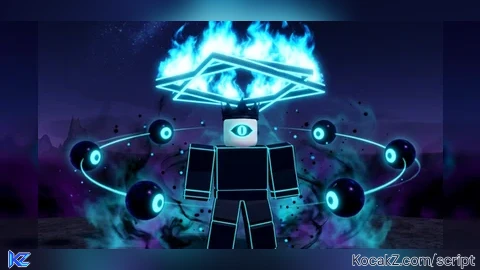
@Scripterblabla yk when testing ts script it doesnt look like from the thumbnail of the script so ik the image might be by some cool AI tho
@LuckyEscaper1337 bro Everyone use AI for the thumb I use AI for the Thumb cause I lazy What's wrong with you GNG go get a better life
@Scripterblabla blud just draw bro not that hard put that thing and just like editing or smth like texts no way that hard gng I've always do that
@LuckyEscaper1337 not all People can Draw bro, I know how to edit but I Lazy So that's why I use Ai