

Key RequiredUniversal
-- Buat ScreenGui
local ScreenGui = Instance.new("ScreenGui")
ScreenGui.Name = "ArtzzModzz"
ScreenGui.Parent = game.CoreGui

-- Warna RGB dinamis
local function RGBColor()
    local r = math.abs(math.sin(tick() * 2)) * 255
    local g = math.abs(math.sin(tick() * 2 + 2)) * 255
    local b = math.abs(math.sin(tick() * 2 + 4)) * 255
    return Color3.fromRGB(r, g, b)
end

-- Frame utama
local MainFrame = Instance.new("Frame")
MainFrame.Size = UDim2.new(0, 300, 0, 400)
MainFrame.Position = UDim2.new(0.5, -150, 0.5, -200)
MainFrame.BackgroundColor3 = Color3.fromRGB(20, 20, 20)
MainFrame.BorderSizePixel = 5
MainFrame.BorderColor3 = RGBColor() -- Set awal RGB
MainFrame.Visible = false
MainFrame.Parent = ScreenGui

-- Perbarui warna border secara dinamis
spawn(function()
    while task.wait() do
        MainFrame.BorderColor3 = RGBColor()
    end
end)

-- Nama Mod Menu
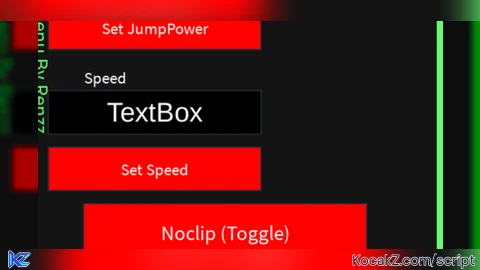
local ModMenuLabel = Instance.new("TextLabel")
ModMenuLabel.Size = UDim2.new(0, 20, 0, 200) -- Lebar kecil, tinggi besar
ModMenuLabel.Position = UDim2.new(0, 10, 0, 10) -- Posisi di kiri
ModMenuLabel.Rotation = 90 -- Rotasi vertikal
ModMenuLabel.Text = "Mod Menu By Renzz"
ModMenuLabel.TextColor3 = RGBColor()
ModMenuLabel.BackgroundTransparency = 1
ModMenuLabel.Font = Enum.Font.SourceSans
ModMenuLabel.TextSize = 18
ModMenuLabel.Parent = MainFrame

-- Perbarui warna teks secara dinamis
spawn(function()
    while task.wait() do
        ModMenuLabel.TextColor3 = RGBColor()
    end
end)

-- Tombol toggle yang bisa dipindahkan
local ToggleButton = Instance.new("TextButton")
ToggleButton.Size = UDim2.new(0, 50, 0, 50)
ToggleButton.Position = UDim2.new(0, 10, 0, 10)
ToggleButton.BackgroundColor3 = Color3.fromRGB(255, 0, 0)
ToggleButton.Text = "Open Mod Menu"
ToggleButton.Font = Enum.Font.SourceSans
ToggleButton.TextSize = 14
ToggleButton.TextColor3 = Color3.fromRGB(255, 255, 255)
ToggleButton.Parent = ScreenGui

-- Fungsi drag untuk tombol toggle
local UIS = game:GetService("UserInputService")
local dragToggle = false
local dragStart = nil
local startPos = nil

ToggleButton.InputBegan:Connect(function(input)
    if input.UserInputType == Enum.UserInputType.MouseButton1 then
        dragToggle = true
        dragStart = input.Position
        startPos = ToggleButton.Position
    end
end)

ToggleButton.InputChanged:Connect(function(input)
    if dragToggle and input.UserInputType == Enum.UserInputType.MouseMovement then
        local delta = input.Position - dragStart
        ToggleButton.Position = UDim2.new(startPos.X.Scale, startPos.X.Offset + delta.X, startPos.Y.Scale, startPos.Y.Offset + delta.Y)
    end
end)

ToggleButton.InputEnded:Connect(function(input)
    if input.UserInputType == Enum.UserInputType.MouseButton1 then
        dragToggle = false
    end
end)

-- Toggle MainFrame
ToggleButton.MouseButton1Click:Connect(function()
    MainFrame.Visible = not MainFrame.Visible
end)

-- Fungsi membuat tombol fitur
local function CreateFeatureButton(name, position, callback)
    local Button = Instance.new("TextButton")
    Button.Size = UDim2.new(0, 200, 0, 40)
    Button.Position = position
    Button.BackgroundColor3 = Color3.fromRGB(255, 0, 0)
    Button.Text = name
    Button.Font = Enum.Font.SourceSans
    Button.TextSize = 18
    Button.TextColor3 = Color3.fromRGB(255, 255, 255)
    Button.Parent = MainFrame

    Button.MouseButton1Click:Connect(callback)
end

-- InputBox untuk menerima angka (versi rapi)
local function CreateInputBox(name, position, callback)
    local Label = Instance.new("TextLabel")
    Label.Size = UDim2.new(0, 200, 0, 20)
    Label.Position = position
    Label.Text = name
    Label.TextColor3 = Color3.fromRGB(255, 255, 255)
    Label.BackgroundTransparency = 1
    Label.TextXAlignment = Enum.TextXAlignment.Left -- Teks rata kiri
    Label.Font = Enum.Font.SourceSans
    Label.TextSize = 14
    Label.Parent = MainFrame

    local InputBox = Instance.new("TextBox")
    InputBox.Size = UDim2.new(0, 150, 0, 30) -- Ukuran lebih kecil
    InputBox.Position = UDim2.new(0, 25, 0, position.Y.Offset + 20) -- Geser ke kiri
    InputBox.PlaceholderText = "Isi angka..."
    InputBox.TextColor3 = Color3.fromRGB(255, 255, 255)
    InputBox.BackgroundColor3 = Color3.fromRGB(0, 0, 0)
    InputBox.TextSize = 14
    InputBox.Parent = MainFrame

    local Button = Instance.new("TextButton")
    Button.Size = UDim2.new(0, 150, 0, 30) -- Ukuran tombol lebih kecil
    Button.Position = UDim2.new(0, 25, 0, position.Y.Offset + 60) -- Geser ke kiri
    Button.BackgroundColor3 = Color3.fromRGB(255, 0, 0)
    Button.Text = "Set "..name
    Button.Font = Enum.Font.SourceSans
    Button.TextSize = 14
    Button.TextColor3 = Color3.fromRGB(255, 255, 255)
    Button.Parent = MainFrame

    Button.MouseButton1Click:Connect(function()
        local input = tonumber(InputBox.Text)
        if input then
            callback(input)
        else
            print("Masukkan angka yang valid!")
        end
    end)
end

-- Input untuk JumpPower dan Speed
CreateInputBox("JumpPower", UDim2.new(0, 50, 0, 20), function(value)
    game.Players.LocalPlayer.Character.Humanoid.JumpPower = value
end)

CreateInputBox("Speed", UDim2.new(0, 50, 0, 120), function(value)
    game.Players.LocalPlayer.Character.Humanoid.WalkSpeed = value
end)

-- Noclip
local NoclipEnabled = false
CreateFeatureButton("Noclip (Toggle)", UDim2.new(0, 50, 0, 220), function()
    NoclipEnabled = not NoclipEnabled
    if NoclipEnabled then
        game:GetService("RunService").Stepped:Connect(function()
            for _, part in pairs(game.Players.LocalPlayer.Character:GetDescendants()) do
                if part:IsA("BasePart") then
                    part.CanCollide = false
                end
            end
        end)
    end
end)

-- Infinite Jump
local InfJumpEnabled = false
CreateFeatureButton("InfJump (Toggle)", UDim2.new(0, 50, 0, 280), function()
    InfJumpEnabled = not InfJumpEnabled
    if InfJumpEnabled then
        game:GetService("UserInputService").JumpRequest:Connect(function()
            if InfJumpEnabled then
                game.Players.LocalPlayer.Character:FindFirstChildOfClass("Humanoid"):ChangeState("Jumping")
            end
        end)
    end
end)


100% chatgpt
Ai but i like the lines for background
what does this do?