


KeylessUniversal
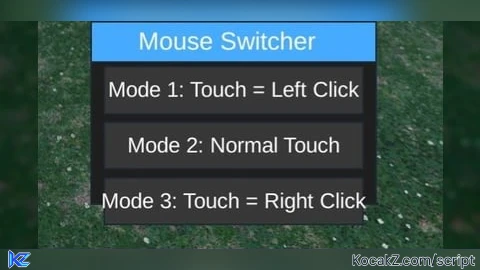
local UIS = game:GetService("UserInputService")
local CoreGui = game:GetService("CoreGui")

local currentMode = 2

local function LeftClick()
    if typeof(mouse1click) == "function" then
        mouse1click()
    end
end

local function RightClick()
    if typeof(mouse2click) == "function" then
        mouse2click()
    end
end

-- Draggable UI
local ScreenGui = Instance.new("ScreenGui")
ScreenGui.Parent = CoreGui
ScreenGui.Name = "SimpleMouse"
ScreenGui.ResetOnSpawn = false

local Main = Instance.new("Frame")
Main.Size = UDim2.new(0, 220, 0, 140)
Main.Position = UDim2.new(0.5, -110, 0.5, -70)
Main.BackgroundColor3 = Color3.fromRGB(30, 30, 30)
Main.Active = true
Main.Draggable = true
Main.Parent = ScreenGui

local TitleBar = Instance.new("Frame")
TitleBar.Size = UDim2.new(1, 0, 0, 30)
TitleBar.BackgroundColor3 = Color3.fromRGB(70, 170, 255)
TitleBar.Draggable = true
TitleBar.Parent = Main

local Title = Instance.new("TextLabel")
Title.Size = UDim2.new(1, -10, 1, 0)
Title.BackgroundTransparency = 1
Title.Text = "Mouse Switcher"
Title.TextColor3 = Color3.new(1, 1, 1)
Title.TextSize = 14
Title.Parent = TitleBar

local Content = Instance.new("Frame")
Content.Size = UDim2.new(1, -20, 1, -40)
Content.Position = UDim2.new(0, 10, 0, 35)
Content.BackgroundTransparency = 1
Content.Parent = Main

local Layout = Instance.new("UIListLayout")
Layout.Parent = Content
Layout.Padding = UDim.new(0, 8)
Layout.HorizontalAlignment = Enum.HorizontalAlignment.Center

-- Three buttons
local function Btn(text, mode)
    local btn = Instance.new("TextButton")
    btn.Size = UDim2.new(1, 0, 0, 35)
    btn.BackgroundColor3 = Color3.fromRGB(55, 55, 55)
    btn.Text = text
    btn.TextColor3 = Color3.new(1, 1, 1)
    btn.TextSize = 12
    btn.Parent = Content

    btn.MouseButton1Click:Connect(function()
        currentMode = mode
        for _, c in Content:GetChildren() do
            if c:IsA("TextButton") then
                c.BackgroundColor3 = Color3.fromRGB(55, 55, 55)
            end
        end
        btn.BackgroundColor3 = Color3.fromRGB(70, 170, 255)
    end)
end

Btn("Mode 1: Touch = Left Click", 1)
Btn("Mode 2: Normal Touch", 2)
Btn("Mode 3: Touch = Right Click", 3)

-- Touch logic
UIS.InputBegan:Connect(function(input, ignore)
    if ignore then return end
    if input.UserInputType ~= Enum.UserInputType.Touch then return end

    if currentMode == 1 then
        LeftClick()
    elseif currentMode == 3 then
        RightClick()
    end
end)


I've been trying to do this compatibility script. This is my second script.
how do you turn it off? I’m mobile and I can’t deactivate it so what do I do? I can’t move if I can’t use/see the movement thing or the jump button, please make it so I can turn it off bro
@Ryderjpruitt I can only do so much. You can try to drag it off the screen. If you have a problem with your backpack not being able to drag, you can try another script. A backpack made.