

Key RequiredUniversal
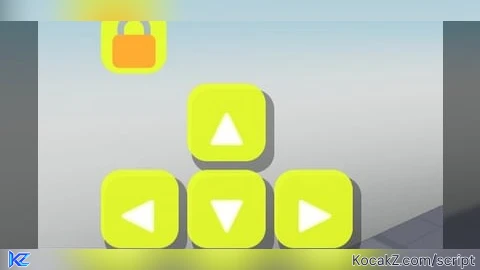
--// 🌈 ADVANCED MOBILE MOVEMENT CONTROLLER
--// LocalScript -> StarterPlayer > StarterPlayerScripts

local Players = game:GetService("Players")
local UserInputService = game:GetService("UserInputService")
local RunService = game:GetService("RunService")
local TweenService = game:GetService("TweenService")

local player = Players.LocalPlayer
local playerGui = player:WaitForChild("PlayerGui")

--==================================================
-- CONFIGURAÇÕES
--==================================================

local BUTTON_SIZE = 62
local GAP = 7

local NORMAL_COLOR = Color3.fromRGB(35, 35, 45)
local PRESSED_COLOR = Color3.fromRGB(70, 150, 255)
local LOCK_COLOR = Color3.fromRGB(40, 200, 110)

local RAINBOW_SPEED = 0.25
local RAINBOW_SATURATION = 0.85
local RAINBOW_VALUE = 1

local muted = false
local locked = true

local pressed = {
	W = false,
	A = false,
	S = false,
	D = false
}

--==================================================
-- GUI
--==================================================

local gui = Instance.new("ScreenGui")
gui.Name = "AdvancedMobileMovement"
gui.ResetOnSpawn = false
gui.IgnoreGuiInset = true
gui.Parent = playerGui

local controller = Instance.new("Frame")
controller.Name = "Controller"

controller.Size = UDim2.fromOffset(
	BUTTON_SIZE * 3 + GAP * 2,
	BUTTON_SIZE * 2 + GAP
)

controller.Position = UDim2.new(0, 25, 1, -170)
controller.BackgroundTransparency = 1
controller.Parent = gui

--==================================================
-- BOTÕES
--==================================================

local function makeButton(name, text, position)

	local button = Instance.new("TextButton")

	button.Name = name
	button.Size = UDim2.fromOffset(BUTTON_SIZE, BUTTON_SIZE)
	button.Position = position

	button.BackgroundColor3 = NORMAL_COLOR
	button.BackgroundTransparency = 0.08

	button.Text = text
	button.TextColor3 = Color3.fromRGB(255,255,255)
	button.TextScaled = true
	button.Font = Enum.Font.GothamBold

	button.AutoButtonColor = false
	button.Parent = controller

	local corner = Instance.new("UICorner")
	corner.CornerRadius = UDim.new(0,16)
	corner.Parent = button

	local stroke = Instance.new("UIStroke")
	stroke.Thickness = 2
	stroke.Transparency = 0.2
	stroke.Color = Color3.fromRGB(255,255,255)
	stroke.Parent = button

	local shadow = Instance.new("Frame")

	shadow.Name = "Shadow"
	shadow.Size = UDim2.new(1,4,1,4)
	shadow.Position = UDim2.fromOffset(3,5)

	shadow.BackgroundColor3 = Color3.fromRGB(0,0,0)
	shadow.BackgroundTransparency = 0.65

	shadow.ZIndex = button.ZIndex - 1
	shadow.Parent = button

	local shadowCorner = Instance.new("UICorner")
	shadowCorner.CornerRadius = UDim.new(0,16)
	shadowCorner.Parent = shadow

	return button
end

local W = makeButton(
	"W",
	"▲",
	UDim2.fromOffset(BUTTON_SIZE + GAP,0)
)

local A = makeButton(
	"A",
	"◀",
	UDim2.fromOffset(0,BUTTON_SIZE + GAP)
)

local S = makeButton(
	"S",
	"▼",
	UDim2.fromOffset(BUTTON_SIZE + GAP,BUTTON_SIZE + GAP)
)

local D = makeButton(
	"D",
	"▶",
	UDim2.fromOffset((BUTTON_SIZE + GAP) * 2,BUTTON_SIZE + GAP)
)

local buttons = {
	W = W,
	A = A,
	S = S,
	D = D
}

--==================================================
-- 🔒 CADEADO
--==================================================

local lockButton = Instance.new("TextButton")

lockButton.Name = "LockButton"
lockButton.Size = UDim2.fromOffset(52,52)

lockButton.Position = UDim2.new(
	0,25,
	1,-230
)

lockButton.BackgroundColor3 = LOCK_COLOR
lockButton.BackgroundTransparency = 0.08

lockButton.Text = "🔒"
lockButton.TextScaled = true
lockButton.Font = Enum.Font.GothamBold
lockButton.TextColor3 = Color3.new(1,1,1)

lockButton.AutoButtonColor = false
lockButton.Parent = gui

local lockCorner = Instance.new("UICorner")
lockCorner.CornerRadius = UDim.new(0,15)
lockCorner.Parent = lockButton

local lockStroke = Instance.new("UIStroke")
lockStroke.Thickness = 2
lockStroke.Color = Color3.fromRGB(255,255,255)
lockStroke.Transparency = 0.2
lockStroke.Parent = lockButton

--==================================================
-- 🔊 SONS
--==================================================

local pressSound = Instance.new("Sound")

pressSound.Name = "PressSound"
pressSound.SoundId = "rbxasset://sounds/electronicpingshort.wav"
pressSound.Volume = 0.12
pressSound.Parent = gui

local lockSound = Instance.new("Sound")

lockSound.Name = "LockSound"
lockSound.SoundId = "rbxasset://sounds/electronicpingshort.wav"
lockSound.Volume = 0.15
lockSound.Parent = gui

local function playSound(sound)

	if muted then
		return
	end

	local clone = sound:Clone()

	clone.Parent = gui
	clone.Volume = sound.Volume

	clone:Play()

	task.delay(1,function()

		if clone then
			clone:Destroy()
		end

	end)
end

--==================================================
-- 🌈 EFEITO ARCO-ÍRIS
--==================================================

local rainbowObjects = {
	W,
	A,
	S,
	D,
	lockButton
}

task.spawn(function()

	local hue = 0

	while gui.Parent do

		hue = (hue + RAINBOW_SPEED * 0.01) % 1

		local rainbowColor = Color3.fromHSV(
			hue,
			RAINBOW_SATURATION,
			RAINBOW_VALUE
		)

		for _,object in ipairs(rainbowObjects) do

			if object and object.Parent then

				if object == lockButton then

					if locked then
						object.BackgroundColor3 = rainbowColor
					end

				elseif not pressed[object.Name] then

					object.BackgroundColor3 = rainbowColor
				end
			end
		end

		task.wait(0.03)
	end
end)

--==================================================
-- ANIMAÇÃO DOS BOTÕES
--==================================================

local function setButtonPressed(button,state)

	if state then

		TweenService:Create(
			button,
			TweenInfo.new(0.08),
			{
				BackgroundColor3 = PRESSED_COLOR,
				Size = UDim2.fromOffset(
					BUTTON_SIZE - 4,
					BUTTON_SIZE - 4
				)
			}
		):Play()

	else

		TweenService:Create(
			button,
			TweenInfo.new(0.08),
			{
				Size = UDim2.fromOffset(
					BUTTON_SIZE,
					BUTTON_SIZE
				)
			}
		):Play()
	end
end

--==================================================
-- MOVIMENTO
--==================================================

local activeTouches = {}

local function setDirection(direction,state)

	if pressed[direction] == state then
		return
	end

	pressed[direction] = state

	local button = buttons[direction]

	if button then
		setButtonPressed(button,state)
	end

	if state then
		playSound(pressSound)
	end
end

for direction,button in pairs(buttons) do

	button.InputBegan:Connect(function(input)

		if input.UserInputType == Enum.UserInputType.Touch
			or input.UserInputType == Enum.UserInputType.MouseButton1 then

			activeTouches[input] = direction

			setDirection(direction,true)
		end
	end)

	button.InputEnded:Connect(function(input)

		if activeTouches[input] == direction then

			activeTouches[input] = nil

			setDirection(direction,false)
		end
	end)
end

--==================================================
-- 🎮 MOVIMENTO REAL DO PERSONAGEM
--==================================================

local function getHumanoid()

	local character = player.Character

	if not character then
		return nil
	end

	return character:FindFirstChildOfClass("Humanoid")
end

RunService.RenderStepped:Connect(function()

	local humanoid = getHumanoid()

	if not humanoid then
		return
	end

	local camera = workspace.CurrentCamera

	if not camera then
		return
	end

	local forward = 0
	local right = 0

	if pressed.W then
		forward += 1
	end

	if pressed.S then
		forward -= 1
	end

	if pressed.D then
		right += 1
	end

	if pressed.A then
		right -= 1
	end

	local direction = Vector3.new(
		right,
		0,
		forward
	)

	if direction.Magnitude > 0 then

		direction = direction.Unit

		local cameraForward = Vector3.new(
			camera.CFrame.LookVector.X,
			0,
			camera.CFrame.LookVector.Z
		)

		local cameraRight = Vector3.new(
			camera.CFrame.RightVector.X,
			0,
			camera.CFrame.RightVector.Z
		)

		if cameraForward.Magnitude > 0 then
			cameraForward = cameraForward.Unit
		end

		if cameraRight.Magnitude > 0 then
			cameraRight = cameraRight.Unit
		end

		local finalDirection =
			(cameraRight * direction.X) +
			(cameraForward * direction.Z)

		humanoid:Move(finalDirection,false)

	else

		humanoid:Move(Vector3.zero,false)

	end
end)

--==================================================
-- 📱 ARRASTAR CONTROLE INTEIRO
--==================================================

local dragging = false
local dragStart
local startPosition

local function updateController(input)

	local delta = input.Position - dragStart

	controller.Position = UDim2.new(

		startPosition.X.Scale,
		startPosition.X.Offset + delta.X,

		startPosition.Y.Scale,
		startPosition.Y.Offset + delta.Y
	)
end

controller.InputBegan:Connect(function(input)

	if locked then
		return
	end

	if input.UserInputType == Enum.UserInputType.Touch
		or input.UserInputType == Enum.UserInputType.MouseButton1 then

		dragging = true

		dragStart = input.Position
		startPosition = controller.Position

		input.Changed:Connect(function()

			if input.UserInputState == Enum.UserInputState.End then
				dragging = false
			end

		end)
	end
end)

UserInputService.InputChanged:Connect(function(input)

	if not dragging then
		return
	end

	if input.UserInputType == Enum.UserInputType.Touch
		or input.UserInputType == Enum.UserInputType.MouseMovement then

		updateController(input)
	end
end)

--==================================================
-- 🔒 ABRIR / FECHAR CADEADO
--==================================================

lockButton.Activated:Connect(function()

	locked = not locked

	playSound(lockSound)

	if locked then

		lockButton.Text = "🔒"

	else

		lockButton.Text = "🔓"

	end
end)

--==================================================
-- 🔇 MUTE / 🔊 UNMUTE
--==================================================

player.Chatted:Connect(function(message)

	message = string.lower(message)

	-- Remove espaços extras
	message = message:gsub("^%s*(.-)%s*$","%1")

	if message == "mute" then

		muted = true

	elseif message == "unmute" then

		muted = false

	end
end)

--==================================================
-- SOLTAR BOTÕES
--==================================================

UserInputService.InputEnded:Connect(function(input)

	local direction = activeTouches[input]

	if direction then

		activeTouches[input] = nil

		setDirection(direction,false)
	end
end)

--==================================================
-- RESETAR DEPOIS DA MORTE
--==================================================

player.CharacterAdded:Connect(function()

	for direction in pairs(pressed) do

		pressed[direction] = false

		if buttons[direction] then
			buttons[direction].Size = UDim2.fromOffset(
				BUTTON_SIZE,
				BUTTON_SIZE
			)
		end
	end
end)


Nice you just gotta get used to it