

Key RequiredUniversal
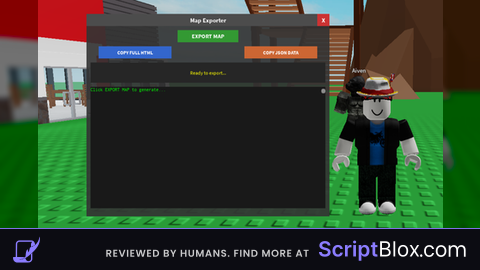
-- MAP EXPORTER WITH GUI also yes this is ai i know i jst thought this script worked very well
local player = game.Players.LocalPlayer
local gui = Instance.new("ScreenGui")
gui.Name = "MapExporter"
gui.Parent = player:WaitForChild("PlayerGui")

-- Main frame
local frame = Instance.new("Frame")
frame.Size = UDim2.new(0, 600, 0, 500)
frame.Position = UDim2.new(0.5, -300, 0.5, -250)
frame.BackgroundColor3 = Color3.new(0.2, 0.2, 0.2)
frame.BackgroundTransparency = 0.1
frame.BorderSizePixel = 0
frame.Active = true
frame.Draggable = true
frame.Parent = gui

-- Title
local title = Instance.new("TextLabel")
title.Size = UDim2.new(1, 0, 0, 30)
title.Position = UDim2.new(0, 0, 0, 0)
title.BackgroundColor3 = Color3.new(0.3, 0.3, 0.3)
title.BorderSizePixel = 0
title.Text = "Map Exporter"
title.TextColor3 = Color3.new(1, 1, 1)
title.Font = Enum.Font.SourceSansBold
title.TextSize = 18
title.Parent = frame

-- Close button
local close = Instance.new("TextButton")
close.Size = UDim2.new(0, 30, 0, 30)
close.Position = UDim2.new(1, -30, 0, 0)
close.BackgroundColor3 = Color3.new(0.8, 0.2, 0.2)
close.BorderSizePixel = 0
close.Text = "X"
close.TextColor3 = Color3.new(1, 1, 1)
close.Font = Enum.Font.SourceSansBold
close.TextSize = 18
close.Parent = frame
close.MouseButton1Click:Connect(function() gui:Destroy() end)

-- Export button
local exportBtn = Instance.new("TextButton")
exportBtn.Size = UDim2.new(0, 150, 0, 30)
exportBtn.Position = UDim2.new(0.5, -75, 0, 40)
exportBtn.BackgroundColor3 = Color3.new(0.2, 0.6, 0.2)
exportBtn.BorderSizePixel = 0
exportBtn.Text = "EXPORT MAP"
exportBtn.TextColor3 = Color3.new(1, 1, 1)
exportBtn.Font = Enum.Font.SourceSansBold
exportBtn.TextSize = 16
exportBtn.Parent = frame

-- Copy buttons
local copyBtn1 = Instance.new("TextButton")
copyBtn1.Size = UDim2.new(0, 180, 0, 30)
copyBtn1.Position = UDim2.new(0.5, -270, 0, 80)
copyBtn1.BackgroundColor3 = Color3.new(0.2, 0.4, 0.8)
copyBtn1.BorderSizePixel = 0
copyBtn1.Text = "COPY FULL HTML"
copyBtn1.TextColor3 = Color3.new(1, 1, 1)
copyBtn1.Font = Enum.Font.SourceSansBold
copyBtn1.TextSize = 14
copyBtn1.Parent = frame

local copyBtn2 = Instance.new("TextButton")
copyBtn2.Size = UDim2.new(0, 180, 0, 30)
copyBtn2.Position = UDim2.new(0.5, 90, 0, 80)
copyBtn2.BackgroundColor3 = Color3.new(0.8, 0.4, 0.2)
copyBtn2.BorderSizePixel = 0
copyBtn2.Text = "COPY JSON DATA"
copyBtn2.TextColor3 = Color3.new(1, 1, 1)
copyBtn2.Font = Enum.Font.SourceSansBold
copyBtn2.TextSize = 14
copyBtn2.Parent = frame

-- Status text
local statusLabel = Instance.new("TextLabel")
statusLabel.Size = UDim2.new(1, -20, 0, 50)
statusLabel.Position = UDim2.new(0, 10, 0, 120)
statusLabel.BackgroundColor3 = Color3.new(0.15, 0.15, 0.15)
statusLabel.BorderSizePixel = 0
statusLabel.Text = "Ready to export..."
statusLabel.TextColor3 = Color3.new(1, 1, 0)
statusLabel.Font = Enum.Font.SourceSans
statusLabel.TextSize = 14
statusLabel.TextWrapped = true
statusLabel.Parent = frame

-- Text box for output (will show summary only)
local textBox = Instance.new("ScrollingFrame")
textBox.Size = UDim2.new(1, -20, 1, -200)
textBox.Position = UDim2.new(0, 10, 0, 180)
textBox.BackgroundColor3 = Color3.new(0.1, 0.1, 0.1)
textBox.BorderSizePixel = 0
textBox.CanvasSize = UDim2.new(0, 0, 10, 0)
textBox.ScrollBarThickness = 10
textBox.Parent = frame

local textLabel = Instance.new("TextLabel")
textLabel.Size = UDim2.new(1, 0, 0, 20)
textLabel.BackgroundTransparency = 1
textLabel.TextColor3 = Color3.new(0, 1, 0)
textLabel.Font = Enum.Font.Code
textLabel.TextSize = 12
textLabel.TextXAlignment = Enum.TextXAlignment.Left
textLabel.TextYAlignment = Enum.TextYAlignment.Top
textLabel.Text = "Click EXPORT MAP to generate..."
textLabel.TextWrapped = true
textLabel.Parent = textBox

-- Store the generated data
local generatedHTML = ""
local generatedJSON = ""

-- Function to update text box
local function setOutput(text)
    -- Split text into lines to count
    local lines = {}
    for line in string.gmatch(text, "[^\r\n]+") do
        table.insert(lines, line)
    end
    local lineCount = #lines

    -- Limit to 1000 lines max for display
    if lineCount > 1000 then
        local displayText = table.concat(lines, "\n", 1, 100) .. "\n\n... (truncated, " .. lineCount .. " total lines) ...\n\n" .. table.concat(lines, "\n", lineCount-50, lineCount)
        textLabel.Text = displayText
        lineCount = 150  -- Approximate
    else
        textLabel.Text = text
    end

    textLabel.Size = UDim2.new(1, 0, 0, lineCount * 16)
    textBox.CanvasSize = UDim2.new(0, 0, 0, lineCount * 16 + 20)
end

-- Copy to clipboard function with fallback
local function copyToClipboard(text, type)
    local success = pcall(function()
        setclipboard(text)
    end)

    if success then
        statusLabel.Text = "✅ " .. type .. " copied to clipboard! Paste into a text file."
        statusLabel.TextColor3 = Color3.new(0, 1, 0)
    else
        -- Show in text box as fallback
        setOutput(text)
        statusLabel.Text = "⚠️ Couldn't copy directly. Select all text below and copy manually."
        statusLabel.TextColor3 = Color3.new(1, 1, 0)
    end
end

-- Export function
exportBtn.MouseButton1Click:Connect(function()
    statusLabel.Text = "Collecting map data... (this may take a moment)"
    statusLabel.TextColor3 = Color3.new(1, 1, 0)
    task.wait()

    local mapData = {
        name = tostring(game.Name),
        parts = {},
        spawns = {}
    }

    -- Collect all parts in workspace
    for _, obj in ipairs(workspace:GetDescendants()) do
        if obj:IsA("BasePart") and obj.Transparency < 1 then

            -- Skip players
            local isPlayerPart = false
            for _, p in ipairs(game.Players:GetPlayers()) do
                if p.Character and (obj:IsDescendantOf(p.Character) or obj.Parent == p.Character) then
                    isPlayerPart = true
                    break
                end
            end

            if not isPlayerPart then
                -- Get color safely
                local r, g, b = 0.5, 0.5, 0.5

                local brickColor = obj.BrickColor
                if brickColor then
                    local color = brickColor.Color
                    if color then
                        r = color.R
                        g = color.G
                        b = color.B
                    end
                elseif obj.Color then
                    r = obj.Color.R
                    g = obj.Color.G
                    b = obj.Color.B
                end

                local partData = {
                    name = tostring(obj.Name),
                    class = tostring(obj.ClassName),
                    position = {obj.Position.X, obj.Position.Y, obj.Position.Z},
                    size = {obj.Size.X, obj.Size.Y, obj.Size.Z},
                    color = {r, g, b},
                    rotation = {obj.Orientation.X, obj.Orientation.Y, obj.Orientation.Z}
                }

                table.insert(mapData.parts, partData)
            end
        end
    end

    -- Collect spawns
    for _, obj in ipairs(workspace:GetDescendants()) do
        if obj.Name and type(obj.Name) == "string" and obj.Name:lower():find("spawn") and obj:IsA("BasePart") then
            table.insert(mapData.spawns, {obj.Position.X, obj.Position.Y, obj.Position.Z})
        end
    end

    statusLabel.Text = "Encoding map data... (" .. #mapData.parts .. " parts)"
    task.wait()

    -- Encode JSON
    local jsonSuccess, jsonResult = pcall(function()
        return game:GetService("HttpService"):JSONEncode(mapData)
    end)

    if not jsonSuccess then
        statusLabel.Text = "❌ Error encoding map data. Map might be too large."
        statusLabel.TextColor3 = Color3.new(1, 0, 0)
        return
    end

    generatedJSON = jsonResult

    statusLabel.Text = "Generating HTML... (this may take a moment)"
    task.wait()

    -- FIXED HTML with proper camera controls
    generatedHTML = [[<!DOCTYPE html>
<html>
<head>
    <title>]] .. tostring(game.Name) .. [[ Map</title>
    <style>
        body { margin: 0; overflow: hidden; font-family: Arial; }
        #info { position: absolute; top: 10px; left: 10px; background: rgba(0,0,0,0.7); color: white; padding: 10px; border-radius: 5px; z-index: 100; }
        #controls { position: absolute; bottom: 10px; left: 10px; background: rgba(0,0,0,0.7); color: white; padding: 10px; border-radius: 5px; z-index: 100; }
        #status { position: absolute; top: 10px; right: 10px; background: rgba(0,0,0,0.7); color: #0f0; padding: 10px; border-radius: 5px; z-index: 100; }
    </style>
</head>
<body>
    <div id="info">Map: ]] .. tostring(game.Name) .. [[ | Parts: ]] .. #mapData.parts .. [[ | Spawns: ]] .. #mapData.spawns .. [[</div>
    <div id="controls">WASD: Fly | Mouse: Look | Click to lock mouse | Shift: Speed boost | Space/Ctrl: Up/Down</div>
    <div id="status">Ready</div>

    <script src="https://cdnjs.cloudflare.com/ajax/libs/three.js/r128/three.min.js"></script>

    <script>
    // Map data
    const mapData = ]] .. jsonResult .. [[;

    // Setup scene
    const scene = new THREE.Scene();
    scene.background = new THREE.Color(0x111122);

    // Camera
    const camera = new THREE.PerspectiveCamera(75, window.innerWidth / window.innerHeight, 0.1, 1000);
    if (mapData.spawns && mapData.spawns.length > 0) {
        camera.position.set(mapData.spawns[0][0], mapData.spawns[0][1] + 2, mapData.spawns[0][2] + 5);
    } else {
        camera.position.set(0, 5, 20);
    }

    // Renderer
    const renderer = new THREE.WebGLRenderer({ antialias: true });
    renderer.setSize(window.innerWidth, window.innerHeight);
    renderer.shadowMap.enabled = true;
    renderer.shadowMap.type = THREE.PCFSoftShadowMap;
    renderer.setPixelRatio(window.devicePixelRatio);
    document.body.appendChild(renderer.domElement);

    // Lights
    const ambientLight = new THREE.AmbientLight(0x404060);
    scene.add(ambientLight);

    const dirLight = new THREE.DirectionalLight(0xffffff, 1);
    dirLight.position.set(20, 30, 20);
    dirLight.castShadow = true;
    dirLight.shadow.mapSize.width = 1024;
    dirLight.shadow.mapSize.height = 1024;
    dirLight.shadow.camera.near = 0.5;
    dirLight.shadow.camera.far = 100;
    dirLight.shadow.camera.left = -50;
    dirLight.shadow.camera.right = 50;
    dirLight.shadow.camera.top = 50;
    dirLight.shadow.camera.bottom = -50;
    scene.add(dirLight);

    // Fill lights
    const fillLight1 = new THREE.PointLight(0x4466ff, 0.3);
    fillLight1.position.set(-20, 10, 20);
    scene.add(fillLight1);

    const fillLight2 = new THREE.PointLight(0xffaa66, 0.3);
    fillLight2.position.set(20, 10, -20);
    scene.add(fillLight2);

    // Grid
    const gridHelper = new THREE.GridHelper(200, 40, 0x8888ff, 0x333344);
    scene.add(gridHelper);

    // Add axes helper (optional, can remove)
    // const axesHelper = new THREE.AxesHelper(5);
    // scene.add(axesHelper);

    // Create map parts
    if (mapData.parts && mapData.parts.length > 0) {
        mapData.parts.forEach(part => {
            try {
                const geometry = new THREE.BoxGeometry(part.size[0], part.size[1], part.size[2]);
                const material = new THREE.MeshStandardMaterial({
                    color: new THREE.Color(part.color[0], part.color[1], part.color[2])
                });
                const mesh = new THREE.Mesh(geometry, material);
                mesh.position.set(part.position[0], part.position[1], part.position[2]);
                mesh.rotation.set(
                    part.rotation[0] * Math.PI / 180,
                    part.rotation[1] * Math.PI / 180,
                    part.rotation[2] * Math.PI / 180
                );
                mesh.castShadow = true;
                mesh.receiveShadow = true;
                scene.add(mesh);
            } catch(e) {
                console.log("Error adding part:", e);
            }
        });
    }

    // Add spawn markers
    if (mapData.spawns && mapData.spawns.length > 0) {
        mapData.spawns.forEach(spawn => {
            const sphereGeo = new THREE.SphereGeometry(1, 16);
            const sphereMat = new THREE.MeshStandardMaterial({ color: 0x00ff00, emissive: 0x004400 });
            const sphere = new THREE.Mesh(sphereGeo, sphereMat);
            sphere.position.set(spawn[0], spawn[1], spawn[2]);
            sphere.castShadow = true;
            scene.add(sphere);

            // Add a beam of light
            const beamGeo = new THREE.CylinderGeometry(0.2, 0.2, 5, 8);
            const beamMat = new THREE.MeshStandardMaterial({ color: 0x00ff00, emissive: 0x004400, transparent: true, opacity: 0.3 });
            const beam = new THREE.Mesh(beamGeo, beamMat);
            beam.position.set(spawn[0], spawn[1] + 2.5, spawn[2]);
            scene.add(beam);
        });
    }

    // Camera controls with Pointer Lock API
    const moveState = {
        forward: false,
        backward: false,
        left: false,
        right: false,
        up: false,
        down: false,
        speed: 5
    };

    let mouseSensitivity = 0.002;
    let pitch = 0;
    let yaw = 0;
    let mouseLocked = false;

    // Mouse lock on click
    renderer.domElement.addEventListener('click', () => {
        renderer.domElement.requestPointerLock();
    });

    // Handle pointer lock change
    document.addEventListener('pointerlockchange', () => {
        mouseLocked = document.pointerLockElement === renderer.domElement;
        document.getElementById('status').innerText = mouseLocked ? 'Mouse Locked' : 'Click to lock mouse';
    });

    // Mouse movement for looking
    document.addEventListener('mousemove', (e) => {
        if (mouseLocked) {
            yaw -= e.movementX * mouseSensitivity;
            pitch -= e.movementY * mouseSensitivity;

            // Limit pitch to avoid flipping
            pitch = Math.max(-Math.PI/2, Math.min(Math.PI/2, pitch));

            // Apply rotation to camera
            camera.rotation.order = 'YXZ';
            camera.rotation.y = yaw;
            camera.rotation.x = pitch;
        }
    });

    // Keyboard controls
    document.addEventListener('keydown', (e) => {
        switch(e.code) {
            case 'KeyW': moveState.forward = true; e.preventDefault(); break;
            case 'KeyS': moveState.backward = true; e.preventDefault(); break;
            case 'KeyA': moveState.left = true; e.preventDefault(); break;
            case 'KeyD': moveState.right = true; e.preventDefault(); break;
            case 'Space': moveState.up = true; e.preventDefault(); break;
            case 'ShiftLeft': moveState.speed = 15; e.preventDefault(); break;
            case 'ControlLeft': moveState.down = true; e.preventDefault(); break;
        }
    });

    document.addEventListener('keyup', (e) => {
        switch(e.code) {
            case 'KeyW': moveState.forward = false; e.preventDefault(); break;
            case 'KeyS': moveState.backward = false; e.preventDefault(); break;
            case 'KeyA': moveState.left = false; e.preventDefault(); break;
            case 'KeyD': moveState.right = false; e.preventDefault(); break;
            case 'Space': moveState.up = false; e.preventDefault(); break;
            case 'ShiftLeft': moveState.speed = 5; e.preventDefault(); break;
            case 'ControlLeft': moveState.down = false; e.preventDefault(); break;
        }
    });

    // Animation loop with delta time for smooth movement
    const clock = new THREE.Clock();

    function animate() {
        requestAnimationFrame(animate);

        const delta = Math.min(clock.getDelta(), 0.1); // Cap delta to avoid large jumps

        if (mouseLocked) {
            // Calculate movement direction based on camera orientation
            const direction = new THREE.Vector3(0, 0, 0);

            if (moveState.forward) {
                direction.z -= 1;
            }
            if (moveState.backward) {
                direction.z += 1;
            }
            if (moveState.left) {
                direction.x -= 1;
            }
            if (moveState.right) {
                direction.x += 1;
            }

            // Normalize diagonal movement
            if (direction.length() > 0) {
                direction.normalize();
            }

            // Transform direction from local to world space
            direction.applyQuaternion(camera.quaternion);

            // Remove vertical component from horizontal movement
            if (!moveState.up && !moveState.down) {
                direction.y = 0;
            }

            // Add vertical movement
            if (moveState.up) {
                direction.y += 1;
            }
            if (moveState.down) {
                direction.y -= 1;
            }

            // Apply movement
            camera.position.addScaledVector(direction, moveState.speed * delta * 10);
        }

        renderer.render(scene, camera);
    }

    animate();

    // Handle window resize
    window.addEventListener('resize', () => {
        camera.aspect = window.innerWidth / window.innerHeight;
        camera.updateProjectionMatrix();
        renderer.setSize(window.innerWidth, window.innerHeight);
    });

    // Update status
    setInterval(() => {
        if (mouseLocked) {
            document.getElementById('status').innerHTML = `Pos: ${camera.position.x.toFixed(1)}, ${camera.position.y.toFixed(1)}, ${camera.position.z.toFixed(1)} | Speed: ${moveState.speed}`;
        }
    }, 100);
    </script>
</body>
</html>]]

    statusLabel.Text = "✅ Map exported! " .. #mapData.parts .. " parts, " .. #mapData.spawns .. " spawns. HTML size: " .. string.len(generatedHTML) .. " chars"
    statusLabel.TextColor3 = Color3.new(0, 1, 0)

    -- Show summary in text box
    setOutput("✅ MAP EXPORTED SUCCESSFULLY!\n\n" ..
              "Game: " .. tostring(game.Name) .. "\n" ..
              "Parts: " .. #mapData.parts .. "\n" ..
              "Spawns: " .. #mapData.spawns .. "\n\n" ..
              "HTML Size: " .. string.len(generatedHTML) .. " characters\n" ..
              "JSON Size: " .. string.len(generatedJSON) .. " characters\n\n" ..
              "Click 'COPY FULL HTML' to copy the complete HTML file\n" ..
              "Click 'COPY JSON DATA' to copy just the map data\n\n" ..
              "First 500 chars of HTML:\n" .. string.sub(generatedHTML, 1, 500) .. "...")
end)

-- Copy HTML button
copyBtn1.MouseButton1Click:Connect(function()
    if generatedHTML and generatedHTML ~= "" then
        copyToClipboard(generatedHTML, "HTML")
    else
        statusLabel.Text = "❌ Generate the map first!"
        statusLabel.TextColor3 = Color3.new(1, 0, 0)
    end
end)

-- Copy JSON button
copyBtn2.MouseButton1Click:Connect(function()
    if generatedJSON and generatedJSON ~= "" then
        copyToClipboard(generatedJSON, "JSON")
    else
        statusLabel.Text = "❌ Generate the map first!"
        statusLabel.TextColor3 = Color3.new(1, 0, 0)
    end
end)

print("✅ GUI LOADED)

works wonders bro! great job (good job AI) but still, good working script. add more details to ur description/tut on how to get everything working and this script will be GOLDEN.