


KeylessUniversal
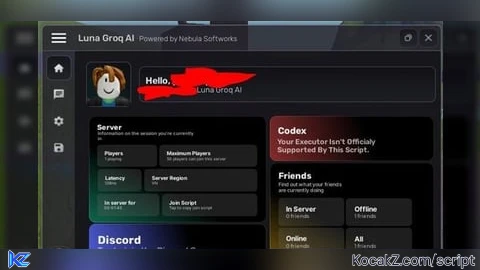
local Luna = loadstring(game:HttpGet("https://raw.githubusercontent.com/Nebula-Softworks/Luna-Interface-Suite/refs/heads/master/source.lua", true))()
local HttpService = game:GetService("HttpService")

-- Variables to store AI data
local GroqSettings = {
    APIKey = "",
    Model = "llama-3.3-70b-versatile",
    Temperature = 0.7
}

local Window = Luna:CreateWindow({
	Name = "Luna Groq AI",
	Subtitle = "Powered by Nebula Softworks",
	LogoID = nil,
	LoadingEnabled = true,
	LoadingTitle = "Initializing AI Interface",
	LoadingSubtitle = "Fetching Groq API Modules",
	ConfigSettings = {
		ConfigFolder = "GroqAIScript"
	},
	KeySystem = false -- Disabled for this example
})

Window:CreateHomeTab({
	SupportedExecutors = {"All"},
	DiscordInvite = "nebula",
	Icon = 1
})

-- AI CHAT TAB
local ChatTab = Window:CreateTab({
	Name = "AI Chat",
	Icon = "chat",
	ImageSource = "Material",
	ShowTitle = true
})

local OutputParagraph = ChatTab:CreateParagraph({
	Title = "AI Response",
	Text = "Ask something to get started..."
})

local UserInput = ""
ChatTab:CreateInput({
	Name = "Enter Prompt",
	PlaceholderText = "How do I make a raycast in Luau?",
	CurrentValue = "",
	Numeric = false,
	Callback = function(Text)
		UserInput = Text
	end
}, "PromptInput")

-- Function to handle Groq API Request
local function SendGroqRequest()
    if GroqSettings.APIKey == "" then
        Luna:Notification({
            Title = "Missing API Key",
            Content = "Please enter your Groq API key in the Settings tab!",
            Icon = "warning"
        })
        return
    end

    OutputParagraph:Set({Title = "AI Status", Text = "Thinking..."})

    -- Check for executor request function
    local httpRequest = (syn and syn.request) or (http and http.request) or http_request or request

    if not httpRequest then
        OutputParagraph:Set({Title = "Error", Text = "Executor does not support 'request' function."})
        return
    end

    local success, response = pcall(function()
        return httpRequest({
            Url = "https://api.groq.com/openai/v1/chat/completions",
            Method = "POST",
            Headers = {
                ["Content-Type"] = "application/json",
                ["Authorization"] = "Bearer " .. GroqSettings.APIKey
            },
            Body = HttpService:JSONEncode({
                model = GroqSettings.Model,
                messages = {
                    {role = "user", content = UserInput}
                },
                temperature = GroqSettings.Temperature
            })
        })
    end)

    if success then
        local data = HttpService:JSONDecode(response.Body)
        if data.choices and data.choices[1] then
            local aiText = data.choices[1].message.content
            OutputParagraph:Set({Title = "Groq AI", Text = aiText})
        else
            OutputParagraph:Set({Title = "API Error", Text = response.Body})
        end
    else
        OutputParagraph:Set({Title = "HTTP Error", Text = tostring(response)})
    end
end

ChatTab:CreateButton({
	Name = "Send Request",
	Callback = function()
		SendGroqRequest()
	end
})

-- SETTINGS TAB
local SettingsTab = Window:CreateTab({
	Name = "Settings",
	Icon = "settings",
	ImageSource = "Material",
	ShowTitle = true
})

SettingsTab:CreateInput({
	Name = "Groq API Key",
	PlaceholderText = "gsk_...",
	CurrentValue = "",
	Callback = function(Value)
		GroqSettings.APIKey = Value
	end
}, "APIKeyInput")

SettingsTab:CreateDropdown({
	Name = "Select Model",
	Options = {
        "llama-3.3-70b-versatile",
        "llama-3.1-8b-instant",
        "mixtral-8x7b-32768",
        "gemma2-9b-it"
    },
	CurrentOption = {"llama-3.3-70b-versatile"},
	MultipleOptions = false,
	Callback = function(Options)
		GroqSettings.Model = Options[1]
	end
})

SettingsTab:CreateSlider({
	Name = "Creativity (Temperature)",
	Range = {0, 100},
	Increment = 1,
	CurrentValue = 70,
	Callback = function(Value)
		GroqSettings.Temperature = Value / 100
	end
})

-- Add Luna's built-in theme and config management
local ConfigTab = Window:CreateTab({
	Name = "UI Configs",
	Icon = "save",
	ImageSource = "Material",
	ShowTitle = true
})
ConfigTab:BuildConfigSection()
ConfigTab:BuildThemeSection()

Luna:Notification({
	Title = "Welcome",
	Icon = "check_circle",
	Content = "Luna & Groq Integration Loaded."
})


Test!
test1!