


KeylessUniversal
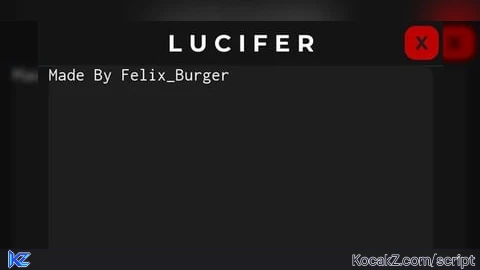
-- Create ScreenGui
local gui = Instance.new("ScreenGui")
gui.Name = "LuciferGui"
gui.Parent = game.Players.LocalPlayer:WaitForChild("PlayerGui")
gui.ResetOnSpawn = false

-- Main Container (Mobile size)
local container = Instance.new("Frame")
container.Name = "Container"
container.Size = UDim2.new(0, 360, 0, 300)
container.Position = UDim2.new(0.5, -180, 0.5, -150)
container.BackgroundColor3 = Color3.fromRGB(20, 20, 20)
container.BorderSizePixel = 0
container.Active = true
container.Draggable = true
container.Parent = gui

local corner = Instance.new("UICorner")
corner.CornerRadius = UDim.new(0, 16)
corner.Parent = container

-- Title Label
local title = Instance.new("TextLabel")
title.Name = "Title"
title.Size = UDim2.new(1, 0, 0, 40)
title.BackgroundColor3 = Color3.fromRGB(20, 20, 20)
title.TextColor3 = Color3.fromRGB(255, 255, 255)
title.Font = Enum.Font.GothamBold
title.TextSize = 25
title.Text = "L U C I F E R"
title.Parent = container

-- Close Button
local closeButton = Instance.new("TextButton")
closeButton.Name = "CloseButton"
closeButton.Size = UDim2.new(0, 30, 0, 30)
closeButton.Position = UDim2.new(1, -35, 0, 5)
closeButton.BackgroundColor3 = Color3.fromRGB(190, 0, 0)
closeButton.TextColor3 = Color3.fromRGB(30, 30, 30)
closeButton.Font = Enum.Font.GothamBold
closeButton.TextSize = 20
closeButton.Text = "X"
closeButton.Parent = container

local closeCorner = Instance.new("UICorner")
closeCorner.CornerRadius = UDim.new(0, 10)
closeCorner.Parent = closeButton

closeButton.MouseButton1Click:Connect(function()
	gui:Destroy()
end)

-- Code Box
local codeBox = Instance.new("TextBox")
codeBox.Name = "CodeBox"
codeBox.Size = UDim2.new(1, -20, 1, -110)
codeBox.Position = UDim2.new(0, 10, 0, 40)
codeBox.BackgroundColor3 = Color3.fromRGB(30, 30, 30)
codeBox.TextColor3 = Color3.fromRGB(255, 255, 255)
codeBox.ClearTextOnFocus = false
codeBox.MultiLine = true
codeBox.TextXAlignment = Enum.TextXAlignment.Left
codeBox.TextYAlignment = Enum.TextYAlignment.Top
codeBox.Font = Enum.Font.Code
codeBox.TextSize = 16
codeBox.Text = "Made By Felix_Burger"
codeBox.Parent = container

local cbCorner = Instance.new("UICorner")
cbCorner.CornerRadius = UDim.new(0, 10)
cbCorner.Parent = codeBox

-- Clear Button
local clearBtn = Instance.new("TextButton")
clearBtn.Name = "ClearButton"
clearBtn.Size = UDim2.new(0, 120, 0, 45)
clearBtn.Position = UDim2.new(0.1, 0, 1, -55)
clearBtn.BackgroundColor3 = Color3.fromRGB(20, 20, 20)
clearBtn.TextColor3 = Color3.fromRGB(255, 255, 255)
clearBtn.Font = Enum.Font.GothamBold
clearBtn.TextSize = 20
clearBtn.Text = "Clear"
clearBtn.Parent = container

local clCorner = Instance.new("UICorner")
clCorner.CornerRadius = UDim.new(0, 12)
clCorner.Parent = clearBtn

clearBtn.MouseButton1Click:Connect(function()
	codeBox.Text = ""
end)

-- Execute Button
local executeBtn = Instance.new("TextButton")
executeBtn.Name = "ExecuteButton"
executeBtn.Size = UDim2.new(0, 120, 0, 45)
executeBtn.Position = UDim2.new(0.6, 0, 1, -55)
executeBtn.BackgroundColor3 = Color3.fromRGB(20, 20, 20)
executeBtn.TextColor3 = Color3.fromRGB(255, 255, 255)
executeBtn.Font = Enum.Font.GothamBold
executeBtn.TextSize = 20
executeBtn.Text = "Execute"
executeBtn.Parent = container

local rbCorner = Instance.new("UICorner")
rbCorner.CornerRadius = UDim.new(0, 12)
rbCorner.Parent = executeBtn

executeBtn.MouseButton1Click:Connect(function()
	local code = codeBox.Text
	local func, err = loadstring(code)

	if func then
		pcall(func)
	else
		warn("Script Error:", err)
	end
end)

---------------------------------------------------------
-- CHAT COMMAND /EXECUTE SUPPORT
---------------------------------------------------------

local player = game.Players.LocalPlayer

player.Chatted:Connect(function(msg)
	if msg:lower() == "/execute" then
		local code = codeBox.Text
		local func, err = loadstring(code)

		if func then
			pcall(func)
		else
			warn("Script Error:", err)
		end
	end
end)


nice ai code 👑🔥
Excelente ejecutor
amazing ai code would you like me to help u actually make a real executor? if yes, dm me on discord, @aguy1823
Made by chat gpt